

TL;DR
Worker không phải server riêng. Không có firewall cá nhân, không systemd, không selinux. Security đi theo mô hình defense-in-depth 6 tầng từ edge vào trong:
- WAF + Bot Management — edge trước Worker. OWASP, rule-based, bot score.
- Rate limit + Turnstile — quota request, captcha invisible cho form.
- Cloudflare Access — zero-trust JWT cho admin route.
- Worker auth + validate — verify JWT/cookie, Zod schema input.
- Response headers — CSP, HSTS, X-Frame-Options, Referrer-Policy.
- Storage bindings — D1/KV/R2 scoped per Worker, không public internet.
Luận điểm chính:
Worker security không phải “viết handler bảo mật”. Cloudflare cung cấp nhiều control ở tầng platform (WAF, Bot, Access, Turnstile) rẻ hơn và an toàn hơn tự code. Dev bỏ qua layer này thường xây dựng lại phần kém hơn trong Worker. Một app production cần cả platform control + app-level check.
Bài này đi qua: 6 tầng với config thực tế, 4 pattern auth (Access, signed cookie, API key, OIDC), secret management chuẩn, CSP header tối thiểu, Bot Management rule, và 8 anti-pattern.
Dành cho ai
- Dev mới deploy Worker, chưa nghĩ nhiều về security.
- Team có admin dashboard, cần protect tránh bot.
- Ai đang quản lý secret qua
.envmuốn chuyển sang wrangler secret.
Nên đọc trước: Part 3 (bindings), Part 17 (observability).
Sau bài này bạn sẽ:
- Setup Access cho admin route trong < 15 phút.
- Implement signed cookie session cho app user.
- Deploy CSP header tối thiểu không break existing page.
- Biết khi nào Bot Management đáng bật, khi nào Turnstile đủ.
Bài này không nói về gì
- OWASP top 10 chi tiết: assume bạn biết XSS, SQL injection, CSRF. Bài focus vào Worker-specific control.
- Enterprise WAF custom rule language deep: cần bài riêng. Focus preset + common pattern.
- Penetration testing / offensive: bài này là defensive.
- Compliance (SOC2, ISO 27001): cấp organizational, không cover.
6 tầng defense-in-depth
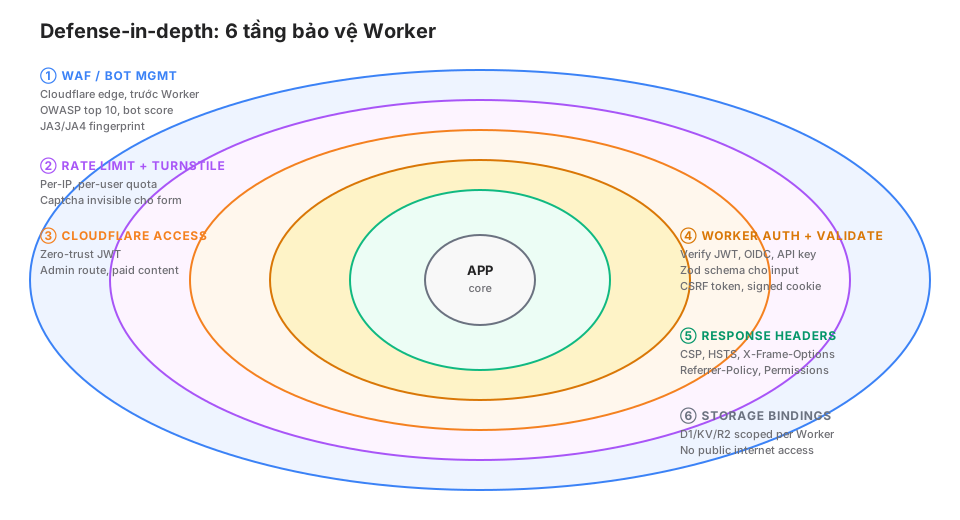
Không cần implement cả 6. Blog tĩnh chỉ cần tầng 5 (header). App UGC full cần 1-6.
Tầng 1: WAF + Bot Management
WAF managed rule
Cloudflare WAF có preset rule (OWASP Core Rule Set) chặn SQL injection, XSS, LFI, RFI pattern.
Bật mặc định trên tất cả zone (Free + Paid).
Dashboard: Security → WAF → Managed Rules. Có thể tune sensitivity (low/medium/high).
WAF custom rule
Cho trường hợp specific:
(http.request.uri.path contains "/wp-admin" and ip.geoip.country ne "VN")
→ Block

(http.request.uri.path eq "/api/expensive" and rate(1m) > 10)
→ Challenge

(http.user_agent contains "sqlmap")
→ Block
Rule Language mạnh. Kết hợp field về IP, UA, path, header, body.
Bot Management
Cloudflare compute “bot score” 0-99 cho mỗi request dựa trên:
- JA3/JA4 TLS fingerprint.
- Behavioral pattern.
- IP reputation.
- HTTP/2 fingerprint.
Rule theo score:
(cf.bot_management.score < 30) → Block
(cf.bot_management.score < 60) → Challenge (Managed Challenge)
Enterprise feature, không free. Dùng khi:
- E-commerce: anti-scraping, anti-credential-stuffing.
- Dev tool public: anti-abuse free tier.
- Content site: chặn content theft bot.
Alternative miễn phí: Super Bot Fight Mode (Pro+), rule-based không có score.
Tầng 2: Rate limit + Turnstile
Rate limit native (zone-level)
Dashboard: Security → WAF → Rate limiting rules.
If: http.request.uri.path eq "/api/subscribe"
Rate: 5 requests / 1 minute per IP
Action: Block for 10 minutes
Pro plan: 10 rule. Business+: unlimited.
Miễn phí alternative: WAF custom rule với rate() function (limited).
Rate limit custom với Durable Object
Cần logic phức tạp (sliding window, per-user, per-endpoint) → DO rate limiter (Part 15).
Turnstile
Captcha invisible cho form, replacement hCaptcha/reCAPTCHA.
Client:
<script src="https://challenges.cloudflare.com/turnstile/v0/api.js" defer></script>
<form action="/api/contact" method="POST">
  <input name="email" type="email" required>
  <div class="cf-turnstile" data-sitekey="YOUR_SITE_KEY"></div>
  <button>Submit</button>
</form>
Turnstile inject hidden field cf-turnstile-response với token.
Worker verify:
async function verifyTurnstile(token: string, ip: string, secret: string): Promise<boolean> {
  const response = await fetch("https://challenges.cloudflare.com/turnstile/v0/siteverify", {
    method: "POST",
    headers: { "Content-Type": "application/x-www-form-urlencoded" },
    body: new URLSearchParams({
      secret,
      response: token,
      remoteip: ip,
    }),
  });
  const { success } = await response.json();
  return success;
}

export default {
  async fetch(request: Request, env: Env) {
    const formData = await request.formData();
    const token = formData.get("cf-turnstile-response") as string;
    const ip = request.headers.get("cf-connecting-ip") ?? "";

    if (!await verifyTurnstile(token, ip, env.TURNSTILE_SECRET)) {
      return new Response("Captcha failed", { status: 403 });
    }

    // Process form
  },
};
Turnstile miễn phí, không limit. Dùng cho:
- Contact form.
- Newsletter signup.
- Login page (trước password).
- Rate-limited public API.
Tầng 3: Cloudflare Access
Zero-trust auth cho admin route. SSO với Google/Okta/GitHub, JWT injected vào request.
Setup
Dashboard: Zero Trust → Access → Applications → Add.
Config:
- Application type: self-hosted.
- Application domain:
cloudsecop.net/admin(path-specific). - Session duration: 24h.
- Identity provider: Google Workspace / Okta / GitHub.
- Policy:
email ends with @mycompany.com.
User truy cập /admin/* → redirect Access login → SSO → JWT trong cookie CF_Authorization.
Verify trong Worker
import { parseJWT, verifyAccess } from "./access";

export default {
  async fetch(request: Request, env: Env) {
    const url = new URL(request.url);

    if (url.pathname.startsWith("/admin/")) {
      const jwt = request.headers.get("cf-access-jwt-assertion")
        ?? parseCookie(request, "CF_Authorization");

      if (!jwt) return new Response("Unauthorized", { status: 401 });

      try {
        const claims = await verifyAccess(jwt, env.CF_ACCESS_AUD, env.CF_TEAM);
        // claims.email, claims.sub, claims.country
        return handleAdmin(request, env, claims);
      } catch {
        return new Response("Invalid token", { status: 403 });
      }
    }

    return handlePublic(request, env);
  },
};
verifyAccess fetch JWKS từ Cloudflare, verify signature:
// access.ts
import { jwtVerify, createRemoteJWKSet } from "jose";

export async function verifyAccess(token: string, aud: string, team: string) {
  const JWKS = createRemoteJWKSet(
    new URL(`https://${team}.cloudflareaccess.com/cdn-cgi/access/certs`)
  );

  const { payload } = await jwtVerify(token, JWKS, {
    issuer: `https://${team}.cloudflareaccess.com`,
    audience: aud,
  });

  return payload;  // { email, sub, country, iat, exp, ... }
}
Audience (AUD) tag identify app. Get từ Access application config.
Access JWT flow
Service Auth token
Machine-to-machine call Access-protected endpoint: dùng Service Token.
Dashboard → Access → Service Auth → Create Service Token. Lấy CF-Access-Client-Id + CF-Access-Client-Secret.
External service call:
curl https://cloudsecop.net/admin/api \
  -H "CF-Access-Client-Id: <client-id>" \
  -H "CF-Access-Client-Secret: <client-secret>"
Cloudflare verify, forward request. Worker receive same JWT pattern.
Tầng 4: Worker auth + validate
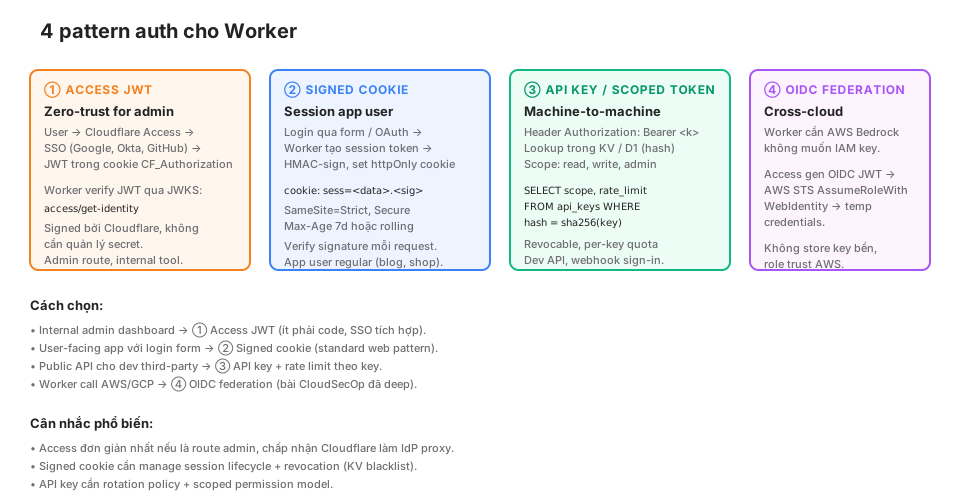
Pattern 1: Cloudflare Access (đã cover)
Pattern 2: Signed cookie session
User-facing app (blog commenter, shop buyer) không fit Access. Session cookie HMAC-signed.
import { sign, verify } from "./cookie";

async function login(email: string, password: string, env: Env) {
  // verify password từ D1
  const user = await env.DB.prepare("SELECT id, password_hash FROM users WHERE email = ?")
    .bind(email).first();

  if (!user || !await argon2Verify(password, user.password_hash)) {
    throw new Error("Invalid credentials");
  }

  // Create session
  const session = {
    userId: user.id,
    exp: Math.floor(Date.now() / 1000) + 86400 * 7,  // 7 days
  };

  const token = await sign(JSON.stringify(session), env.COOKIE_SECRET);

  return new Response("OK", {
    headers: {
      "Set-Cookie": `sess=${token}; HttpOnly; Secure; SameSite=Strict; Path=/; Max-Age=604800`,
    },
  });
}

async function middleware(request: Request, env: Env) {
  const cookie = request.headers.get("Cookie");
  const token = parseCookie(cookie, "sess");
  if (!token) return null;

  try {
    const data = await verify(token, env.COOKIE_SECRET);
    const session = JSON.parse(data);
    if (session.exp < Date.now() / 1000) return null;  // expired
    return session;
  } catch {
    return null;
  }
}

// cookie.ts
export async function sign(data: string, secret: string): Promise<string> {
  const key = await crypto.subtle.importKey(
    "raw",
    new TextEncoder().encode(secret),
    { name: "HMAC", hash: "SHA-256" },
    false,
    ["sign"]
  );
  const sig = await crypto.subtle.sign("HMAC", key, new TextEncoder().encode(data));
  return `${btoa(data)}.${bufferToBase64(sig)}`;
}

export async function verify(token: string, secret: string): Promise<string> {
  const [dataB64, sigB64] = token.split(".");
  const data = atob(dataB64);
  const expected = await sign(data, secret);
  if (!safeEqual(token, expected)) throw new Error("Invalid signature");
  return data;
}
Required flags:
HttpOnly: JS không đọc được (chống XSS steal).Secure: chỉ HTTPS.SameSite=Strict(orLax): chống CSRF.Path: scope cookie.Max-Age: expire time.
Pattern 3: API key + scoped token
Public API cho developer.
async function authenticateAPIKey(request: Request, env: Env): Promise<APIUser | null> {
  const auth = request.headers.get("Authorization");
  if (!auth?.startsWith("Bearer ")) return null;

  const key = auth.slice(7);
  const hash = await sha256(key);

  const user = await env.DB.prepare(
    "SELECT id, scopes, rate_limit FROM api_keys WHERE key_hash = ? AND revoked_at IS NULL"
  ).bind(hash).first();

  return user as APIUser | null;
}

async function sha256(input: string): Promise<string> {
  const buf = await crypto.subtle.digest("SHA-256", new TextEncoder().encode(input));
  return [...new Uint8Array(buf)].map(b => b.toString(16).padStart(2, "0")).join("");
}
Store hash, không store plaintext. User lose key không recoverable = phải reissue (good security property).
Scope check:
if (!user.scopes.includes("posts:write")) {
  return new Response("Insufficient scope", { status: 403 });
}
Pattern 4: OIDC federation
Worker cần gọi AWS Bedrock không lưu IAM key. Access gen OIDC JWT, AWS STS trust relationship, trả temp credential.
Chi tiết ở post riêng “OIDC federation Cloudflare → AWS” trong blog này. Short summary:
// 1. Worker call Access để gen OIDC JWT
const oidcJWT = await env.OIDC_SERVICE.fetch("/oidc/token");

// 2. Call AWS STS AssumeRoleWithWebIdentity
const stsResponse = await fetch("https://sts.amazonaws.com/", {
  method: "POST",
  body: new URLSearchParams({
    Action: "AssumeRoleWithWebIdentity",
    RoleArn: env.AWS_ROLE_ARN,
    WebIdentityToken: oidcJWT,
    DurationSeconds: "3600",
    Version: "2011-06-15",
  }),
});

// 3. Parse XML response → temp credentials
const { AccessKeyId, SecretAccessKey, SessionToken } = parseSTSResponse(stsResponse);

// 4. SigV4-sign request tới Bedrock
await callBedrock({ AccessKeyId, SecretAccessKey, SessionToken });
Không IAM key stored. AWS trust Cloudflare Access như IdP.
Input validation với Zod
import { z } from "zod";

const ContactSchema = z.object({
  email: z.string().email().max(255),
  name: z.string().min(1).max(100),
  message: z.string().min(10).max(5000),
});

export async function handleContact(request: Request, env: Env) {
  const body = await request.json();

  const result = ContactSchema.safeParse(body);
  if (!result.success) {
    return Response.json({ errors: result.error.errors }, { status: 400 });
  }

  const { email, name, message } = result.data;
  // Safe to use now
}
Zod catch:
- Missing field.
- Wrong type.
- Length constraint.
- Email format.
Không parse qua Zod = untrusted data reach business logic = dangerous.
Tầng 5: Response headers
CSP, HSTS, v.v. set qua header response. Astro middleware hoặc Worker:
export default {
  async fetch(request: Request, env: Env) {
    const response = await handleRequest(request, env);

    const headers = new Headers(response.headers);

    // HSTS: force HTTPS 1 year
    headers.set("Strict-Transport-Security", "max-age=31536000; includeSubDomains; preload");

    // Prevent MIME sniff
    headers.set("X-Content-Type-Options", "nosniff");

    // Prevent clickjacking
    headers.set("X-Frame-Options", "DENY");

    // Referrer
    headers.set("Referrer-Policy", "strict-origin-when-cross-origin");

    // Permissions (disable unused features)
    headers.set("Permissions-Policy", "camera=(), microphone=(), geolocation=(), payment=()");

    // CSP: tối thiểu
    headers.set("Content-Security-Policy", [
      "default-src 'self'",
      "script-src 'self' 'unsafe-inline' https://static.cloudflareinsights.com https://challenges.cloudflare.com",
      "style-src 'self' 'unsafe-inline'",
      "img-src 'self' data: https:",
      "font-src 'self' data:",
      "connect-src 'self' https://cloudflareinsights.com",
      "frame-ancestors 'none'",
      "base-uri 'self'",
      "form-action 'self'",
    ].join("; "));

    return new Response(response.body, {
      status: response.status,
      headers,
    });
  },
};
Blog này dùng CSP chính xác pattern trên. 19 assertion smoke test (Part 12) include check mọi header này.
CSP challenge
unsafe-inline cho script là compromise. Proper CSP dùng nonce:
const nonce = crypto.randomUUID();
headers.set("Content-Security-Policy", `script-src 'self' 'nonce-${nonce}'`);

// Template inject nonce vào mọi <script>
html = html.replaceAll("<script", `<script nonce="${nonce}"`);
Phức tạp hơn, nhưng prevent được XSS inline script. Production recommendation.
CSP report
Monitor violation:
Content-Security-Policy: default-src 'self'; report-uri /csp-reportEndpoint /csp-report log violation. Discover 3rd-party script không compliant.
Tầng 6: Storage bindings
Binding scope per-Worker. D1 database không accept connection từ internet — chỉ Worker binding. Same R2 (trừ public bucket), KV, Vectorize.
Implication:
- Không cần firewall cho D1.
- Không leak connection string.
- Worker compromise = scope damage = database access (still bad, but bounded).
Principle: treat binding as scoped capability. Wrangler secret cho API key external cần tương tự.
Secret management
wrangler secret
Không commit secret vào git. Upload qua CLI:
wrangler secret put OPENAI_API_KEY
# enter value

wrangler secret put TURNSTILE_SECRET
Secrets inject vào env runtime, không visible trong wrangler.jsonc.
Rotation
# 1. Generate new key ở provider
# 2. Update secret
wrangler secret put OPENAI_API_KEY
# 3. Không cần redeploy — secret hot-reload
# 4. Revoke old key ở provider
Zero-downtime rotation
Secret critical path (DB password, API key chính): dual-credential.
// Code try both
try {
  return await callWithKey(env.API_KEY_V2);
} catch (e) {
  if (e.status === 401) {
    return await callWithKey(env.API_KEY_V1);  // fallback
  }
  throw e;
}
Rotate:
- Set
API_KEY_V2= new. - Revoke
API_KEY_V1ở provider sau stable period. - Remove
API_KEY_V1secret.
Never log secret
// SAI — secret leak vào log
console.log("Config:", env);
console.log("Auth:", request.headers);

// ĐÚNG
console.log("Auth status:", authStatus);
// redact sensitive
const safe = { ...env };
delete safe.SECRET_KEY;
console.log("Config:", safe);
Redact qua Tail Worker (Part 17) extra layer.
Bot Management: khi nào đáng bật
Bot Management là paid (Enterprise). Cân nhắc:
Bật khi:
- E-commerce: bot scrape price, check inventory 24/7.
- Login page: credential stuffing rampant.
- Free tier API: abuse free tier gây cost real.
- Auth endpoint: brute force tránh rate limit.
- Content theft: scraper clone blog.
Không cần:
- Internal tool: Access đã cover.
- Static blog low-traffic: WAF + rate limit + Turnstile đủ.
- Budget constraint: Super Bot Fight Mode (Pro $20/mo) thay thế, rule-based.
Blog này
Static blog, no login, no UGC, no paid API. Bot Management không đáng. Dùng:
- WAF managed rule (free).
- Super Bot Fight Mode (tiny — per-route).
- Turnstile cho contact + newsletter.
- CSP + HSTS cho defense-in-depth.
Total security cost: $0 cho free plan, $20/tháng Pro.
Anti-pattern
❌ 1. Store secret trong code
const API_KEY = "sk-abc123"; // committed!Rotation không thể. Audit log không có. Dùng wrangler secret.
❌ 2. Verify JWT bằng HS256 với secret trong code
HS256 = symmetric. Client có thể forge nếu secret leak. Dùng RS256 / ES256 (asymmetric) cho JWT nếu có 3rd party verify.
Access dùng RS256 with JWKS — proper.
❌ 3. Skip input validation
const { email } = await request.json();
await env.DB.prepare(`INSERT INTO users VALUES ('${email}')`).run();
SQL injection + không kiểm email format. Dùng Zod + prepared statement.
❌ 4. Trust cf-connecting-ip blindly
const ip = request.headers.get("cf-connecting-ip");
// Act on ip
Header này Cloudflare set correctly. Nhưng nếu Worker invoked từ non-Cloudflare path (direct origin), header có thể spoof. Always trust request.cf?.clientIP trên zone, hoặc validate cf-ray present.
❌ 5. CORS wildcard
headers.set("Access-Control-Allow-Origin", "*");
headers.set("Access-Control-Allow-Credentials", "true");  // conflict!
Wildcard + credentials = browser reject. Allow specific origin:
const origin = request.headers.get("Origin");
const allowed = ["https://cloudsecop.net", "https://khavan.khavan.workers.dev"];
if (allowed.includes(origin)) {
  headers.set("Access-Control-Allow-Origin", origin);
  headers.set("Access-Control-Allow-Credentials", "true");
}
❌ 6. Client-side auth check
<script>
if (!localStorage.getItem("role") === "admin") window.location = "/";
</script>
Attacker edit DOM trước script run. Auth check MUST ở server (Worker).
❌ 7. Log PII plaintext
console.log("User email:", email, "password:", password);Dump vào log aggregator. GDPR violation. Redact trước log.
❌ 8. Assume Cloudflare fix everything
WAF catch 90% OWASP, không 100%. Zero-day tồn tại. Defense-in-depth — layer nhiều tầng, không rely 1 tầng duy nhất.
Gotcha
① CSP test production-only
CSP strict có thể break page. Test với Content-Security-Policy-Report-Only header trước, log violation, iterate, mới bật enforce.
② Turnstile domain specific
Turnstile site key bound domain. Test local localhost cần add domain trong config. Hoặc dùng dummy site key cho dev.
③ Access JWT cookie domain
CF_Authorization cookie set cho zone. Subdomain admin.cloudsecop.net cần share cookie với apex → config Access Application scope đúng.
④ wrangler secret không list value
wrangler secret list # chỉ tên, không valueGiá trị set xong không read lại. Lost = re-set. Store ở password manager (1Password, Bitwarden).
⑤ HSTS preload commitment
preload directive add zone vào Chrome/Firefox preload list. Remove khó. Chỉ enable khi chắc HTTPS forever.
⑥ Bot fingerprint false positive
Bot Management aggressive → false positive block user thật. Monitor dashboard, tune sensitivity. Whitelist known-good bot (Googlebot, Bingbot qua verified bot feature).
⑦ SameSite=Strict break redirect flow
SameSite=Strict cookie không gửi theo cross-site redirect (OAuth callback). Dùng Lax cho session cookie nếu có OAuth flow.
⑧ Access bypass local dev
wrangler dev không có Access layer. Test local = không Access. Verify trên staging zone với Access enabled.
Production checklist
- WAF managed rule enabled (default).
- Custom WAF rule cho admin path, known abuse pattern.
- Rate limit WAF rule cho write endpoint (subscribe, login, search).
- Turnstile cho public form.
- Cloudflare Access cho
/admin/*(nếu có). - JWT verify qua JWKS, không skip signature check.
- Signed cookie HttpOnly + Secure + SameSite cho session.
- Input validation Zod trước mọi business logic.
- Secret qua
wrangler secret put, không trong code. - CSP + HSTS + X-Frame-Options + nosniff + Permissions-Policy.
- Log redact sensitive field.
- API key hash stored, không plaintext.
- Scope check per endpoint (RBAC).
- Smoke test (Part 12) verify security header post-deploy.
- Incident response playbook: key rotation, session invalidate, user notify.
Kết
Worker security không phải “viết code bảo mật”. Nó là stacking control ở 6 tầng: WAF, rate limit, Access, Worker auth, response header, storage binding. Mỗi tầng catch class khác nhau.
Cloudflare cung cấp 4/6 tầng ở platform level (WAF, Bot, Access, Turnstile). Skip = rebuild với quality thấp hơn + maintain code security. Dùng platform tier là productivity win thực.
Part 19: Cost model — phân tích pricing từng primitive, breakpoint khi chuyển tier, so sánh với AWS Lambda + API Gateway + DynamoDB + S3 real numbers.