TL;DR
- Pure client-side React SPA (
OSS Mode with no Amplify initialization) — answers live in localStorage, nothing leaves the browser.- Walks the 4 SMM phases (Quick Wins → Foundational → Efficient → Optimized), exports
assessment.jsonfor state +remediation.xlsxfor a sortable backlog.- No AWS credentials, no real-state validation — pair it with Prowler or Security Hub to cross-check self-reported answers against actual configuration.
- Don’t try to land all 4 phases in one sitting; a 2-hour workshop covers Quick Wins + half Foundational, and the JSON export is the only checkpoint mechanism.
- Commit the JSON to a private repo with date in filename (e.g.
smm-assessment-2026-05-04.json) — that’s how you get the version history the tool itself doesn’t provide.- Map Excel rows to tracker:
Phase→ Epic,Domain→ Label,Not StartedoutranksIn Progress; controls without owners after 2 weeks die.- Value comes from cadence, not the first run — quarterly re-assessment surfaces trends; one-off runs are just audits.
AWS has shipped a free web app for self-assessing security posture against the AWS Security Maturity Model: assessment-tool.maturitymodel.security.aws.dev. This post captures how the tool works, the workflow for a multi-account AWS Organization, what it exports (JSON + Excel remediation plan), and practical trade-offs against doing the same thing manually in a spreadsheet or leaning on a CSPM scanner. The goal is to help you decide whether this belongs in your security team’s quarterly cadence.
Context
The AWS Security Maturity Model (SMM) — now at v2 — is a prescriptive framework written by a team of AWS Security specialists, peer-reviewed, and already used by 100+ AWS Solutions Architects with 50,000+ unique users in its first year. It’s a sibling to the Well-Architected Framework and the Cloud Adoption Framework, but with a different goal. Well-Architected asks “is this workload well-designed?”. Cloud Adoption asks “is the org ready for the cloud?”. SMM answers a more specific question: which AWS security controls should we do first, based on impact-over-effort ratios?
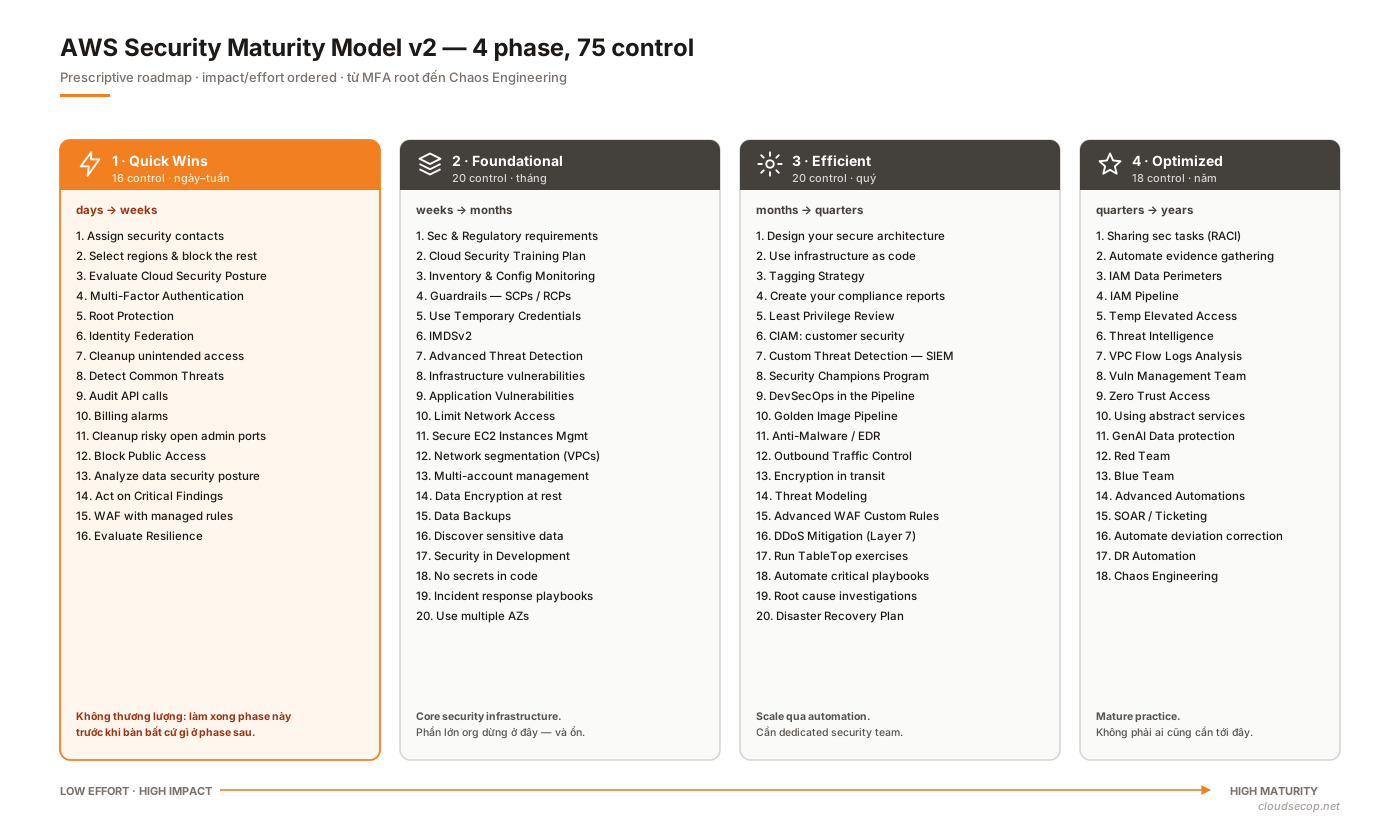
The model splits the journey into four phases:
- Quick Wins — high-impact actions you can land in days: root MFA, security contacts, enabling GuardDuty, an Organization CloudTrail.
- Foundational — core security infrastructure: IAM Identity Center, SCPs, KMS CMKs, VPC segmentation, centralized logging.
- Efficient — advanced capabilities: infrastructure-as-code guardrails, DevSecOps pipelines, custom detections, automated remediation.
- Optimized — mature practices: zero-trust access, red/blue teams, chaos engineering, continuous compliance automation.
Anyone can read the model as docs. The problem: once an org has 50 accounts and 10 business units, reading the docs and then sitting down to assess each control against each account is work that tends to get abandoned. That’s the gap this tool fills.
Problem
Before the assessment tool, I ran maturity reviews on a 200-row spreadsheet — one row per control, four columns for phase status. It had three pain points:
- Spreadsheet drift. I’d reopen the file each quarter, not remembering which copy was current, and every time I shared it by email for a stakeholder to confirm, another floating version joined the pile. The final file was always named something like
assessment-final-v3-real-FINAL.xlsx. - No scoring discipline. “Partially implemented” meant different things on different attempts. One quarter I’d tick
Enable GuardDuty in all regionsas “done” with 3/17 regions on; the next I’d insist on 17/17 — so the numbers across quarters weren’t comparable. - Output that wasn’t actionable. Exporting to PDF for leadership looked nice, but an engineer reading it didn’t know where to start — no remediation owner, no effort estimate, no link to runbooks.
Half-measures weren’t enough:
- AWS Trusted Advisor / Security Hub findings: they scan real state, but only say “present / absent”. They don’t rank by maturity phase and they can’t answer process questions (“does the team have an incident response playbook?”).
- Prowler / ScoutSuite: excellent for technical controls, but limited to what’s observable through the AWS API. Governance, third-party risk, and IR process are out of scope.
- AWS Well-Architected Tool in the console: per-workload, not per-org, and its questions don’t map 1:1 to SMM phases.
This tool fills that gap: a guided questionnaire that follows the SMM structure, with manageable state, structured exports, and running entirely in the user’s browser.
Architecture
Looking at the page’s HTML and the JS bundle, this is a pure client-side React SPA. A comment in the HTML spells it out: Version: 2.0.1 - OSS Mode with no Amplify initialization — the current build drops all backend calls, so no data leaves the page after initial load.
[browser]
   │
   ├── React app (Vite bundle)
   │     ├── questionnaire UI (per phase, per domain)
   │     ├── scoring engine
   │     └── state → localStorage / in-memory
   │
   ├── jsonExportGenerator     → download assessment.json
└── excelRemediationGenerator → download remediation.xlsx| Component | Purpose | What I can observe |
|---|---|---|
| Host | Public static hosting | *.security.aws.dev behind CloudFront |
| Frontend | SPA | React + Vite (assets/index-*.js, modulepreload) |
| UI kit | Component library | Bundles named ui-libs, forms, charts |
| AWS-specific modules | Service taxonomy | aws-core, aws-security, aws-management, aws-infrastructure, aws-data |
| Export | JSON + Excel | jsonExportGenerator, excelRemediationGenerator |
| State | Client-only | OSS Mode with no Amplify initialization |
| CSP | Minimal | <meta http-equiv="Content-Security-Policy" content="upgrade-insecure-requests"> |
Threat-model note: no backend means no server-side persistence. Clearing browser storage and refreshing wipes the assessment. That’s an upside (no data leak) and a downside (no version history, no shareable link mid-flight).
Workflow
Here’s the workflow I use against a ~30-account, 6-BU AWS Organization.
1. Prep inputs before opening the tool
The tool asks questions that require input from several teams. Opening it first and then hunting people down is a good way to stall. Pre-gather:
- From platform / landing zone team: account list, OU structure, existing SCPs, active regions.
- From identity team: IAM Identity Center status, SSO coverage, remaining IAM users, MFA coverage.
- From security ops: GuardDuty / Security Hub / Config status, CloudTrail destination, retention policy.
- From application teams: CI/CD security gates, IaC scanning, secret scanning.
- From IR team: playbook coverage, tabletop frequency, time-to-detect / time-to-respond targets.
Takes 1–2 days of conversations. Skip this step and the score skews optimistic because the assessor fills in “probably yes”.
2. Run the assessment
1. Open https://assessment-tool.maturitymodel.security.aws.dev/
2. Pick a phase: Quick Wins → Foundational → Efficient → Optimized
3. Within each phase, answer each domain (IAM, Detective, Infra, Data, IR, AppSec, Resilience)
4. Each question is 3-4 levels: Not Started / In Progress / Implemented / N/A
5. Save progress via Export JSON
My advice: don’t try to land all four phases in one sitting. A 2-hour workshop gets you Quick Wins + half of Foundational. Split the rest across sessions and export JSON between them so nothing is lost.
3. Re-import and finish
1. Reopen the tool next session
2. Import the JSON from last time
3. Pick up where you left off
4. At the end: export JSON (source of truth) + export Excel (remediation plan)
Commit the JSON to a private repo, with a date in the filename (smm-assessment-2026-05-04.json). That’s the simplest way to get the version history the tool itself doesn’t provide.
4. Turn the output into a backlog
The Excel export lists all non-implemented controls sorted by phase. Import into a tracker (Jira, Linear, GitHub Issues) with this mapping:
Phase→ EpicDomain→ Label- Each non-done control → Story or Task
Not Started→ higher priority thanIn Progress
Assign owners during the readout with stakeholders. A control without an owner after two weeks = a control that will never ship.
Security considerations
Because the tool runs in the assessor’s browser, a few things deserve attention:
Where the data lives. The bundle suggests state is kept in localStorage or in memory. The answers themselves — “GuardDuty enabled?” or “Does the team have an IR playbook?” — aren’t secrets in isolation. But when you export JSON and email or Slack it, treat the file as internal-only: it lists your security gaps, which is a convenient roadmap for an attacker if it leaks.
No AWS credentials involved. The tool doesn’t ask for an access key and doesn’t call AWS APIs. Unlike Prowler, Security Hub, or the Well-Architected Tool, it can’t verify reality — if you say “GuardDuty runs in 17 regions”, the tool takes your word for it. Implication: don’t self-assess alone. Pair it with a scanner (Prowler, Security Hub) to cross-check answers against actual state.
No shareable-state links. Since state is client-only, there’s no “share a link to a half-filled assessment”. Don’t waste time looking. The workaround is exporting JSON and emailing it.
The CSP is minimal, only upgrade-insecure-requests. Not a vulnerability, but you are trusting AWS to not serve malicious JS from *.security.aws.dev. That’s an acceptable level of trust for me — but worth recording in your threat model.
Operations
One-off assessments provide point-in-time value. To get sustained value, run it on a cadence:
- Quarterly re-assessment. Every quarter I sit down, load the previous JSON, and update statuses. 30 minutes if little has changed, two hours after a landing-zone overhaul.
- Event-driven re-assessment. After introducing a new AWS service (e.g., a Redshift cluster) or after an incident, re-assess the relevant portion.
- Metrics to watch. Track the number of
Not Startedcontrols over time. If that number hasn’t dropped across two consecutive quarters, the assessment has become form-filling, not a driver. - Leadership report. Export the Excel, filter for
Not StartedinQuick Wins, send to the CISO. A Quick Win still open after six months is a conversation worth having. - Reference runbooks. Every non-done control should link to an internal runbook or AWS doc in the ticket description. Without one, the engineer will Google, and can end up elsewhere.
Trade-offs
| Decision | Options | What I pick | Why |
|---|---|---|---|
| Client-only tool vs backend-stored assessment | Client-only (today) | Client-only | No data-sharing risk, no account provisioning. Cost: you manage versions. |
| Self-assessment vs scanner-driven | Both, complementary | SMM tool + Prowler / Security Hub | The tool captures governance/process; scanners catch technical drift. One isn’t enough. |
| Solo review vs cross-team workshop | Workshop | Workshop | Questions span 4–5 teams. Solo trends optimistic. Cost: one day of meetings. |
| Commit JSON to repo vs keep on laptop | Repo (private) | Repo | Audit trail, diffs between quarters. Cost: treat that repo as internal-sensitive. |
| All four phases in one go vs rolling | Rolling | Quick Wins → Foundational first | Quick Wins have the highest ROI. Finishing Optimized while root MFA is off is the wrong order. |
| Treat output as a report vs a roadmap | Roadmap | Roadmap (owners + deadlines) | Reports go unread. Roadmaps with tickets get built. |
Lessons
- This tool replaces the spreadsheet, not the scanner. If you expect it to crawl your AWS accounts and pre-fill answers — wrong tool. It’s a structured questionnaire.
- The value is in cadence, not the first run. The first assessment takes 4 hours and surfaces a lot of low-hanging gaps. From the second onward, trends emerge: which domains are improving, which are stuck.
- Don’t self-fill alone. Questions around IR, DevSecOps, and compliance are outside one security engineer’s view. A cross-team workshop produces much more accurate results.
- JSON export is the real checkpoint. It preserves state between sessions, enables diffs between quarters, re-imports into the tool. Treat it like a migration file.
- Quick Wins first, non-negotiable. If the root account lacks MFA, there’s nothing to discuss about red teams. The phase order is deliberate.
References
- AWS Security Maturity Model — the canonical docs describing every phase and control.
- AWS Security Maturity Model Assessment Tool — the tool this post is about.
- AWS Well-Architected Framework — Security Pillar — a complementary framework, assessed per workload.
- Prowler — the scanner I use to reality-check self-assessment answers against actual technical state.
- CIS AWS Foundations Benchmark — another checklist, heavily overlapping with SMM’s Foundational phase.