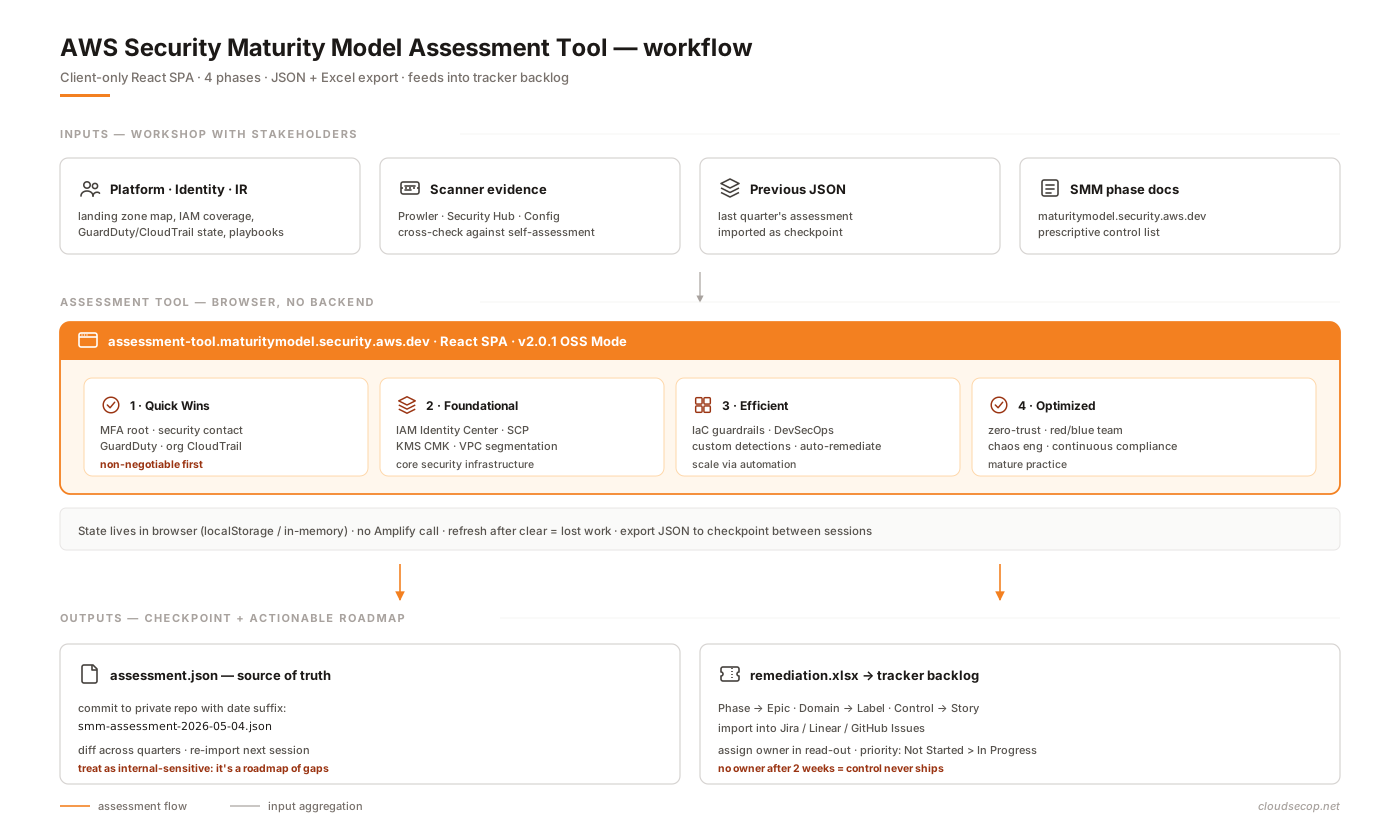
TL;DR
- SMM v2 sorts 74 controls into 4 phases (Quick Wins 16 / Foundational 20 / Efficient 20 / Optimized 18) ranked by impact-over-effort — the ordering itself is the product, not the list.
- New in v2:
GenAI Data protectionin Optimized,IAM Data Perimeters/IAM Pipeline/Temporary Elevated Accessmoved to phase 4, resilience threaded through every phase.- Phase 1 must finish evenly across every account (enforce via SCP + StackSets); Phase 2 rolls out in waves; Phase 3 per-BU; Phase 4 per-capability.
- For the region-block SCP, use
NotActionto exempt global services (iam:*,organizations:*,cloudfront:*,route53:*,sts:*) — STS exempt is conservative, narrow it tosts:GetCallerIdentityif worried.- Block Public Access SCP needs both
s3:PutBucketPublicAccessBlock+s3:PutAccountPublicAccessBlock— denying only one leaves a bypass.- For the identity-perimeter SCP,
BoolIfExists(not plainBool) onaws:PrincipalIsAWSService— plainBoolfails closed when the key is absent and lets attackers through.- Stop at phase 3 without a full-time security team; phase 4 demands operational maturity, not a checklist.
AWS has updated the Security Maturity Model to v2 — a prescriptive roadmap that sorts 74 security controls into four phases by impact-over-effort: Quick Wins → Foundational → Efficient → Optimized. It’s not a new compliance framework. It’s not a shorter Well-Architected. It’s an opinionated answer to the question every security lead eventually hears: “there are a hundred things to do — where do we start?”. This post walks through the v2 structure, covers each phase, highlights what’s noteworthy compared to other AWS docs, and shows how I map it onto a multi-account AWS Organization in practice. A companion post on the assessment tool covers the usage side — this one is about reading the model.
Context
Before SMM, there were three main places to look for “how does AWS security work?”:
- AWS Well-Architected — Security Pillar: detailed and precise, but it assesses one workload at a time. It doesn’t answer “where is this org on its journey?”.
- CIS AWS Foundations Benchmark: a hard checklist — mostly technical controls, no implementation order.
- AWS Prescriptive Guidance: plenty of whitepapers across many topics, but not a single roadmap.
SMM v2 slots in between those with a different posture: an opinionated roadmap with a specific ordering, written for the person deciding “what’s next” rather than the person implementing each control. According to the home page, the model was authored by a team of AWS Security specialists, peer-reviewed, and has reached 50,000+ unique users and 100+ AWS Solutions Architects in its first year.
The overall shape is a matrix:
- Rows: four phases, each representing an increasing level of investment (days → years).
- Columns: controls (74 total, 16–20 per phase), each linking to a detailed implementation page.
The key point: order matters. You don’t cherry-pick a phase 4 control because it sounds cool. You crawl through phase 1 first, because red teaming is a luxury while your root account still lacks MFA.
What v2 does better than v1
I won’t get lost in a v1-vs-v2 diff, but a few things are worth calling out:
- A GenAI control. Phase 4 now includes
GenAI Data protection— a recognition that Bedrock / Q / custom LLMs are a real attack surface, not a future concern. - Identity reshuffle.
IAM Data Perimeters,IAM Pipeline,Temporary Elevated Accessare moved clearly into Optimized — reflecting the reality that data perimeters and JIT access shouldn’t be attempted before the org even has SSO. - Resilience as a spine.
Evaluate Resiliencein Quick Wins,Disaster Recovery Planin Efficient,DR Automation+Chaos Engineeringin Optimized. Resilience is no longer a separate topic — it runs through every phase. - A companion assessment tool. v1 was just docs. v2 ships with a web self-assessment tool that exports JSON + an Excel remediation plan — turning the docs into a trackable roadmap.
Phase 1 — Quick Wins (16 controls)
The “do it in days, high ROI” bucket. The full list:
- Assign security contacts
- Select the regions & block the rest
- Evaluate Cloud Security Posture
- Multi-Factor Authentication
- Root Protection
- Identity Federation
- Cleanup unintended access
- Detect Common Threats
- Audit API calls
- Billing alarms
- Cleanup risky open admin ports
- Block Public Access
- Analyze data security posture
- Act on Critical Findings
- WAF with managed rules
- Evaluate Resilience
Read it closely: most are “flip a switch” or “run a scan”. The expensive ones (in human time, not dollars) are Cleanup unintended access and Act on Critical Findings — because they force you to go team-by-team and ask who’s actually using what. That effort is non-negotiable; without it, every later phase is noisy.
Two controls I often see under-appreciated:
- Select regions & block the rest — use the SCP condition key
aws:RequestedRegionto deny unused regions. Not glamorous, but it meaningfully shrinks your blast radius (a compromised account only reaches your 2 approved regions rather than all 17) and is one of the cheapest controls in the entire model. - Billing alarms — sounds like finance, not security. But a 3× billing spike is a great signal for crypto-mining abuse after an IAM key leak. It’s a detective control wearing a FinOps hat.
Phase 2 — Foundational (20 controls)
This is “core infrastructure” — once this phase is done, the org has a baseline it can sleep on:
- Sec & Regulatory requirements
- Cloud Security Training Plan
- Inventory & Config Monitoring
- Guardrails — Organization policies (SCPs/RCPs)
- Use Temporary Credentials
- IMDSv2
- Advanced Threat Detection
- Infrastructure vulnerabilities
- Application Vulnerabilities
- Limit Network Access
- Secure EC2 Instances Management
- Network segmentation (VPCs)
- Multi-account management
- Data Encryption at rest
- Data Backups
- Discover sensitive data
- Security in Development
- No secrets in code
- Define incident response playbooks
- Use multiple Availability Zones
The key control here is number 4 — Guardrails via SCP/RCP — which is the biggest leverage control in the phase. A well-placed SCP does more than ten detective controls. Denying both s3:PutBucketPublicAccessBlock and s3:PutAccountPublicAccessBlock (the bucket-level and account-level pair) at the Organization level keeps Block Public Access from being disabled — note this covers only that one path; a bucket can still go public via bucket policy, ACL, or website config if you don’t add guardrails there too.
Common traps:
- All-at-once rollout. A misdeployed SCP can lock the entire org out. Test in a non-prod OU first, keep a rollback plan, and use
aws:PrincipalOrgIDcarefully. - Playbooks that live only in Confluence. Define incident response playbooks isn’t just writing — it’s validating through tabletops, which is a phase 3 control (Run TableTop exercises). Watch out for the cycle: you write playbooks no one tests.
- IMDSv2 enforcement. Plenty of legacy workloads (old ASGs, community AMIs) still allow IMDSv1 by default. Enforce it at the account level (per-region) via the EC2 API
ModifyInstanceMetadataDefaults— otherwise you remain an SSRF target.
Phase 3 — Efficient (20 controls)
This phase assumes a dedicated security team and an automation culture:
- Design your secure architecture
- Use infrastructure as code
- Tagging Strategy
- Create your compliance reports
- Least Privilege Review
- CIAM: security of your customers
- Custom Threat Detection — SIEM / Security Lake
- Security Champions Program
- DevSecOps: Security in the Pipeline
- Golden Image Pipeline
- Anti-Malware / EDR / RP
- Outbound Traffic Control
- Encryption in transit
- Threat Modeling
- Advanced WAF with Custom Rules
- DDoS Mitigation (Layer 7)
- Run TableTop exercises
- Automate critical playbooks
- Investigations — Root cause analysis
- Disaster Recovery Plan
Observations:
- IaC and Tagging Strategy sit next to each other for a reason. Tagging only has value when it’s enforced through code (IaC + a preventive SCP on
aws:RequestTag/<key>), not through a “tagging convention” page in the wiki. - Security Champions Program is a people control, not a tool. It’s how a 5-person security team keeps a 200-person eng org secure — by delegating, not bottlenecking.
- CIAM is in phase 3, not earlier. The ordering reflects that orgs usually need to lock down production IAM before worrying about customer identity. If you’re building a B2C product, you may need to pull this forward.
Phase 4 — Optimized (18 controls)
This is the phase most orgs never need to fully reach — and that’s fine:
- Sharing security tasks (RACI)
- Automate evidence gathering
- IAM Data Perimeters
- IAM Pipeline
- Temporary Elevated Access
- Threat Intelligence
- VPC Flow Logs Analysis
- Vulnerability Management Team
- Zero Trust Access
- Using abstract services
- GenAI Data protection
- Red Team
- Blue Team
- Advanced Automations
- Security Orchestration & Ticketing (SOAR)
- Automate deviation correction
- Disaster Recovery Automation
- Chaos Engineering
The classic phase 4 controls:
- IAM Data Perimeters: use SCPs + RCPs + VPC endpoint policies to ensure your data is only accessed by your identities, through your networks. This is the endgame of IAM hardening.
- Zero Trust Access: not just “drop the VPN”. A model where every request is re-verified by identity + device + context. It needs a dedicated platform (Verified Access, Identity Center, or third-party like Cloudflare Access).
- GenAI Data protection (new in v2): guardrails for Bedrock / Q / custom LLMs, audit of prompts/responses, data-plane isolation. No one-size-fits-all recipe — it’s use-case dependent.
Controls that get misread:
- Red Team / Blue Team is not “hire a pentest once a year”. At this phase, it means having a team (or a person) dedicated to adversary simulation and defensive engineering, running continuously — not as an event.
- Chaos Engineering sounds like reliability, but in SMM it’s security chaos: inject credential rotation failures, simulate IAM permission boundary misconfigs, and measure detection + recovery.
Mapping to a real AWS Organization
In theory, the four phases are sequential. In practice, after applying this to an AWS Organization with ~30 accounts across 5 business units, a few patterns have emerged:
- Phase 1 has to finish evenly across every account. You can’t have the payments account done but marketing still exposed. Attackers find the weakest account. Enforce through SCPs + StackSets.
- Phase 2 can roll out in waves. Wave 1: landing zone core + production OU. Wave 2: dev + staging. Wave 3: sandbox. The trap is treating sandbox as “not production” and deferring it — then discovering sandbox holds cached prod credentials.
- Phase 3 is best rolled out per business unit. BUs with clear ownership self-drive; BUs without need close hand-holding from whoever owns security. Don’t try to synchronize progress.
- Phase 4 rolls out per capability, not per account. Red Team isn’t pinned to “account X” — it’s an org-wide capability. IAM Data Perimeter, inversely, deploys per-account but needs an Org-level SCP.
- Cross-phase controls belong in the same program. For example: IAM Identity Center (phase 2
Use Temporary Credentials) + Temporary Elevated Access (phase 4) + IAM Pipeline (phase 4) should be one identity program, not three separate projects.
Working snippets for 5 high-leverage controls
This section isn’t exhaustive — it’s the code I’ve actually shipped for the five controls with the highest leverage.
1. SCP — Block unused regions (Phase 1: Select the regions & block the rest)
Attach at Organization Root or a parent OU, and exempt global IAM-plane services (IAM, Organizations, CloudFront, Route53, STS, Support):
{
  "Version": "2012-10-17",
  "Statement": [
    {
      "Sid": "DenyAllOutsideApprovedRegions",
      "Effect": "Deny",
      "NotAction": [
        "iam:*",
        "organizations:*",
        "cloudfront:*",
        "route53:*",
        "sts:*",
        "support:*",
        "waf:*",
        "wafv2:*",
        "shield:*",
        "globalaccelerator:*",
        "networkmanager:*",
        "health:*",
        "artifact:*",
        "chatbot:*",
        "tag:GetResources",
        "aws-portal:*",
        "budgets:*",
        "ce:*"
      ],
      "Resource": "*",
      "Condition": {
        "StringNotEquals": {
          "aws:RequestedRegion": [
            "ap-southeast-1",
            "us-east-1"
          ]
        }
      }
    }
  ]
}
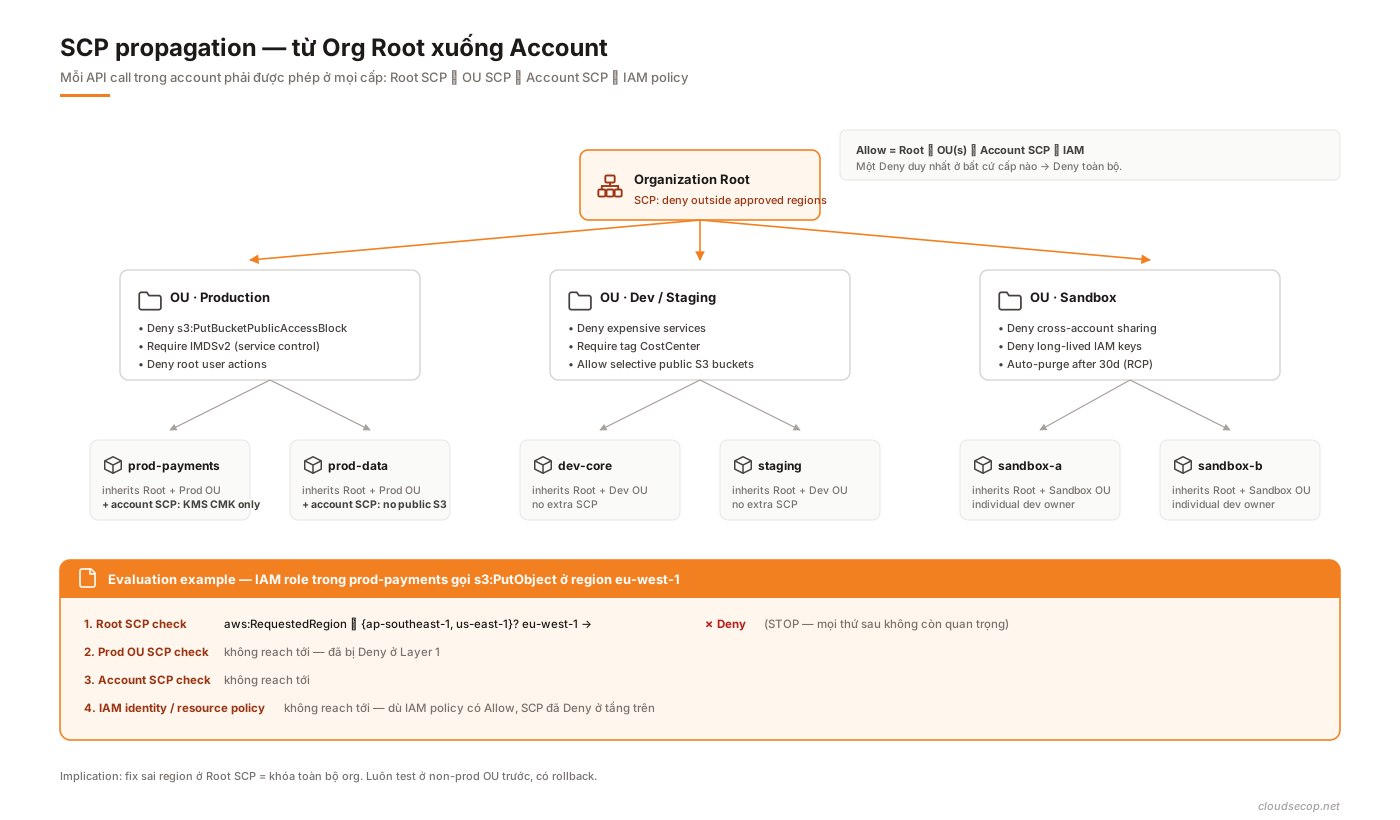
Why NotAction: IAM, Organizations, Route53, CloudFront, Shield, Global Accelerator, Cloud WAN, etc. are global services whose call logs typically appear in us-east-1. Without the exemption, the condition denies them and you lock yourself out. Note: sts:* is exempted here conservatively — STS actually has regional endpoints. If you’re worried about an attacker using STS to assume roles in disallowed regions, narrow the exemption to sts:GetCallerIdentity and sts:DecodeAuthorizationMessage instead of sts:*.
The diagram below shows how SCPs are evaluated from Organization Root down to an account — a deny at any level blocks the request regardless of the user’s or role’s IAM policy:
2. SCP — Keep S3 Block Public Access from being disabled (Phase 2: Guardrails)
You need to deny both IAM actions: s3:PutBucketPublicAccessBlock (bucket-level — the same action gates set and delete) and s3:PutAccountPublicAccessBlock (account-level). Denying only the first leaves the account-level override as a bypass. Apply it to every principal except OrgAdminRole:
{
  "Version": "2012-10-17",
  "Statement": [
    {
      "Sid": "PreventPublicAccessBlockTampering",
      "Effect": "Deny",
      "Action": [
        "s3:PutBucketPublicAccessBlock",
        "s3:PutAccountPublicAccessBlock"
      ],
      "Resource": "*",
      "Condition": {
        "ArnNotLike": {
          "aws:PrincipalArn": [
            "arn:aws:iam::*:role/OrgAdminRole",
            "arn:aws:iam::*:role/aws-service-role/*"
          ]
        }
      }
    }
  ]
}
Only the bucket + account pair is a real guardrail — relaxing either tier brings public-by-default back.
3. Terraform — Account-level IMDSv2 enforcement (Phase 2: IMDSv2)
Uses the EC2 ModifyInstanceMetadataDefaults API. Requires AWS provider v5.70+ (Terraform core 1.5+ is fine):
resource "aws_ec2_instance_metadata_defaults" "imdsv2_only" {
  http_tokens                 = "required"   # IMDSv2 mandatory
  http_put_response_hop_limit = 2
  http_endpoint               = "enabled"
  instance_metadata_tags      = "enabled"
}
Key detail: the default is per-region. Deploy it across every region you use (see the SCP in #1 for the region list). CloudFormation has no native resource for this yet — use a Custom::* Lambda-backed resource that calls the EC2 SDK.
4. SCP — Require tags on resource creation (Phase 3: Tagging Strategy)
Require CostCenter and Owner tags when creating EC2 instances, EBS volumes, and RDS instances:
{
  "Version": "2012-10-17",
  "Statement": [
    {
      "Sid": "RequireTagsOnCreate",
      "Effect": "Deny",
      "Action": [
        "ec2:RunInstances",
        "ec2:CreateVolume",
        "rds:CreateDBInstance"
      ],
      "Resource": [
        "arn:aws:ec2:*:*:instance/*",
        "arn:aws:ec2:*:*:volume/*",
        "arn:aws:rds:*:*:db:*"
      ],
      "Condition": {
        "Null": {
          "aws:RequestTag/CostCenter": "true",
          "aws:RequestTag/Owner": "true"
        }
      }
    }
  ]
}
Null returns true when the key isn’t supplied — so the deny fires when the tag is missing. S3 buckets need a separate pattern, since bucket tags flow through a different API.
Caveat: this SCP only enforces at create time. A caller who creates an untagged resource and then tags it via ec2:CreateTags / rds:AddTagsToResource a second later will bypass it. To close the gap, add a deny on the AddTags* actions when aws:ResourceTag/<key> is still absent, or constrain the allowed tag keys via aws:TagKeys with ForAllValues:StringEquals.
5. Data Perimeter — Identity perimeter SCP (Phase 4: IAM Data Perimeters)
Make sure every request into S3 / KMS / etc. comes from an identity that belongs to the Organization:
{
  "Version": "2012-10-17",
  "Statement": [
    {
      "Sid": "DenyAccessFromNonOrgIdentities",
      "Effect": "Deny",
      "Action": [
        "s3:*",
        "kms:*",
        "secretsmanager:*",
        "dynamodb:*"
      ],
      "Resource": "*",
      "Condition": {
        "StringNotEqualsIfExists": {
          "aws:PrincipalOrgID": "o-xxxxxxxxxx"
        },
        "BoolIfExists": {
          "aws:PrincipalIsAWSService": "false"
        }
      }
    }
  ]
}
Critical nuance: BoolIfExists rather than plain Bool is required. aws:PrincipalIsAWSService is absent for most principals (IAM users, roles, external accounts) — plain Bool fails closed when the key is missing, so the deny doesn’t fire against the very attackers you’re trying to block. This is a common mistake when hand-writing data perimeters; the AWS reference samples use BoolIfExists for exactly this reason.
This is only the identity perimeter — one of the three layers of a data perimeter. You also need a resource perimeter (resource-based policies on buckets/keys that reject non-org principals) and a network perimeter (VPC endpoint policies). All three together make up a full Data Perimeter.
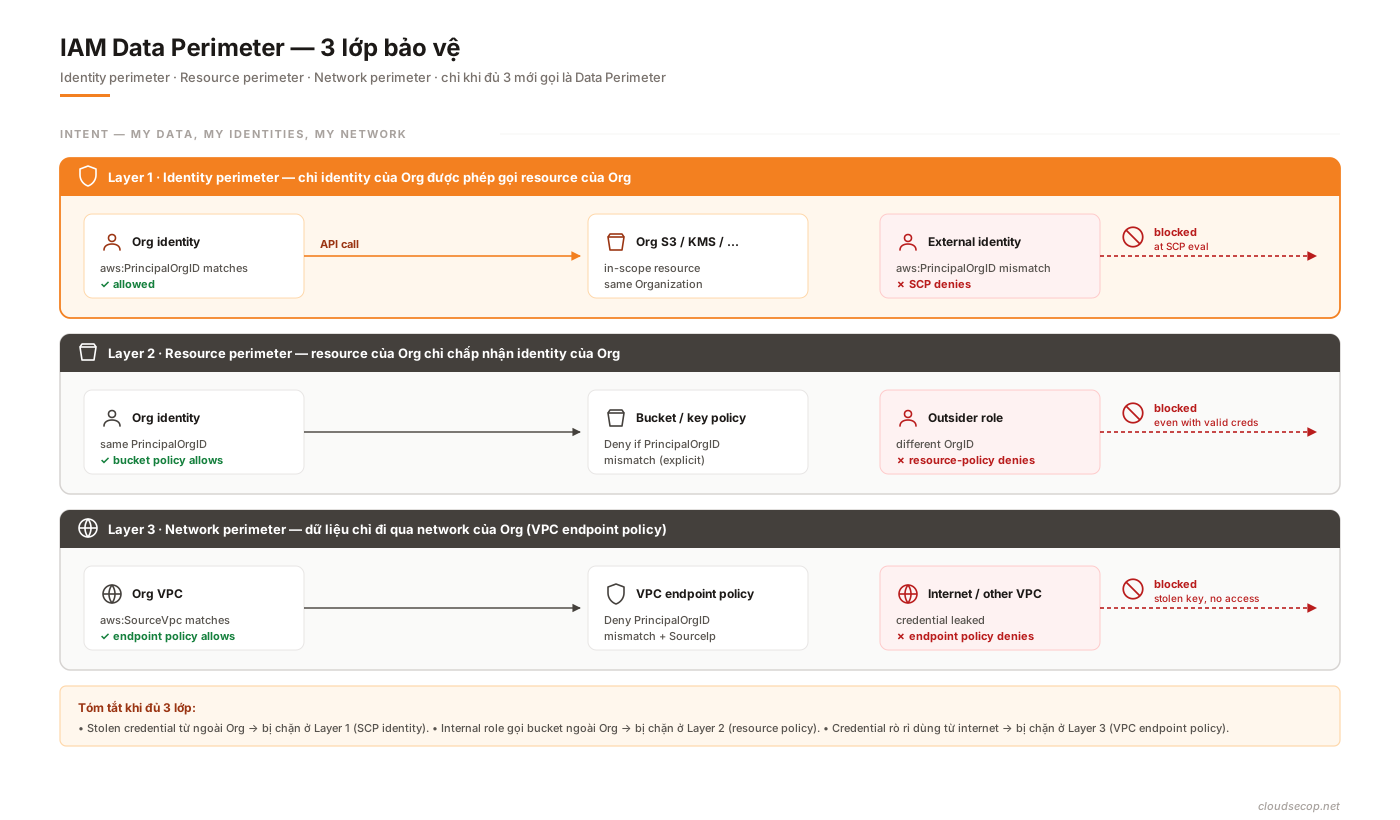
For a full three-layer reference: AWS Data Perimeter — reference policies.
Common traps when reading SMM v2
- Using SMM as a compliance framework. It isn’t one. It doesn’t replace ISO 27001 / SOC 2 / PCI. It’s a technical roadmap toward posture, not an audit trail. Compliance runs in parallel.
- Cherry-picking phase 4 controls. “We’ll just do Zero Trust Access and skip phases 1–2.” Sooner or later, an incident will prove that wrong.
- Treating Optimized as the end goal for every org. It’s not. A 10-person startup doesn’t need Red Team and Chaos Engineering. Knowing where to stop is a skill.
- Not tracking re-implementation. Controls aren’t “tick once, done forever”. MFA might be ticked today; six months later a new service account exists without it. Re-audit.
- Not mapping to a real backlog. Reading 74 controls, nodding, closing the tab. No tickets, no owners, no deadlines = nothing happens.
Trade-offs
| Question | Option | What I pick | Why |
|---|---|---|---|
| Adopt SMM v2 or build our own maturity model? | Adopt SMM | Adopt | Authored by AWS, peer-reviewed, community traction. Build your own only for very specific reasons. |
| SMM alone, or combined with CIS / Well-Architected? | Combined | SMM for ordering, CIS + WA as spot-checks | SMM is opinionated on sequence, CIS on specifics, WA on per-workload. |
| Track in a spreadsheet or a tool? | Tool (official assessment tool) | Tool | Spreadsheets drift fast and lack structured version history. |
| Finish phase 1 before touching phase 2, or pipeline? | Phase 1 first | Phase 1 first | Phase 1 is cheap and high-ROI. Finishing it makes drift detection in later phases easier. |
| Chase phase 4 or stop at phase 3? | Depends | Stop at phase 3 without a full-time security team | Phase 4 demands operational maturity, not a feature checklist. |
| Re-assess quarterly or annually? | Quarterly | Quarterly | AWS services move fast. A year is too long. |
Lessons
- The ordering, not the list, is SMM’s actual product. Many people assume the value is the list of controls. It isn’t — CIS and Well-Architected also have lists. The value is that AWS has already ranked them by impact over effort.
- 74 controls aren’t 74 projects. Group them into programs (identity, threat detection, resilience) to avoid silos.
- Quick Wins must land in the first quarter. A one-year roadmap that spreads Quick Wins across every month is a sign you’ve misread the model.
- The real payoff shows up on the third re-assessment. First time: you see gaps. Second: you see progress. Third: you see trends. Stop after the first and all you’ve done is an audit.
- Localize for stakeholders if needed. The model is in English. A non-English CTO or CISO decides faster when the summary is in their language. That’s not laziness — it’s removing friction.
References
- AWS Security Maturity Model v2 — the canonical docs and source of truth for the control list.
- AWS Security Maturity Model Assessment Tool — the companion web app.
- Companion post on the assessment tool — workflow, JSON/Excel export, trade-offs.
- AWS Well-Architected Framework — Security Pillar — per-workload assessment, complements SMM.
- CIS AWS Foundations Benchmark — hard checklist with heavy overlap on the Foundational phase.
- AWS Prescriptive Guidance — Security — deep dives per control.