

TL;DR
Migrating an app AWS → Cloudflare is an architecture decision, not a pure engineering task. 3 strategies differ in time, risk, and code volume.
Main thesis:
Don’t migrate straight from Lambda to Worker without evaluating the whole stack. Cloudflare primitives are different enough that some AWS patterns (DynamoDB hot partitions, RDS connection pools, S3 Glacier lifecycles) don’t map 1-1. A good migration is portfolio thinking: what migrates well (big savings), what stays on AWS (specialized), what needs a rewrite (legacy). The strangler fig pattern is the safest.
This post covers: service-by-service mapping AWS → Cloudflare, 3 strategies (strangler, big bang, hybrid), data migration (DynamoDB export, S3 sync, RDS dump), the cutover plan with DNS TTL handling, rollback strategy, and 10 real pitfalls.
This post closes Block 5 (Production) and the 20-part Cloudflare Developer Platform Handbook series.
Who this is for
- Teams on AWS evaluating whether migration is feasible.
- Engineering leads who’ve already decided to migrate and need a concrete playbook.
- Architects designing new systems: “AWS or Cloudflare?”.
Recommended prerequisites: the whole series (previous 19 parts), especially Part 19 (cost model).
By the end of this post you will:
- Know which primitives map cleanly and which need refactoring.
- Pick a migration strategy that fits your team + risk profile.
- Have a concrete playbook: data migration, cutover, rollback.
- Avoid 10 real pitfalls other teams have hit.
What this post isn’t about
- The decision to migrate: assumes a business reason exists (cost, ops, edge performance).
- Migrating from Vercel/Netlify to Cloudflare: usually simpler (mostly an Astro/Next.js adapter switch). Focus here is the harder AWS case.
- Migrating Kubernetes workloads: different scope. Workers don’t replace container runtimes.
Primitive mapping
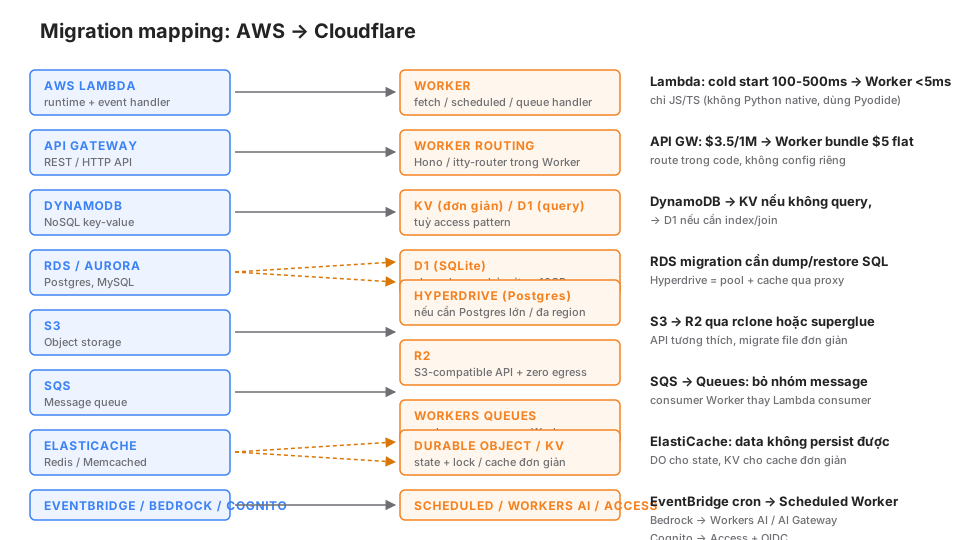
Lambda → Worker
Direct map: Lambda handler(event, context) → Worker fetch(request, env, ctx).
Differences:
- Runtime: Lambda = Node/Python/Go/Ruby. Worker = V8 isolate, JS/TS/WASM only. Native Python via Pyodide (slow, preview).
- Cold start: Lambda 100-500ms. Worker < 5ms.
- CPU: Lambda charges by GB-s, memory config. Worker charges pure CPU time.
- Filesystem: Lambda
/tmp512MB. Worker has no filesystem.
Code migration Node.js Lambda → Worker:
// Lambda
exports.handler = async (event) => {
  const body = JSON.parse(event.body);
  // ...
  return { statusCode: 200, body: JSON.stringify(result) };
};

// Worker
export default {
  async fetch(request: Request, env: Env): Promise<Response> {
    const body = await request.json();
    // ...
    return Response.json(result);
  },
};
Python Lambda: rewrite in TypeScript. Heuristic: 1 Python Lambda of 200 lines ≈ 2-4 days TypeScript rewrite if the team knows JS.
API Gateway → Worker routing
API Gateway: configured in the AWS console, integrated with Lambda.
Worker: routing in code (Hono, itty-router, Part 9).
import { Hono } from "hono";

const app = new Hono();
app.get("/api/users/:id", handleUser);
app.post("/api/subscribe", handleSubscribe);

export default app;
Pro: routing is version-controlled. Con: you lose specific features (APIGW request validator, usage plan).
DynamoDB → KV or D1
DynamoDB is multi-purpose. Map by access pattern:
Simple key-value, eventual consistency is fine → KV:
// DynamoDB
await ddb.put({ TableName: "users", Item: { id, name, email } });
const { Item } = await ddb.get({ TableName: "users", Key: { id } });

// KV
await env.USERS_KV.put(id, JSON.stringify({ name, email }));
const user = JSON.parse(await env.USERS_KV.get(id));
Queries by index, filter, aggregate → D1:
// DynamoDB with GSI
await ddb.query({ TableName: "posts", IndexName: "byTag", KeyConditionExpression: "tag = :t", ... });

// D1
await env.DB.prepare("SELECT * FROM posts WHERE tag = ? ORDER BY pubdate DESC LIMIT 10")
  .bind(tag).all();
Hot partition / high throughput → D1 with a partition pattern or keep DynamoDB and call it via Worker fetch.
RDS / Aurora → D1 or Hyperdrive
Small schema (< 10GB), moderate traffic → D1:
- Dump RDS:
pg_dump -h rds-endpoint -U admin dbname > backup.sql - Convert Postgres-specific syntax → SQLite:
SERIAL→INTEGER PRIMARY KEY AUTOINCREMENT.TIMESTAMPTZ→TEXT(ISO 8601 string).JSONB→TEXT(parse in app).- No stored procedures, simple triggers only, no arrays.
- Apply to D1:
wrangler d1 execute my-db --file=backup.sql
Large schema, Postgres-specific features (arrays, JSON ops, extensions) → Hyperdrive: Hyperdrive = Cloudflare-managed pool + cache in front of an external Postgres (Neon, RDS, Supabase). Worker connects through Hyperdrive, reducing latency + connection overhead.
import postgres from "postgres";

const sql = postgres(env.HYPERDRIVE.connectionString);
const users = await sql`SELECT * FROM users WHERE id = ${id}`;
Keep Postgres infrastructure, add a Cloudflare edge layer.
S3 → R2
Easiest migration. S3-compatible API (S3 signature).
Tools:
- rclone:
rclone sync s3:my-bucket r2:my-bucket— parallel, resumable. - superglue (Cloudflare tool): bulk migration.
- Worker sync: custom code fetching S3 → putting R2 with progress tracking.
After migrating, update endpoints in code:
// WRONG: S3 endpoint
const response = await fetch(`https://my-bucket.s3.amazonaws.com/${key}`);

// RIGHT: R2 binding
const object = await env.BUCKET.get(key);
return new Response(object.body);
Update every mention of s3.amazonaws.com in code + IAM policies + lifecycle config.
SQS → Queues
SQS → Cloudflare Queues. Similar concept:
// SQS Lambda consumer
exports.handler = async (event) => {
  for (const record of event.Records) {
    const body = JSON.parse(record.body);
    await process(body);
  }
};

// Queue consumer Worker
export default {
  async queue(batch: MessageBatch<MyMsg>, env: Env): Promise<void> {
    for (const msg of batch.messages) {
      try {
        await process(msg.body);
        msg.ack();
      } catch {
        msg.retry();
      }
    }
  },
};
Differences:
- SQS message group IDs → not in Queues. Ordering via message key or a DO.
- SQS FIFO → Queues don’t guarantee strict ordering.
- SQS visibility timeout → Queues has an equivalent (
retryDelay).
ElastiCache → Durable Objects + KV
Simple cache, read-heavy → KV (eventual consistency is fine).
Session, lock, rate limit → Durable Objects (strong consistency).
Pub/Sub → Durable Objects with WebSocket broadcast.
Redis data structures (Sorted Set, Hash, List) have no direct Cloudflare equivalent. Rewrite the logic with D1 (if SQL-friendly) or DOs (if state-machine).
EventBridge cron → Scheduled Worker
{
  "triggers": {
    "crons": ["0 * * * *"]
  }
}
export default {
async scheduled(event: ScheduledEvent, env: Env, ctx: ExecutionContext) {
// every hour
},
};1-1 map. Complex EventBridge rules (multi-target, dead letter) need custom Worker logic.
Cognito → Access + OIDC
Cognito user pools → Cloudflare Access with SSO IdPs (Google, Okta, GitHub).
User migration: export from Cognito, import into the IdP. No native Cloudflare tool for identity migration (different platform scope).
Bedrock → Workers AI + AI Gateway
Covered in Part 13. Workers AI for entry-tier models (Llama, Mistral). Frontier models (GPT-4, Claude 4.7, Gemini 2.5 Pro) still called through AI Gateway.
SES → external
Cloudflare has no Email Sending. Use Resend, Postmark, SendGrid via HTTP from the Worker.
SageMaker / EMR / Redshift → keep AWS
Specialized workloads without a Cloudflare equivalent. Hybrid strategy (section below).
3 migration strategies
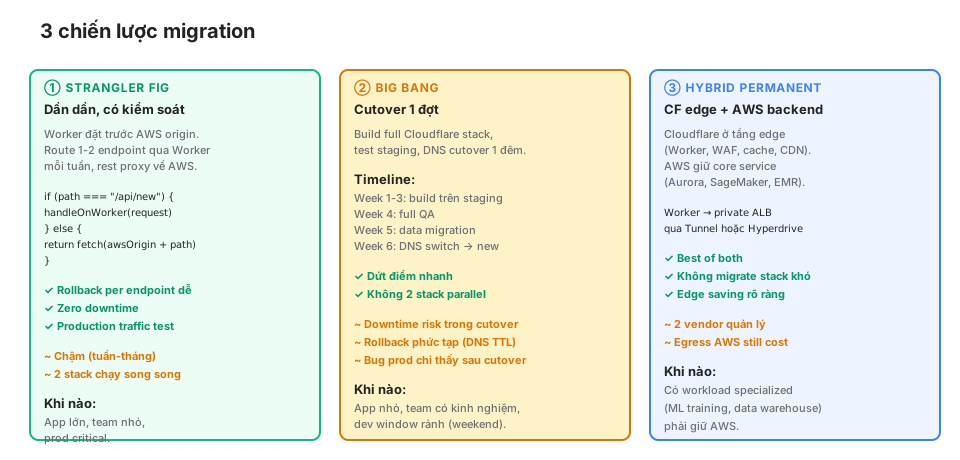
① Strangler fig (recommended for prod)
Worker sits in front of the AWS origin. Migrate 1-2 endpoints per week to the Worker, proxy the rest to AWS.
export default {
  async fetch(request: Request, env: Env): Promise<Response> {
    const url = new URL(request.url);

    // Migrated endpoints
    if (url.pathname === "/api/posts") return handlePosts(request, env);
    if (url.pathname === "/api/search") return handleSearch(request, env);

    // Not yet migrated → proxy to AWS
    const awsUrl = `https://old-app.example.com${url.pathname}${url.search}`;
    return fetch(awsUrl, request);
  },
};
Pros:
- Easy per-endpoint rollback.
- Zero downtime (DNS doesn’t change).
- Test with real production traffic.
- Team builds confidence gradually.
Cons:
- Slow (weeks-months).
- 2 stacks running in parallel = 2 deployments.
- Extra latency for not-yet-migrated endpoints (Worker → AWS → Worker → client).
When: critical prod app, small team, no downtime tolerance.
② Big bang (for small apps)
Build the full Cloudflare stack on staging, QA, migrate data, cutover DNS overnight.
Example timeline:
- Week 1-3: rewrite Lambda → Worker, schema D1/R2, staging test.
- Week 4: end-to-end QA, load test.
- Week 5: data migration (offline job).
- Week 6: DNS cutover, monitor 48h, rollback if needed.
Pros:
- Quick and decisive.
- No parallel stacks.
- Team only goes through the storm once.
Cons:
- Downtime window during cutover.
- Complex rollback (DNS TTL 24-48h).
- Prod bugs only surface after cutover.
When: small app (< 20 endpoints), team with both AWS + CF experience, free dev window.
③ Hybrid permanent (for enterprise)
Cloudflare at the edge (Worker, WAF, cache, CDN). AWS keeps the core (Aurora, SageMaker, EMR, specialized).
User → Cloudflare Worker (auth, cache, rate limit)
     → AWS ALB (via Tunnel or Hyperdrive)
     → Aurora / SageMaker / EMR
Pros:
- Don’t migrate the hard workloads.
- Clear edge savings (WAF, cache, DDoS).
- No forced AWS → CF full retrain.
Cons:
- 2 vendors to manage.
- AWS egress still counts (Worker → AWS pulls data).
- Cost stays flat or doesn’t drop much.
When: you have specialized AWS workloads (ML training, data warehouse) that can’t migrate.
Data migration tools
DynamoDB export
Use the S3 Export feature:
aws dynamodb export-table-to-point-in-time \
  --table-arn arn:aws:dynamodb:us-east-1:xxx:table/my-table \
  --s3-bucket my-export-bucket
Output: JSON Lines files on S3.
Worker ingests into D1:
export async function importDynamoDB(request: Request, env: Env) {
  const { files } = await request.json();  // list of S3 URLs

  for (const url of files) {
    const response = await fetch(url);
    const text = await response.text();
    const records = text.split("\n").filter(Boolean).map(JSON.parse);

    // Batch insert into D1
    const stmts = records.map((r) =>
      env.DB.prepare("INSERT INTO users VALUES (?, ?, ?)")
        .bind(r.id, r.name, r.email)
    );
    await env.DB.batch(stmts);
  }
}
S3 → R2 sync
rclone (recommended):
# Configure both remotes
rclone config  # add s3 + r2

# Sync
rclone sync s3:my-bucket r2:my-bucket --progress --transfers=10

# Verify
rclone check s3:my-bucket r2:my-bucket
Parallel, resumable, delta sync. 10TB in a few hours.
RDS Postgres dump
# Export
pg_dump -h rds.example.com -U admin -d mydb \
  --no-owner --no-privileges --data-only \
  > data.sql

# Convert syntax
sed -i 's/TIMESTAMPTZ/TEXT/g' data.sql
# Manual review for JSONB, arrays

# Import into D1
wrangler d1 execute my-db --file=data.sql
Schema conversion: more manual. Postgres types → SQLite types aren’t 1-1.
Alternative: keep Postgres, use Hyperdrive.
Cutover plan: big bang detail
24h before cutover:
- Staging fully working (smoke test passing).
- Full data backup (S3 snapshot, RDS snapshot, DynamoDB PITR).
- Rollback plan documented.
- Team oncall schedule.
- Communication plan (status page, customer email).
Cutover steps (Saturday 2AM VN time, lowest traffic):
- T-60min: freeze writes to AWS (read-only mode).
- T-55min: incremental data sync (S3 → R2, DynamoDB → D1 delta).
- T-30min: verify data parity (sample check).
- T-15min: deploy Worker production config (bindings pointing to R2/D1).
- T-5min: reduce DNS TTL to 60s (already done 24h before so caches expired).
- T-0: DNS cutover → Cloudflare Worker.
- T+5min: live smoke test (Part 12).
- T+10min: monitor 4xx, 5xx rates, latency.
- T+30min: if OK, unfreeze writes.
- T+24h: close monitoring. Rollback window.
Rollback (if needed)
- Revert DNS to AWS (TTL 60s → propagates 1-2 minutes).
- Unfreeze AWS write gate.
- Loss: requests in the 10-15 minute gap may double-write (to R2 and S3 if gating wasn’t right).
Post-incident: root-cause review, plan the retry.
10 real pitfalls
① Python Lambda → must rewrite to TypeScript
Workers Python (Pyodide) is still preview. Rewriting to TS is the standard path. Underestimating this effort = slip.
② DynamoDB hot partitions ≠ KV partitions
DynamoDB partitions by hash key. KV has no such concept. A DynamoDB hot key can become a single-key bottleneck on KV (write conflicts).
③ Postgres JSONB queries → D1 doesn’t have them
-- Postgres
SELECT * FROM events WHERE data->>'type' = 'login';

-- D1 (no jsonb op)
SELECT * FROM events WHERE json_extract(data, '$.type') = 'login';
SQLite json_extract replaces it, but can’t be indexed. For high-query workloads, denormalize into a separate column (event_type) and index it directly.
④ S3 Glacier lifecycle doesn’t map
R2 has no Glacier tier (cold storage 10x cheaper). Archive pattern differs: store compressed in R2 or keep AWS Glacier + Worker proxy.
⑤ Lambda memory vs CPU limit
Lambda memory config indirectly sets CPU. Worker charges pure CPU time. A CPU-bound 300ms handler in a 3GB Lambda = fine. Worker 30s CPU limit may be OK but the CPU chart differs from AWS CloudWatch.
⑥ Cognito user export isn’t easy
Cognito doesn’t export password hashes. Users must reset passwords when migrating to a new IdP. Communication plan critical.
⑦ API Gateway stage vars are lost
API Gateway has stageVariables.key. Worker doesn’t. Replace with normal env vars, deployed per environment.
⑧ Lambda VPC doesn’t map
VPC Lambdas access private RDS directly. Edge Workers aren’t in a VPC. Need Cloudflare Tunnel or Hyperdrive routing via a Postgres public endpoint (with auth).
⑨ SQS DLQ ≠ Queues DLQ
SQS DLQ: after N retries, the message moves to DLQ. Queues has a dead_letter_queue binding. Config differs, message format isn’t identical, an adapter is needed.
⑩ CloudFormation drift
IaC (CloudFormation, Terraform AWS) doesn’t map to Cloudflare. Cloudflare has a Terraform provider but coverage differs. Re-IaC migration = extra effort.
When NOT to migrate
Not every app should migrate. Keep AWS if:
AWS-native workloads
- SageMaker training: no CF equivalent.
- EMR / Athena / Redshift: data warehouse, ETL.
- Kinesis streaming: high-throughput streaming.
- Lambda on other runtimes (Rust, .NET): not JS-friendly.
Heavy existing investment
- 100+ Lambdas, 50+ DynamoDB tables, 5 years of tech debt. $/month savings don’t justify 6 months of migration cost.
- AWS-specialized team, no CF experience. Retrain cost > savings.
Compliance requirements
- HIPAA, PCI with specific AWS BAA.
- FedRAMP. Cloudflare has FedRAMP Moderate for some services, but check coverage.
Deep enterprise discounts
- AWS 3-year RIs at 60% off. AWS cost can end up below Cloudflare list price.
Migration readiness checklist
Before starting:
- Clear cost evaluation (Part 19 template).
- Identify non-migrable workloads (SageMaker, EMR, etc.).
- Pick strategy (strangler / big bang / hybrid).
- Team trained on CF fundamentals (covered by this series).
- Cloudflare staging environment ready.
- Data migration tool chosen (rclone, DynamoDB export).
- Rollback plan documented.
- DNS TTL reduced 24h before cutover (if big bang).
- Communication plan (status page, customer notify).
- Monitoring parity (AWS CloudWatch vs CF Analytics Engine).
During:
- Post-deploy smoke test (Part 12).
- Error rate + latency monitoring (Part 17).
- Data parity checks.
- Security header verification (Part 18).
After:
- Cost tracking 1 month post-migration.
- Performance comparison AWS baseline vs CF.
- Team retrospective: what worked, what didn’t.
- Decommission AWS resources (cost savings).
Series wrap-up
20 parts. 58 blog posts. 100+ SVG diagrams. From Part 1 (What is the Cloudflare Developer Platform) to Part 20 (migration).
Block 1: Foundation (1-4) — platform, runtime, mental model, dev loop.
Block 2: Storage (5-8) — KV, D1, R2, Queues + Durable Objects.
Block 3: Framework (9-12) — Router, ORM, Astro/Remix/SvelteKit, CI/CD.
Block 4: AI + Media (13-16) — Workers AI, Vectorize RAG, Durable Objects realtime, Stream + Images.
Block 5: Production (17-20) — Observability, Security, Cost, Migration.
The Cloudflare Developer Platform isn’t a “new” cloud. It’s a mental-model shift from region-based compute + heavy egress to edge-first + zero egress + bundled includes. Some patterns don’t migrate, but most web apps — static sites, blogs, SaaS, APIs, realtime — fit Cloudflare better on cost + performance + ops simplicity.
This series was written over ~4 months for a personal blog. For teams/startups: read → try → decide. There’s no “absolute right answer”. There’s the right workload for the right platform.
Thanks for reading through. Feedback via KhaVan or comment on any post. Go build something interesting.