

TL;DR
R2 is Cloudflare’s object storage: S3 API v4 compatible, zero egress fee, native Worker integration via bindings, one-click custom domains.
The key claim:
If your workload has any meaningful egress (media, downloads, asset delivery), R2 saves 90%+ versus S3. If you only store a few GB of cold backups, S3 Glacier is cheaper. Decide based on the egress-to-storage ratio, not “Cloudflare is better than AWS”.
This post covers: R2 vs S3 in real cost terms, 4 access patterns (Worker binding proxy, public bucket, presigned URL, multipart), migration from S3, and gotchas around strong consistency, metadata, and lifecycle.
Who this is for
- Developers paying significant S3 egress and evaluating R2.
- Teams building media storage (images, video, PDF) that needs custom domains + CDN.
- Anyone migrating from S3 who wants to keep their boto3 / aws-sdk client.
Read first: Part 3 (Storage layer), Part 5 (KV — decision tree for when to use R2).
After this post you’ll:
- Decide R2 vs S3 based on a real cost model.
- Pick the right access pattern (Worker proxy vs public bucket vs presigned).
- Migrate from S3 via Super Slurper or self-managed dual-write.
- Avoid eventual-consistency list, CORS, and cache gotchas.
What this post isn’t about
- Intro to S3: assumed you already use it.
- Image transforms (resize, crop): that’s Cloudflare Images, Part 16.
- R2 SQL (beta): not yet covered.
- R2 Data Catalog: analytics workload, out of scope for this series.
R2 vs S3: when R2 wins
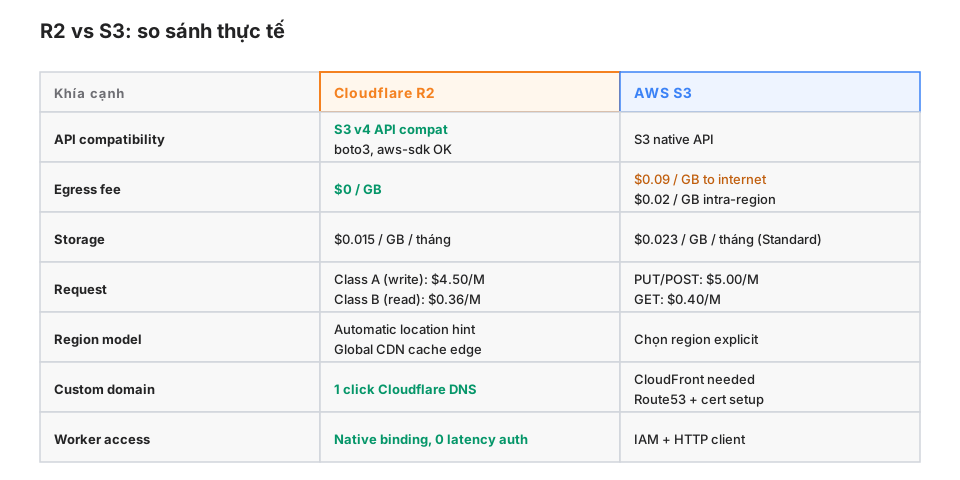
Where R2 clearly wins
- Media hosting: blog images, short videos, PDF reports — high egress-to-storage ratio.
- CDN origin: R2 as the origin, Cloudflare’s CDN caches for free.
- Direct client downloads: apps downloading files from storage, skipping the backend.
- Avatars, user uploads: egress is typically 10x storage or more.
Where S3 is still better
- Cold backup storage: S3 Glacier Deep Archive at $0.00099/GB/month.
- AWS ecosystem integration: Athena queries, Lambda triggers, SNS notifications — R2 has no native equivalents yet.
- Region-specific compliance: S3 lets you pick a region explicitly; R2 uses location hints.
- In-VPC, non-public workloads: S3 VPC endpoints save egress.
A real cost model
Assume: 100 GB storage, 10 TB egress/month (a media-heavy blog + downloads).
| R2 | S3 | |
|---|---|---|
| Storage | $1.50 | $2.30 |
| Egress | $0 | $900 (10 TB × $0.09) |
| Requests | ~$1-5 | ~$1-5 |
| Total | ~$5 | ~$905 |
99% of the cost is egress. That’s why R2 appeared right after AWS raised egress.
The flip case: 10 GB of cold backups, no egress.
| R2 | S3 Glacier | |
|---|---|---|
| Storage | $0.15 | $0.01 |
| Retrieval | free | $0.03/GB |
For rarely-retrieved backups, S3 Glacier is 15× cheaper.
Binding
{
  "r2_buckets": [
    {
      "binding": "BUCKET",
      "bucket_name": "my-media",
      "preview_bucket_name": "my-media-preview"
    }
  ]
}
In the Worker:
interface Env {
  BUCKET: R2Bucket;
}
Basic API
// Put an object
await env.BUCKET.put("images/logo.png", imageBytes, {
  httpMetadata: { contentType: "image/png" },
  customMetadata: { uploadedBy: "user:123" }
});

// Get an object
const object = await env.BUCKET.get("images/logo.png");
if (!object) return new Response("Not found", { status: 404 });

// Stream it back
return new Response(object.body, {
  headers: {
    "Content-Type": object.httpMetadata?.contentType ?? "application/octet-stream",
    "ETag": object.httpEtag,
  }
});

// Delete
await env.BUCKET.delete("images/logo.png");

// List with a prefix
const listed = await env.BUCKET.list({ prefix: "images/", limit: 100 });
for (const obj of listed.objects) {
  console.log(obj.key, obj.size, obj.uploaded);
}

// Head (metadata only, no body fetched)
const head = await env.BUCKET.head("images/logo.png");
4 access patterns
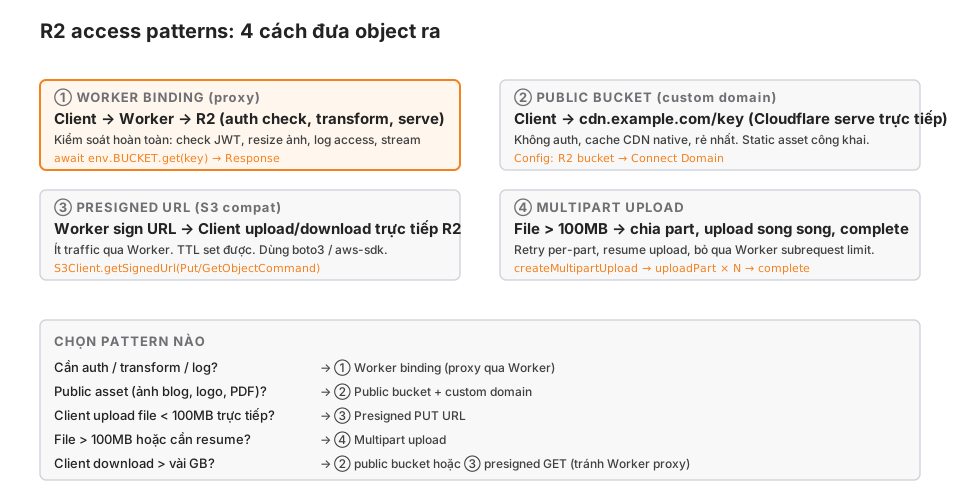
① Worker binding (proxy)
Client → Worker → R2, with full control.
async fetch(request, env) {
  const url = new URL(request.url);
  const key = url.pathname.slice(1);

  // Auth check
  const jwt = request.headers.get("Cf-Access-Jwt-Assertion");
  const claims = await verifyJwt(jwt, env);
  if (!claims) return new Response("Unauthorized", { status: 401 });

  // Fetch from R2
  const object = await env.BUCKET.get(key);
  if (!object) return new Response("Not found", { status: 404 });

  // Log the access
  ctx.waitUntil(logAccess(env, claims.email, key));

  // Stream
  return new Response(object.body, {
    headers: {
      "Content-Type": object.httpMetadata?.contentType ?? "application/octet-stream",
      "Cache-Control": "private, max-age=300",
    }
  });
}
Use when:
- You need per-object auth.
- You need a transform (resize, watermark, encrypt-at-rest).
- You need an access log per request.
- The object is small and routing traffic through the Worker is acceptable.
Gotcha: each request is 1 Worker invocation + 1 R2 subrequest. For high-traffic delivery, the Worker cost dominates the R2 cost. For anything larger than a few MB, look at the other patterns.
② Public bucket + custom domain
Client → cdn.example.com/key, Cloudflare serves directly without the Worker.
Setup:
- R2 bucket → Settings → Public access → Connect Domain.
- Pick a domain on Cloudflare DNS (
cdn.example.com). - Cloudflare creates the SSL cert and routes automatically.
- The object is accessible at
https://cdn.example.com/key.
Use when:
- Public assets: blog images, logos, PDF reports.
- No auth needed.
- High traffic (CDN cache helps).
Gotcha:
- The whole bucket is public. You can’t control per-object.
- CDN cache: invalidate via the Cloudflare dashboard or purge API.
- CORS: set via bucket config, not per-object.
This blog uses this pattern for images.cloudsecop.net (serving cover SVG/PNG files).
③ Presigned URL (S3 compat)
The Worker signs a URL; the client uploads/downloads directly to R2.
import { AwsClient } from "aws4fetch";

async function getPresignedPutUrl(env: Env, key: string): Promise<string> {
  const aws = new AwsClient({
    accessKeyId: env.R2_ACCESS_KEY_ID,
    secretAccessKey: env.R2_SECRET_ACCESS_KEY,
    service: "s3",
  });

  const endpoint = `https://${env.R2_ACCOUNT_ID}.r2.cloudflarestorage.com/${env.BUCKET_NAME}/${key}`;

  const signed = await aws.sign(
    new Request(endpoint, { method: "PUT" }),
    { aws: { signQuery: true }, expiresIn: 3600 }  // 1 hour
  );

  return signed.url;
}
Client:
const { url } = await fetch("/api/upload-url", { method: "POST" }).then(r => r.json());
await fetch(url, { method: "PUT", body: file });
Use when:
- The client uploads directly, bypassing the Worker (saves Worker CPU time).
- You want URL TTL (auto-expires).
- You want to keep a boto3 / aws-sdk client in a non-Cloudflare backend.
Gotcha:
- You need R2 access key + secret (generated in the dashboard).
- A presigned URL has no auth claim beyond its signature. If it leaks within the TTL, anyone can use it.
- Maximum TTL is 7 days.
④ Multipart upload
For files > 100MB or when you need resumability.
// Step 1: create upload
const upload = await env.BUCKET.createMultipartUpload("large-video.mp4", {
  httpMetadata: { contentType: "video/mp4" }
});

// Step 2: upload parts (can run in parallel, from multiple requests)
const part1 = await upload.uploadPart(1, chunk1);  // 5MB - 5GB per part
const part2 = await upload.uploadPart(2, chunk2);

// Step 3: complete
await upload.complete([part1, part2]);

// Or abort on failure
// await upload.abort();
Use when:
- Uploading > 100MB in one Worker request (subrequest wall-time limit).
- Client upload needs resume (pause + resume).
- Streaming from a large source (transform + progressive upload).
Gotcha:
- Abandoned multipart uploads still cost storage. Set a lifecycle policy to auto-delete.
- Part size: 5MB - 5GB.
- Maximum 10,000 parts per upload.
Migrating from S3
Super Slurper (dashboard, one-click)
R2 dashboard → Bucket → Data Migration → From S3.
Provide:
- S3 bucket name + AWS credentials (read-only is fine).
- Destination R2 bucket.
Cloudflare runs the copy asynchronously and emails you when it’s done. For large (TB-scale) volumes, expect several hours. It’s not a real-time sync.
Self-managed (aws-sdk + env.BUCKET.put)
For continuous sync or mid-migration transforms:
// Worker or Node script
import { S3Client, GetObjectCommand, ListObjectsV2Command } from "@aws-sdk/client-s3";

async function migrate(env: Env) {
  const s3 = new S3Client({ region: "us-east-1" });
  let continuationToken: string | undefined;

  do {
    const list = await s3.send(new ListObjectsV2Command({
      Bucket: "old-s3-bucket",
      ContinuationToken: continuationToken,
    }));

    for (const obj of list.Contents ?? []) {
      const { Body } = await s3.send(new GetObjectCommand({
        Bucket: "old-s3-bucket",
        Key: obj.Key!,
      }));

      const stream = Body as ReadableStream;
      await env.BUCKET.put(obj.Key!, stream, {
        httpMetadata: { contentType: obj.ContentType ?? "application/octet-stream" }
      });
    }

    continuationToken = list.NextContinuationToken;
  } while (continuationToken);
}
Dual-write strategy
For critical systems, with zero downtime:
- Week 1: dual-write — upload code writes to both S3 and R2.
- Week 2: migrate historical data (Super Slurper).
- Week 3: dual-read — read R2, fall back to S3 on miss.
- Week 4: monitor, confirm R2 has 100% coverage.
- Week 5: disable S3 writes, R2 only.
- Month 2: delete S3 (after a grace period).
Don’t rush step 5. One missing object = a user complaint.
Gotchas
① Eventual consistency on list
await env.BUCKET.put("a.txt", "...");
const listed = await env.BUCKET.list({ prefix: "a" });
// Might not see "a.txt" immediately
list() can lag a few seconds after put(). Getting by exact key is strongly consistent; list is eventual.
Don’t rely on list right after a write to confirm.
② Custom metadata limit
customMetadata is capped at 2 KB total (keys + values). For richer metadata, encode into the key structure or use a D1 pointer.
// Heavy metadata → split
await env.BUCKET.put(`user/${userId}/file/${fileId}`, body);
await env.DB.prepare("INSERT INTO file_meta (key, metadata) VALUES (?, ?)")
  .bind(key, JSON.stringify(rich_meta))
  .run();
③ Content-Type isn’t auto-detected
// WRONG: R2 doesn't sniff, returns "application/octet-stream"
await env.BUCKET.put("photo.jpg", body);

// RIGHT:
await env.BUCKET.put("photo.jpg", body, {
  httpMetadata: { contentType: "image/jpeg" }
});
Browsers won’t render images with the wrong Content-Type.
④ CORS for browser upload
By default an R2 bucket has no CORS config. Fetching from example.com → R2 gets blocked.
Configure CORS via the dashboard or Wrangler:
wrangler r2 bucket cors put my-bucket --file cors.jsoncors.json:
[{
  "AllowedOrigins": ["https://my-app.com"],
  "AllowedMethods": ["GET", "PUT"],
  "AllowedHeaders": ["content-type"],
  "MaxAgeSeconds": 3600
}]
⑤ CDN cache doesn’t auto-invalidate
Public bucket + custom domain → Cloudflare caches objects. A put() to the same key doesn’t purge the old cache.
Options:
// Invalidate via the API
await fetch(`https://api.cloudflare.com/client/v4/zones/${zone}/purge_cache`, {
  method: "POST",
  headers: { "Authorization": `Bearer ${token}` },
  body: JSON.stringify({ files: [`https://cdn.example.com/${key}`] })
});
Or use versioned keys (image-v2.png) to bypass the cache.
⑥ Lifecycle rule for multipart cleanup
wrangler r2 bucket lifecycle put my-bucket --file lifecycle.json{
"rules": [{
"id": "cleanup-incomplete-multipart",
"enabled": true,
"abortIncompleteMultipartUpload": {
"daysAfterInitiation": 7
}
}]
}Without this rule, a failed multipart upload leaves orphaned parts consuming storage.
⑦ “Egress free” isn’t “infinite scale”
R2 has $0 egress but still charges Class B requests ($0.36/M reads). One million page views × 10 images per view = 10M Class B = $3.60, plus Worker invocations. Still cheap, but not literally free.
Production checklist
- Pick the right access pattern (Worker / public / presigned / multipart) per use case.
- Content-Type set explicitly on every
put(). - CORS configured if the browser uploads directly.
- Lifecycle rule to clean up abandoned multipart uploads (7 days is reasonable).
- Custom metadata < 2 KB; anything richer in D1.
- Public buckets don’t contain sensitive data (the whole bucket is exposed).
- Presigned URL TTLs are the minimum necessary (not the 7-day max).
- CDN cache policy matches your invalidation strategy.
-
list()is not used to confirm recent writes (eventual consistency).
Wrap-up
R2 is S3-compatible object storage with zero egress, native Worker integration. A big cost win for media / CDN-origin workloads; not a “win-everything” — cold backups still belong on S3 Glacier.
Four access patterns cover 99% of use cases: Worker binding (auth), public bucket (static assets), presigned URL (direct client), multipart (large files). S3 migration has Super Slurper (one-click) or the dual-write strategy (critical systems).
Part 8 next: Queues and Durable Objects — async messaging and stateful coordination. The two hardest primitives to use correctly, and the ones that make Workers a genuinely full-stack platform.