

TL;DR
CI/CD for Workers is simpler than most platforms: git push → GitHub Actions → wrangler deploy → smoke test. No container, no artifact storage, no orchestration.
Main thesis:
Three common mistakes: using the Global API Key instead of a scoped token (security), no smoke test after deploy (silent failures), no concurrent lock in the workflow (race conditions where deploys overwrite each other). A production pipeline needs all three.
This post covers: the full 4-step pipeline, scoped token setup, smoke test pattern, preview environments, rollback strategy, and the full workflow file from this blog.
This post closes Block 3 (Framework). Block 4 opens with Workers AI in Part 13.
Who this is for
- Developers who already have a Worker but no CI yet.
- Anyone still using the Global API Key in a GitHub secret (move off it now).
- Teams scaling a project who need a concurrent lock + smoke tests.
Recommended prerequisites: Part 4 (Wrangler dev loop), Part 9 (Router), Part 11 (Framework).
By the end of this post you will:
- Set up a GitHub Actions pipeline end-to-end.
- Create a scoped API token with minimum permissions.
- Write a post-deploy smoke test.
- Roll back in 10 seconds when you need to.
What this post isn’t about
- GitLab CI / CircleCI / Jenkins: same idea, different syntax. This post uses GitHub Actions.
- Complex multi-stage preview environments (PR preview, staging, canary): mentioned but not covered in depth.
- Blue/green deployment: Workers has instant rollback, so this pattern is rarely needed.
The 4-step pipeline
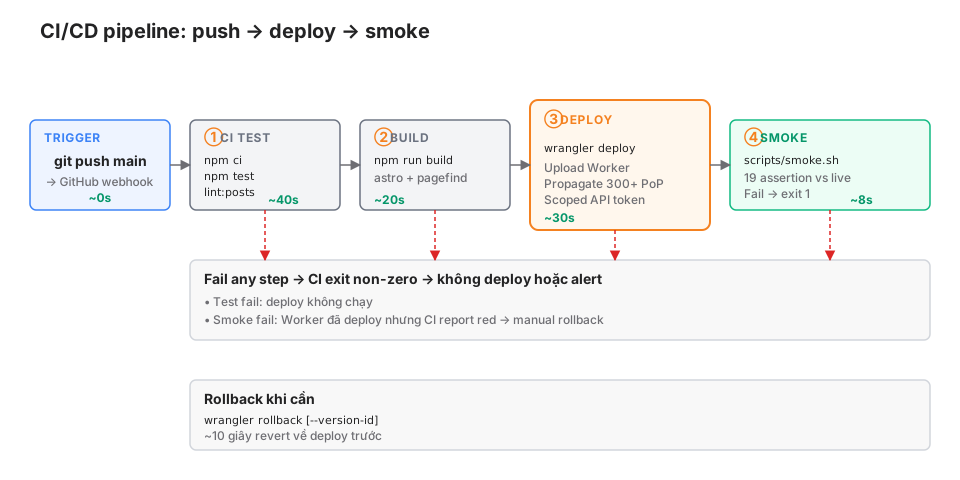
Total time: ~100 seconds from push to live + verified
Real numbers from this blog. 100 seconds end-to-end is fast compared to most container-based pipelines: no image build, no registry push, no rolling deployment.
The full workflow file
.github/workflows/deploy.yml from cloudsecop.net:
name: Deploy to Cloudflare Workers

on:
  push:
    branches: [main]
  workflow_dispatch:

concurrency:
  group: deploy-${{ github.ref }}
  # cancel-in-progress: true is fine for a blog / low-stakes:
  # a new push cancels an in-flight deploy. For production-critical
  # systems, use `cancel-in-progress: false` to queue instead —
  # see the Concurrent lock section below.
  cancel-in-progress: true

permissions:
  contents: read

jobs:
  deploy:
    runs-on: ubuntu-latest
    timeout-minutes: 10
    steps:
      - name: Checkout
        uses: actions/checkout@v4

      - name: Setup Node
        uses: actions/setup-node@v4
        with:
          node-version: 22
          cache: npm

      - name: Install
        run: npm ci

      - name: Lint posts
        run: npm run lint:posts

      - name: Test
        run: npm test

      - name: Build
        run: npm run build

      - name: Deploy
        run: npx wrangler deploy
        env:
          CLOUDFLARE_API_TOKEN: ${{ secrets.CLOUDFLARE_API_TOKEN }}
          CLOUDFLARE_ACCOUNT_ID: ${{ secrets.CLOUDFLARE_ACCOUNT_ID }}

      - name: Smoke test
        run: scripts/smoke.sh
        env:
          SITE_URL: https://cloudsecop.net
Step-by-step
concurrency: only one deploy runs at a time per ref. Push twice in a row and the second push cancels the first. Prevents deploy races.
permissions: contents: read: the default GitHub Actions token has write. Downgrade to read-only. Principle of least privilege.
timeout-minutes: 10: fail fast if any step hangs.
actions/checkout@v4: check out the code. Pin the version for reproducibility.
actions/setup-node@v4 + cache: npm: caches node_modules keyed on package-lock.json. Subsequent builds are 5-10x faster.
npm ci (not npm install): strict install from the lockfile, no updates.
npm run lint:posts: blog-specific — checks frontmatter schema + translation pairing.
npm test: vitest with vitest-pool-workers (Part 4).
npm run build: Astro build + Pagefind index.
npx wrangler deploy: uploads the Worker. Scoped token (see the next section).
scripts/smoke.sh: probes the live site after deploy (see later).
API token: scoped, not Global
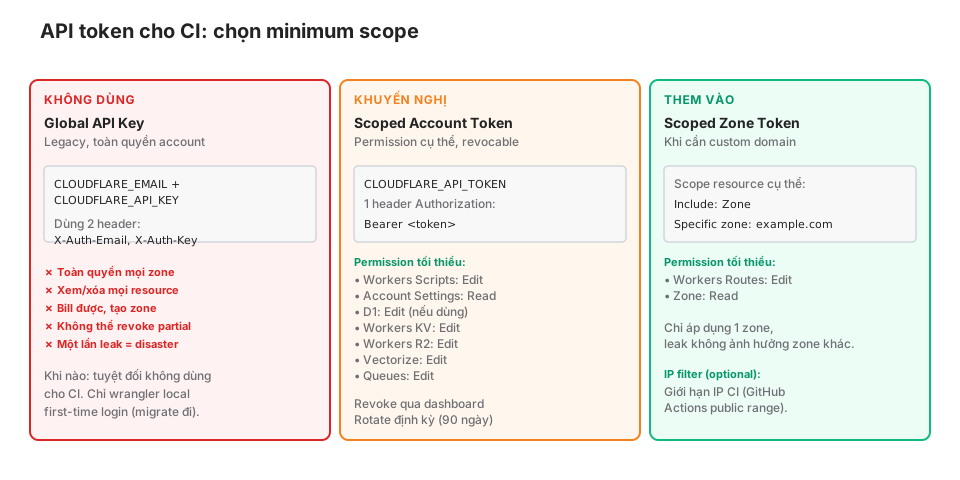
Creating a Scoped Account Token
Cloudflare dashboard → My Profile → API Tokens → Create Token.
Pick Custom token with these permissions:
Account permissions:
- Workers Scripts → Edit
- Account Settings → Read
- Workers KV Storage → Edit (if you use KV)
- D1 → Edit (if you use D1)
- Workers R2 Storage → Edit (if you use R2)
- Workers Queues → Edit (if you use Queues)
- Vectorize → Edit (if you use Vectorize)
- Workers AI → Read (if you use AI, Read is usually enough)
Zone permissions (if you have a custom domain):
- Workers Routes → Edit
- Zone → Read
Account resources: pick a specific account, not All accounts.
Zone resources (if applicable): pick a specific zone, not All zones.
Client IP filtering (optional, paranoid): the GitHub Actions public IP range. Hard to maintain because the list changes, but more secure.
TTL (optional): the token expires after N days. More secure, but you have to rotate it.
After create, Cloudflare shows the token once. Copy it immediately.
Saving to GitHub secrets
Repo → Settings → Secrets and variables → Actions → New repository secret.
CLOUDFLARE_API_TOKEN: paste the token.CLOUDFLARE_ACCOUNT_ID: find this in the Cloudflare dashboard, right sidebar.CF_SUBDOMAIN(only needed for the PR-preview workflow below): the account’sworkers.devsubdomain, e.g.khavaninkhavan.workers.dev.
The main deploy workflow consumes the first two secrets:
env:
  CLOUDFLARE_API_TOKEN: ${{ secrets.CLOUDFLARE_API_TOKEN }}
  CLOUDFLARE_ACCOUNT_ID: ${{ secrets.CLOUDFLARE_ACCOUNT_ID }}
Why NOT the Global API Key
The Global API Key (CLOUDFLARE_EMAIL + CLOUDFLARE_API_KEY):
- Full account access: view/change/delete every zone, billing, create resources.
- Can’t be partially revoked.
- One leak = the whole infrastructure is compromised.
A scoped token:
- Only the permissions you grant.
- Easy to revoke: disable the token in the dashboard → effect is immediate.
- Multiple tokens for multiple purposes (CI deploy, personal wrangler, read-only monitoring).
If you’re still on the Global API Key, switch today.
Smoke tests: 19 assertions
After deploy, probe the live site. Build passing doesn’t mean deploy succeeded. You need to verify real traffic.
scripts/smoke.sh
#!/usr/bin/env bash
set -euo pipefail

SITE="${SITE_URL:-https://cloudsecop.net}"
PASS=0
FAIL=0

assert() {
  local name="$1"
  local expected="$2"
  local actual="$3"
  if [[ "$actual" == "$expected" ]]; then
    echo "  ✓ $name"
    PASS=$((PASS + 1))
  else
    echo "  ✗ $name: expected '$expected', got '$actual'"
    FAIL=$((FAIL + 1))
  fi
}

assert_contains() {
  local name="$1"
  local needle="$2"
  local haystack="$3"
  if [[ "$haystack" == *"$needle"* ]]; then
    echo "  ✓ $name"
    PASS=$((PASS + 1))
  else
    echo "  ✗ $name: missing '$needle'"
    FAIL=$((FAIL + 1))
  fi
}

# === Core routes ===
echo "Core routes:"
assert "Home 200" "200" "$(curl -sI "$SITE/" -o /dev/null -w '%{http_code}')"
assert "Blog index 200" "200" "$(curl -sI "$SITE/blog/" -o /dev/null -w '%{http_code}')"
assert "Sample post 200" "200" "$(curl -sI "$SITE/blog/zero-trust-notes/" -o /dev/null -w '%{http_code}')"

# === Real 404 ===
echo "Error handling:"
assert "/nonexistent → 404" "404" "$(curl -sI "$SITE/nonexistent-url-test" -o /dev/null -w '%{http_code}')"

# === Feeds ===
echo "Feeds:"
assert "RSS 200" "200" "$(curl -sI "$SITE/rss.xml" -o /dev/null -w '%{http_code}')"
assert "Sitemap 200" "200" "$(curl -sI "$SITE/sitemap-index.xml" -o /dev/null -w '%{http_code}')"

# === OG image ===
echo "Assets:"
assert "OG default 200" "200" "$(curl -sI "$SITE/og-default.png" -o /dev/null -w '%{http_code}')"
assert "Dynamic OG 200" "200" "$(curl -sI "$SITE/og/zero-trust-notes.png" -o /dev/null -w '%{http_code}')"

# === API ===
echo "API endpoints:"
POPULAR=$(curl -s "$SITE/api/popular")
assert_contains "Popular returns JSON" '"posts"' "$POPULAR"

# === Security headers ===
echo "Security headers:"
HEADERS=$(curl -sI "$SITE/")
assert_contains "HSTS" "strict-transport-security" "$HEADERS"
assert_contains "CSP" "content-security-policy" "$HEADERS"
assert_contains "X-Content-Type-Options" "nosniff" "$HEADERS"
assert_contains "X-Frame-Options" "DENY" "$HEADERS"
assert_contains "Permissions-Policy" "permissions-policy" "$HEADERS"
assert_contains "Referrer-Policy" "strict-origin-when-cross-origin" "$HEADERS"

# === i18n ===
echo "i18n:"
assert "EN home 200" "200" "$(curl -sI "$SITE/en/" -o /dev/null -w '%{http_code}')"
assert_contains "hreflang in home" "hreflang" "$(curl -s "$SITE/")"

# === Summary ===
echo ""
echo "===== $PASS passed, $FAIL failed ====="
[[ $FAIL -eq 0 ]] || exit 1
Runs in ~8 seconds, covers 19 assertions.
Why smoke tests matter
Build passing != deploy succeeded. Silent failures include:
- Binding missing in
wrangler.jsonc→ Worker crashes at runtime. - Env var secret never uploaded → API fails the moment a user hits it.
- Asset build path wrong → 404 on every page.
- CSP / HSTS headers accidentally turned off → security regression.
- CDN cache stale after deploy → users still see the old version.
Smoke tests catch all of these in under 10 seconds, immediately after deploy.
Extending your smoke test
This blog has 19 assertions. Your project will differ:
- E-commerce: check the product list API, cart flow, checkout redirect.
- Dashboard: check that auth-required endpoints return 401 without a token.
- Chat app: check the WebSocket upgrade.
- RAG endpoint: check
/api/searchreturns sensible results for a test query.
Rule of thumb: each assertion must be fast (< 1s each) and critical (if it fails, users feel it).
Concurrent lock: why you need it
concurrency:
  group: deploy-${{ github.ref }}
  cancel-in-progress: true
Without the lock:
- Push commit A → Action A starts (~100s).
- 30 seconds later, push commit B → Action B starts in parallel.
- Action A deploys commit A.
- Action B deploys commit B → overrides A.
- Smoke test for A runs against B’s state → false failure.
With the lock:
- Push commit A → Action A starts.
- Push commit B → Action B cancels Action A (same group), Action B runs.
- Only one deploy succeeds, state stays consistent.
cancel-in-progress: true for feature branches / PRs. For production (main) you can use cancel-in-progress: false + queuing so no deploy gets dropped.
Preview environments: staging-lite
Configure env in wrangler.jsonc
{
  "name": "my-app",
  "main": "src/index.ts",
  "compatibility_date": "2026-05-01",
  "d1_databases": [
    { "binding": "DB", "database_name": "my-db-prod", "database_id": "..." }
  ],

  "env": {
    "preview": {
      "name": "my-app-preview",
      "d1_databases": [
        { "binding": "DB", "database_name": "my-db-preview", "database_id": "..." }
      ]
    }
  }
}
Deploy the preview:
npx wrangler deploy --env previewIt runs at my-app-preview.<subdomain>.workers.dev, with a separate D1, no impact on production.
Workflow for PR previews
on:
  pull_request:
    branches: [main]

jobs:
  deploy-preview:
    runs-on: ubuntu-latest
    steps:
      - uses: actions/checkout@v4
      - uses: actions/setup-node@v4
        with: { node-version: 22, cache: npm }
      - run: npm ci
      - run: npm test
      - run: npm run build
      - name: Deploy preview
        run: npx wrangler deploy --env preview
        env:
          CLOUDFLARE_API_TOKEN: ${{ secrets.CLOUDFLARE_API_TOKEN }}
          CLOUDFLARE_ACCOUNT_ID: ${{ secrets.CLOUDFLARE_ACCOUNT_ID }}

      - name: Comment preview URL on PR
        uses: actions/github-script@v7
        with:
          script: |
            github.rest.issues.createComment({
              issue_number: context.issue.number,
              owner: context.repo.owner,
              repo: context.repo.repo,
              body: `Preview deployed: https://my-app-preview.${{ secrets.CF_SUBDOMAIN }}.workers.dev`
            });
PR reviewers see a preview URL and can test before merging to main.
Multi-environment config
{
  "env": {
    "preview": { ... },
    "staging": { ... },
    "prod": { ... }
  }
}
Deploy staging only when merging to a staging branch, prod only when merging to main:
on:
  push:
    branches: [main, staging]

jobs:
  deploy:
    steps:
      - name: Deploy
        run: |
          if [ "${{ github.ref }}" = "refs/heads/main" ]; then
            npx wrangler deploy --env prod
          elif [ "${{ github.ref }}" = "refs/heads/staging" ]; then
            npx wrangler deploy --env staging
          fi
Rollback in 10 seconds
Via Wrangler
npx wrangler rollbackReverts to the previous deploy. List versions to pick a specific one:
npx wrangler deployments list
# → version-id: 01234567-abcd-...

npx wrangler rollback --version-id 01234567-abcd-...
Via dashboard
Cloudflare dashboard → Workers → Select Worker → Deployments → Rollback.
Via CI workflow
A dedicated emergency workflow:
# .github/workflows/rollback.yml
name: Emergency rollback

on:
  workflow_dispatch:
    inputs:
      version_id:
        description: 'Version ID to rollback to (leave blank for previous)'
        required: false

jobs:
  rollback:
    runs-on: ubuntu-latest
    steps:
      - uses: actions/checkout@v4
      - uses: actions/setup-node@v4
        with: { node-version: 22 }
      - run: npm ci
      - name: Rollback
        run: |
          if [ -n "${{ github.event.inputs.version_id }}" ]; then
            npx wrangler rollback --version-id ${{ github.event.inputs.version_id }}
          else
            npx wrangler rollback
          fi
        env:
          CLOUDFLARE_API_TOKEN: ${{ secrets.CLOUDFLARE_API_TOKEN }}
          CLOUDFLARE_ACCOUNT_ID: ${{ secrets.CLOUDFLARE_ACCOUNT_ID }}
      - name: Smoke test
        run: scripts/smoke.sh
Trigger it manually through the GitHub Actions UI. Rollback + smoke test completes in under 30 seconds.
When to roll back
- Smoke test fails post-deploy.
- Customer complaints after deploy.
- Metric spike (error rate, latency).
- Security issue reported.
Workers keeps a short deployment history for rollback (10 entries via wrangler deployments list). If you need to pin a specific version for longer, tag the corresponding git commit — that’s the real rollback source of truth.
Secret rotation pattern
Cloudflare secrets:
wrangler secret put API_KEY
# enter the value
Rotate:
- Create a new secret at the provider (Resend, AWS, etc.).
wrangler secret put API_KEYwith the new value.- No redeploy needed — secrets are injected at runtime.
- Exercise an API endpoint that uses the secret.
- Revoke the old secret at the provider.
Cloudflare has no native “dual-credential” feature — for zero-downtime rotation, set two secrets (API_KEY_V1, API_KEY_V2) and have code try V1 → fall back to V2.
Rotation schedule:
- Annual: rarely used secrets (backup webhook), rotated manually each year.
- Quarterly: hot-path secrets (the main API key), rotated by script + alert.
- On-demand: when you suspect a leak.
Gotchas
① Wrangler version cache
- run: npx wrangler deploynpx downloads the latest wrangler each run → slow + possible breaking changes.
Fix: pin the version in package.json:
"devDependencies": {
  "wrangler": "4.87.0"
}
Run it via npm run:
- run: npm run deploy # deploy script in package.json② Node version mismatch
with:
  node-version: 22
Pin the major version. Minor updates are fine. Wrangler may set a minimum Node requirement.
③ Secrets leaking to logs
- run: echo "Token: ${{ secrets.CLOUDFLARE_API_TOKEN }}" # GitHub auto-masksGitHub Actions auto-masks secrets in log output. But don’t pipe secrets to stdout in long strings — masking can fail on multi-line output.
④ Smoke tests depending on propagation
# Right after deploy, the CDN may not be fully propagated
wrangler deploy
sleep 5  # wait for propagation
scripts/smoke.sh
wrangler deploy returns as soon as the Worker is uploaded. CDN cache / DNS propagation can lag by a few seconds. Running smoke tests immediately may hit the old version.
This blog runs smoke tests immediately after wrangler deploy returns, with NO sleep. In ~1.5 years of running we haven’t hit a propagation false positive. If you do, add sleep 5 before smoke.
⑤ D1 migration failures don’t auto-rollback
The CI workflow applies D1 migrations:
- run: npx wrangler d1 migrations apply my-db --remoteIf a migration fails midway, D1 does not auto-rollback. The Worker deploy succeeds, but the schema is inconsistent.
Fix: always apply migrations before deploy, and test them locally before pushing.
⑥ workflow_dispatch running without tests
on:
  push:
    branches: [main]
  workflow_dispatch:  # manual trigger
Manual triggers run the same workflow with the same steps. But teams sometimes use workflow_dispatch to deploy without tests → dangerous.
If you need to skip tests (emergency hotfix), create a separate deploy-hotfix.yml with an explicit flag + approver.
Monitoring after deploy
CI doesn’t replace runtime monitoring:
- Tail Workers: real-time log stream (Part 17).
- Analytics Engine: event tracking (Part 17).
- Cloudflare dashboard: requests, errors, CPU time per Worker.
- Third-party: Sentry, Datadog via a
tailconsumer.
Alerting:
- Error rate > 1% → Slack alert.
- P95 latency > 500ms → email alert.
- Smoke test fails → page oncall.
Details in Part 17.
Production checklist
- Scoped API token (not Global API Key).
-
concurrency.groupwithcancel-in-progressor queuing. -
permissions: contents: read(minimum GitHub token). -
timeout-minutesset reasonably. -
npm ci(notnpm install). - Test step runs before deploy.
- Post-deploy smoke test with ≥ 5 critical assertions.
- Rollback workflow available (manual trigger).
- Preview environment for PRs.
- Secret rotation schedule (annual / quarterly minimum).
- Wrangler version pinned in package.json.
- Node version pinned (major) in actions/setup-node.
Wrap-up
The Workers pipeline is simple: push → test → build → deploy → smoke. Each step matters; skipping one is a silent failure waiting to happen.
Three non-negotiables: scoped token, concurrent lock, smoke tests. Those three are the difference between a pipeline that “runs” and one that’s production-grade.
Block 3 (Framework) ends here. Block 4 opens with Part 13: Workers AI and AI Gateway — inference model catalog, pricing, caching patterns, when to use Workers AI vs Bedrock/OpenAI.