

TL;DR
Cloudflare has two complementary AI products:
- Workers AI: inference on Cloudflare’s edge GPUs.
env.AI.run("@cf/meta/llama-3.3-70b-instruct", { messages }). No GPU management, pay per neuron. - AI Gateway: a proxy layer in front of any LLM provider (Workers AI, OpenAI, Anthropic, Bedrock, Google, Groq, etc.). Cache, rate limit, retry, fallback, logs, analytics.
Main thesis:
Workers AI wins for embeddings and small models (latency and cost). Frontier LLMs (Claude, GPT-4, Gemini Pro) still have to go through external providers. AI Gateway is the glue that gives you a single observability + cache + fallback layer no matter which provider you call.
This post covers: the Workers AI model catalog, the pricing model, 5 caching patterns, when to pick Workers AI vs external, and production-grade retry/fallback through AI Gateway.
This post opens Block 4 (AI). Part 14 dives into Vectorize + RAG.
Who this is for
- Developers adding AI features to an app (summarize, classify, embedding, chat).
- Teams already using OpenAI/Anthropic who want lower cost + observability.
- Teams needing multi-provider retry/fallback without writing custom glue.
Recommended prerequisites: Part 2 (runtime), Part 3 (bindings).
By the end of this post you will:
- Call Workers AI from a Worker in fewer than 5 lines of code.
- Understand how AI Gateway cache and rate limit work.
- Know when to use Workers AI vs external providers, and when to mix.
- Implement OpenAI → Anthropic → Workers AI fallback when a provider is down.
What this post isn’t about
- Fine-tuning: Workers AI is mostly about inference. LoRA is supported for a few models, but training workflow is out of scope.
- Prompt engineering: a separate topic, not covered in depth here.
- Complex agentic workflows: tool calling / function calling is mentioned but covered more deeply in a later post (Part 18).
What Workers AI is
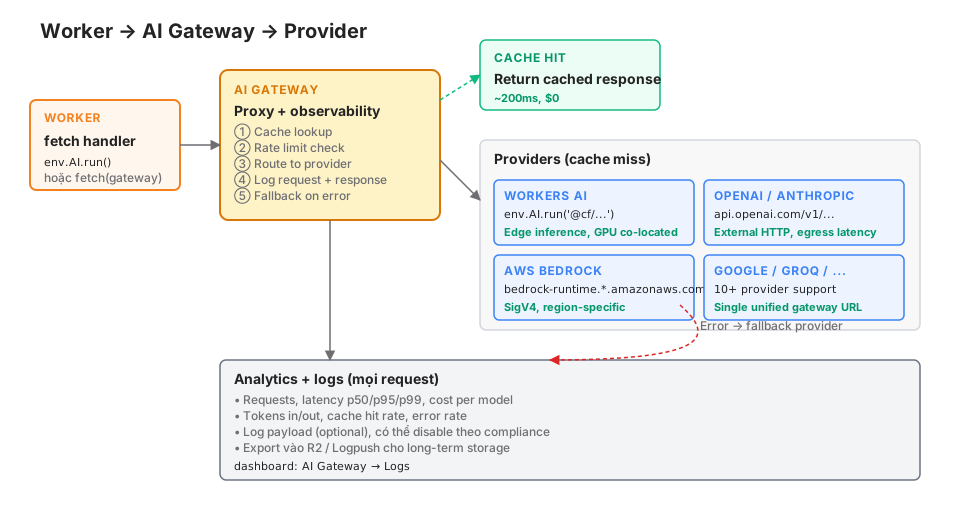
Workers AI is serverless inference on Cloudflare GPUs, hosted at major data centers (a subset of the 330+ PoPs — not every edge location has GPUs). The AI binding exposes RPC-style access:
export interface Env {
  AI: Ai;
}

export default {
  async fetch(request: Request, env: Env): Promise<Response> {
    const response = await env.AI.run("@cf/meta/llama-3.3-70b-instruct", {
      messages: [
        { role: "system", content: "You are a news summarization assistant." },
        { role: "user", content: "Summarize this article in 3 sentences: ..." },
      ],
    });

    return Response.json(response);
  },
};wrangler.jsonc:
{
  "ai": {
    "binding": "AI"
  }
}
No API key, no HTTPS client — the binding handles authentication through the account context.
vs external providers
Calling OpenAI from a Worker:
const response = await fetch("https://api.openai.com/v1/chat/completions", {
  method: "POST",
  headers: {
    Authorization: `Bearer ${env.OPENAI_API_KEY}`,
    "Content-Type": "application/json",
  },
  body: JSON.stringify({
    model: "gpt-4o-mini",
    messages: [...],
  }),
});
Comparison:
| Dimension | Workers AI | External (OpenAI, etc.) |
|---|---|---|
| Latency | ~100-500ms (edge GPU) | 200ms-2s (egress + provider) |
| Auth | Binding handles it | API key secret |
| Cost | Neuron / token | Token in/out |
| Model quality | 8B-70B open | Frontier (GPT-4, Claude 4.7, etc.) |
| Availability | Cloudflare SLA | Provider SLA |
| Cold start | Low: most models stay warm, but larger / rarer ones can be slow to load on first hit | Low |
Workers AI does not replace GPT-4 or Claude for hard tasks. It’s strong for: embeddings, classification, summarization, image generation, and high-volume tasks that don’t need frontier quality.
Model catalog
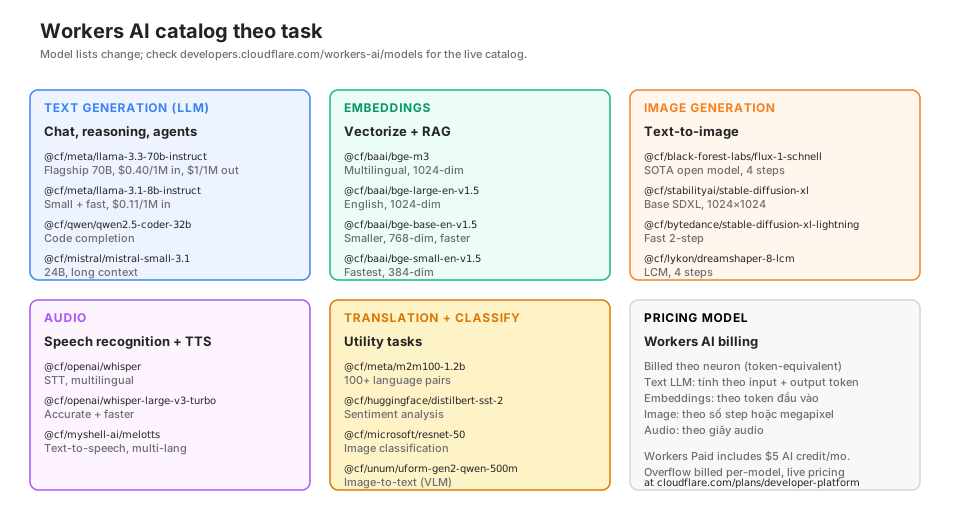
The catalog changes constantly. Check the live model list in the docs. This post was written in May 2026.
Text generation (LLM)
Chat, reasoning, agents, summarization.
@cf/meta/llama-3.3-70b-instruct— flagship 70B, the strongest model in the Workers AI catalog for complex reasoning.@cf/meta/llama-3.1-8b-instruct— 8B, fast, sufficient for most tasks.@cf/qwen/qwen2.5-coder-32b-instruct— code completion.@cf/mistral/mistral-small-3.1-24b-instruct— long context, tool calling.@cf/google/gemma-3-12b-it— newer, good for multi-modal.
Embeddings (for RAG)
@cf/baai/bge-m3— multilingual, 1024-dim (Part 14 will deep-dive this).@cf/baai/bge-large-en-v1.5— English, 1024-dim.@cf/baai/bge-base-en-v1.5— 768-dim, fast.@cf/baai/bge-small-en-v1.5— 384-dim, fastest of the bge line.
Image generation
@cf/black-forest-labs/flux-1-schnell— SOTA open, 4 steps.@cf/stabilityai/stable-diffusion-xl-base-1.0— base SDXL.@cf/bytedance/stable-diffusion-xl-lightning— 2 steps, fastest in the SDXL line.@cf/lykon/dreamshaper-8-lcm— LCM, 4 steps.
Audio
@cf/openai/whisper— multilingual speech-to-text.@cf/openai/whisper-large-v3-turbo— accurate + faster.@cf/myshell-ai/melotts— multi-language text-to-speech.
Classification / other
@cf/meta/m2m100-1.2b— translation for 100+ language pairs.@cf/huggingface/distilbert-sst-2-int8— sentiment analysis.@cf/unum/uform-gen2-qwen-500m— vision-language model (VLM).
Pricing model
Workers AI uses neurons — a unified cost unit across every model. Each model publishes cost per 1000 input tokens / 1000 output tokens / second of audio / image step.
Example numbers (reference only, check the docs for live pricing):
- Llama 3.3 70B: ~$0.40/1M input tokens, $1/1M output tokens.
- Llama 3.1 8B: ~$0.11/1M input, $0.28/1M output.
- bge-m3: ~$0.012/1M tokens.
- Flux schnell: ~$0.0053 per image (4 steps).
- Whisper: ~$0.00012 per second of audio.
Billing:
- Workers Free: 10k neurons/day free.
- Workers Paid ($5/month): the $5/month plan bundles a neuron allocation; overflow is billed per-neuron per model.
- Enterprise: custom quota.
vs OpenAI (similar 8B tier):
OpenAI gpt-4o-mini: ~$0.15/1M input, $0.60/1M output. Workers AI Llama 8B is cheaper at Cloudflare’s public pricing (see workers-ai pricing for current numbers — both sides move periodically).
For frontier models (GPT-4, Claude 4.7, Gemini 2.5 Pro), Workers AI has no equivalent. You have to use external providers.
What AI Gateway is
AI Gateway does not run inference. It’s a proxy layer in front of every provider, offering:
- Caching: cache responses by prompt + model + params. Hits don’t call the provider, return immediately, cost $0.
- Rate limiting: per user, per app, per endpoint.
- Retry: auto retry with exponential backoff when a provider returns 429/500.
- Fallback: provider 1 fails → try provider 2.
- Logging: every request + response logged. Redact is optional.
- Analytics: request count, latency p50/p95/p99, cost per model, cache hit rate.
- Schema validation: optional.
Setup
Create a gateway in the dashboard: AI → AI Gateway → Create Gateway. You get a URL:
https://gateway.ai.cloudflare.com/v1/<account-id>/<gateway-name>/<provider>Calling through the gateway
Swap the provider endpoint for the gateway URL:
// Instead of calling OpenAI directly
const response = await fetch(
  `https://gateway.ai.cloudflare.com/v1/${env.CF_ACCOUNT_ID}/my-gateway/openai/chat/completions`,
  {
    method: "POST",
    headers: {
      Authorization: `Bearer ${env.OPENAI_API_KEY}`,
      "Content-Type": "application/json",
    },
    body: JSON.stringify({
      model: "gpt-4o-mini",
      messages: [...],
    }),
  }
);
The payload doesn’t change. The OpenAI client library works too — just change the base URL.
With Workers AI
const response = await env.AI.run(
  "@cf/meta/llama-3.1-8b-instruct",
  { messages: [...] },
  { gateway: { id: "my-gateway" } }
);
Just add the gateway.id option. Every Workers AI call is logged through the gateway from then on.
Caching: a concrete example
Use case: a blog with a “similar posts” feature powered by an LLM.
Without cache:
async function findSimilar(postSlug: string, env: Env) {
  const post = await env.DB.prepare("SELECT title, tags FROM posts WHERE slug = ?")
    .bind(postSlug).first();

  const response = await env.AI.run("@cf/meta/llama-3.3-70b-instruct", {
    messages: [
      { role: "system", content: "Suggest 3 related post titles." },
      { role: "user", content: `Post title: ${post.title}, tags: ${post.tags}` },
    ],
  });

  return response.response;
}
Every page view = 1 LLM call. A popular post with 10k views/month = 10k calls.
With AI Gateway cache:
const response = await env.AI.run(
  "@cf/meta/llama-3.3-70b-instruct",
  { messages: [...] },
  {
    gateway: {
      id: "my-gateway",
      cacheTtl: 86400,  // cache 24h
      cacheKey: `similar-posts:${postSlug}`,  // optional, defaults to hashing the full payload
    },
  }
);
First call hits the provider. For the next 86400 seconds, cache hits return in ~200ms at $0.
A 95% cache hit rate (for popular posts) → 95% lower cost, 95% lower latency.
5 caching patterns
① Deterministic cache (cache-first)
Idempotent task with fixed input. Example: summarize an article (the content doesn’t change).
await env.AI.run(model, { messages }, {
  gateway: { id: "my-gateway", cacheTtl: 86400 * 30 },  // 30 days
});
② Short-TTL cache (hot data)
Task where data changes often but is stable for 5-10 minutes. Example: today’s trending news.
await env.AI.run(model, { messages }, {
  gateway: { id: "my-gateway", cacheTtl: 300 },  // 5 minutes
});
③ Per-user cache
Cache per userId so data doesn’t leak across users.
await env.AI.run(model, { messages }, {
  gateway: {
    id: "my-gateway",
    cacheTtl: 3600,
    cacheKey: `user:${userId}:recommendations`,
  },
});
④ No cache for personalization
Prompt contains user context → don’t cache. Pass skipCache: true on the gateway object (see the example in ⑤ below).
⑤ Client-forwarded cache header
Use a cf-cache-status: revalidate header in the request to force refresh:
await env.AI.run(model, { messages }, {
  gateway: { id: "my-gateway", cacheTtl: 3600, skipCache: forceRefresh },
});
Rate limiting
Prevent abuse and cost spikes.
Dashboard setting:
Gateway → Rate limits → Add rule
  • By IP address: 100 req/min
  • By Authorization header: 1000 req/hour
  • By custom header (cf-user-id): 50 req/min per user
The gateway returns 429 when over limit. Catch in the Worker:
const response = await fetch(gatewayUrl, {...});
if (response.status === 429) {
  return new Response("Rate limit exceeded", { status: 429 });
}
For a user-facing UI: show a message + Retry-After header.
Fallback pattern: multi-provider
Provider downtime is real. OpenAI incident, Anthropic maintenance, Bedrock region outage. Fallback reduces incident impact.
Pattern: cascade fallback
async function callLLM(messages: any[], env: Env) {
  const providers = [
    { name: "openai", model: "gpt-4o-mini" },
    { name: "anthropic", model: "claude-3-5-haiku-20241022" },
    { name: "workers-ai", model: "@cf/meta/llama-3.1-8b-instruct" },
  ];

  for (const provider of providers) {
    try {
      if (provider.name === "workers-ai") {
        return await env.AI.run(provider.model, { messages }, {
          gateway: { id: "my-gateway" },
        });
      }

      const response = await fetch(
        `https://gateway.ai.cloudflare.com/v1/${env.CF_ACCOUNT_ID}/my-gateway/${provider.name}/v1/chat/completions`,
        {
          method: "POST",
          headers: {
            Authorization: `Bearer ${getKey(provider.name, env)}`,
            "Content-Type": "application/json",
          },
          body: JSON.stringify({
            model: provider.model,
            messages,
          }),
          signal: AbortSignal.timeout(10000),  // 10s timeout
        }
      );

      if (response.ok) return await response.json();

      console.log(`Provider ${provider.name} returned ${response.status}, trying next`);
    } catch (err) {
      console.log(`Provider ${provider.name} failed: ${err.message}`);
    }
  }

  throw new Error("All providers failed");
}
Workers AI is the final fallback: low cost, no external network dependency.
Pattern: gateway-native fallback
AI Gateway has a “Fallback configuration” feature directly in the dashboard. Set primary = OpenAI, fallback = Anthropic. The gateway auto-retries when primary returns 5xx. Your code needs no fallback logic.
When to use Workers AI vs external
Workers AI wins for:
- Embeddings: bge-m3 is fast, cheap, runs alongside Vectorize with zero egress.
- Classification / moderation: DistilBERT is small and fast.
- Small LLM tasks: Llama 8B for simple summary, tagging, FAQ routing.
- High-volume image generation: Flux schnell 4-step is cheaper than OpenAI DALL-E.
- Whisper STT: cheaper than OpenAI Whisper API, same model.
- High-volume tasks: embedding 1M documents → Workers AI saves significantly.
External providers win for:
- Frontier reasoning: GPT-4, Claude 4.7, Gemini 2.5 Pro — no equivalent yet.
- Complex agents with tool calling: external models tend to be stronger.
- Specific features: vision with GPT-4V, code with Claude, etc.
- Existing contracts: if you already have a committed Anthropic/OpenAI bill.
Mix pattern (recommended)
Simple task (embedding, classify, small summary) → Workers AI
Hard reasoning (agent, complex Q&A)              → Claude / GPT-4
Bulk image generation                            → Workers AI (Flux schnell)
High-quality image gen                           → DALL-E 3 / Midjourney API
AI Gateway is the glue, a single observability layer for everything.
Streaming
Long LLM responses → users wait. Streaming returns chunks as the model generates.
const stream = await env.AI.run(
  "@cf/meta/llama-3.3-70b-instruct",
  {
    messages: [...],
    stream: true,
  }
);

return new Response(stream, {
  headers: { "Content-Type": "text/event-stream" },
});
Client JS:
const response = await fetch("/api/chat", { method: "POST", body });
const reader = response.body.getReader();
const decoder = new TextDecoder();

while (true) {
  const { done, value } = await reader.read();
  if (done) break;
  const text = decoder.decode(value);
  // parse SSE, append to UI
}
AI Gateway also supports streaming through providers. The gateway doesn’t buffer, it’s pass-through.
Short embeddings workflow
Detailed RAG is in Part 14. Preview:
// Embed input
const { data } = await env.AI.run("@cf/baai/bge-m3", {
  text: ["What is a Worker", "What is Cloudflare D1"],
});

// data = [[0.01, -0.23, ...], [...], ...] — 2 vectors, 1024-dim each

// Upsert to Vectorize
await env.VECTORIZE.upsert([
  { id: "doc-1", values: data[0], metadata: { title: "What is a Worker" } },
  { id: "doc-2", values: data[1], metadata: { title: "What is D1" } },
]);

// Query
const { data: queryEmb } = await env.AI.run("@cf/baai/bge-m3", {
  text: ["Explain Cloudflare Workers"],
});

const results = await env.VECTORIZE.query(queryEmb[0], { topK: 3 });
// results.matches = top 3 most similar docs
Workers AI + Vectorize on the same Worker = no egress. Embedding calls and vector store calls both stay inside Cloudflare’s network.
Image generation
const response = await env.AI.run("@cf/black-forest-labs/flux-1-schnell", {
  prompt: "A futuristic city at sunset, cyberpunk style",
  num_steps: 4,  // 4 steps, fast for schnell
});

// response is an ArrayBuffer (PNG bytes)
return new Response(response, {
  headers: { "Content-Type": "image/png" },
});
Dynamic OG image:
// worker/og.ts
export async function generateOG(slug: string, env: Env) {
  const post = await env.DB.prepare("SELECT title FROM posts WHERE slug = ?")
    .bind(slug).first();

  const prompt = `Minimal geometric cover image for blog post: "${post.title}". Dark theme, orange accent.`;

  const image = await env.AI.run("@cf/black-forest-labs/flux-1-schnell", {
    prompt,
    num_steps: 4,
  });

  // Cache in R2 for next time
  await env.R2.put(`og/${slug}.png`, image, {
    httpMetadata: { contentType: "image/png" },
    customMetadata: { cachedAt: String(Date.now()) },
  });

  return new Response(image, { headers: { "Content-Type": "image/png" } });
}
Combined with an R2 cache: generate once, serve forever.
Gotchas
① Model size vs timeout
Llama 70B with 10k input tokens + 4k output tokens can take 30-60 seconds. Worker CPU limit defaults: 30s (Free) / 5 minutes (Paid). Split the task or use streaming.
② Other providers’ rate limits through the gateway
The gateway can’t cheat a provider’s quota. OpenAI 10k req/min is still 10k. Gateway cache + rate limit reduce requests, but don’t raise the provider quota.
③ Cache key collision
The default cache key is a hash of the full payload. If two users send the same prompt, they share the cache. This may be a bug (data leak) or a feature (same query = same answer). Use an explicit cacheKey when you need user isolation.
④ Streaming responses can’t be cached
Cache requires a full response. Streaming returns chunks, so the gateway can’t cache. If you need cache, use non-streaming for initial generation and streaming for UX.
⑤ Neurons vs tokens are different
Neurons are a Cloudflare unit, tokens are a model unit. Cloudflare reports cost in neurons, prompt engineering usually speaks in tokens. 1 text token is roughly 1-2 neurons depending on the model.
⑥ Models can be deprecated
Meta publishes Llama 4 → Cloudflare adds @cf/meta/llama-4-*, but Llama 3 stays available. Deprecation has a notice period (usually 90 days). Pin the model version in code; don’t use latest.
⑦ Egress isn’t free with externals
Workers AI has free egress (inside Cloudflare’s network). External providers have bandwidth egress (small, usually ignored but worth watching at high volume).
Observability
AI Gateway dashboard:
- Requests: total, filtered by provider/model/status.
- Latency: p50, p95, p99.
- Cost: estimated per token / request, per model.
- Cache hit rate: % of requests served from cache.
- Error breakdown: 4xx vs 5xx, per provider.
Detailed logs (optional):
- Every request + response saved.
- Redact fields (OpenAI API key, user email, etc.) via regex.
- Export via Logpush to R2 for long-term storage.
Alerts:
- Cost > $X/day → email.
- Error rate > 5% → Slack.
- p95 latency > 2s → investigate.
Production checklist
- AI Gateway set up for every LLM call (including Workers AI).
- Cache policy per endpoint (TTL matched to content type).
- Rate limit by user / IP / app.
- Fallback provider configured (primary → secondary → Workers AI).
- Streaming for user-facing LLM UI.
- Redact sensitive data in logs (PII, API keys).
- Cost budget alerts (email + Slack).
- Model version pinned, no
latest. - Reasonable timeouts (10-30s for non-streaming).
- Per-provider error handling (429, 500, timeout).
- Embedding model chosen by language (bge-m3 for VI, bge-large-en for EN).
Wrap-up
Workers AI + AI Gateway is the foundation of the AI stack on Cloudflare. Workers AI gives you edge inference (embeddings, small LLMs, image, audio); AI Gateway gives you observability + cache + fallback across every provider.
Not every task is a fit for Workers AI. Frontier reasoning still needs Claude/GPT-4. The mix pattern, with AI Gateway as the glue, is the most production-ready approach.
Part 14: Vectorize + RAG patterns — a deep-dive on embeddings, vector indexes, hybrid search, and production RAG patterns from markdown/MDX content.