

TL;DR
Three ways to query D1:
- Raw SQL via
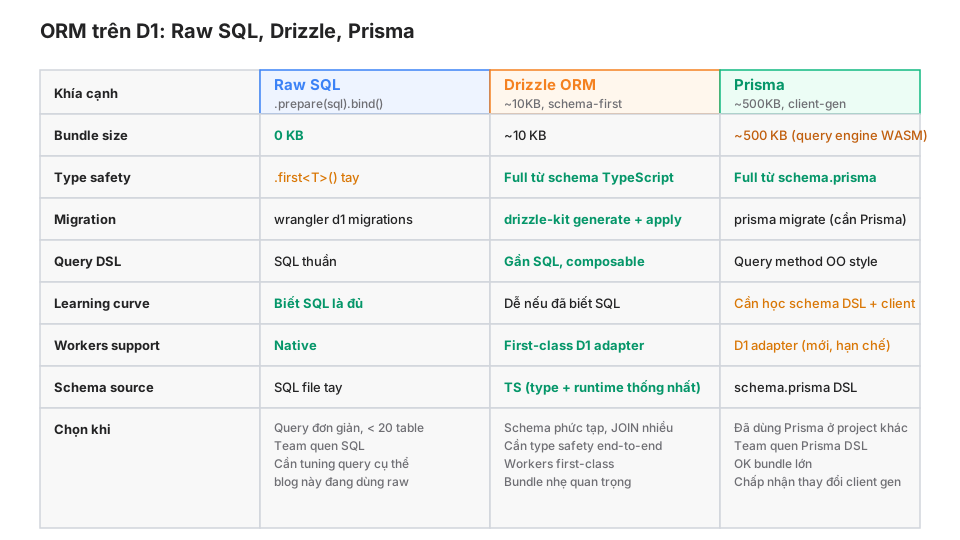
env.DB.prepare(): 0 bundle, full control over the SQL. - Drizzle ORM: ~10KB, TypeScript schema, SQL-adjacent query builder, integrated migration tooling.
- Prisma: ~500KB because it ships a query engine WASM, full feature set, its own schema DSL.
The key claim:
Workers is not Node. Bundle size and cold start matter. Prisma on D1 is still maturing (the D1 adapter is fresh). Drizzle is the current sweet spot for most projects. Raw SQL still suits simple projects and SQL-literate teams.
This post walks through each workflow, complex query patterns (JOINs, pagination, transactions), migrations, and the real-world trade-offs.
Who this is for
- Developers who’ve read Part 6 (D1 in production) and want more type safety.
- Anyone who has
.prepare()calls in 20+ places and is considering a refactor. - Node developers who’ve used Prisma and are thinking about it on Workers.
Read first: Part 6 (D1 query methods), Part 9 (Router).
After this post you’ll:
- Set up Drizzle end-to-end (schema → migration → query).
- Understand the Prisma-on-Workers trade-off (bundle + adapter maturity).
- Know when raw SQL beats an ORM.
What this post isn’t about
- D1 internals / architecture: covered in Part 6.
- Schema design + indexes: see d1-schema-tips.
- Query optimisation tuning: deserves its own post.
The three options compared
Raw SQL: no ORM
The pattern from Part 6:
interface Post { id: string; title: string; body: string; published_at: number; }

async function getPost(env: Env, slug: string): Promise<Post | null> {
  return await env.DB
    .prepare("SELECT id, title, body, published_at FROM posts WHERE slug = ?")
    .bind(slug)
    .first<Post>();
}

async function createPost(env: Env, post: Post) {
  await env.DB
    .prepare("INSERT INTO posts (id, title, body, published_at) VALUES (?, ?, ?, ?)")
    .bind(post.id, post.title, post.body, post.published_at)
    .run();
}
Pros
- Zero dependencies: nothing extra to install.
- SQL right there: you know exactly what’s running, easy to optimise.
- No magic: no
select().from()then wondering what SQL was generated. - Manual migrations: suits teams used to Postgres
psql.
Cons
- Type safety is a lie:
first<Post>()is just a cast; D1 doesn’t verify schema. - Refactors hurt: renaming a column → grep + replace across 20 files.
- Boilerplate: each table gets its own
get,list,create,update,delete. - SQL injection risk if you accidentally concat a string instead of using
.bind().
When raw SQL is the right call
- A schema with < 10 tables, simple relations.
- A team fluent in SQL that doesn’t want a learning curve.
- Complex queries where every byte counts.
- This blog uses raw SQL everywhere on D1. Reason: 10 tables, simple queries, no ORM overhead needed.
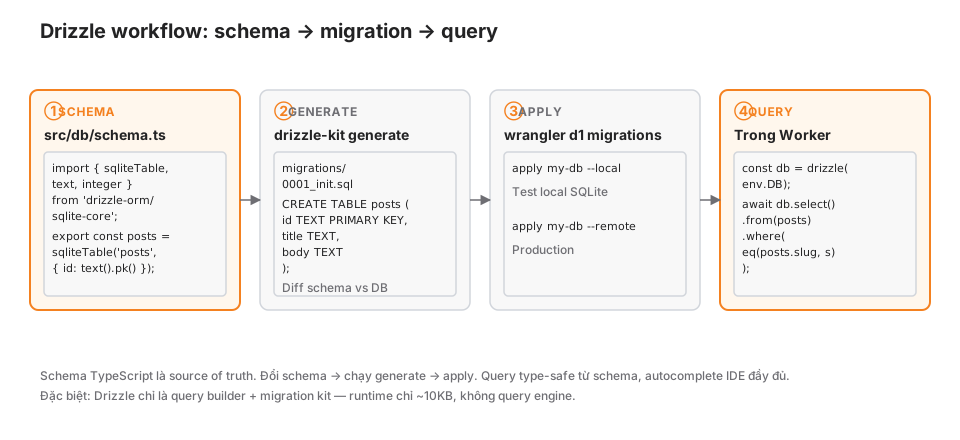
Drizzle ORM: the Workers sweet spot
Install
npm install drizzle-orm
npm install -D drizzle-kit
TypeScript schema
// src/db/schema.ts
import { sqliteTable, text, integer, primaryKey } from "drizzle-orm/sqlite-core";
import { sql } from "drizzle-orm";

export const posts = sqliteTable("posts", {
  id: text().primaryKey(),
  slug: text().notNull().unique(),
  title: text().notNull(),
  body: text().notNull(),
  authorId: text("author_id").notNull(),
  publishedAt: integer("published_at", { mode: "timestamp_ms" }),
  readingTime: integer("reading_time"),
});

export const tags = sqliteTable("tags", {
  id: text().primaryKey(),
  name: text().notNull().unique(),
});

export const postTags = sqliteTable("post_tags", {
  postId: text("post_id").notNull().references(() => posts.id),
  tagId: text("tag_id").notNull().references(() => tags.id),
}, (t) => ({
  pk: primaryKey({ columns: [t.postId, t.tagId] }),
}));

export type Post = typeof posts.$inferSelect;
export type NewPost = typeof posts.$inferInsert;
The schema is TypeScript. $inferSelect / $inferInsert derive row types.
drizzle.config.ts
import { defineConfig } from "drizzle-kit";

export default defineConfig({
  schema: "./src/db/schema.ts",
  out: "./migrations",
  dialect: "sqlite",
  driver: "d1-http",
  dbCredentials: {
    accountId: process.env.CLOUDFLARE_ACCOUNT_ID!,
    databaseId: process.env.D1_DATABASE_ID!,
    token: process.env.CLOUDFLARE_API_TOKEN!,
  },
});
Generate migrations
npx drizzle-kit generateCreates migrations/0001_<name>.sql with the SQL diff between the current schema and the database:
CREATE TABLE `posts` (
  `id` text PRIMARY KEY NOT NULL,
  `slug` text NOT NULL,
  `title` text NOT NULL,
  ...
);
CREATE UNIQUE INDEX `posts_slug_unique` ON `posts` (`slug`);
Apply migrations
Using Wrangler (same as Part 6):
wrangler d1 migrations apply my-db --local
wrangler d1 migrations apply my-db --remote
Or let Drizzle push via its HTTP API (skipping wrangler):
npx drizzle-kit push # no migration files — pushes schema directlyRecommendation: always generate + wrangler apply for production. Use push only during rapid dev prototyping.
Type-safe queries
import { drizzle } from "drizzle-orm/d1";
import { eq, desc, and, or, like, inArray } from "drizzle-orm";
import { posts, tags, postTags } from "./db/schema";

async fetch(request: Request, env: Env) {
  const db = drizzle(env.DB);

  // Simple SELECT
  const post = await db
    .select()
    .from(posts)
    .where(eq(posts.slug, "hello"))
    .limit(1)
    .then(rows => rows[0]);
  // post: Post | undefined, fully typed

  // INSERT
  await db.insert(posts).values({
    id: crypto.randomUUID(),
    slug: "new-post",
    title: "New Post",
    body: "...",
    authorId: "khavan",
    publishedAt: new Date(),
  });

  // UPDATE
  await db.update(posts)
    .set({ readingTime: 10 })
    .where(eq(posts.id, postId));

  // DELETE
  await db.delete(posts).where(eq(posts.id, postId));

  // WHERE with multiple conditions
  const recentCfPosts = await db
    .select()
    .from(posts)
    .where(
      and(
        eq(posts.authorId, "khavan"),
        or(like(posts.title, "%Cloudflare%"), like(posts.body, "%Cloudflare%"))
      )
    )
    .orderBy(desc(posts.publishedAt))
    .limit(20);

  // JOIN
  const postsWithTags = await db
    .select({
      post: posts,
      tagName: tags.name,
    })
    .from(posts)
    .leftJoin(postTags, eq(postTags.postId, posts.id))
    .leftJoin(tags, eq(tags.id, postTags.tagId))
    .where(eq(posts.authorId, "khavan"));

  // IN clause
  const byIds = await db
    .select()
    .from(posts)
    .where(inArray(posts.id, ids));
}
Autocomplete in the IDE is full: posts.slug → string, posts.publishedAt → Date.
Transactions (D1 batch)
import { sql } from "drizzle-orm";

await db.batch([
  db.insert(posts).values(newPost),
  db.insert(postTags).values({ postId: newPost.id, tagId: "cf" }),
  db.update(/* stats table */).set({ count: sql`count + 1` }),
]);
Atomic, same as raw SQL’s env.DB.batch([...]).
Drizzle Queries API (nested queries)
import { relations } from "drizzle-orm";

// Define relations
export const postsRelations = relations(posts, ({ many }) => ({
  postTags: many(postTags),
}));

export const postTagsRelations = relations(postTags, ({ one }) => ({
  post: one(posts, { fields: [postTags.postId], references: [posts.id] }),
  tag: one(tags, { fields: [postTags.tagId], references: [tags.id] }),
}));

// Query with nesting
const db = drizzle(env.DB, { schema: { posts, tags, postTags, postsRelations, postTagsRelations } });

const postWithTags = await db.query.posts.findFirst({
  where: eq(posts.slug, "hello"),
  with: {
    postTags: {
      with: { tag: true }
    }
  }
});
// post.postTags[0].tag.name
Similar to Prisma’s nested include, but at a fraction of the bundle.
Drizzle pros
- 10KB bundle: Workers-friendly.
- TypeScript schema: single source of truth, type + runtime aligned.
- SQL-adjacent query builder: easy to map from SQL.
- No query engine: no WASM, no cold-start hit.
- First-class D1: official adapter, no hacks.
Drizzle cons
- API still churns: breaking changes between minor versions happen.
- Docs aren’t super polished: sometimes you read source for edge cases.
- Raw SQL escape hatch: complex cases need
sql\…“. - Migration diffs can be wrong: column renames sometimes inferred as drop + add.
Prisma: heavy but familiar
Prisma is the biggest ORM in the Node ecosystem. Its D1 adapter is newer.
Schema DSL
// prisma/schema.prisma
datasource db {
  provider = "sqlite"
  url      = "file:./dev.db"
}

generator client {
  provider        = "prisma-client-js"
  previewFeatures = ["driverAdapters"]
}

model Post {
  id          String   @id @default(uuid())
  slug        String   @unique
  title       String
  body        String
  authorId    String   @map("author_id")
  publishedAt DateTime? @map("published_at")
  postTags    PostTag[]
}

model Tag {
  id       String    @id @default(uuid())
  name     String    @unique
  postTags PostTag[]
}

model PostTag {
  postId String @map("post_id")
  tagId  String @map("tag_id")
  post   Post   @relation(fields: [postId], references: [id])
  tag    Tag    @relation(fields: [tagId], references: [id])
  @@id([postId, tagId])
  @@map("post_tags")
}
Generate + migrate
npx prisma generate
npx prisma migrate dev --name init
Using it with the D1 adapter
import { PrismaClient } from "@prisma/client";
import { PrismaD1 } from "@prisma/adapter-d1";

async fetch(request: Request, env: Env) {
  const adapter = new PrismaD1(env.DB);
  const prisma = new PrismaClient({ adapter });

  const post = await prisma.post.findUnique({
    where: { slug: "hello" },
    include: { postTags: { include: { tag: true } } },
  });

  await prisma.post.create({
    data: {
      slug: "new",
      title: "New",
      body: "...",
      authorId: "khavan",
      postTags: {
        create: [{ tag: { connect: { name: "cf" } } }]
      }
    }
  });
}
The API will feel familiar from Node Prisma.
Bundle-size warning
$ wrangler deploy
...
Total Upload: 520.45 KiB / gzip: 180.22 KiB
About 180KB gzipped. Ten to twenty times Drizzle. Cold start is still OK at ~10-20ms but noticeable.
Prisma pros
- Mature API: the most polished TS ORM.
- Smooth transition from Node projects: same API.
- Great nested queries: long
includechains work fine. - Studio UI: a dashboard for viewing/editing data.
Prisma cons on Workers
- 500KB bundle: fine against the 3MB free limit, but eats meaningfully into the 10MB paid limit once your app grows.
- D1 adapter is still preview: some Prisma features (migrations, introspection) are limited.
- Cold start up: from 5ms to 20-30ms with Prisma.
- Migration flow is awkward: Prisma migrate wants a Postgres proxy or workaround.
When to skip ORMs entirely
ORMs aren’t free. Reasons to skip:
Simple project
A blog with 10 tables and simple queries — raw SQL is fine. Adding Drizzle = another dependency, another build step, more learning curve for new contributors.
Hot paths that need tuning
// Raw SQL: you know exactly what runs, EXPLAIN QUERY PLAN is direct
await env.DB.prepare(
  "SELECT p.*, a.name as author_name " +
  "FROM posts p INNER JOIN authors a ON a.id = p.author_id " +
  "WHERE p.published_at > ? AND p.author_id = ? " +
  "ORDER BY p.published_at DESC LIMIT 20"
).bind(since, authorId).all();

// ORM: query builder composes; sometimes the generated SQL isn't optimal
const db = drizzle(env.DB);
await db.select({...}).from(posts).innerJoin(authors, ...).where(...)...
For hot paths, raw SQL + EXPLAIN QUERY PLAN is clearer.
Team unfamiliar with ORM abstractions
A “Drizzle vs Prisma vs TypeORM” debate can cost more than skipping the ORM. If the team is fluent in SQL, raw SQL is the neutral choice.
This blog: why raw SQL
This blog doesn’t use an ORM. 7 D1 tables:
subscribers,post_views_daily,ai_summaries,webmentions_in,webmentions_out,contact_messages,newsletter_campaigns.
Most queries are SELECT ... WHERE key = ? and INSERT. No complex JOINs, no nested include. Raw SQL + .first<T>() is enough.
If this scaled to 30 tables with deep relations, I’d switch to Drizzle.
Common patterns
① Cursor pagination
Raw SQL:
async function getPostsPage(env: Env, cursor?: string, limit = 20) {
  const sql = cursor
    ? "SELECT * FROM posts WHERE published_at < ? ORDER BY published_at DESC LIMIT ?"
    : "SELECT * FROM posts ORDER BY published_at DESC LIMIT ?";
  const stmt = cursor ? env.DB.prepare(sql).bind(cursor, limit) : env.DB.prepare(sql).bind(limit);
  const { results } = await stmt.all<Post>();
  const nextCursor = results.length === limit ? results[results.length - 1].published_at : null;
  return { posts: results, nextCursor };
}
Drizzle:
async function getPostsPage(db: D, cursor?: Date, limit = 20) {
  const query = db.select().from(posts).orderBy(desc(posts.publishedAt)).limit(limit);
  if (cursor) query.where(lt(posts.publishedAt, cursor));
  const results = await query;
  const nextCursor = results.length === limit ? results[results.length - 1].publishedAt : null;
  return { posts: results, nextCursor };
}
② Atomic counter increment
// Raw
await env.DB.prepare("UPDATE stats SET post_count = post_count + 1 WHERE id = ?").bind(id).run();

// Drizzle
await db.update(stats).set({ postCount: sql`${stats.postCount} + 1` }).where(eq(stats.id, id));
③ Upsert
D1 supports SQLite upsert:
INSERT INTO subscribers (email, confirmed) VALUES (?, ?)
ON CONFLICT(email) DO UPDATE SET confirmed = excluded.confirmed;
Raw:
await env.DB.prepare(
  "INSERT INTO subscribers (email, confirmed) VALUES (?, ?) " +
  "ON CONFLICT(email) DO UPDATE SET confirmed = excluded.confirmed"
).bind(email, true).run();
Drizzle:
await db.insert(subscribers)
  .values({ email, confirmed: true })
  .onConflictDoUpdate({
    target: subscribers.email,
    set: { confirmed: true },
  });
④ FTS queries
D1 supports FTS5 (virtual tables). Drizzle doesn’t have an FTS DSL yet; fall back to raw:
// Both Drizzle and raw have to drop to raw SQL for FTS
const { results } = await env.DB.prepare(
  "SELECT p.* FROM posts p " +
  "INNER JOIN posts_fts f ON f.rowid = p.rowid " +
  "WHERE posts_fts MATCH ? ORDER BY rank LIMIT 20"
).bind(query).all();

// Drizzle's escape hatch
import { sql } from "drizzle-orm";
const results = await db.execute(
  sql`SELECT p.* FROM ${posts} p INNER JOIN posts_fts f ON f.rowid = p.rowid WHERE posts_fts MATCH ${query} ORDER BY rank LIMIT 20`
);
Gotchas
① Drizzle schema vs actual D1 drift
schema.ts says: column `reading_time INTEGER`
D1 reality: column doesn't exist because migration hasn't run

→ query fails at runtime, types say OK
Fix: always run migrations immediately after changing the schema. In CI, check drizzle-kit generate --check (no diff = OK).
② Prisma adapter limits
Prisma’s D1 adapter doesn’t yet support:
prisma migrate(use wrangler instead)- Introspection from D1
- Some raw query patterns
Check the Prisma changelog for current status.
③ Drizzle batch doesn’t retry individual parts
If one statement in a batch fails, the whole batch rolls back. No partial commit. Same behaviour as raw D1 batch.
④ sqliteTable vs pgTable
Import the wrong one → runs locally (SQLite), fails on a Postgres deploy. And the reverse: pgTable doesn’t work on D1.
⑤ Datetime coercion
// Drizzle's "timestamp_ms" mode auto-converts Date ↔ integer
publishedAt: integer("published_at", { mode: "timestamp_ms" })

// Comes out as Date
const post = await db.select().from(posts).limit(1).then(r => r[0]);
post.publishedAt; // Date
Without mode, it comes out as a number. Easy to confuse when JSON-serialising.
⑥ Prisma bundle against the free tier
Free Worker bundle is 3MB. Prisma + your app code > 3MB means upgrading to Paid. Check the bundle size before committing to Prisma.
Migration strategies when changing
Raw → Drizzle
- Set up the TypeScript schema to match the existing D1 (
drizzle-kit introspect:sqlite). - Keep raw SQL running in parallel. Add Drizzle for new queries.
- Refactor existing queries module-by-module — no all-at-once rewrite.
Drizzle → Prisma (reverse)
Rare. If needed, manually port the Drizzle schema to Prisma DSL (no auto tool exists).
Prisma → Drizzle
Common because of the bundle. prisma-generator-drizzle helps convert schema.prisma to Drizzle TS schema. Migration SQL has to be hand-written.
Production checklist
- ORM schema (or SQL files) is the source of truth, committed to git.
- Migration flow includes a local test step before remote apply.
- Schema type inference works (IDE autocomplete).
- Hot-path queries tested with
EXPLAIN QUERY PLAN. - Bundle size monitored after every deploy.
- FTS / raw SQL escape hatches documented where the ORM isn’t enough.
- Batch atomicity for multi-statement writes.
- Transactions tested under concurrent writes.
Wrap-up
Raw SQL, Drizzle, Prisma — three trade-off profiles. Raw for simplicity + control. Drizzle for type safety + light bundle + native Workers support. Prisma for Prisma-familiar teams + an acceptable bundle.
There’s no “best ORM”. Match the workload and the team’s skill set.
Part 11 next: Astro, Remix, SvelteKit on Workers — full-stack frameworks, SSR vs SSG, adapter config, and deploy patterns.