

TL;DR
The Workers runtime is a V8 isolate executing handlers of the form fetch(request, env, ctx). A request goes through six steps: PoP receives → isolate lookup (warm or ~5ms cold start) → handler runs → subrequests fan out → response returns → waitUntil runs in the background.
The single biggest misconception when coming from Lambda:
CPU time is not wall time.
await fetch()doesn’t count against CPU time, but a compute-heavyforloop does. The Free plan gives you 10ms CPU; the Paid plan defaults to 50ms. Exceed it and the request is killed.
This post covers: the detailed lifecycle, the three objects passed into the handler (Request, env, ctx), per-plan limits, waitUntil for background tasks, passThroughOnException for fallback, and six common misconceptions. Code samples come from the Worker currently running this blog.
Who this is for
- Developers who’ve read Part 1 and are about to write their first handler.
- Anyone building a Worker and hitting
Worker exceeded CPU time limitorToo many subrequests. - Anyone who wants to know why
console.login a loop occasionally eats the CPU budget.
Prerequisites: Promises / async-await in JS, the Fetch API (Request, Response, Headers).
After this post you’ll:
- Understand the 6-step lifecycle of a request.
- Distinguish CPU time from wall time.
- Know when to use
ctx.waitUntilvsctx.passThroughOnException. - Avoid six common misconceptions that cause handlers to leak state or hit limits.
What this post isn’t about
- Specific bindings (D1, KV, R2): Parts 3-8.
- Hono or other router frameworks: Part 9. We use vanilla
fetchhere. - Wrangler and local dev: Part 4.
- Pricing details: Part 19.
Anatomy: the handler is just a function
A standard Worker module exports an object with up to three handlers:
// src/index.ts
export default {
  async fetch(request: Request, env: Env, ctx: ExecutionContext): Promise<Response> {
    return new Response("Hello from the edge");
  },

  async scheduled(event: ScheduledEvent, env: Env, ctx: ExecutionContext): Promise<void> {
    // runs on cron trigger from wrangler.jsonc
  },

  async queue(batch: MessageBatch, env: Env, ctx: ExecutionContext): Promise<void> {
    // consumer for Queues
  }
} satisfies ExportedHandler<Env>;
Three handlers, three different inputs, same pattern:
- First argument is the event trigger (
Request,ScheduledEvent,MessageBatch). envholds every binding (DB, KV, R2, secrets).ctxis theExecutionContext, giving youwaitUntilandpassThroughOnException.
No app.listen(port). No framework-level Express middleware chain. No process.env. Just one function called for every request, and the platform handles the rest.
Request lifecycle: 6 steps
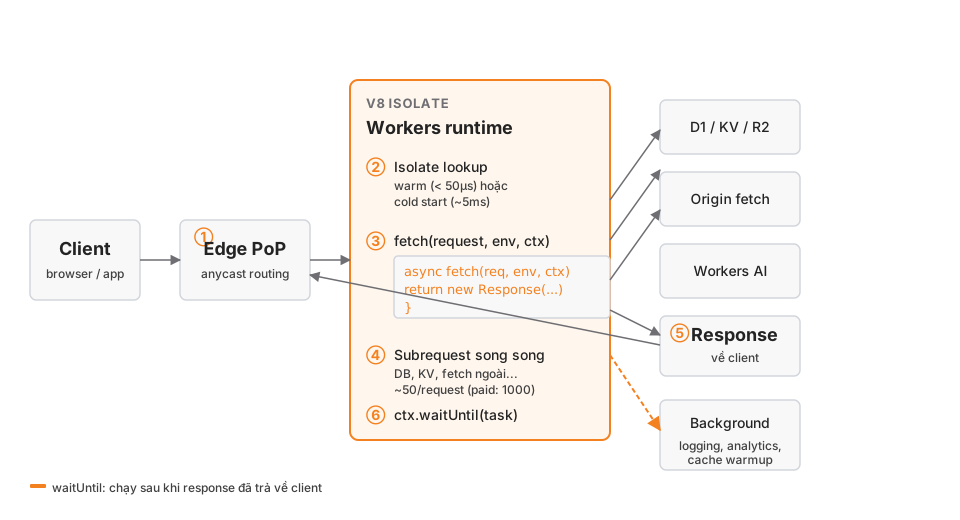
① Request arrives at a PoP
DNS for example.com points to Cloudflare. Anycast routing delivers the request to the nearest PoP (usually < 50ms RTT).
② Isolate lookup
Cloudflare looks for an already-compiled isolate for this Worker:
- Warm isolate: reused, handler runs after ~50µs. This is the majority of requests in production.
- Cold start: if no isolate exists at this PoP yet, V8 compiles the script. That takes ~5ms.
There’s no “scale to zero” 15-minute wait and another cold start like Lambda. Cloudflare keeps isolates warm for a long time, and cold starts are cheap enough that they aren’t a priority to optimise.
③ The fetch handler runs
The handler receives (request, env, ctx), does something, returns a Response.
async fetch(request, env, ctx) {
  const url = new URL(request.url);
  if (url.pathname === "/api/posts") {
    const rows = await env.DB.prepare("SELECT * FROM posts").all();
    return Response.json(rows);
  }
  return new Response("Not found", { status: 404 });
}
④ Subrequests fan out
Every await env.DB.prepare(...) or await fetch("https://api.com/...") is a subrequest. There’s a limit:
- Free plan: 50 subrequests / request.
- Paid plan: 1000 subrequests / request.
Bindings (D1, KV, R2, Queues, AI) all count as subrequests. If you loop over 100 D1 rows and each row calls KV, you’ll burn through the budget immediately.
⑤ Response returns
When the handler returns a Response, Cloudflare streams the body back to the client. After this point, the response has left the isolate.
⑥ waitUntil runs in the background
ctx.waitUntil(promise) registers a Promise the platform will await after the response has already gone out. Use it for logging, analytics, cache warmup — anything that doesn’t need to block the response.
async fetch(request, env, ctx) {
  const response = await handleRequest(request, env);

  // Log async, don't block the response
  ctx.waitUntil(
    env.DB.prepare("INSERT INTO views (slug, ts) VALUES (?, ?)")
      .bind(slug, Date.now())
      .run()
  );

  return response;
}
The user sees the response immediately; the log write happens after.
The 3 handler objects
Request
Standard Fetch API, plus a cf property with edge metadata:
async fetch(request: Request, env: Env, ctx: ExecutionContext) {
  const url = new URL(request.url);
  const method = request.method;
  const body = await request.json();

  // Cloudflare-specific
  const country = request.cf?.country;        // 'VN', 'US', ...
  const colo = request.cf?.colo;              // 'SIN', 'HKG' — the PoP code
  const tlsVersion = request.cf?.tlsVersion;  // 'TLSv1.3'
  const botScore = request.cf?.botManagement?.score;
}
For analytics and geo-routing, request.cf is enough without pulling in an external service.
env
Contains every binding + secret + var from wrangler.jsonc:
interface Env {
  DB: D1Database;
  KV: KVNamespace;
  BUCKET: R2Bucket;
  QUEUE: Queue;
  AI: Ai;
  VECTORIZE: VectorizeIndex;
  // secrets
  RESEND_API_KEY: string;
  // plain vars
  SITE_ORIGIN: string;
}
No process.env. No dotenv. Secrets are injected at compile time and protected by Wrangler.
ctx (ExecutionContext)
Two methods:
ctx.waitUntil(promise): extend the lifecycle past the response.ctx.passThroughOnException(): if the handler throws, Cloudflare forwards the request to the origin (useful when the Worker sits in front of a zone with a real origin).
CPU time vs wall time
This is the single biggest source of confusion.
Wall time: real elapsed time from when the handler starts until it ends, including time spent awaiting I/O. Capped at 30s on every plan.
CPU time: only counts time the CPU is actually busy running your code. await fetch() is waiting on the network → CPU is idle → not counted.
async fetch(request, env) {
  await fetch("https://slow-api.com/data");       // 2s wall, ~0ms CPU
  await new Promise(r => setTimeout(r, 5000));    // 5s wall, ~0ms CPU
  for (let i = 0; i < 1e7; i++) { sum += i; }     // 50ms wall, 50ms CPU
}
The first two lines are fine even though wall time is ~7s. The third line is where danger lives.
Per-plan limits
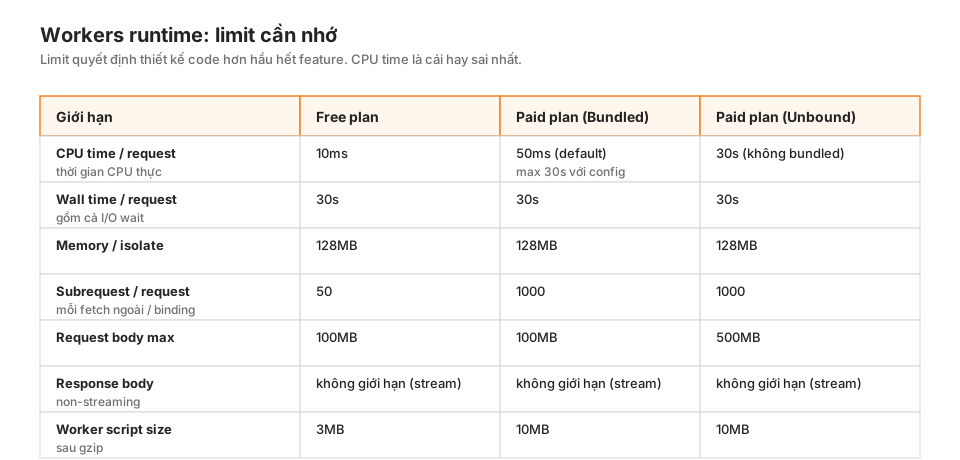
Worth memorising:
- Free plan 10ms CPU: enough for a simple, I/O-bound API. Parsing a large JSON, heavy regex, RSA-signature JWT verify will blow through it.
- Paid Bundled 50ms CPU (default), configurable up to 30s: fine for 99% of use cases.
- Paid Unbound 30s CPU: for compute-heavy workloads, but billed per CPU-ms rather than bundled.
This blog runs on Paid Bundled with 50ms. I had to split one handler that was embedding 200 documents in one request because it exceeded 50ms. Now it fans out via a Queue, one message per document.
When you’ll hit the CPU limit
- RSA signature JWT verification on every request.
- Parsing large CSV or markdown.
- Running heavy regex against request body.
- Base64 encoding/decoding large binary blobs.
- Running Pagefind-like indexing inside the worker.
Fix: cache (KV, Cache API), offload to Queues, or use a specialised binding (AI, Stream).
waitUntil: the most important pattern
waitUntil is the canonical way to run work “after the response has gone out”. Use it for anything that doesn’t block the user:
Log a page view
async fetch(request, env, ctx) {
  const response = await render(request, env);

  ctx.waitUntil(logView(request, env));

  return response;
}

async function logView(request: Request, env: Env) {
  const slug = new URL(request.url).pathname;
  await env.DB.prepare(
    "INSERT INTO post_views_daily (slug, day, count) VALUES (?, ?, 1) " +
    "ON CONFLICT(slug, day) DO UPDATE SET count = count + 1"
  ).bind(slug, today()).run();
}
Cache warmup after a miss
async fetch(request, env, ctx) {
  const cached = await env.KV.get(key);
  if (cached) return new Response(cached);

  const fresh = await computeExpensive();
  ctx.waitUntil(env.KV.put(key, fresh, { expirationTtl: 3600 }));

  return new Response(fresh);
}
The user doesn’t wait for the KV write. The handler returns immediately; the KV write runs in the background.
Analytics event
ctx.waitUntil(
  env.ANALYTICS.writeDataPoint({
    blobs: [slug, userAgent],
    doubles: [readingTime],
    indexes: [country],
  })
);
A big gotcha
waitUntil does not bypass the 30s wall-time limit. If your background task takes a minute, it gets killed. For long tasks, use a Queue, not waitUntil.
passThroughOnException: fallback to origin
When a Worker runs on a zone with a real origin (not workers.dev), you can fall back if the handler throws:
async fetch(request, env, ctx) {
  ctx.passThroughOnException();

  try {
    return await handleRequest(request, env);
  } catch (err) {
    // rethrow so CF falls through to origin
    throw err;
  }
}
Useful in the early days of adding a Worker in front of an origin — a handler crash doesn’t take the site down, the request just goes straight to the origin.
This blog doesn’t use it (no backing origin, everything is Workers Assets). But if you have nginx/Rails behind and the Worker is a CDN middleware, this is a mandatory safety net.
6 common misconceptions
① “A module-level variable is a cache”
// WRONG
let cache = new Map();

export default {
  async fetch(request, env) {
    if (cache.has(key)) return new Response(cache.get(key));
    // ...
  }
};
Isolates can be recycled at any time. This cache isn’t guaranteed to survive between two requests. Sometimes it hits, sometimes it misses. Use KV or the Cache API.
② “Cold starts are a problem”
Lambda developers are used to optimising cold starts via provisioned concurrency. Workers cold starts are ~5ms — don’t bother. Spend that effort on CPU time and subrequest count instead.
③ “await inside a for loop is fine”
// WRONG — runs sequentially, burns wall time
for (const id of ids) {
  const row = await env.DB.prepare("SELECT * FROM posts WHERE id = ?").bind(id).first();
  results.push(row);
}

// RIGHT — in parallel
const rows = await Promise.all(
  ids.map(id => env.DB.prepare("SELECT * FROM posts WHERE id = ?").bind(id).first())
);
With D1 an IN (?) clause is even better. But the general principle: parallel, not sequential.
④ “waitUntil runs forever”
The 30s wall-time limit still applies to waitUntil. Background tasks longer than 30s need to go through a Queue.
⑤ “env is global”
env is injected per request — it’s not a global. You can’t import { env } from "..." at module level. Pass it through function arguments.
⑥ “console.log is free”
console.log doesn’t cost significant CPU time, but each log line costs you something on Tail Workers if you’ve enabled them. Don’t spam logs in the hot path. Use structured logs on failure paths.
Production checklist
- The handler doesn’t touch module-level mutable state (cache, counter, etc.).
- Every task that doesn’t block the user is wrapped in
ctx.waitUntil(). - Loops over collections use
Promise.all, notfor await. - CPU-heavy work (crypto, large parses, heavy regex) is offloaded via Queues or cached.
- Subrequest count is controlled (< 50 Free, < 1000 Paid).
- Error handling doesn’t throw back to the platform (return a 5xx JSON instead of letting it crash).
- If there’s a backing origin,
ctx.passThroughOnException()is enabled. - No
setTimeoutlonger than the wall-time limit.
Wrap-up
The Workers runtime, at its core, is: a function running in a V8 isolate, receiving a request, returning a response, all within 30s wall time and 50ms CPU time (Paid default). Bindings are the only way to talk to the outside world. ctx.waitUntil is the only legitimate way to run background work.
Accept this mental model, and every optimisation and design decision after it has somewhere to land.
Part 3 goes into the 3-binding mental model: Request → Identity → Storage. That’s the common frame for every Worker, from a simple API to a full-stack app.