

TL;DR
Every Worker, from a 50-line API to a 5000-line full-stack blog, decomposes into 3 binding layers:
- Request — where the event comes from (
fetch,scheduled,queue,request.cfmetadata). - Identity — who’s calling (Access JWT, session cookie, API key, mTLS, OIDC federation).
- Storage — what you read and write (D1, KV, R2, Queues, Durable Objects, Vectorize, Cache API, Workers AI).
The key claim:
When debugging or designing, ask “which layer?” before asking “what’s wrong?”. 80% of bugs live at the boundary between two layers — for example, identity verified against the wrong input before a storage read, or storage returning stale data after the identity has changed.
This post defines the 3 layers, maps them onto the Worker running this blog, and lays out a decision tree for picking the right storage primitive. Parts 5-8 dive into each storage primitive; Parts 13-16 cover AI and Durable Objects.
Who this is for
- Developers who’ve written their first
fetchhandler and are now scaling up to a full-stack app. - Anyone deciding architecture before code: which storage, which identity, whether you need a Durable Object at all.
- Anyone reading someone else’s Worker and wanting to decompose it quickly.
Read first: Part 1 (platform overview), Part 2 (runtime lifecycle).
After this post you’ll:
- Map a real Worker into 3 layers.
- Be able to choose between D1, KV, R2, Durable Object, and Cache API.
- Distinguish the common identity mechanisms and know when to use each.
What this post isn’t about
- Storage primitive details: Part 5 (KV), Part 6 (D1), Part 7 (R2), Part 8 (Queues + DO).
- Router frameworks (Hono, Itty): Part 9.
- Workers AI and Vectorize specifics: Parts 13-14.
The principle: 3 layers, not more
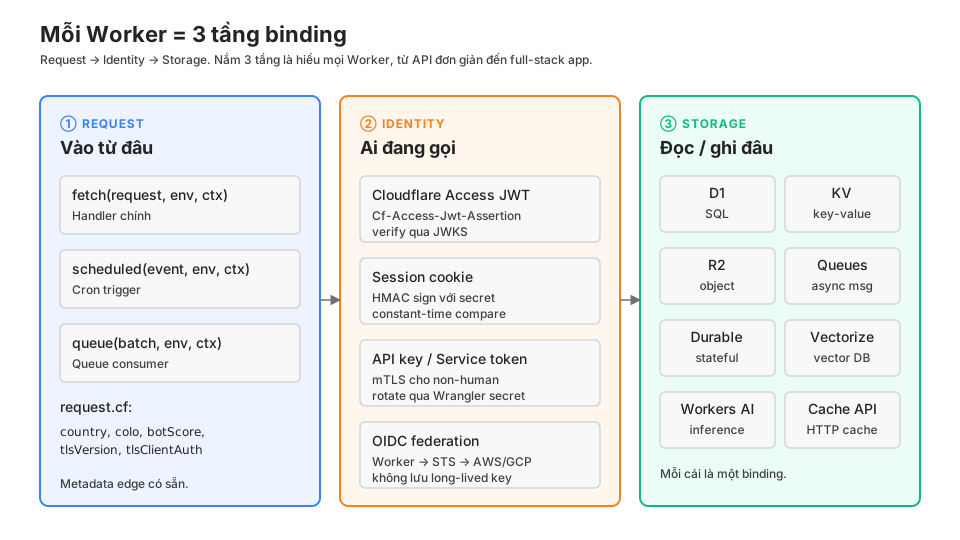
① Request
The Request layer answers: what event triggered this Worker to run?
Three sources:
- HTTP request:
fetch(request, env, ctx). 99% of traffic goes through here. - Cron:
scheduled(event, env, ctx). Triggered bycronsinwrangler.jsonc. - Queue message:
queue(batch, env, ctx). The consumer for a Queues binding.
There’s also tail (log consumer) and email (Email Workers), but you’ll see them less.
From the Request layer you get:
request.url,request.method,request.headers,request.body.request.cf: edge metadata (country, colo, botScore, tlsVersion, tlsClientAuth). Free, no external service needed.event.cron(scheduled): the cron string that fired.batch.messages(queue): the array of messages, each withid,body,ack(),retry().
Everything else is app logic, running in the runtime from Part 2.
② Identity
The Identity layer answers: who is calling, with what permissions?
This layer often gets merged into app logic, but separating it keeps code cleaner and makes auditing easier. Four common mechanisms:
Cloudflare Access JWT
For /admin/* or internal endpoints. Access sits in front of the Worker, injects Cf-Access-Jwt-Assertion headers. The Worker verifies the JWT against the Access team JWKS.
import { verifyAccessJwt } from "./lib/access-jwt";

async fetch(request, env, ctx) {
  const jwt = request.headers.get("Cf-Access-Jwt-Assertion");
  if (!jwt) return new Response("Missing JWT", { status: 401 });

  const claims = await verifyAccessJwt(jwt, env.CF_ACCESS_TEAM_DOMAIN, env.CF_ACCESS_AUD);
  if (!claims) return new Response("Invalid JWT", { status: 403 });

  const adminEmails = env.ADMIN_EMAILS.split(",");
  if (!adminEmails.includes(claims.email)) {
    return new Response("Not admin", { status: 403 });
  }

  // Only now do we enter app logic
  return handleAdminRequest(request, env, claims);
}
This blog uses that pattern for /admin/*. worker/lib/access-jwt.ts verifies via JWKS with a 10-minute in-isolate cache.
Session cookie with HMAC
For newsletter unsubscribe, webmention confirm. The cookie carries a token signed with an HMAC secret. Verify with crypto.subtle plus a constant-time compare.
import { timingSafeEqual } from "./lib/http";

async function verifyUnsubscribeToken(token: string, email: string, secret: string) {
  const expected = await hmacSha256(secret, email);
  return timingSafeEqual(token, expected);
}
API key / Service token
For non-human callers (CI, external crons, third-party webhooks). Store the secret with wrangler secret put.
async fetch(request, env) {
  const key = request.headers.get("X-API-Key");
  const valid = await timingSafeEqual(key ?? "", env.API_KEY);
  if (!valid) return new Response("Unauthorized", { status: 401 });
  // ...
}
For mTLS, Cloudflare Access does the heavy lifting. The Worker only needs to check request.cf.tlsClientAuth.certVerified === "SUCCESS".
OIDC federation
For workload-to-workload auth outside Cloudflare. The Worker issues an OIDC token → AWS STS or GCP STS → scoped temporary credentials. No long-lived access key stored anywhere.
This blog uses OIDC to call AWS Bedrock (Claude Opus) for AI summaries:
- The Worker signs a JWT with a private key held in secrets.
- It POSTs the JWT to AWS STS
AssumeRoleWithWebIdentity. - STS returns temp credentials (valid 15-60 minutes).
- The Worker caches those credentials in KV and reuses them until expiry.
- It calls Bedrock with those credentials.
Details on that pattern deserve their own post (out of scope here). The point to hold: no long-lived AWS access keys in .env, in CI secrets, or in Worker secrets.
③ Storage
The Storage layer answers: where do you read and write, with what access pattern?
This layer has the most primitives and is the one that’s most often picked wrong. Decision tree below.
Applied: this blog’s Worker
cloudsecop.net runs on a single Worker. Decomposed across the 3 layers:
Request layer
fetch: routes by path (/,/blog/*,/api/*,/admin/*,/og/*.png).scheduled: cron0 2 * * SUNfires the weekly digest and webmention send retries.queue: consumer for rebuilding the Vectorize index when a post is added.
Identity layer
| Endpoint | Identity mechanism |
|---|---|
| Public pages | None (anonymous) |
/api/subscribe | Turnstile token + email + abuse-guard |
/api/unsubscribe/* | HMAC-signed token in the URL |
/api/contact | Turnstile + abuse-guard |
/api/webmention | Source URL validation (SSRF guard) |
/api/email-inbound | HMAC secret from the Resend webhook |
/admin/* | Cloudflare Access JWT + ADMIN_EMAILS allowlist |
| Bedrock call | OIDC federation → AWS STS |
Storage layer
| Purpose | Primitive |
|---|---|
| Subscribers, page views | D1 (khavan-subscribers) |
| AI summary cache | D1 (ai_summaries) |
| Post embeddings | Vectorize (khavan-posts) |
| OIDC temp credentials | KV (OIDC_CREDS_CACHE) |
| Feature flags, config | KV |
| Analytics events | Analytics Engine |
| Static assets | Workers Assets (env.ASSETS) |
| Generated OG images | Computed per-request, cached via Cache API |
| Weekly digest | D1 (subscribers) + Resend API |
One Worker. Every endpoint decomposes cleanly into the 3 layers. When debugging, walk the layers in reverse: storage error? identity? request parsing?
Picking the right storage
This is the most frequently mis-answered question. Decision tree:
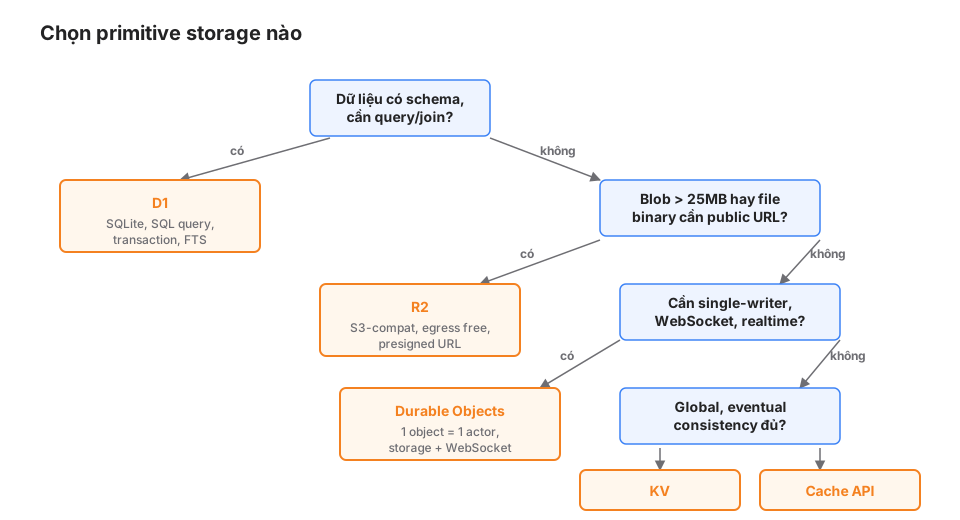
Use D1 when
- The data has a fixed schema (users, posts, orders).
- You need complex SQL (JOIN, GROUP BY, window functions).
- You need transactions (atomic batch insert, rollback).
- You want FTS for free-text search.
- Total size is under ~10GB per database.
Don’t use D1 for: data above ~10GB, sub-millisecond global reads (D1 has a single primary region), or binary blobs > 1MB (use R2).
Use R2 when
- Binary objects (images, video, PDF, zip).
- Files > 25MB (KV is capped at 25MB).
- You need a public URL or a presigned URL.
- You want egress-free (no per-GB fee).
- You’re replacing S3 and want to keep the boto3/aws-sdk client.
Don’t use R2 for: querying object contents (use D1 or Vectorize) or very fast prefix listing (use KV metadata).
Use KV when
- Simple key-value, global read.
- Cache metadata (feature flags, redirect map, tag aliases).
- Session data, short-lived auth tokens.
- Frequent lookups where eventual consistency (< 60s propagation) is fine.
Don’t use KV for: strong consistency (use D1 or a Durable Object), values > 25MB, or write rate above ~1 write/key/second.
Use Durable Objects when
- Single-writer coordination (counter, rate limiter, lock).
- WebSocket servers (chat rooms, multiplayer, collaborative editors).
- Sessions with in-memory state (shopping cart, form wizard).
- Transactional operations over multiple keys.
Don’t use DO for: stateless workloads (use a Worker + D1) or anything that needs a global query (a DO is pinned to one region).
Use Cache API when
- HTTP response caching (avoid regenerating the same response).
- Warmup after a cold fetch.
- Caching presigned-URL responses for a short TTL.
Don’t use Cache API for: sharing data across non-HTTP requests (use KV) or invalidation by key pattern (use KV with TTL).
Use Queues when
- Fire-and-forget background jobs.
- Rate-limiting or smoothing outgoing traffic.
- Retry with exponential backoff.
- Fan-out / fan-in processing.
Use Vectorize when
- Semantic search via embeddings.
- RAG (retrieve relevant context for an LLM).
- Similarity search.
Use Workers AI when
- An inference model in the catalog fits your need (embeddings, small LLMs, image gen).
- You don’t need a GPU to train your own.
Common gotchas
① Folding Identity into the main handler
// Hard to test, hard to audit
async fetch(request, env) {
  const jwt = request.headers.get("Cf-Access-Jwt-Assertion");
  // ... 30 lines of verification ...
  if (authorized) {
    const row = await env.DB.prepare("...").first();
    // ...
  }
}
Pull Identity out into middleware:
async fetch(request, env) {
  const claims = await requireAdmin(request, env);
  if (claims instanceof Response) return claims; // 401/403

  return handleAdminRequest(request, env, claims);
}
Identity is its own layer — testable, auditable, logged separately.
② Using the wrong primitive
Common mistakes:
- Using KV for session data that changes frequently → rate-limited to 1 write/key/second.
- Using D1 for binary blobs → bloated rows, slow queries.
- Using a Durable Object for stateless workloads → pinned to one region, losing the edge advantage.
- Using R2 for small metadata that needs to be queried → list operations are slow.
The decision tree above is a first guide. When unsure, start with D1 + KV and scale when you hit a bottleneck.
③ Storage without Identity
// WRONG
async fetch(request, env) {
  if (url.pathname === "/api/user") {
    const id = url.searchParams.get("id");
    return Response.json(await env.DB.prepare("SELECT * FROM users WHERE id = ?").bind(id).first());
  }
}
No identity check → anyone can view any profile. Storage must always come after Identity, never before or in parallel with it.
④ Caching Identity results wrong
// WRONG
const cachedClaims = new Map<string, Claims>();

async function verifyJwt(jwt: string) {
  if (cachedClaims.has(jwt)) return cachedClaims.get(jwt);
  // ...
}
A module-level Map doesn’t survive across requests (Part 2). And caching JWTs for too long is a security risk (revocation stops working). Use KV with a short TTL (60s) or re-verify every request.
Production checklist
- The Worker decomposes cleanly into 3 layers on an architecture diagram.
- Every endpoint has an explicit Identity mechanism (including “public” — write it explicitly).
- Identity is verified before Storage is touched, never inline.
- Every Storage choice has a reason (not “because KV was easiest”) that matches the decision tree.
- Secrets go through
wrangler secret put, never hardcoded or in plain env vars. - OIDC federation is preferred for workload-to-workload auth; no long-lived keys.
- Logging distinguishes the 3 layers (request received, identity verified, storage op done).
Wrap-up
The 3-binding mental model is the recurring frame for every post in the series. Part 4 goes into the concrete dev loop: Wrangler, Miniflare, local dev, testing with vitest.
From Part 5 onward we dive into the Storage layer: KV, D1, R2, Queues, Durable Objects. Each post will have real code and real gotchas from building this blog.