

TL;DR
Workers aren’t dedicated servers. No host firewall, no systemd, no selinux. Security follows a 6-layer defense-in-depth model, from the edge inward:
- WAF + Bot Management — edge, before the Worker. OWASP, rule-based, bot score.
- Rate limit + Turnstile — request quotas, invisible captcha for forms.
- Cloudflare Access — zero-trust JWT for admin routes.
- Worker auth + validate — verify JWT/cookie, Zod input schema.
- Response headers — CSP, HSTS, X-Frame-Options, Referrer-Policy.
- Storage bindings — D1/KV/R2 scoped per Worker, no public internet.
Main thesis:
Worker security isn’t about “writing secure handlers”. Cloudflare provides many platform-level controls (WAF, Bot, Access, Turnstile) that are cheaper and safer than coding them yourself. Teams that skip these layers usually end up rebuilding an inferior version in the Worker. A production app needs both platform controls and app-level checks.
This post covers: all 6 layers with real config, 4 auth patterns (Access, signed cookie, API key, OIDC), proper secret management, a minimal CSP header, Bot Management rules, and 8 anti-patterns.
Who this is for
- Developers who just deployed a Worker and haven’t thought much about security.
- Teams with admin dashboards who need bot protection.
- Anyone managing secrets through
.envwho wants to switch to wrangler secrets.
Recommended prerequisites: Part 3 (bindings), Part 17 (observability).
By the end of this post you will:
- Set up Access for admin routes in under 15 minutes.
- Implement a signed cookie session for app users.
- Deploy a minimal CSP header without breaking existing pages.
- Know when Bot Management is worth enabling, and when Turnstile is enough.
What this post isn’t about
- OWASP top 10 in detail: assumes you know XSS, SQL injection, CSRF. Focus is Worker-specific controls.
- Deep enterprise WAF custom rule language: deserves its own post. Focus is presets + common patterns.
- Pen-testing / offensive: this is defensive.
- Compliance (SOC2, ISO 27001): organizational-level, not covered.
6-layer defense-in-depth
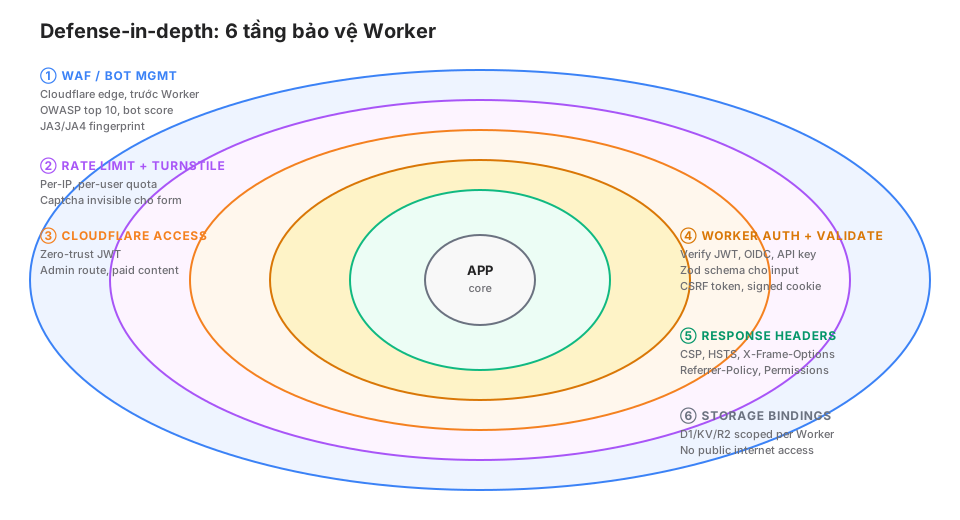
You don’t need all 6. A static blog only needs layer 5 (headers). A full UGC app needs all of 1-6.
Layer 1: WAF + Bot Management
WAF managed rules
Cloudflare WAF includes presets (OWASP Core Rule Set) that block SQL injection, XSS, LFI, RFI patterns.
Enabled by default on every zone (Free + Paid).
Dashboard: Security → WAF → Managed Rules. Tune sensitivity (low/medium/high).
WAF custom rules
For specific cases:
(http.request.uri.path contains "/wp-admin" and ip.geoip.country ne "VN")
→ Block

(http.request.uri.path eq "/api/expensive" and rate(1m) > 10)
→ Challenge

(http.user_agent contains "sqlmap")
→ Block
Rule Language is powerful. Combine fields across IP, UA, path, headers, body.
Bot Management
Cloudflare computes a “bot score” 0-99 per request from:
- JA3/JA4 TLS fingerprint.
- Behavioral patterns.
- IP reputation.
- HTTP/2 fingerprinting.
Rule by score:
(cf.bot_management.score < 30) → Block
(cf.bot_management.score < 60) → Challenge (Managed Challenge)
Enterprise feature, not free. Use when:
- E-commerce: anti-scraping, anti-credential-stuffing.
- Public dev tools: anti-abuse on the free tier.
- Content sites: block content-theft bots.
Free alternative: Super Bot Fight Mode (Pro+), rule-based without a score.
Layer 2: Rate limit + Turnstile
Native rate limit (zone-level)
Dashboard: Security → WAF → Rate limiting rules.
If: http.request.uri.path eq "/api/subscribe"
Rate: 5 requests / 1 minute per IP
Action: Block for 10 minutes
Pro plan: 10 rules. Business+: unlimited.
Free alternative: WAF custom rule with the rate() function (limited).
Custom rate limit with Durable Objects
If you need complex logic (sliding window, per-user, per-endpoint) → DO rate limiter (Part 15).
Turnstile
Invisible captcha for forms, a replacement for hCaptcha/reCAPTCHA.
Client:
<script src="https://challenges.cloudflare.com/turnstile/v0/api.js" defer></script>
<form action="/api/contact" method="POST">
  <input name="email" type="email" required>
  <div class="cf-turnstile" data-sitekey="YOUR_SITE_KEY"></div>
  <button>Submit</button>
</form>
Turnstile injects a hidden cf-turnstile-response field with a token.
Worker verify:
async function verifyTurnstile(token: string, ip: string, secret: string): Promise<boolean> {
  const response = await fetch("https://challenges.cloudflare.com/turnstile/v0/siteverify", {
    method: "POST",
    headers: { "Content-Type": "application/x-www-form-urlencoded" },
    body: new URLSearchParams({
      secret,
      response: token,
      remoteip: ip,
    }),
  });
  const { success } = await response.json();
  return success;
}

export default {
  async fetch(request: Request, env: Env) {
    const formData = await request.formData();
    const token = formData.get("cf-turnstile-response") as string;
    const ip = request.headers.get("cf-connecting-ip") ?? "";

    if (!await verifyTurnstile(token, ip, env.TURNSTILE_SECRET)) {
      return new Response("Captcha failed", { status: 403 });
    }

    // Process form
  },
};
Turnstile is free with no limit. Use for:
- Contact forms.
- Newsletter signup.
- Login pages (in front of password).
- Rate-limited public APIs.
Layer 3: Cloudflare Access
Zero-trust auth for admin routes. SSO with Google/Okta/GitHub, JWT injected into the request.
Setup
Dashboard: Zero Trust → Access → Applications → Add.
Config:
- Application type: self-hosted.
- Application domain:
cloudsecop.net/admin(path-specific). - Session duration: 24h.
- Identity provider: Google Workspace / Okta / GitHub.
- Policy:
email ends with @mycompany.com.
User visits /admin/* → redirected to Access login → SSO → JWT in CF_Authorization cookie.
Verify in the Worker
import { parseJWT, verifyAccess } from "./access";

export default {
  async fetch(request: Request, env: Env) {
    const url = new URL(request.url);

    if (url.pathname.startsWith("/admin/")) {
      const jwt = request.headers.get("cf-access-jwt-assertion")
        ?? parseCookie(request, "CF_Authorization");

      if (!jwt) return new Response("Unauthorized", { status: 401 });

      try {
        const claims = await verifyAccess(jwt, env.CF_ACCESS_AUD, env.CF_TEAM);
        // claims.email, claims.sub, claims.country
        return handleAdmin(request, env, claims);
      } catch {
        return new Response("Invalid token", { status: 403 });
      }
    }

    return handlePublic(request, env);
  },
};
verifyAccess fetches JWKS from Cloudflare and verifies the signature:
// access.ts
import { jwtVerify, createRemoteJWKSet } from "jose";

export async function verifyAccess(token: string, aud: string, team: string) {
  const JWKS = createRemoteJWKSet(
    new URL(`https://${team}.cloudflareaccess.com/cdn-cgi/access/certs`)
  );

  const { payload } = await jwtVerify(token, JWKS, {
    issuer: `https://${team}.cloudflareaccess.com`,
    audience: aud,
  });

  return payload;  // { email, sub, country, iat, exp, ... }
}
The audience (AUD) tag identifies the app. Get it from the Access application config.
Access JWT flow
Service Auth tokens
Machine-to-machine calls to Access-protected endpoints: use Service Tokens.
Dashboard → Access → Service Auth → Create Service Token. Get CF-Access-Client-Id + CF-Access-Client-Secret.
External service call:
curl https://cloudsecop.net/admin/api \
  -H "CF-Access-Client-Id: <client-id>" \
  -H "CF-Access-Client-Secret: <client-secret>"
Cloudflare verifies and forwards the request. Worker receives the same JWT pattern.
Layer 4: Worker auth + validate
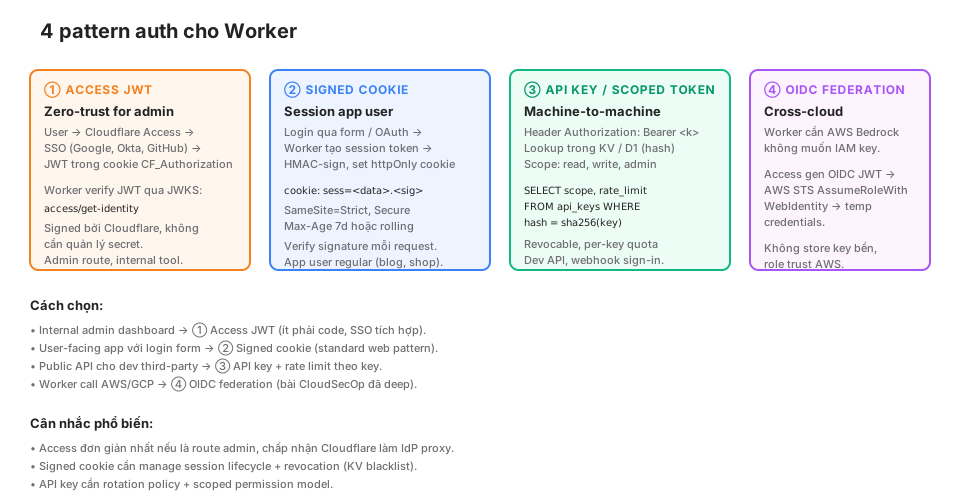
Pattern 1: Cloudflare Access (already covered)
Pattern 2: Signed cookie session
User-facing apps (blog commenters, shop buyers) don’t fit Access. HMAC-signed session cookies instead.
import { sign, verify } from "./cookie";

async function login(email: string, password: string, env: Env) {
  // verify password from D1
  const user = await env.DB.prepare("SELECT id, password_hash FROM users WHERE email = ?")
    .bind(email).first();

  if (!user || !await argon2Verify(password, user.password_hash)) {
    throw new Error("Invalid credentials");
  }

  // Create session
  const session = {
    userId: user.id,
    exp: Math.floor(Date.now() / 1000) + 86400 * 7,  // 7 days
  };

  const token = await sign(JSON.stringify(session), env.COOKIE_SECRET);

  return new Response("OK", {
    headers: {
      "Set-Cookie": `sess=${token}; HttpOnly; Secure; SameSite=Strict; Path=/; Max-Age=604800`,
    },
  });
}

async function middleware(request: Request, env: Env) {
  const cookie = request.headers.get("Cookie");
  const token = parseCookie(cookie, "sess");
  if (!token) return null;

  try {
    const data = await verify(token, env.COOKIE_SECRET);
    const session = JSON.parse(data);
    if (session.exp < Date.now() / 1000) return null;  // expired
    return session;
  } catch {
    return null;
  }
}

// cookie.ts
export async function sign(data: string, secret: string): Promise<string> {
  const key = await crypto.subtle.importKey(
    "raw",
    new TextEncoder().encode(secret),
    { name: "HMAC", hash: "SHA-256" },
    false,
    ["sign"]
  );
  const sig = await crypto.subtle.sign("HMAC", key, new TextEncoder().encode(data));
  return `${btoa(data)}.${bufferToBase64(sig)}`;
}

export async function verify(token: string, secret: string): Promise<string> {
  const [dataB64, sigB64] = token.split(".");
  const data = atob(dataB64);
  const expected = await sign(data, secret);
  if (!safeEqual(token, expected)) throw new Error("Invalid signature");
  return data;
}
Required flags:
HttpOnly: JS can’t read (prevents XSS theft).Secure: HTTPS only.SameSite=Strict(orLax): CSRF protection.Path: cookie scope.Max-Age: expiration.
Pattern 3: API key + scoped tokens
Public API for third-party developers.
async function authenticateAPIKey(request: Request, env: Env): Promise<APIUser | null> {
  const auth = request.headers.get("Authorization");
  if (!auth?.startsWith("Bearer ")) return null;

  const key = auth.slice(7);
  const hash = await sha256(key);

  const user = await env.DB.prepare(
    "SELECT id, scopes, rate_limit FROM api_keys WHERE key_hash = ? AND revoked_at IS NULL"
  ).bind(hash).first();

  return user as APIUser | null;
}

async function sha256(input: string): Promise<string> {
  const buf = await crypto.subtle.digest("SHA-256", new TextEncoder().encode(input));
  return [...new Uint8Array(buf)].map(b => b.toString(16).padStart(2, "0")).join("");
}
Store the hash, not plaintext. User losing a key = not recoverable = must reissue (good security property).
Scope check:
if (!user.scopes.includes("posts:write")) {
  return new Response("Insufficient scope", { status: 403 });
}
Pattern 4: OIDC federation
Worker needs to call AWS Bedrock without storing IAM keys. Access generates an OIDC JWT, AWS STS has a trust relationship, returns temp credentials.
Details are in the separate “OIDC federation Cloudflare → AWS” post on this blog. Short summary:
// 1. Worker calls Access to generate the OIDC JWT
const oidcJWT = await env.OIDC_SERVICE.fetch("/oidc/token");

// 2. Call AWS STS AssumeRoleWithWebIdentity
const stsResponse = await fetch("https://sts.amazonaws.com/", {
  method: "POST",
  body: new URLSearchParams({
    Action: "AssumeRoleWithWebIdentity",
    RoleArn: env.AWS_ROLE_ARN,
    WebIdentityToken: oidcJWT,
    DurationSeconds: "3600",
    Version: "2011-06-15",
  }),
});

// 3. Parse XML response → temp credentials
const { AccessKeyId, SecretAccessKey, SessionToken } = parseSTSResponse(stsResponse);

// 4. SigV4-sign the request to Bedrock
await callBedrock({ AccessKeyId, SecretAccessKey, SessionToken });
No IAM keys stored. AWS trusts Cloudflare Access as the IdP.
Input validation with Zod
import { z } from "zod";

const ContactSchema = z.object({
  email: z.string().email().max(255),
  name: z.string().min(1).max(100),
  message: z.string().min(10).max(5000),
});

export async function handleContact(request: Request, env: Env) {
  const body = await request.json();

  const result = ContactSchema.safeParse(body);
  if (!result.success) {
    return Response.json({ errors: result.error.errors }, { status: 400 });
  }

  const { email, name, message } = result.data;
  // Safe to use now
}
Zod catches:
- Missing fields.
- Wrong types.
- Length constraints.
- Email format.
Skipping Zod = untrusted data reaches business logic = dangerous.
Layer 5: Response headers
CSP, HSTS, etc. set via response headers. Astro middleware or Worker:
export default {
  async fetch(request: Request, env: Env) {
    const response = await handleRequest(request, env);

    const headers = new Headers(response.headers);

    // HSTS: force HTTPS 1 year
    headers.set("Strict-Transport-Security", "max-age=31536000; includeSubDomains; preload");

    // Prevent MIME sniff
    headers.set("X-Content-Type-Options", "nosniff");

    // Prevent clickjacking
    headers.set("X-Frame-Options", "DENY");

    // Referrer
    headers.set("Referrer-Policy", "strict-origin-when-cross-origin");

    // Permissions (disable unused features)
    headers.set("Permissions-Policy", "camera=(), microphone=(), geolocation=(), payment=()");

    // CSP: minimal
    headers.set("Content-Security-Policy", [
      "default-src 'self'",
      "script-src 'self' 'unsafe-inline' https://static.cloudflareinsights.com https://challenges.cloudflare.com",
      "style-src 'self' 'unsafe-inline'",
      "img-src 'self' data: https:",
      "font-src 'self' data:",
      "connect-src 'self' https://cloudflareinsights.com",
      "frame-ancestors 'none'",
      "base-uri 'self'",
      "form-action 'self'",
    ].join("; "));

    return new Response(response.body, {
      status: response.status,
      headers,
    });
  },
};
This blog uses exactly this CSP pattern. The 19-assertion smoke test (Part 12) checks every one of these headers.
CSP challenge
unsafe-inline for scripts is a compromise. Proper CSP uses nonces:
const nonce = crypto.randomUUID();
headers.set("Content-Security-Policy", `script-src 'self' 'nonce-${nonce}'`);

// Template injects the nonce into every <script>
html = html.replaceAll("<script", `<script nonce="${nonce}"`);
More complex, but prevents inline-script XSS. Production recommendation.
CSP reports
Monitor violations:
Content-Security-Policy: default-src 'self'; report-uri /csp-reportThe /csp-report endpoint logs violations. Discover non-compliant 3rd-party scripts.
Layer 6: Storage bindings
Bindings are scoped per-Worker. D1 databases don’t accept internet connections — only Worker bindings. Same for R2 (unless public buckets), KV, Vectorize.
Implications:
- No need for a firewall in front of D1.
- No connection strings to leak.
- Worker compromise = damage scope = database access (still bad, but bounded).
Principle: treat bindings as scoped capabilities. Wrangler secrets for external API keys need the same treatment.
Secret management
wrangler secret
Don’t commit secrets to git. Upload via CLI:
wrangler secret put OPENAI_API_KEY
# enter value

wrangler secret put TURNSTILE_SECRET
Secrets are injected into env at runtime, not visible in wrangler.jsonc.
Rotation
# 1. Generate a new key at the provider
# 2. Update the secret
wrangler secret put OPENAI_API_KEY
# 3. No redeploy needed — secrets hot-reload
# 4. Revoke the old key at the provider
Zero-downtime rotation
Secrets on a critical path (DB password, main API key): dual-credential.
// Code tries both
try {
  return await callWithKey(env.API_KEY_V2);
} catch (e) {
  if (e.status === 401) {
    return await callWithKey(env.API_KEY_V1);  // fallback
  }
  throw e;
}
Rotate:
- Set
API_KEY_V2= new. - Revoke
API_KEY_V1at the provider after a stable period. - Remove the
API_KEY_V1secret.
Never log secrets
// WRONG — leaks secrets into logs
console.log("Config:", env);
console.log("Auth:", request.headers);

// RIGHT
console.log("Auth status:", authStatus);
// redact sensitive
const safe = { ...env };
delete safe.SECRET_KEY;
console.log("Config:", safe);
Redact via Tail Worker (Part 17) as an extra layer.
Bot Management: when to enable it
Bot Management is paid (Enterprise). Considerations:
Enable when:
- E-commerce: bots scrape prices, check inventory 24/7.
- Login pages: credential stuffing is rampant.
- Free-tier APIs: free-tier abuse causes real cost.
- Auth endpoints: brute force bypassing rate limits.
- Content theft: scrapers cloning the blog.
Skip when:
- Internal tools: Access already covers it.
- Low-traffic static blog: WAF + rate limit + Turnstile is enough.
- Budget-constrained: Super Bot Fight Mode (Pro $20/mo) substitutes, rule-based.
This blog
Static blog, no login, no UGC, no paid API. Bot Management isn’t worth it. Uses:
- WAF managed rules (free).
- Super Bot Fight Mode (small — per-route).
- Turnstile for contact + newsletter.
- CSP + HSTS for defense-in-depth.
Total security cost: $0 on the free plan, $20/month on Pro.
Anti-patterns
❌ 1. Secrets in code
const API_KEY = "sk-abc123"; // committed!Rotation isn’t possible. Audit log missing. Use wrangler secret.
❌ 2. Verifying JWT with HS256 + a secret in code
HS256 = symmetric. Clients can forge if the secret leaks. Use RS256 / ES256 (asymmetric) for JWTs if a third party verifies them.
Access uses RS256 with JWKS — proper.
❌ 3. Skipping input validation
const { email } = await request.json();
await env.DB.prepare(`INSERT INTO users VALUES ('${email}')`).run();
SQL injection + no email format check. Use Zod + prepared statements.
❌ 4. Trusting cf-connecting-ip blindly
const ip = request.headers.get("cf-connecting-ip");
// Act on ip
This header is set correctly by Cloudflare. But if the Worker is invoked via a non-Cloudflare path (direct origin), the header can be spoofed. Always trust request.cf?.clientIP on a zone, or validate that cf-ray is present.
❌ 5. CORS wildcards
headers.set("Access-Control-Allow-Origin", "*");
headers.set("Access-Control-Allow-Credentials", "true");  // conflict!
Wildcard + credentials = browser rejects. Allow specific origins:
const origin = request.headers.get("Origin");
const allowed = ["https://cloudsecop.net", "https://khavan.khavan.workers.dev"];
if (allowed.includes(origin)) {
  headers.set("Access-Control-Allow-Origin", origin);
  headers.set("Access-Control-Allow-Credentials", "true");
}
❌ 6. Client-side auth checks
<script>
if (!localStorage.getItem("role") === "admin") window.location = "/";
</script>
An attacker can edit the DOM before the script runs. Auth checks MUST happen server-side (in the Worker).
❌ 7. Logging PII in plaintext
console.log("User email:", email, "password:", password);Ends up in the log aggregator. GDPR violation. Redact before logging.
❌ 8. Assuming Cloudflare fixes everything
WAF catches 90% of OWASP, not 100%. Zero-days exist. Defense-in-depth — multiple layers, never rely on just one.
Gotchas
① CSP testing is production-only
Strict CSP can break the page. Test with a Content-Security-Policy-Report-Only header first, log violations, iterate, then enforce.
② Turnstile is domain-specific
Turnstile site keys are bound to a domain. Local testing on localhost requires adding the domain in the config. Or use the dummy site key for dev.
③ Access JWT cookie domain
The CF_Authorization cookie is set per zone. A subdomain admin.cloudsecop.net needs to share the cookie with the apex → configure Access Application scope correctly.
④ wrangler secret doesn’t list values
wrangler secret list # names only, no valuesValues can’t be read back after setting. Lost = re-set. Store in a password manager (1Password, Bitwarden).
⑤ HSTS preload commitment
The preload directive adds your zone to the Chrome/Firefox preload list. Removing it is hard. Only enable when you’re sure about HTTPS forever.
⑥ Bot fingerprint false positives
Aggressive Bot Management → false positives blocking real users. Monitor dashboard, tune sensitivity. Whitelist known-good bots (Googlebot, Bingbot via verified-bot feature).
⑦ SameSite=Strict breaks redirect flows
SameSite=Strict cookies don’t travel with cross-site redirects (OAuth callbacks). Use Lax for session cookies when there’s an OAuth flow.
⑧ Access bypassed in local dev
wrangler dev has no Access layer. Local testing = no Access. Verify on a staging zone with Access enabled.
Production checklist
- WAF managed rules enabled (default).
- Custom WAF rules for admin paths, known abuse patterns.
- Rate-limit WAF rules for write endpoints (subscribe, login, search).
- Turnstile on public forms.
- Cloudflare Access for
/admin/*(if applicable). - JWT verified via JWKS, no skipping the signature check.
- Signed cookies HttpOnly + Secure + SameSite for sessions.
- Zod input validation before any business logic.
- Secrets via
wrangler secret put, never in code. - CSP + HSTS + X-Frame-Options + nosniff + Permissions-Policy.
- Redact sensitive fields in logs.
- API key hashes stored, not plaintext.
- Scope check per endpoint (RBAC).
- Smoke test (Part 12) verifies security headers post-deploy.
- Incident response playbook: key rotation, session invalidation, user notification.
Wrap-up
Worker security isn’t “write secure code”. It’s stacking controls across 6 layers: WAF, rate limit, Access, Worker auth, response headers, storage bindings. Each layer catches a different class of problem.
Cloudflare provides 4/6 layers at the platform level (WAF, Bot, Access, Turnstile). Skip = rebuild an inferior version + maintain your own security code. Using the platform tier is a real productivity win.
Part 19: Cost model — per-primitive pricing analysis, breakpoints when moving tiers, comparison with real AWS Lambda + API Gateway + DynamoDB + S3 numbers.