

TL;DR
The Cloudflare developer platform is an edge-native stack for building full-stack apps directly on Cloudflare’s network. Compute runs inside V8 isolates across 300+ PoPs, not containers. Around Workers sit 11 more primitives (D1, R2, KV, Queues, Durable Objects, Workers AI, Vectorize, Stream, Images, Analytics Engine, Cron triggers), wired up through bindings in wrangler.jsonc.
It differs from Lambda in a fundamental way:
An isolate is not a container. Cold start is measured in milliseconds, memory footprint in megabytes, and the scaling unit is the request — not the instance. That changes how you design the app, not just where you deploy it.
This post builds the first mental model, compares Cloudflare with Lambda / Vercel / Deno Deploy, and lists the 12 primitives you’ll meet throughout the series. Part 2 goes deeper into the runtime; Parts 3-8 cover each storage primitive; Parts 13-16 cover AI and Durable Objects.
Who this is for
- Developers comfortable with Node.js/Lambda who want to try an edge runtime without reading every Cloudflare doc page.
- Teams weighing Cloudflare Workers for a new service (API, CMS, background worker).
- Anyone already using Cloudflare for CDN/DNS who hasn’t yet seen why the rest of the platform is worth another look.
You should know JavaScript/TypeScript at a basic level, have deployed at least one REST API before, and understand the HTTP request/response flow.
After this post you’ll:
- Know how Workers differ from Lambda (it’s not only “faster”).
- Remember all 12 platform primitives and what each one does.
- Be able to decide when Cloudflare fits your next workload and when it doesn’t.
What this post isn’t about
- Cloudflare One (Zero Trust, SASE). It has its own 20-part handbook.
- Pages as a Jamstack deploy target. We touch it briefly in Part 11.
- Networking, DDoS, WAF. That’s Cloudflare’s “classic CDN” side; this post is about building on Cloudflare.
- Zone setup, DNS records, SSL. Assumed.
Cloudflare is no longer what it was
Five years ago, Cloudflare meant “CDN plus WAF plus DDoS”. Using Cloudflare meant putting a proxy layer in front of an origin running on AWS, GCP, or DigitalOcean.
Not anymore.
Everything you need for a full-stack application now runs natively on the Cloudflare network:
- Compute: Workers
- Static assets: Workers Assets or Pages
- Relational DB: D1 (SQLite at the edge)
- Object storage: R2 (S3-compatible, no egress fee)
- Key-value cache: KV
- Messaging: Queues + Durable Objects
- AI inference: Workers AI (50+ models)
- Vector DB: Vectorize
- Media: Stream, Images
- Analytics: Analytics Engine
- Scheduled jobs: Cron triggers
All of this runs across 300+ PoPs worldwide. Your code runs close to the user, your database is close to the user, your AI inference is close to the user. Requests don’t have to backhaul to one central region.
The blog you’re reading right now runs on exactly this stack: one Worker serves assets; D1 holds subscribers, page-view counters, and AI-summary cache; KV holds short-lived OIDC creds; Vectorize holds embeddings for semantic search; Workers AI generates those embeddings; Analytics Engine captures events; Cron triggers the weekly digest. One Worker, one wrangler.jsonc. No AWS account, no container registry, no self-hosted CI runner.
That’s why Cloudflare is no longer “just a CDN”. It’s a platform.
12 primitives orbiting Workers
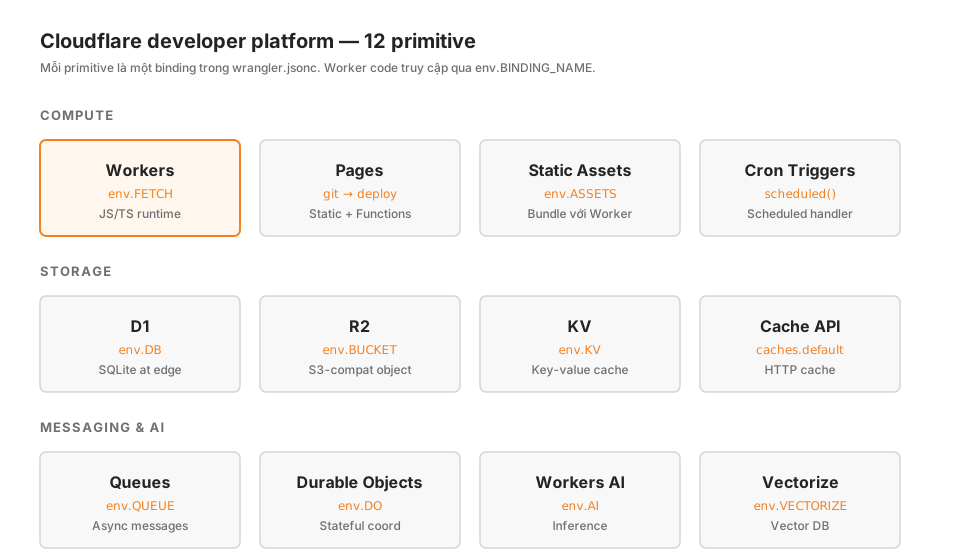
The mental model to hold: Workers is the compute; everything else is a binding.
In wrangler.jsonc:
{
  "name": "my-app",
  "main": "src/index.ts",
  "d1_databases": [{ "binding": "DB", "database_name": "my-db", "database_id": "..." }],
  "r2_buckets": [{ "binding": "ASSETS_BUCKET", "bucket_name": "my-assets" }],
  "kv_namespaces": [{ "binding": "KV", "id": "..." }],
  "queues": { "producers": [{ "binding": "QUEUE", "queue": "my-queue" }] },
  "ai": { "binding": "AI" },
  "vectorize": [{ "binding": "VECTORIZE", "index_name": "my-index" }]
}
In the Worker code:
export default {
  async fetch(request: Request, env: Env): Promise<Response> {
    const row = await env.DB.prepare("SELECT * FROM posts WHERE slug = ?").bind(slug).first();
    const blob = await env.ASSETS_BUCKET.get("logo.png");
    const cached = await env.KV.get("feature-flags");
    await env.QUEUE.send({ type: "view", slug });
    const embedding = await env.AI.run("@cf/baai/bge-m3", { text: [query] });
    const matches = await env.VECTORIZE.query(embedding.data[0], { topK: 5 });
    return Response.json({ row, cached, matches });
  }
};
That’s the entire “API surface” for talking to every primitive. No SDK client. No connection pool. No IAM account. The binding is the contract between the Worker and the platform.
Part 3 goes deep into this mental model. Parts 5-8 walk through each storage primitive. Parts 13-16 cover AI and Durable Objects.
An isolate is not a container
This is the single biggest design choice, and the biggest source of misunderstanding when developers move from Node/Lambda to Workers.
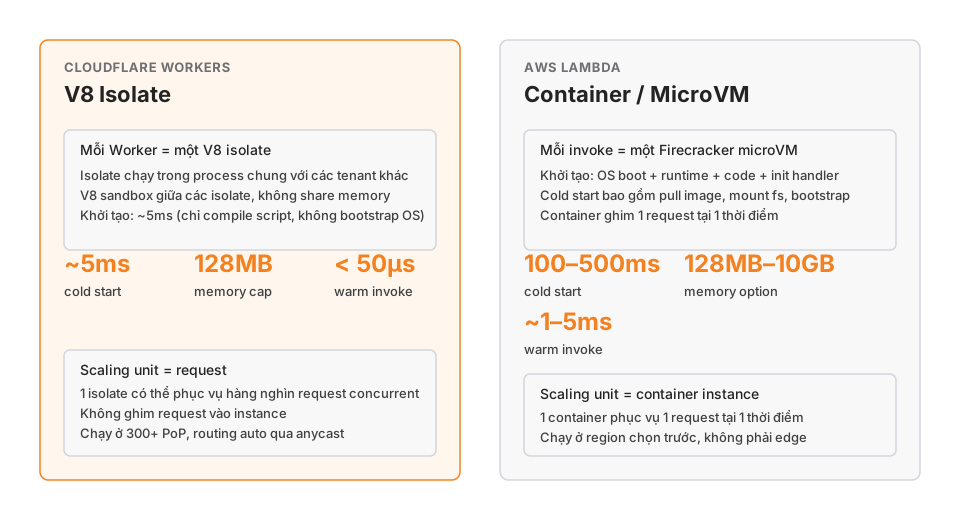
Lambda model: every invocation needs a container (a Firecracker microVM). The container boot includes a minimal OS, filesystem mount, bootstrapping the runtime (Node/Python/Go), loading your code, and running the init handler. That costs 100-500ms for a cold start. The container keeps state across subsequent invocations, but pins 1 request to 1 container at a time.
Workers model: every Worker is a V8 isolate. Isolates are a V8 engine primitive — the same engine that runs Chrome, Node, and Deno. An isolate is a sandbox between pieces of JavaScript in the same process. Google uses isolates to run hundreds of browser tabs without one tab leaking memory into another. Cloudflare uses isolates to run thousands of Workers from many tenants in a single process, each sandboxed from the others.
Consequences:
- ~5ms cold start: only a JS script is compiled into V8. No OS bootstrap.
- 128MB memory cap: enough for a request handler, not for a long-lived in-memory app.
- Concurrent requests within one isolate: requests aren’t pinned. A single isolate can serve thousands of requests in parallel through the usual async/await model.
- Scaling unit = request: not the instance. There’s no notion of “how many Workers are running” the way there is with Lambda concurrency. Cloudflare scales by routing requests to whichever isolate is nearest and free.
- 300+ PoPs: the same code is deployed everywhere on the edge network. Requests hit the nearest PoP, not a faraway region.
What that changes for your code
It’s not just “deploy somewhere else”. The code mental model changes too:
- No persistent filesystem: no writing to
/tmpand expecting it to stick. For long-term state, use D1/R2/KV. - No process-level cross-request cache:
let cache = {}at module scope will not reliably survive across requests. An isolate can be recycled at any time. Use KV or the Cache API for cross-request state. - No
fs, nochild_process: the runtime is browser-like plus the Workers API, not full Node. Some Node libraries won’t run, or will need thenodejs_compatflag. - Subrequest limit: each request is capped at ~50 outgoing subrequests (1000 on paid plans). You can’t fan out to dozens of origins inside one handler.
- CPU time limit: each request has a CPU-time budget. Heavy compute must be chunked or pushed to Workers AI / Queues.
When isolates don’t fit
Not every workload suits Workers:
- Long-running jobs (ML training, 1-hour video encoding): Workers have a CPU-time limit. Use a different service, or hand off via Queues / Durable Object Workflows.
- Filesystem-heavy tools (imagemagick, ffmpeg binaries): these just can’t run here. Use Images / Stream or an external service.
- Native Node libraries with C++ bindings (sharp, canvas, node-sass): often incompatible. Use WASM alternatives or an external service.
- Tight-latency access to an external DB (RDS in a private VPC with no public endpoint): you’ll need Tunnel, Hyperdrive, or to keep that service on AWS.
Workers shine brightest on short request/response APIs, full-stack web apps, real-time coordination via Durable Objects, and AI inference. A 2-hour batch job is not a Workers workload.
Who’s actually running this in production
Rather than marketing bullet points, a few publicly-documented examples:
- Shopify: migrated Oxygen (their storefront runtime) to Workers after cold-start measurements.
- Canva: runs real-time collaborative editing on Workers + Durable Objects.
- Adobe: Marquee (an image-generation pipeline) runs on Workers AI.
- Many indie SaaS and agencies: full stack on Cloudflare, no AWS at all.
At a smaller scale, this blog runs entirely on a single Worker: serving 58 posts, plus subscribers, newsletter, AI summaries, semantic search, webmentions, analytics, and the admin JWT gateway. No other backend. wrangler.jsonc has 7 bindings and 1 cron trigger. The local .env is under 10 lines, mostly external API keys for Resend and Bedrock.
Versus Vercel and Deno Deploy
These three edge runtimes get lumped together a lot. The real differences:
| Dimension | Cloudflare Workers | Vercel Edge Functions | Deno Deploy |
|---|---|---|---|
| Runtime | V8 isolate | V8 isolate (Cloudflare OEM) | V8 isolate (Deno) |
| PoPs | 300+ | 40+ (region-selectable) | 35+ |
| Cold start | ~5ms | ~50ms | ~30ms |
| Storage primitives | D1, R2, KV, Queues, DO, AI | KV, Blob (via Vercel) | Deno KV |
| Stateful coordination | Durable Objects | Not native | Deno KV (limited) |
| Vendor lock-in | High (Cloudflare primitives) | High (Vercel platform) | Low (Deno open-source) |
| Pricing | Request + duration + storage | Request + function duration | Request + egress |
Vercel Edge Functions is basically Workers re-packaged (Vercel OEMed it from Cloudflare for a while). The real distinction is the surrounding platform: Vercel leans toward framework deploys (Next.js first); Cloudflare leans toward full-stack primitives.
Deno Deploy is lighter but has fewer primitives, and is best for simple APIs. Great for rapid prototypes, weaker for multi-primitive production.
If you need D1 + R2 + KV + Queues + DO + AI + Vectorize all in one runtime, Cloudflare is currently the only choice.
When NOT to pick Cloudflare
Cloudflare hype is cheap. Reasons to pick something else:
- Workload needs a full Linux runtime (custom Nginx module, classic daemon, arbitrary binary): use a container on AWS/GCP.
- Database is already huge on AWS, and migration costs more than the benefit: run the API on Lambda near the DB to keep data transfer costs down.
- Team has deep AWS operational expertise, and you’re mid-SOC 2 audit: changing platforms during an audit window is avoidable risk.
- You need GPU inference for a custom model: Workers AI has a 50+ model catalog, but it can’t run your own trained models. Bedrock, SageMaker, or Replicate are better fits.
- CI/CD is tightly coupled to AWS (ECR → ECS → CodeBuild): the tooling switch costs real time.
“The edge is the future” is not, on its own, a sufficient reason. Pick Cloudflare when there’s a concrete problem the edge solves: global latency, S3 egress costs, or tech-stack vendor lock.
Series roadmap
The 20 parts are grouped into 5 blocks:
Block 1 — Foundation (Parts 1-4)
- Part 1: This post.
- Part 2: The Workers runtime mental model.
- Part 3: The 3-binding mental model.
- Part 4: The Wrangler + Miniflare dev loop.
Block 2 — Storage (Parts 5-8)
- Part 5: KV deep-dive.
- Part 6: D1 in production.
- Part 7: R2 object storage.
- Part 8: Queues and Durable Objects.
Block 3 — Frameworks and build (Parts 9-12)
- Part 9: Router choice (Hono, Itty, vanilla).
- Part 10: ORMs on D1 (Drizzle, Prisma).
- Part 11: Astro, Remix, SvelteKit on Workers.
- Part 12: CI/CD with Wrangler + GitHub Actions.
Block 4 — AI and advanced (Parts 13-16)
- Part 13: Workers AI + AI Gateway.
- Part 14: Vectorize + the RAG pattern.
- Part 15: Durable Objects for real-time.
- Part 16: Stream + Images.
Block 5 — Production (Parts 17-20)
- Part 17: Observability (Logs, Analytics, Tail Workers).
- Part 18: Security (secrets, CSP, Bot Management).
- Part 19: The real production cost model.
- Part 20: Migrating from AWS / Vercel.
Every post will include real code, gotchas encountered while building this blog or side projects, and a production checklist. No doc-warming.
Wrap-up
Cloudflare is not a CDN-plus-something anymore. It’s a full-stack, edge-native platform that’s fundamentally different from AWS Lambda’s container model. Twelve primitives around Workers are enough to build a blog, a CMS, a SaaS, a chat app, a RAG endpoint, a newsletter, or an analytics dashboard — all in one wrangler.jsonc.
Isolates change how you write code: smaller memory, faster cold starts, request-level scaling, no persistent filesystem, no cross-request process cache. Accept that mental model and the rest falls into place.
Part 2 goes into the runtime: request lifecycle, the fetch handler, subrequests, the CPU limit, waitUntil, the context object, and how to write handlers that don’t leak state.