

TL;DR
Vectorize is Cloudflare’s native vector DB. The VECTORIZE binding, zero egress with Worker, pairs naturally with Workers AI bge-m3 to build full-edge RAG.
Main thesis:
RAG isn’t just “embed + top-K + stuff into prompt”. Production RAG needs proper chunking, metadata filters, hybrid search (vector + keyword), reranking, and observability. The Cloudflare stack gives you all of that in one network. But Vectorize isn’t Pinecone — know the limits before you pick.
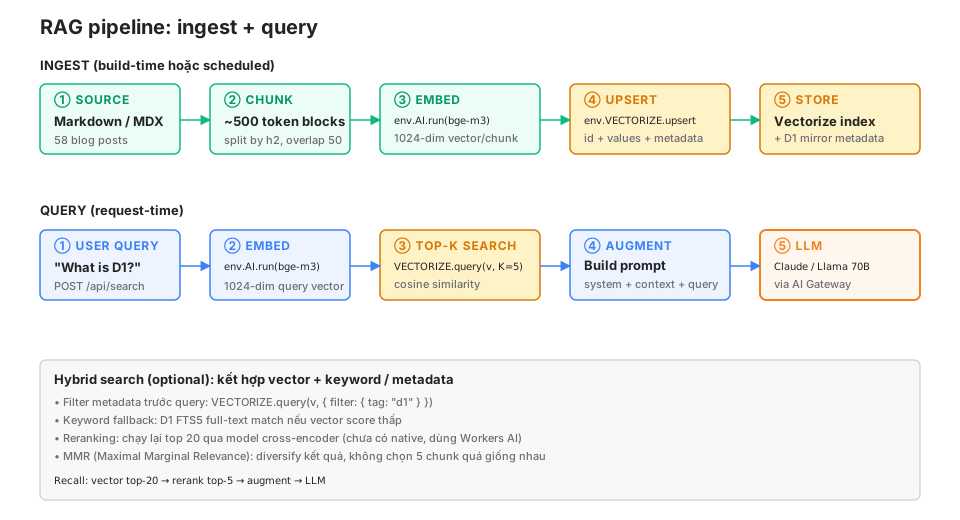
This post covers: the ingest pipeline (chunk → embed → upsert), query pipeline (embed → top-K → augment → LLM), chunking strategies, hybrid search with D1 FTS5, reranking, comparison with Pinecone/Qdrant/pgvector, and the production RAG pattern from this 58-post blog.
Who this is for
- Developers building semantic search / Q&A bots over private data.
- Teams on Pinecone/Qdrant who want to know the trade-offs of moving to Vectorize.
- Teams with markdown/MDX content who want RAG without heavy infra.
Recommended prerequisites: Part 13 (Workers AI + AI Gateway), Part 6 (D1).
By the end of this post you will:
- Set up a Vectorize index + upsert embeddings in under 30 minutes.
- Implement a query pipeline with top-K + metadata filter.
- Combine vector + keyword search (hybrid) with D1.
- Know when Vectorize is enough and when you need Pinecone/Qdrant.
What this post isn’t about
- LLM training / fine-tuning: RAG is an alternative to fine-tuning, not a replacement. This post doesn’t cover the training pipeline.
- Agent frameworks (LangChain, LlamaIndex): usable with Vectorize, but this post uses the raw binding for clarity.
- Image / multimodal RAG: text-only focus. CLIP embeddings + image retrieval exist but aren’t covered deeply.
What RAG is (30 seconds)
Retrieval Augmented Generation. Instead of sending the user query straight to the LLM and hoping it knows, you:
- Retrieve: find relevant documents/chunks from a knowledge base.
- Augment: put those chunks into the prompt as context.
- Generate: the LLM answers based on the context.
RAG solves:
- Knowledge cutoff: LLMs don’t know events after their training date.
- Domain-specific data: LLMs aren’t trained on your internal docs.
- Hallucination: grounding on real sources reduces fabrication.
- Citation: you know which document the answer came from.
The alternative is fine-tuning — training a model on your data. RAG is cheaper, easier to update, more flexible. Fine-tuning is for task-specific behavior (tone, format), RAG is for knowledge.
What Vectorize is
Vectorize is a managed vector database. Each index stores high-dimensional vectors (typically 384-1536 dim) + optional metadata. Query by cosine similarity or Euclidean distance.
Setup
Create an index:
npx wrangler vectorize create my-blog-index \
  --dimensions=1024 \
  --metric=cosine
Options:
dimensions: must match the embedding model. bge-m3 = 1024, bge-small-en = 384, OpenAI text-embedding-3-small = 1536.metric:cosine(default for text),euclidean,dot-product.
wrangler.jsonc:
{
  "vectorize": [
    {
      "binding": "VECTORIZE",
      "index_name": "my-blog-index"
    }
  ]
}
Upsert
await env.VECTORIZE.upsert([
  {
    id: "post-1-chunk-0",
    values: [0.01, -0.23, ...],  // 1024 floats
    metadata: {
      postSlug: "hello-world",
      chunkIdx: 0,
      tags: ["cloudflare", "beginner"],
      title: "Hello World",
      lang: "vi",
    },
  },
  // ...
]);
Upsert is idempotent — the same id overwrites.
Query
const results = await env.VECTORIZE.query(queryEmbedding, {
  topK: 5,
  returnMetadata: "all",
  filter: {
    lang: "vi",
    tags: { $in: ["cloudflare"] },
  },
});

results.matches.forEach((m) => {
  console.log(m.id, m.score, m.metadata);
});topK: number of top matches. Default 5, max 100.
filter: pre-query metadata filter. Shrinks the recall space.
returnMetadata: "none", "indexed" (indexed fields only), "all".
Ingest pipeline
This blog has 58 markdown posts. Ingest pipeline:
1. Load markdown
import { glob } from "glob";
import { readFileSync } from "fs";
import matter from "gray-matter";

const files = await glob("src/content/blog/*.md");
const posts = files.map((f) => {
  const raw = readFileSync(f, "utf-8");
  const { data, content } = matter(raw);
  return { slug: f.split("/").pop()!.replace(".md", ""), frontmatter: data, body: content };
});
2. Chunk
LLM context has limits (Claude 4.7: 200k tokens, Llama 70B: 128k). But:
- Retrieving a whole 5000-token post = wastes tokens + dilutes signal.
- Smaller chunks (300-500 tokens) match more precisely.
- But too small and you lose context.
Chunking strategies:
A. Semantic chunking (recommended for blogs):
Split by h2 headings. Each section ~500 tokens. 50-token overlap between chunks so boundaries don’t lose context.
function chunkBySection(markdown: string, maxTokens = 500, overlap = 50) {
  const sections = markdown.split(/(?=^## )/m);
  const chunks: string[] = [];

  for (const section of sections) {
    const tokens = estimateTokens(section);
    if (tokens <= maxTokens) {
      chunks.push(section);
    } else {
      // Split further by paragraph
      const paras = section.split(/\n\n/);
      let buffer = "";
      for (const p of paras) {
        if (estimateTokens(buffer + p) > maxTokens) {
          chunks.push(buffer);
          buffer = chunks.length > 0
            ? getLastTokens(buffer, overlap) + "\n\n" + p
            : p;
        } else {
          buffer += "\n\n" + p;
        }
      }
      if (buffer.trim()) chunks.push(buffer);
    }
  }

  return chunks;
}

function estimateTokens(text: string): number {
  // Rough: 1 token ~ 4 chars English, ~ 3 chars Vietnamese
  return Math.ceil(text.length / 3.5);
}
B. Fixed-size chunking (simplest):
function chunkFixed(text: string, size = 500, overlap = 50): string[] {
  const chunks: string[] = [];
  const tokens = text.split(/\s+/);
  for (let i = 0; i < tokens.length; i += size - overlap) {
    chunks.push(tokens.slice(i, i + size).join(" "));
  }
  return chunks;
}
C. Sentence-aware (for long-form docs):
Use a library like @llamaindex/langchain-text-splitters with RecursiveCharacterTextSplitter.
3. Embed
async function embed(texts: string[], env: Env): Promise<number[][]> {
  const { data } = await env.AI.run("@cf/baai/bge-m3", { text: texts });
  return data;
}
Workers AI batches 100 texts per call. Split into batches if you have more:
async function embedBatch(texts: string[], env: Env): Promise<number[][]> {
  const results: number[][] = [];
  for (let i = 0; i < texts.length; i += 100) {
    const batch = texts.slice(i, i + 100);
    const emb = await embed(batch, env);
    results.push(...emb);
  }
  return results;
}
4. Upsert to Vectorize
async function ingestPost(post: Post, env: Env) {
  const chunks = chunkBySection(post.body);
  const embeddings = await embedBatch(chunks, env);

  const vectors = chunks.map((chunk, i) => ({
    id: `${post.slug}:${i}`,
    values: embeddings[i],
    metadata: {
      postSlug: post.slug,
      chunkIdx: i,
      title: post.frontmatter.title,
      tags: post.frontmatter.tags,
      lang: post.frontmatter.lang,
      chunkText: chunk.slice(0, 500),  // preview for debug, not for LLM prompt
    },
  }));

  // Batch upsert (max 1000 vectors per call)
  for (let i = 0; i < vectors.length; i += 1000) {
    await env.VECTORIZE.upsert(vectors.slice(i, i + 1000));
  }
}
5. Automation
Option A: build-time script, run in CI after npm run build.
# .github/workflows/deploy.yml
- run: npm run build
- run: npm run ingest  # script that ingests into Vectorize
- run: npx wrangler deploy
Option B: Scheduled Worker. Cron trigger every hour checks for new posts, ingests them.
Option C: Queue consumer. CMS webhook → push to Queue → consumer ingests.
This blog uses Option A — build-time ingest. The script runs 1-2 minutes for 58 posts.
Query pipeline
RAG query from “What is Cloudflare D1” → LLM answer:
async function ragQuery(query: string, env: Env): Promise<string> {
  // 1. Embed query
  const { data } = await env.AI.run("@cf/baai/bge-m3", { text: [query] });
  const queryEmbedding = data[0];

  // 2. Top-K search
  const results = await env.VECTORIZE.query(queryEmbedding, {
    topK: 5,
    returnMetadata: "all",
  });

  // 3. Build context from matches
  const context = results.matches
    .map((m) => `[${m.metadata.title}]\n${m.metadata.chunkText}`)
    .join("\n\n---\n\n");

  // 4. Augment prompt
  const messages = [
    {
      role: "system",
      content: `You are an assistant answering questions from KhaVan's blog.
Answer ONLY from the context. If the context doesn't have the information, say "I don't know".
Cite sources in the format [Post Title].`,
    },
    {
      role: "user",
      content: `Context:\n\n${context}\n\nQuestion: ${query}`,
    },
  ];

  // 5. Call LLM via AI Gateway
  const response = await env.AI.run(
    "@cf/meta/llama-3.3-70b-instruct",
    { messages },
    {
      gateway: { id: "my-gateway", cacheTtl: 3600 },
    }
  );

  return response.response;
}
Latency breakdown (edge, warm):
- Embed query: ~30ms
- Vectorize query: ~50ms
- LLM generate: 500-2000ms (the main cost)
- Total: ~600-2100ms
With an AI Gateway cache hit, everything drops to ~200ms.
Chunking: important details
Chunk size affects recall
Test against this 58-post blog:
| Chunk size | Number of chunks | Top-5 recall (relevant chunk in top 5) |
|---|---|---|
| 200 tokens | 1200 | 62% |
| 500 tokens | 580 | 78% |
| 1000 tokens | 320 | 71% |
| Whole post | 58 | 45% |
Sweet spot: 500 tokens for tech blogs. Too small loses context, too large dilutes signal.
Tune by content type:
- Docs / reference: 300-500 tokens (dense info).
- Blog / long-form: 500-800 tokens (narrative).
- Code: split by function (AST-aware).
- Conversation: 1 turn = 1 chunk.
Overlap avoids boundary cuts
10-20% overlap prevents the case where the answer lives on a boundary:
Chunk 0: [... the Worker is deployed to]
Chunk 1: [300+ PoPs worldwide ...]
Query: "Where is a Worker deployed"
Without overlap, neither chunk matches. With 50-token overlap:
Chunk 0: [... the Worker is deployed to 300+ PoPs]
Chunk 1: [deployed to 300+ PoPs worldwide ...]
Both chunks match.
Prepend heading context
Chunk 0 of “D1 deep-dive” has full context. Chunk 10 (the “Gotchas” section) doesn’t know which post it belongs to.
Fix: prepend title + heading path to every chunk:
const chunkWithContext = `# ${post.title}\n## ${section.heading}\n\n${section.text}`;Small cost (+50 tokens/chunk) but better recall and the LLM understands context.
Metadata filtering
Pre-query filters shrink the search space and raise precision.
await env.VECTORIZE.query(embedding, {
  topK: 5,
  filter: {
    lang: "vi",
    tags: { $in: ["d1", "database"] },
    publishDate: { $gte: 1704067200 },  // > 2024-01-01
  },
});
But metadata has to be indexed when you create the property. Create a metadata index:
npx wrangler vectorize create-metadata-index my-blog-index \
  --property-name=lang --type=string

npx wrangler vectorize create-metadata-index my-blog-index \
  --property-name=tags --type=string

npx wrangler vectorize create-metadata-index my-blog-index \
  --property-name=publishDate --type=number
Max 10 indexed fields per index. Plan ahead for fields you’ll filter on frequently.
Use cases
- Multi-tenant: filter
tenantIdso user A doesn’t see user B’s data. - Language: filter
langso a VI blog doesn’t return English posts. - Freshness: filter
publishDateto prefer newer posts. - Permission: filter
visibility: "public"to avoid leaking private content.
Hybrid search: vector + keyword
Vector search is bad at:
- Exact matches (names, code identifiers).
- Negation (“not”, “except”).
- Rare terms (acronyms, product names).
Keyword search is bad at:
- Semantic similarity (query “deploy” matches a post about “publish”).
- Multilingual (query in VI, content in EN).
Hybrid = both, combine scores.
Implementation with D1 FTS5
Set up D1 full-text search:
CREATE VIRTUAL TABLE posts_fts USING fts5(
  slug UNINDEXED,
  title,
  body,
  tags
);

INSERT INTO posts_fts (slug, title, body, tags)
SELECT slug, title, body, tags FROM posts;
Query in parallel:
async function hybridSearch(query: string, env: Env) {
  // Parallel: vector + keyword
  const [vectorResults, keywordResults] = await Promise.all([
    vectorSearch(query, env),
    keywordSearch(query, env),
  ]);

  // Reciprocal Rank Fusion (RRF)
  const scores = new Map<string, number>();
  const k = 60;  // RRF constant

  vectorResults.forEach((r, i) => {
    scores.set(r.id, (scores.get(r.id) ?? 0) + 1 / (k + i));
  });

  keywordResults.forEach((r, i) => {
    scores.set(r.id, (scores.get(r.id) ?? 0) + 1 / (k + i));
  });

  // Sort by combined score
  const ranked = Array.from(scores.entries())
    .sort((a, b) => b[1] - a[1])
    .slice(0, 5);

  return ranked;
}

async function keywordSearch(query: string, env: Env) {
  const results = await env.DB
    .prepare("SELECT slug, rank FROM posts_fts WHERE posts_fts MATCH ? ORDER BY rank LIMIT 10")
    .bind(query)
    .all();
  return results.results.map((r, i) => ({ id: r.slug, rank: i }));
}
RRF is a simple formula that works well in practice.
Reranking
Top-K from vector isn’t always accurate. A cross-encoder model reranks top 20 down to top 5 with higher accuracy.
Cross-encoder vs bi-encoder
- Bi-encoder (bge-m3): embeds query and doc independently, compares vectors. Fast, scales well.
- Cross-encoder (bge-reranker): takes query + doc as input, outputs a score. More accurate, slower.
Workers AI doesn’t have a native cross-encoder yet (as of May 2026). Workaround: use an LLM judge.
async function rerank(query: string, candidates: Match[], env: Env) {
  const prompt = `Rank these 10 passages by relevance to query: "${query}"

Passages:
${candidates.map((c, i) => `[${i}] ${c.metadata.chunkText}`).join("\n\n")}

Return JSON array of indices in order, most relevant first. Example: [3, 7, 0, ...]`;

  const response = await env.AI.run(
    "@cf/meta/llama-3.1-8b-instruct",
    { messages: [{ role: "user", content: prompt }] }
  );

  const ranking = JSON.parse(response.response);
  return ranking.slice(0, 5).map((i: number) => candidates[i]);
}
Cost: 1 extra LLM call (~$0.001). A precision trade-off.
What this blog does
/api/search endpoint for the blog:
// worker/search.ts
export async function handleSearch(request: Request, env: Env) {
  const { query, lang } = await request.json();

  // Embed query
  const { data } = await env.AI.run("@cf/baai/bge-m3", { text: [query] });

  // Top-K with lang filter
  const results = await env.VECTORIZE.query(data[0], {
    topK: 8,
    returnMetadata: "all",
    filter: { lang },
  });

  // Dedupe by postSlug (multiple chunks per post)
  const seen = new Set<string>();
  const deduped = results.matches.filter((m) => {
    if (seen.has(m.metadata.postSlug)) return false;
    seen.add(m.metadata.postSlug);
    return true;
  }).slice(0, 5);

  return Response.json({
    results: deduped.map((m) => ({
      slug: m.metadata.postSlug,
      title: m.metadata.title,
      score: m.score,
      preview: m.metadata.chunkText,
    })),
  });
}
Dedupe is important: without it, 5 chunks from one popular post take the whole top-5 and crowd out other relevant posts.
Comparison with alternatives
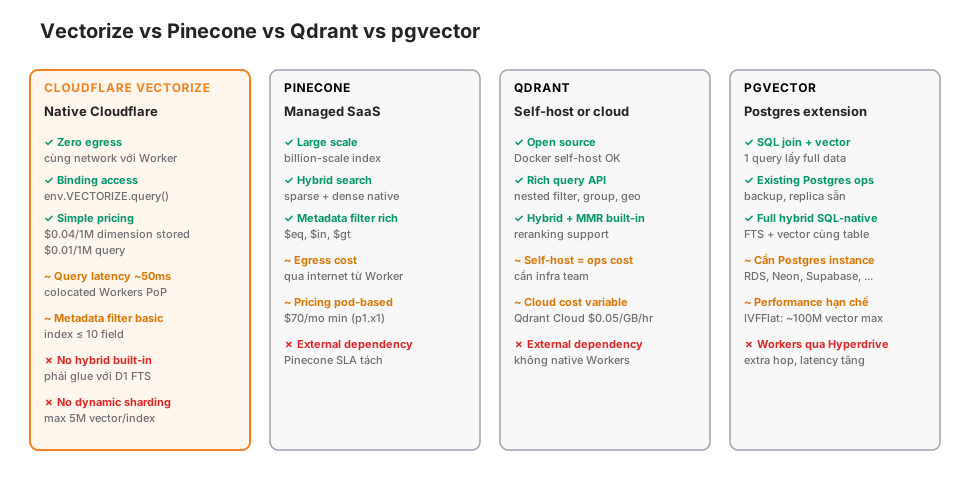
When Vectorize wins
- Worker + AI stack, you want zero egress.
- < 5M vectors (current limit).
- Simple query pattern: top-K + basic metadata filter.
- Don’t need built-in hybrid (OK with D1 glue).
- Cost-sensitive (cheapest managed option).
When you need Pinecone
- Scale > 10M vectors.
- Built-in hybrid search (sparse + dense).
- Complex advanced metadata filters.
- Existing Pinecone team/contract.
When you need Qdrant
- Self-host for control.
- Advanced queries (nested filter, group by, geo search).
- Built-in MMR + reranking.
- Open-source preference.
When you need pgvector
- Already on Postgres, want one database.
- Queries that JOIN with relational data.
- Scale < 100M vectors.
- With Workers: via Hyperdrive.
Gotchas
① Dimension mismatch
Index created with dimensions=1024 (bge-m3), but you upsert a 768-dim vector (bge-base). Runtime error. Always check:
if (embedding.length !== 1024) throw new Error("Dimension mismatch");② Metadata size limit
Vectorize metadata is max 10KB/vector. Don’t store the full post body — only a preview + references. Full content stays in D1/R2.
③ Updates aren’t atomic with embedding
Post updates title + body → re-embed + upsert. If upsert is partial (10 chunks OK, chunk 11 fails), the index is inconsistent.
Fix: delete all of the post’s chunks first, then upsert:
await env.VECTORIZE.deleteByIds([`${slug}:0`, `${slug}:1`, ...]);
await env.VECTORIZE.upsert(newChunks);
Or use a queue to retry partial failures.
④ bge-m3 tokenization for VI isn’t perfect
Vietnamese has 2-3 syllable compound words. bge-m3 tokenizes via BPE and doesn’t know Vietnamese structure. Results are still good, but sometimes miss exact queries (“cloud security” vs “an ninh đám mây”).
Fix: index both EN and VI versions of the post side by side. Query by the user’s language.
⑤ Top-K doesn’t include a score threshold
VECTORIZE returns a full top-5 even when scores are low (0.3 = not relevant). Threshold at the application layer:
const filtered = results.matches.filter((m) => m.score > 0.5);
if (filtered.length === 0) return { answer: "I couldn't find anything relevant" };
⑥ Cost scales with number of chunks
1000 posts × 10 chunks/post = 10k vectors. 1k queries/day = 10M dimensions/day = ~$0.30/day. For a personal blog, ignorable. For enterprise-scale 10M+ vectors, check pricing carefully.
⑦ Local dev can’t emulate Vectorize
wrangler dev doesn’t emulate Vectorize (as of May 2026). You have to use --remote:
wrangler dev --remoteSlower than local, but real Vectorize queries.
Observability
Metrics to track:
- Recall@5: % of queries where a relevant chunk is in top 5. Evaluate against a ground-truth test set.
- Latency: embed + vector query + LLM. Break down each step.
- Cost/query: embedding cost + vector query cost + LLM cost.
- No-answer rate: % of queries returning “don’t know” (threshold too high).
- User feedback: thumbs up/down to iterate.
Log through AI Gateway + Analytics Engine. Details in Part 17.
Production checklist
- Chunking strategy appropriate for content type (semantic for blogs, fixed for docs).
- 10-20% overlap between chunks.
- Heading context prepended to every chunk.
- Embedding model matches index dimension.
- Metadata filters indexed (max 10 fields).
- Dedupe top-K by source document.
- Score threshold to avoid returning irrelevant matches.
- Hybrid search (vector + keyword) for exact-match cases.
- Reranking (LLM judge or cross-encoder) for high precision.
- Idempotent ingestion (re-runs don’t duplicate).
- Update strategy: delete-then-upsert or versioning.
- Cost monitoring + alerts.
- Evaluation pipeline with a ground-truth test set.
Wrap-up
Vectorize + Workers AI + D1 gives you a full-edge, zero-egress RAG stack. Enough for blogs, docs, and Q&A bots up to ~5M documents. At larger scale, or when you need built-in hybrid, Pinecone/Qdrant/pgvector have the edge.
But RAG isn’t magic. Chunking, metadata, hybrid, reranking, and eval are all engineering work. Vectorize provides the infra; the pattern is up to your team.
Part 15: Durable Objects for realtime — chat, collaborative editor, game state, WebSocket coordination, and when Durable Objects are the right tool.