

TL;DR
Cloudflare has three complementary media products:
- Stream: end-to-end video. Upload → multi-bitrate transcode → HLS/DASH → player embed. Priced by minutes stored + minutes delivered.
- Images: full photo lifecycle. Upload → variant config → deliver via
imagedelivery.net. Subscription $5/100k stored + $1/100k delivered. - Image Resizing on Zone or Worker cf.image: transform images from any origin (R2, S3, web). Pay-per-use $0.50/1k unique transforms, CDN cache hits free.
Main thesis:
Not every use case needs the Images product. A tech blog with covers + dynamic OG images → R2 + Image Resizing is enough and cheaper. An e-commerce site with 100k product photos + multiple variants → the Images product subscription earns its keep. Any video volume → Stream is the only reasonable option (self-hosting FFmpeg is a rabbit hole).
This post covers: the 2 pipelines (Stream, Images) in detail, 3 ways to transform images with trade-offs, responsive + lazy patterns, real dynamic OG images, signed URLs, and when each product is correct.
This post closes Block 4 (AI + Media). Block 5 (Production) opens with Part 17 on observability.
Who this is for
- Developers building apps that upload / serve images or video.
- Blog owners who want automatic cover + OG image optimization.
- E-commerce teams needing responsive product photos at multiple sizes.
- Anyone self-hosting FFmpeg who wants out.
Recommended prerequisites: Part 7 (R2), Part 13 (Workers AI for Flux).
By the end of this post you will:
- Upload + serve video through Stream in under 30 minutes.
- Know when to pick Images vs R2 + transform.
- Implement responsive images with srcset + format=auto.
- Generate dynamic OG images from a Worker.
What this post isn’t about
- Live streaming deep-dive: Stream Live exists but has a different flow (WebRTC/RTMP ingest). This post focuses on VOD.
- Video editor / post-production: DAW, NLE aren’t Cloudflare’s domain.
- AI image generation: Flux/SDXL was covered in Part 13. This post focuses on transform + deliver, not generation.
Big picture
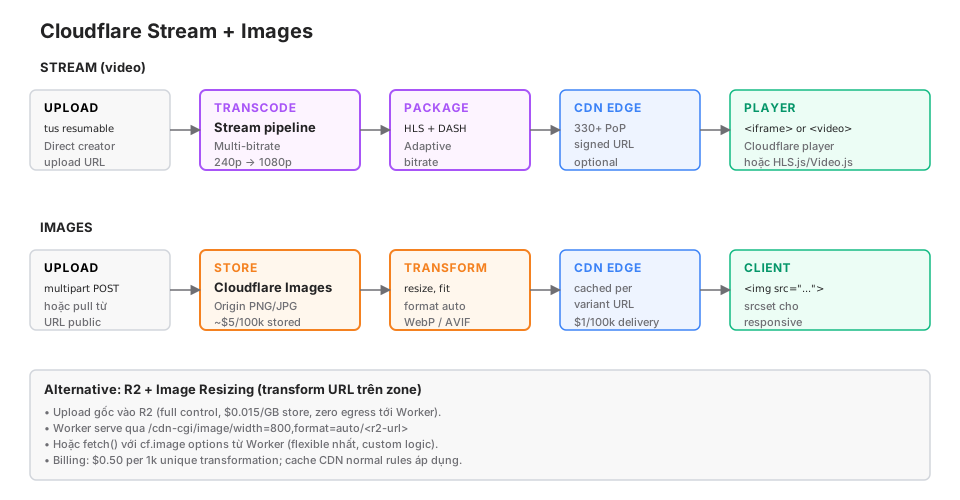
Cloudflare Stream: video
Video is a rabbit hole if you self-host: transcode, storage, ABR, DRM, CDN, player. Stream packages all of it into a single subscription.
Upload
Direct creator upload (client-to-Cloudflare, bypassing your Worker):
// Worker creates the upload URL
async function getUploadURL(request: Request, env: Env): Promise<Response> {
  const r = await fetch(
    `https://api.cloudflare.com/client/v4/accounts/${env.CF_ACCOUNT_ID}/stream/direct_upload`,
    {
      method: "POST",
      headers: {
        Authorization: `Bearer ${env.STREAM_API_TOKEN}`,
        "Content-Type": "application/json",
      },
      body: JSON.stringify({
        maxDurationSeconds: 3600,
        expiry: new Date(Date.now() + 3600_000).toISOString(),
      }),
    }
  );

  const { result } = await r.json();
  return Response.json({ uploadURL: result.uploadURL, uid: result.uid });
}
Client uses tus (resumable upload protocol):
import * as tus from "tus-js-client";

const file = document.querySelector("input[type=file]").files[0];
const upload = new tus.Upload(file, {
  endpoint: uploadURL,  // from Worker
  chunkSize: 50 * 1024 * 1024,  // 50MB
  onProgress: (sent, total) => {
    console.log(`${(sent / total * 100).toFixed(1)}%`);
  },
  onSuccess: () => console.log("Done"),
});
upload.start();
Resumable: network drops, upload resumes exactly where it left off. Critical for mobile / unstable connections.
Transcode
Automatic. Cloudflare transcodes the uploaded video into multiple renditions:
Input: 4K MP4 upload
Output:
  → 240p (low bandwidth)
  → 360p
  → 480p
  → 720p
  → 1080p
  → (no transcode above source)
ABR (Adaptive Bitrate) — the player picks a rendition matching the user’s bandwidth.
Transcode time: roughly real-time. A 10-minute video = ~10-minute transcode.
Package
HLS (Apple ecosystem + modern browsers) + DASH (Android + fallback). Auto-generated.
Manifest URL:
https://customer-<code>.cloudflarestream.com/<uid>/manifest/video.m3u8
https://customer-<code>.cloudflarestream.com/<uid>/manifest/video.mpd
Embed
Option 1: Cloudflare player iframe.
<iframe
  src="https://customer-<code>.cloudflarestream.com/<uid>/iframe"
  style="border: none; aspect-ratio: 16/9; width: 100%;"
  allow="accelerometer; gyroscope; autoplay; encrypted-media; picture-in-picture;"
  allowfullscreen>
</iframe>
Option 2: HLS.js / Video.js custom player.
<video id="player" controls></video>
<script src="https://cdn.jsdelivr.net/npm/hls.js@latest"></script>
<script>
const video = document.getElementById("player");
if (Hls.isSupported()) {
  const hls = new Hls();
  hls.loadSource("https://customer-<code>.cloudflarestream.com/<uid>/manifest/video.m3u8");
  hls.attachMedia(video);
}
</script>
Signed URL (optional)
Protect private videos:
async function getSignedURL(uid: string, env: Env): Promise<string> {
  const r = await fetch(
    `https://api.cloudflare.com/client/v4/accounts/${env.CF_ACCOUNT_ID}/stream/${uid}/token`,
    {
      method: "POST",
      headers: {
        Authorization: `Bearer ${env.STREAM_API_TOKEN}`,
        "Content-Type": "application/json",
      },
      body: JSON.stringify({
        exp: Math.floor(Date.now() / 1000) + 3600,  // 1h
      }),
    }
  );

  const { result } = await r.json();
  return `https://customer-<code>.cloudflarestream.com/${result.token}/manifest/video.m3u8`;
}
Token expires in 1h. Users can’t share the URL forever. Enough for paid content, course platforms.
Stream pricing
- Storage: $5 per 1000 minutes stored per month.
- Delivery: $1 per 1000 minutes delivered.
Example: 100 videos, avg 10 minutes = 1000 minutes stored = $5/month. 10k views/month, avg 5 minutes watched = 50k minutes delivered = $50/month. Total ~$55/month.
Compared to AWS + MediaConvert + CloudFront: similar or cheaper, but far less operational effort.
Cloudflare Images: photo lifecycle
Images targets apps that upload + serve many photos (UGC, e-comm, photography).
Upload
Three ways:
A. Direct upload (client → CF):
// Worker creates the upload URL
async function getImageUploadURL(env: Env) {
  const r = await fetch(
    `https://api.cloudflare.com/client/v4/accounts/${env.CF_ACCOUNT_ID}/images/v2/direct_upload`,
    {
      method: "POST",
      headers: { Authorization: `Bearer ${env.IMAGES_API_TOKEN}` },
    }
  );
  const { result } = await r.json();
  return { uploadURL: result.uploadURL, id: result.id };
}
Client POSTs the file:
const formData = new FormData();
formData.append("file", fileInput.files[0]);
await fetch(uploadURL, { method: "POST", body: formData });
B. Server-side upload:
const formData = new FormData();
formData.append("file", fileBlob);

await fetch(
  `https://api.cloudflare.com/client/v4/accounts/${accountId}/images/v1`,
  {
    method: "POST",
    headers: { Authorization: `Bearer ${token}` },
    body: formData,
  }
);
C. Pull from a public URL:
await fetch(
  `https://api.cloudflare.com/client/v4/accounts/${accountId}/images/v1`,
  {
    method: "POST",
    headers: {
      Authorization: `Bearer ${token}`,
      "Content-Type": "application/json",
    },
    body: JSON.stringify({ url: "https://example.com/photo.jpg" }),
  }
);
Variants
Instead of per-request transforms, Images uses pre-configured “variants”.
Dashboard → Images → Variants:
variant: "thumb"
  width: 200
  height: 200
  fit: cover
  format: auto

variant: "hero"
  width: 1920
  height: 1080
  fit: contain
  format: auto
  quality: 85
URL:
https://imagedelivery.net/<account-hash>/<image-id>/thumb
https://imagedelivery.net/<account-hash>/<image-id>/hero
No custom params inside the URL (unlike Image Resizing). You must define variants first.
Flexible variants
Enable the option in dashboard → URLs can include inline params:
https://imagedelivery.net/<account-hash>/<image-id>/w=800,h=600,fit=cover,format=autoFlexible but no schema validation.
Signed URLs
Protect private images:
const SIGNING_KEY = env.IMAGES_SIGNING_KEY;

function signImageURL(imageId: string, variant: string, expiry: number) {
  const url = `https://imagedelivery.net/<hash>/${imageId}/${variant}?exp=${expiry}`;
  const hmac = crypto.subtle.sign(
    "HMAC",
    importKey(SIGNING_KEY),
    new TextEncoder().encode(url)
  );
  return `${url}&sig=${toHex(hmac)}`;
}
Images pricing
- Storage: $5 per 100k images stored per month.
- Delivery: $1 per 100k images delivered.
- Transformation: included (not billed separately).
Simple: $10/month for 100k images stored + 100k views. Scales linearly.
Image Resizing on Zone (no Images product needed)
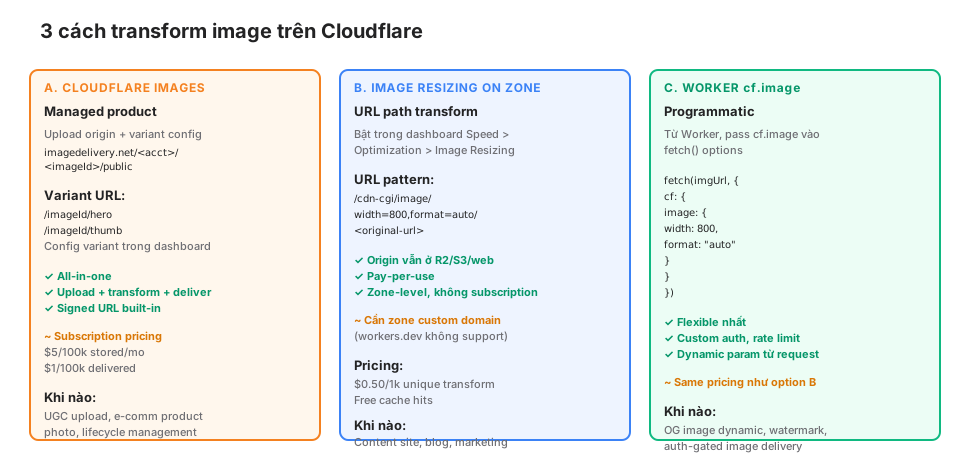
If your images already live in R2, S3, or a web URL, you don’t need the Images product. Enable Image Resizing on the zone:
Dashboard → Speed → Optimization → Image Resizing → EnableURL pattern:
https://<zone>/cdn-cgi/image/width=800,format=auto/<original-path>Example:
<!-- Original -->
https://cloudsecop.net/images/cover.jpg (2000×1500 PNG, 2MB)

<!-- Transformed -->
https://cloudsecop.net/cdn-cgi/image/width=800,format=auto/images/cover.jpg
(800×600 WebP, ~80KB — 25x smaller)
Options
width,height: resize.fit:scale-down,contain,cover,crop,pad.format:auto(WebP/AVIF per browser),webp,avif,json.quality: 1-100 (default 85).gravity:auto,left,right,top,bottom,center.background: color forpad.blur,sharpen,brightness,contrast: filters.trim: crop borders.dpr: device pixel ratio.
Requirements
- The zone must have a custom domain.
- Cloudflare workers.dev doesn’t support this (must go through a zone).
- Enable in dashboard.
Pricing
- $0.50 per 1000 unique transformations.
- Cache hits are free (standard CDN rules).
Example: 100 posts × 3 sizes (1x, 2x, 3x) × 2 formats (WebP, AVIF) = 600 unique transforms. 100k views/month with 90% cache hit rate = 10k misses = only ~600 actual unique transforms (repeat misses for the same variant still count once). Cost ~$0.30/month.
Worker cf.image: programmatic
Need custom logic (auth, dynamic params, watermarks)? Worker fetch with cf.image:
export default {
  async fetch(request: Request): Promise<Response> {
    const url = new URL(request.url);
    const imagePath = url.pathname.slice(1);  // trim leading /
    const width = parseInt(url.searchParams.get("w") || "800");

    // Auth check
    if (url.searchParams.get("private") === "true") {
      const user = await authenticate(request);
      if (!user) return new Response("Unauthorized", { status: 401 });
    }

    // Fetch with image resize
    const imageRequest = new Request(`https://origin.com/${imagePath}`, request);
    return fetch(imageRequest, {
      cf: {
        image: {
          width,
          format: "auto",
          fit: "scale-down",
          quality: 85,
        },
      },
    });
  },
};
Strongest when:
- Origin is protected (R2 private bucket).
- Per-user auth.
- Dynamic watermarks.
- You want to log each view into Analytics Engine.
Pattern: responsive images
HTML <img srcset> lets the browser pick the right size:
<img
  src="https://cloudsecop.net/cdn-cgi/image/width=800,format=auto/images/cover.jpg"
  srcset="
    https://cloudsecop.net/cdn-cgi/image/width=400,format=auto/images/cover.jpg 400w,
    https://cloudsecop.net/cdn-cgi/image/width=800,format=auto/images/cover.jpg 800w,
    https://cloudsecop.net/cdn-cgi/image/width=1600,format=auto/images/cover.jpg 1600w
  "
  sizes="(max-width: 640px) 100vw, 800px"
  alt="..."
  loading="lazy"
/>
The browser picks:
- Mobile 400px viewport → loads 400w.
- Retina desktop at 1600px → loads 1600w.
loading="lazy": the browser defers loading below-fold images. Free perf win.
With Astro
Astro has an <Image /> component, but the transform URL needs customization. Helper:
---
// src/components/CFImage.astro
interface Props {
  src: string;
  alt: string;
  widths?: number[];
  sizes?: string;
  loading?: "lazy" | "eager";
}

const {
  src,
  alt,
  widths = [400, 800, 1200, 1600],
  sizes = "(max-width: 640px) 100vw, 800px",
  loading = "lazy",
} = Astro.props;

const srcset = widths.map((w) =>
  `/cdn-cgi/image/width=${w},format=auto,quality=85${src} ${w}w`
).join(", ");

const defaultSrc = `/cdn-cgi/image/width=${widths[Math.floor(widths.length / 2)]},format=auto${src}`;
---

<img src={defaultSrc} srcset={srcset} sizes={sizes} alt={alt} loading={loading} />
Use:
<CFImage src="/images/cover.jpg" alt="Cover" />Pattern: dynamic OG images
OG images (1200×630) show when you share links on Twitter, LinkedIn, Slack. Static files for 100 posts = boring. Dynamic OG from a Worker:
Method 1: SVG to PNG
// worker/og.ts
export async function generateOG(title: string, env: Env) {
  const svg = `
    <svg xmlns="http://www.w3.org/2000/svg" width="1200" height="630">
      <rect width="1200" height="630" fill="#0f172a"/>
      <text x="60" y="120" fill="#f48120" font-family="system-ui" font-size="32" font-weight="700">
        CloudSecOp
      </text>
      <text x="60" y="200" fill="#fff" font-family="system-ui" font-size="54" font-weight="700">
        ${escapeXml(title.slice(0, 60))}
      </text>
    </svg>
  `;

  // Convert SVG → PNG through Worker cf.image
  const pngResponse = await fetch(
    `data:image/svg+xml;base64,${btoa(svg)}`,
    {
      cf: {
        image: {
          width: 1200,
          height: 630,
          format: "png",
        },
      },
    }
  );

  return pngResponse;
}
Trick: the Worker doesn’t execute the SVG → PNG conversion itself. Using cf.image with format: "png" pushes the conversion down to Cloudflare’s infrastructure.
Method 2: AI-generated with Flux
const image = await env.AI.run("@cf/black-forest-labs/flux-1-schnell", {
  prompt: `Minimal geometric cover for: "${title}". Dark theme, orange accent, editorial.`,
  num_steps: 4,
});

return new Response(image, { headers: { "Content-Type": "image/png" } });
Nicer than an SVG template, but more expensive (~$0.005/image). Aggressive cache to R2:
// Check cache first
const cached = await env.R2.get(`og/${slug}.png`);
if (cached) return new Response(cached.body, { headers: { "Content-Type": "image/png" } });

// Generate
const image = await env.AI.run(...);

// Cache
await env.R2.put(`og/${slug}.png`, image);

return new Response(image, { headers: { "Content-Type": "image/png" } });
Generate once, serve forever. 100 posts = ~$0.50 one-time cost.
Comparison: 3 image options
| Use case | Recommended | Pricing estimate (small scale) |
|---|---|---|
| E-comm with 10k+ product photos, lifecycle + variants | Cloudflare Images | ~$10/month |
| Blog with 100 covers + OG, images in R2 or public | Image Resizing on Zone | ~$0.50/month |
| UGC photo upload, avatars, multi-size | Cloudflare Images | ~$10/month |
| Auth-gated images (paid content) | Worker cf.image + R2 private | ~$1-2/month |
| Static marketing images | Image Resizing on Zone | ~$0.10/month |
Main decisions:
- Need an upload workflow? → Images product or a Worker API that writes to R2.
- Public images on a zone? → Image Resizing on Zone is enough and cheap.
- Complex custom logic? → Worker cf.image.
Gotchas
① Image Resizing doesn’t work on workers.dev
*.workers.dev isn’t a zone → no /cdn-cgi/image/. You need a custom domain. Dev workflow: configure a custom domain or test in production.
② Cache key with query params
/cdn-cgi/image/width=800/images/cover.jpg?v=1  → cache key 1
/cdn-cgi/image/width=800/images/cover.jpg?v=2  → cache key 2
Cache-bust with a query param. But don’t use random ?t=Date.now() → miss on every request.
③ Format auto depends on the Accept header
format=auto returns:
- AVIF if the browser supports it (Chrome 85+, Safari 16+, Firefox 93+).
- WebP if not.
- JPEG fallback.
Test with curl:
curl -H "Accept: image/avif,image/webp" https://... -o test.avif④ Signed URL formats
Images: HMAC in a ?sig= param. Stream: token in the path.
Not interchangeable. Read the docs carefully before coding.
⑤ Stream upload deadlines
Direct upload URLs have an expiry. Users uploading past the deadline = 410 Gone. Set the expiry long enough for slow connections (1h is reasonable).
⑥ MP4 download from Stream
By default Stream serves HLS/DASH, not MP4 downloads. Enable downloadable: true when creating the video:
{ "requireSignedURLs": false, "allowedOrigins": [...], "downloadable": true }MP4 download URL: https://videodelivery.net/<uid>/downloads/default.mp4
⑦ Images variant cache
Updating a variant config → old URLs keep serving the old cached version until TTL expires (or you purge). Use a new variant name for breaking changes (hero-v2 instead of editing hero).
⑧ Transparent PNG → JPEG
format=auto on PNG with alpha → if the browser only supports JPEG, the alpha channel is lost (fills with black/white). Keep PNG explicit:
/cdn-cgi/image/width=800,format=png/...⑨ Stream storage isn’t free
Delete videos when you don’t need them. A 1GB video at 8Mbps = 1 minute → $0.005/month/video. 1000 forgotten videos = $5/month of invisible cost.
Observability
Dashboard: Stream and Images have per-product analytics:
- Stream: video minutes delivered, bandwidth, viewer country.
- Images: transformation count, delivery count, cache hit rate.
Log via Logpush → R2 for long-term storage (every access request).
Alerts:
- Transformation count spike (DDoS abuse via
/cdn-cgi/image/). - Storage cost spike (forgotten uploads).
- Bandwidth spike.
Production checklist
- Stream direct upload via a Worker (don’t expose the token client-side).
- Images upload through a direct upload URL (don’t pass files through the Worker — wastes CPU).
- Signed URLs for private content (Stream: token, Images: HMAC).
- Responsive images:
srcset+sizes+loading="lazy". -
format=autoso browsers get AVIF/WebP. - Dynamic OG images cached in R2, not generated per-request.
- Stable variant naming, don’t modify existing variants (breaking change).
- Enable Image Resizing on a custom domain (workers.dev not supported).
- Monitor cost: storage, transformations, delivery.
- Clean up orphaned media (videos/images with no references).
- Cache headers
Cache-Control: public, max-age=31536000, immutablefor versioned assets.
Wrap-up
Stream is the only reasonable answer for video. The Images product fits UGC/e-comm apps with upload workflows. For everything else — blogs, content sites, marketing — Image Resizing on Zone or Worker cf.image is cheaper and flexible enough.
Block 4 (AI + Media) closes with 4 parts: Workers AI, Vectorize RAG, Durable Objects, Stream + Images. The Cloudflare platform is now nearly full-stack.
Block 5 (Production) opens with Part 17: Observability with Logs + Tail Workers + Analytics Engine — how to know a Worker is working, debug production, and alert on errors.