

TL;DR
A Durable Object (DO) is the only primitive on the Workers platform that guarantees single-writer semantics for a given ID. Each DO instance runs at one PoP, holds state in memory + persistent storage, and auto-migrates when a PoP fails.
Main thesis:
DOs are not a database replacement. They’re a state coordination layer. Use them right for: chat rooms (1 room = 1 DO), collab editors (1 doc = 1 DO), game matches (1 match = 1 DO), per-user rate limiters. Use them wrong (typical CRUD, storing a whole user table) = scaling bottleneck.
This post covers: DO mental model, the WebSocket Hibernation API, 6 real-world patterns with code, storage options (KV vs SQL beta), migrations + deploy, alarms for scheduled work, and when DOs are overkill.
Part 8 covered Queues + DO basics quickly. This post goes deep into the realtime side of DOs.
Who this is for
- Developers building chat, collab, game, or presence features.
- Anyone on Pusher/Ably/Socket.io who wants to self-host on the edge.
- Teams needing stateful rate limiters with strict consistency (not eventual).
Recommended prerequisites: Part 2 (runtime), Part 8 (Queues + DO basics).
By the end of this post you will:
- Build a WebSocket chat room with a DO in under 50 lines of code.
- Understand the Hibernation API for a 10x cost cut.
- Know when DO state fits and when you need an external database.
- Implement a basic CRDT collab editor.
What this post isn’t about
- Full CRDT implementation: Yjs / Automerge internals are complex, not covered here. Focus is on using DOs as a relay + snapshot server.
- WebRTC: peer-to-peer video/audio — DOs can handle signaling, but the media plane is a separate topic.
- Multi-region replication: DOs are single-region instances. Replication needs its own design pattern.
DO mental model
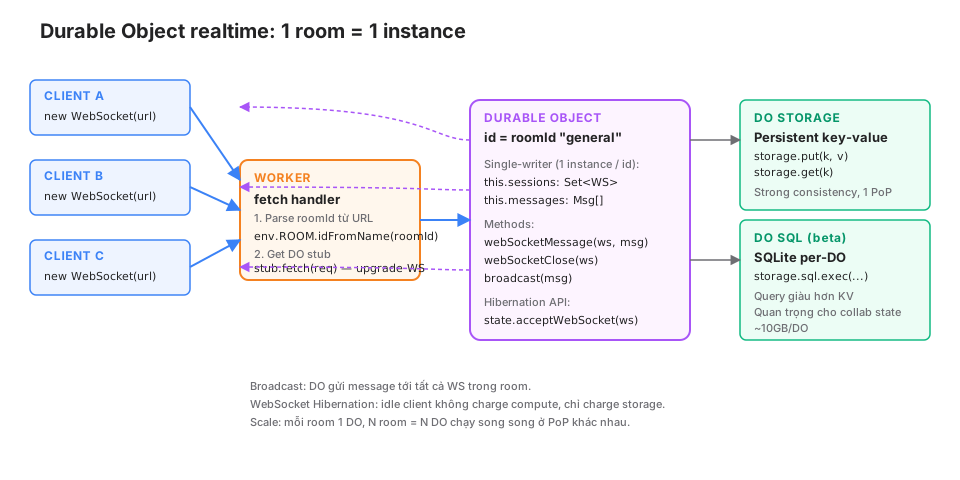
Three core properties:
1. Single-writer per ID
1 ID = 1 instance at a time. No races, no locks. The Worker routes to the right instance by ID.
// Worker
const id = env.ROOM.idFromName("general");  // hash ID → consistent
const stub = env.ROOM.get(id);
return stub.fetch(request);  // forward to DO
1000 clients connecting to "general" at the same time → all routed to the same DO instance. The DO processes sequentially (event loop) → no application-level locking needed.
2. In-memory state + persistent storage
The DO keeps state in memory (fast). storage.put/get persist to disk (Cloudflare-managed). When the DO restarts (deploy, hibernation, PoP move) → memory state is lost, storage survives.
export class RoomDO {
  sessions: Set<WebSocket> = new Set();  // memory only

  constructor(readonly state: DurableObjectState) {}

  async initialize() {
    // Load from storage if needed
    const history = await this.state.storage.get<Msg[]>("history") ?? [];
  }
}
3. Sticky location
A DO instance runs at the PoP nearest the first request. Subsequent requests for the same ID are routed back to that PoP. If the PoP fails, the DO migrates to another PoP (automatically).
Implication: a user in Vietnam creates a room → the DO lives in Singapore. Another Singapore user in the same room = fast. A US user in the same room = +~200ms RTT per message. For global apps you may need to shard rooms by region.
First DO setup
wrangler.jsonc
{
  "name": "my-chat",
  "main": "src/index.ts",
  "compatibility_date": "2026-05-01",
  "durable_objects": {
    "bindings": [
      { "name": "ROOM", "class_name": "RoomDO" }
    ]
  },
  "migrations": [
    { "tag": "v1", "new_sqlite_classes": ["RoomDO"] }
  ]
}
new_sqlite_classes — uses the SQLite storage backend (new, recommended). new_classes = KV backend (legacy).
src/index.ts
export { RoomDO } from "./room";

export default {
  async fetch(request: Request, env: Env): Promise<Response> {
    const url = new URL(request.url);
    const roomId = url.pathname.split("/")[2];  // /room/general/ws

    if (!roomId) return new Response("Missing roomId", { status: 400 });

    const id = env.ROOM.idFromName(roomId);
    const stub = env.ROOM.get(id);
    return stub.fetch(request);
  },
} satisfies ExportedHandler<Env>;
src/room.ts
export class RoomDO {
  sessions: Set<WebSocket> = new Set();

  constructor(readonly state: DurableObjectState, readonly env: Env) {}

  async fetch(request: Request): Promise<Response> {
    const pair = new WebSocketPair();
    const [client, server] = [pair[0], pair[1]];

    await this.handleSession(server);

    return new Response(null, { status: 101, webSocket: client });
  }

  async handleSession(ws: WebSocket) {
    ws.accept();
    this.sessions.add(ws);

    ws.addEventListener("message", (msg) => {
      this.broadcast(msg.data as string);
    });

    ws.addEventListener("close", () => {
      this.sessions.delete(ws);
    });
  }

  broadcast(message: string) {
    for (const session of this.sessions) {
      try {
        session.send(message);
      } catch {
        this.sessions.delete(session);
      }
    }
  }
}
Deploy:
npx wrangler deployConnect from the browser:
const ws = new WebSocket("wss://my-chat.<subdomain>.workers.dev/room/general/ws");
ws.onmessage = (e) => console.log(e.data);
ws.send("hello");
Under 50 lines of code, full chat room. N clients connected to “general” all receive each other’s messages.
WebSocket Hibernation API
Standard WebSocket problem: every active connection keeps a DO instance running continuously, charging compute every second. 100 idle users = 100 DOs running.
Hibernation: the DO “sleeps” when there are no events, wakes on a message. Idle connections don’t get charged compute.
How to use it
Replace ws.accept() + addEventListener with:
async fetch(request: Request): Promise<Response> {
  const pair = new WebSocketPair();
  const [client, server] = [pair[0], pair[1]];

  // Instead of ws.accept():
  this.state.acceptWebSocket(server, ["user:123", "room:general"]);
  // tags let the DO find the connection after it wakes

  return new Response(null, { status: 101, webSocket: client });
}

// Handler at the class level instead of in a closure
async webSocketMessage(ws: WebSocket, message: string) {
  this.broadcast(message);
}

async webSocketClose(ws: WebSocket, code: number, reason: string) {
  // cleanup
}

async webSocketError(ws: WebSocket, error: unknown) {
  // log
}
Broadcast uses getWebSockets():
broadcast(message: string) {
  const sockets = this.state.getWebSockets();  // includes hibernated
  for (const ws of sockets) {
    try {
      ws.send(message);
    } catch {
      // socket closed
    }
  }
}
Trade-off
- Pros: 100 idle connections are only charged storage (~$0.20/GB/month), not compute.
- Cons: handlers are class methods, not closures. State has to be loaded from
this.
Use Hibernation for 99% of cases. Standard WebSocket only when you need closure-captured private variables (rare).
Pattern 1: chat room
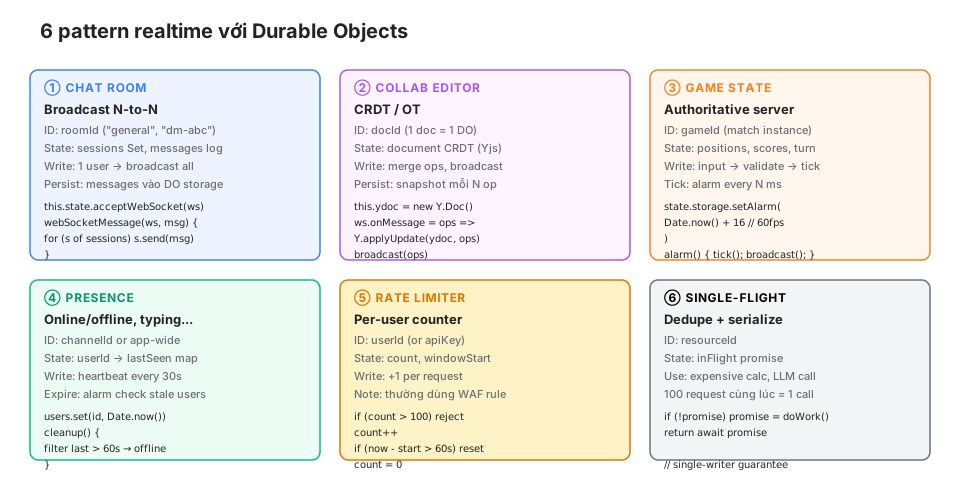
Full implementation with Hibernation + storage:
interface Msg {
  id: string;
  user: string;
  text: string;
  ts: number;
}

export class RoomDO {
  constructor(readonly state: DurableObjectState, readonly env: Env) {}

  async fetch(request: Request): Promise<Response> {
    const url = new URL(request.url);

    if (url.pathname.endsWith("/ws")) {
      // WebSocket upgrade
      const pair = new WebSocketPair();
      const [client, server] = [pair[0], pair[1]];

      const user = url.searchParams.get("user") ?? "anon";
      this.state.acceptWebSocket(server, [`user:${user}`]);

      // Send history
      const history = await this.state.storage.get<Msg[]>("history") ?? [];
      server.send(JSON.stringify({ type: "history", messages: history }));

      return new Response(null, { status: 101, webSocket: client });
    }

    return new Response("Not found", { status: 404 });
  }

  async webSocketMessage(ws: WebSocket, raw: string) {
    const { text } = JSON.parse(raw);
    const tags = this.state.getTags(ws);
    const user = tags.find((t) => t.startsWith("user:"))?.slice(5) ?? "anon";

    const msg: Msg = {
      id: crypto.randomUUID(),
      user,
      text,
      ts: Date.now(),
    };

    // Persist (keep last 100)
    const history = await this.state.storage.get<Msg[]>("history") ?? [];
    history.push(msg);
    if (history.length > 100) history.splice(0, history.length - 100);
    await this.state.storage.put("history", history);

    // Broadcast
    const payload = JSON.stringify({ type: "message", message: msg });
    for (const socket of this.state.getWebSockets()) {
      try {
        socket.send(payload);
      } catch {}
    }
  }

  async webSocketClose(ws: WebSocket) {
    // Hibernation auto-manages, no manual cleanup needed
  }
}
Pattern 2: collab editor (Yjs)
Yjs is a popular CRDT library. DOs act as the relay + snapshot server.
import * as Y from "yjs";

export class DocDO {
  ydoc: Y.Doc;
  snapshotTimer: number | null = null;

  constructor(readonly state: DurableObjectState) {
    this.ydoc = new Y.Doc();
    state.blockConcurrencyWhile(async () => {
      // Load snapshot from storage
      const snapshot = await state.storage.get<Uint8Array>("snapshot");
      if (snapshot) {
        Y.applyUpdate(this.ydoc, snapshot);
      }
    });
  }

  async fetch(request: Request): Promise<Response> {
    const pair = new WebSocketPair();
    const [client, server] = [pair[0], pair[1]];

    this.state.acceptWebSocket(server);

    // Send current state
    const state = Y.encodeStateAsUpdate(this.ydoc);
    server.send(state);

    return new Response(null, { status: 101, webSocket: client });
  }

  async webSocketMessage(ws: WebSocket, data: ArrayBuffer) {
    const update = new Uint8Array(data);
    Y.applyUpdate(this.ydoc, update);

    // Broadcast to other clients
    for (const socket of this.state.getWebSockets()) {
      if (socket !== ws) {
        try {
          socket.send(update);
        } catch {}
      }
    }

    // Schedule snapshot (debounce)
    this.scheduleSnapshot();
  }

  scheduleSnapshot() {
    if (this.snapshotTimer) return;
    this.snapshotTimer = setTimeout(async () => {
      const snapshot = Y.encodeStateAsUpdate(this.ydoc);
      await this.state.storage.put("snapshot", snapshot);
      this.snapshotTimer = null;
    }, 5000) as unknown as number;
  }
}
CRDT property: merge operations don’t conflict, order doesn’t matter. The DO holds the canonical version and broadcasts updates to every client.
Snapshots are debounced to avoid writing storage too often.
Pattern 3: game state (authoritative server)
Games need regular ticks. DO alarms let you schedule future work.
export class GameDO {
  state: GameState = { players: {}, ballPos: { x: 0, y: 0 } };

  constructor(readonly doState: DurableObjectState) {
    doState.blockConcurrencyWhile(async () => {
      const saved = await doState.storage.get<GameState>("state");
      if (saved) this.state = saved;
    });
  }

  async fetch(request: Request): Promise<Response> {
    const pair = new WebSocketPair();
    const [client, server] = [pair[0], pair[1]];

    const userId = new URL(request.url).searchParams.get("userId")!;
    this.doState.acceptWebSocket(server, [`player:${userId}`]);

    // Start tick loop (alarm)
    const alarm = await this.doState.storage.getAlarm();
    if (!alarm) {
      await this.doState.storage.setAlarm(Date.now() + 16);  // 60fps
    }

    return new Response(null, { status: 101, webSocket: client });
  }

  async webSocketMessage(ws: WebSocket, raw: string) {
    const input = JSON.parse(raw);
    const userId = this.doState.getTags(ws).find((t) => t.startsWith("player:"))?.slice(7);
    if (!userId) return;

    // Validate + apply input to game state
    this.applyInput(userId, input);
  }

  async alarm() {
    // Tick: update physics, check collisions
    this.tick();

    // Broadcast state
    const payload = JSON.stringify({ type: "state", state: this.state });
    for (const ws of this.doState.getWebSockets()) {
      try {
        ws.send(payload);
      } catch {}
    }

    // Schedule next tick
    if (this.doState.getWebSockets().length > 0) {
      await this.doState.storage.setAlarm(Date.now() + 16);
    }
  }

  tick() { /* physics update */ }
  applyInput(userId: string, input: any) { /* ... */ }
}
Alarms are the idiomatic way to schedule. Don’t use setInterval — DOs can hibernate, and intervals get dropped.
Pattern 4: presence
User online/offline, typing indicators.
export class PresenceDO {
  users: Map<string, { lastSeen: number; status: string }> = new Map();

  constructor(readonly state: DurableObjectState) {
    state.blockConcurrencyWhile(async () => {
      const saved = await state.storage.get<any>("users");
      if (saved) this.users = new Map(Object.entries(saved));
    });
  }

  async fetch(request: Request): Promise<Response> {
    const pair = new WebSocketPair();
    const [client, server] = [pair[0], pair[1]];

    const userId = new URL(request.url).searchParams.get("userId")!;
    this.state.acceptWebSocket(server, [`user:${userId}`]);

    this.users.set(userId, { lastSeen: Date.now(), status: "online" });
    this.broadcastPresence();

    // Schedule cleanup
    const alarm = await this.state.storage.getAlarm();
    if (!alarm) {
      await this.state.storage.setAlarm(Date.now() + 60_000);
    }

    return new Response(null, { status: 101, webSocket: client });
  }

  async webSocketMessage(ws: WebSocket, raw: string) {
    const userId = this.state.getTags(ws).find((t) => t.startsWith("user:"))?.slice(5);
    if (!userId) return;

    const { type } = JSON.parse(raw);
    if (type === "heartbeat") {
      const user = this.users.get(userId);
      if (user) user.lastSeen = Date.now();
    } else if (type === "typing") {
      const user = this.users.get(userId);
      if (user) user.status = "typing";
      this.broadcastPresence();
    }
  }

  async alarm() {
    // Mark stale users offline
    const now = Date.now();
    let changed = false;
    for (const [id, user] of this.users) {
      if (now - user.lastSeen > 60_000 && user.status !== "offline") {
        user.status = "offline";
        changed = true;
      }
    }
    if (changed) this.broadcastPresence();

    // Reschedule
    if (this.users.size > 0) {
      await this.state.storage.setAlarm(Date.now() + 60_000);
    }
  }

  broadcastPresence() {
    const payload = JSON.stringify({
      type: "presence",
      users: Object.fromEntries(this.users),
    });
    for (const ws of this.state.getWebSockets()) {
      try {
        ws.send(payload);
      } catch {}
    }
  }
}
Pattern 5: rate limiter
Strict per-user rate limiting (not eventual like KV).
export class RateLimiter {
  constructor(readonly state: DurableObjectState) {}

  async fetch(request: Request): Promise<Response> {
    const { limit, windowSec } = await request.json();

    const now = Date.now();
    const windowStart = await this.state.storage.get<number>("windowStart") ?? now;
    const count = await this.state.storage.get<number>("count") ?? 0;

    if (now - windowStart > windowSec * 1000) {
      // Reset window
      await this.state.storage.put("windowStart", now);
      await this.state.storage.put("count", 1);
      return Response.json({ allowed: true, remaining: limit - 1 });
    }

    if (count >= limit) {
      return Response.json({ allowed: false, remaining: 0 }, { status: 429 });
    }

    await this.state.storage.put("count", count + 1);
    return Response.json({ allowed: true, remaining: limit - count - 1 });
  }
}
Worker side:
const userId = getUserId(request);
const id = env.RATE_LIMITER.idFromName(`user:${userId}`);
const stub = env.RATE_LIMITER.get(id);
const result = await stub.fetch(new Request("https://x", {
  method: "POST",
  body: JSON.stringify({ limit: 100, windowSec: 60 }),
}));

const { allowed } = await result.json();
if (!allowed) return new Response("Rate limited", { status: 429 });
Note: Cloudflare has native WAF rate-limiting rules for HTTP traffic — faster, no DO cost. Use a DO rate limiter when you need complex logic (sliding window, per-endpoint, business logic).
Pattern 6: single-flight (dedupe)
Prevent concurrent duplicate work. Example: 100 requests hitting the same LLM prompt simultaneously → call once, share the result.
export class SingleFlight {
  inFlight: Map<string, Promise<any>> = new Map();

  constructor(readonly state: DurableObjectState, readonly env: Env) {}

  async fetch(request: Request): Promise<Response> {
    const { key, work } = await request.json();

    if (!this.inFlight.has(key)) {
      this.inFlight.set(key, this.doExpensiveWork(work).finally(() => {
        this.inFlight.delete(key);
      }));
    }

    const result = await this.inFlight.get(key)!;
    return Response.json(result);
  }

  async doExpensiveWork(work: any): Promise<any> {
    // LLM call, heavy computation, external API
    return await this.env.AI.run(work.model, { messages: work.messages });
  }
}
DO single-writer guarantees that 100 concurrent requests to the same DO ID → 99 await the promise, 1 does the work. Result returns to all.
Storage: KV vs SQL
DOs have 2 storage backends:
KV storage (original)
await state.storage.put("key", value);
const v = await state.storage.get("key");
await state.storage.delete("key");
await state.storage.list({ prefix: "foo:" });
Simple, fast for key-value. ~128KB/value limit.
SQL storage (beta, recommended)
state.storage.sql.exec(`
  CREATE TABLE IF NOT EXISTS messages (
    id TEXT PRIMARY KEY,
    user TEXT,
    text TEXT,
    ts INTEGER
  )
`);

state.storage.sql.exec(
  "INSERT INTO messages VALUES (?, ?, ?, ?)",
  id, user, text, ts
);

const results = state.storage.sql.exec(
  "SELECT * FROM messages ORDER BY ts DESC LIMIT 50"
).toArray();
SQL storage:
- SQLite per-DO, ~10GB limit.
- Richer queries (JOIN, aggregate, index).
- Better for collab state or complex game state.
new_sqlite_classesin migrations.
Recommend SQL storage for every new DO unless the use case is simple key-value.
Migrations between versions
DOs have a migration system separate from D1. Changing the class name or backend → a migration entry:
{
  "migrations": [
    { "tag": "v1", "new_sqlite_classes": ["RoomDO"] },
    { "tag": "v2", "new_sqlite_classes": ["GameDO"] },
    { "tag": "v3", "renamed_classes": [{ "from": "OldName", "to": "NewName" }] },
    { "tag": "v4", "deleted_classes": ["DeadDO"] }
  ]
}
Migrations apply at deploy. Existing DOs keep running, new DOs use the new class.
Careful: deleting a class = losing that DO’s data. There’s a warning at deploy time.
Alarm scheduling
setAlarm(timestamp) schedules alarm() to run at that timestamp. Single-flight (only one alarm pending). Persists across restarts.
await this.state.storage.setAlarm(Date.now() + 60_000);

async alarm() {
  // runs after 60s
  doCleanup();
  // reschedule if needed
  await this.state.storage.setAlarm(Date.now() + 60_000);
}
Use cases: cleanup stale data, game tick loop, send reminder emails, expire sessions.
Max 1 alarm per DO. Need multiple schedules → store a queue in storage, dispatch from alarm.
When NOT to use DOs
DOs are powerful but not for everything:
❌ User table with 1M+ rows
DO-per-user = 1M instances. Storage cost + management nightmare. Use a D1 table.
❌ Simple CRUD API
POST /posts, GET /posts — no coordination needed. D1 + a Worker handler is plenty.
❌ Global counter
Global state (app-wide view count) — a single DO instance becomes a bottleneck. Use Analytics Engine or a sharded D1.
❌ Queue processing
Fan-out background jobs — use Queues (Part 8).
❌ Read-heavy cache
Data read often, rarely written — KV is cheaper and faster.
✅ When DOs are right
- Coordination: lock, serialize, dedupe.
- Stateful WebSockets: chat, collab, game.
- Per-entity state: per-user session, per-room, per-document.
- Alarm scheduling: deadline, reminder, retry.
If you can’t see “coordination” or “WebSocket” or “per-entity stateful”, reconsider whether you need a DO.
Gotchas
① DO location is non-deterministic
DOs run at the PoP closest to the first request. A VN user creating a room → DO in Singapore. A US user joining → extra RTT. For global apps, consider:
- Sharding IDs by region prefix (
us-general,asia-general). - Accepting latency for rare cross-region use cases.
② Concurrent fetch vs event loop
DOs process requests sequentially (single-threaded event loop). 100 concurrent fetches to the same DO = queue. A slow fetch blocks others. Async I/O yields, but CPU-bound work blocks.
③ blockConcurrencyWhile for init
Loading state from storage in the constructor needs blockConcurrencyWhile so requests don’t execute before state is ready.
constructor(readonly state: DurableObjectState) {
  state.blockConcurrencyWhile(async () => {
    this.data = await state.storage.get("data");
  });
}
④ Hibernation loses closures
Standard WebSocket: closures capture variables. Hibernation: handlers are class methods, no capture. Refactor to use this.
⑤ Max 32768 connections per DO
A single DO instance caps around 32k WebSockets. Very large chat rooms need sharding across multiple DOs.
⑥ Storage transactions
SQL storage auto-commits per exec. Multiple execs that need atomicity:
state.storage.transaction(() => {
  state.storage.sql.exec("UPDATE ...");
  state.storage.sql.exec("INSERT ...");
});
⑦ Deleting a DO is hard
state.storage.deleteAll() clears storage, but the DO instance still exists. Truly delete = migrate with deleted_classes.
⑧ Local dev with DOs
wrangler dev emulates DOs through Miniflare. Hibernation API is supported from Miniflare v4+. A few behaviors (location, cross-PoP) can’t be replicated locally.
Observability
DO metrics:
- Active DO count: how many DOs are running.
- Duration (GB-s): compute time.
- Storage (GB-month): storage size.
- WebSocket connection count: active connections (hibernated don’t count compute).
- Requests: fetches into DOs.
- Error rate: % of DOs returning 5xx.
Dashboard: Workers & Pages → pick the Worker → Durable Objects tab.
Logs: tail on Workers logs includes DO logs. Details in Part 17.
Pricing snapshot
- Requests: $0.15/1M requests (same as Workers).
- Duration: $12.50/million GB-s (while DO is active).
- Storage: $0.20/GB/month.
- Hibernated WebSockets: no duration charge, storage only.
Example: 1000 chat rooms, avg 50 users/room, users active 1h/day, hibernation enabled:
- Active duration: 1000 × 1h = 1000 DO-hours/day = ~3600 GB-s/day × $12.5/1M = $0.05/day = ~$1.5/month.
- Storage: 1000 × 1MB = 1GB = $0.20/month.
- Requests: negligible.
~$2/month for 1000 active chat rooms. Self-hosting Socket.io on the smallest AWS EC2 (t3.small) = $15/month, no auto-scaling.
Production checklist
-
new_sqlite_classesfor every new DO. - Hibernation API (
acceptWebSocket) for WebSocket use cases. -
blockConcurrencyWhilefor initializing state from storage. - Broadcast via
getWebSockets(), don’t manually track sessions. - Error handling around
send()(sockets may have closed). - Optimize storage writes (batch, debounce snapshots).
- Migration entries for every class change.
- Reschedule alarms when work remains, stop when empty.
- Tag WebSockets to identify users after hibernation.
- Monitor DO count + storage to detect DO leaks.
- Don’t use DOs for use cases that don’t need coordination.
Wrap-up
Durable Objects are a unique primitive: single-writer coordination + WebSocket + persistent state + alarms. That combo lets you build chat, collab, and games at the edge when most other platforms need external infra (Redis + a cluster + Socket.io).
But DOs aren’t a database. The right tool for a coordination layer, the wrong tool for ordinary CRUD.
Part 16: Stream + Images — video streaming, on-the-fly image resizing, and CDN patterns for media. Closes Block 4.