

TL;DR
Cloudflare KV is an eventually-consistent key-value store. Writes hit a central store, then propagate out to 300+ PoPs within ~60 seconds. Reads are served from the nearest PoP’s edge cache — cheap and fast (< 10ms).
The key claim:
KV is a global cache, not a database. Design every KV workload assuming many reads, few writes, staleness up to 60s is OK. If you need strong consistency or high write throughput, it’s not a KV workload.
This post walks through the real consistency model (with a diagram), the limits that matter, 5 good patterns (feature flags, redirect map, short-lived sessions, asset metadata, rate-limit config), 3 anti-patterns (counters, primary DB, sessions that need hard invalidation), and gotchas from this blog.
Who this is for
- Developers with basic Workers + bindings knowledge who are about to use KV for the first time.
- Anyone misusing KV (counters, primary DB) and hitting throttling or stale reads.
- Anyone choosing between KV / D1 / Durable Object for a specific workload.
Read first: Part 3 (3-binding mental model) to understand where KV sits in the Storage layer.
After this post you’ll:
- Understand KV’s consistency model and why write rate is capped at 1/key/second.
- Know the 5 best-fit KV patterns.
- Avoid 3 anti-patterns that turn KV into a trap.
- Use
metadata+list()efficiently.
What this post isn’t about
- Cache API: a different primitive at the HTTP layer, covered separately.
- D1: Part 6.
- Durable Objects: Part 8.
- Workers KV pricing: Part 19.
What KV actually is
KV is a simple store: put(key, value), get(key), delete(key), list({ prefix }). Keys are strings; values are strings, ArrayBuffers, or ReadableStreams.
Behind that simple API is a central store + edge cache architecture:
- Central store: single source of truth. All writes go here.
- Edge cache: every PoP has its own cache. A read that hits the cache never reaches central.
- Propagation: after a write, central pushes updates to PoPs. This takes anywhere from a few seconds to 60 seconds depending on the PoP and traffic.
Binding
{
  "kv_namespaces": [
    { "binding": "CACHE", "id": "abc123..." },
    { "binding": "FLAGS", "id": "def456..." }
  ]
}
In the Worker:
async fetch(request, env) {
  // get
  const cached = await env.CACHE.get("user:123");

  // put with a TTL
  await env.CACHE.put("user:123", JSON.stringify(user), {
    expirationTtl: 3600,  // 1 hour
  });

  // put with metadata (doesn't count against value size)
  await env.CACHE.put("post:abc", body, {
    metadata: { author: "khavan", tags: ["cloudflare"] },
  });

  // list by prefix
  const result = await env.CACHE.list({ prefix: "user:" });
  for (const key of result.keys) {
    console.log(key.name, key.metadata);
  }

  // delete
  await env.CACHE.delete("user:123");
}
The consistency model: the important bit
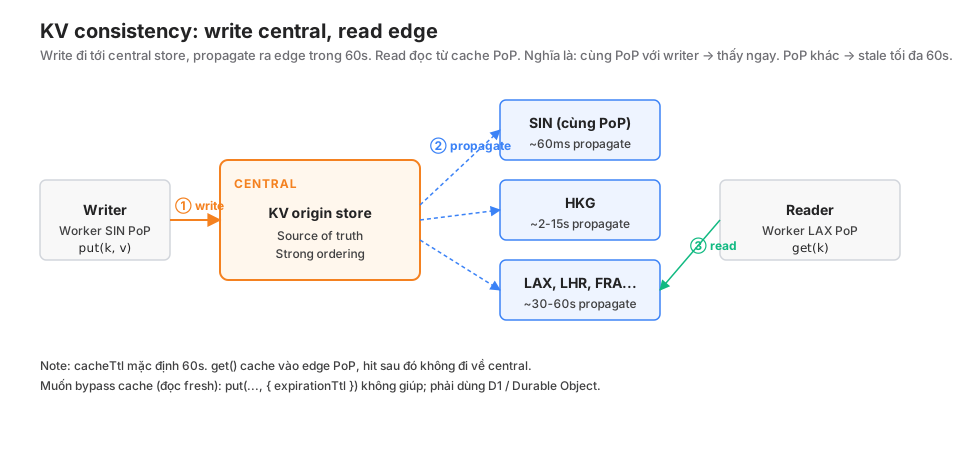
Write path
Worker (SIN PoP) → put("user:123", v)
                 → POST to central store
                 → central persists + broadcasts
                 → propagates to 300+ PoPs within ≤ 60s
Writes don’t acknowledge when all PoPs have received them. put() returns as soon as central has persisted (usually < 100ms).
Read path
Worker (LAX PoP) → get("user:123")
                → check local edge cache
                → hit: return immediately (< 10ms)
                → miss: fetch from central (~50-100ms cross-region)
Hit rate is typically > 90% in production. But cache staleness is the trap: LAX might be serving a 59-second-old copy while SIN has already seen the new write.
Consequences
- Write-then-read in the same PoP: usually sees the update immediately (the local cache is invalidated on write).
- Write-then-read cross-PoP: can be stale for up to 60s.
- Same user, two requests, two different PoPs: inconsistency.
Which makes KV not suitable for:
- Monotonically-increasing counters (race conditions + write rate limit).
- Sessions that need strong consistency (user logs in in Sydney, the Tokyo request 2 seconds later sees “not logged in”).
- Primary databases (stale reads break business logic).
cacheTtl: controlled staleness
If you want to trade consistency for performance:
// Cache 5 minutes at the edge, even if the key has expired at central
const cached = await env.CACHE.get("heavy-config", { cacheTtl: 300 });
cacheTtl > 60s: very fast reads, accepting longer staleness.cacheTtl: 0: always goes to central (slow, expensive, loses the KV advantage).
This blog uses cacheTtl: 60 for feature flags. When a flag changes, it takes at most 1 minute for the edge to reflect it.
Limits to memorise
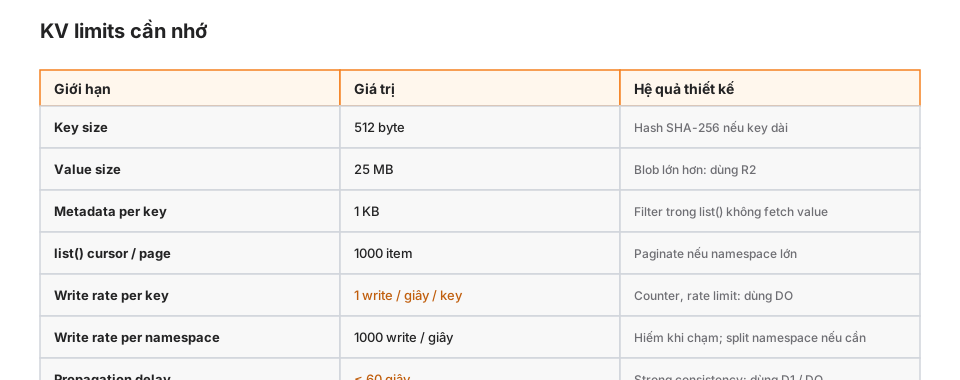
Write rate per key: 1/second
This is the most important limit. Try this:
for (let i = 0; i < 10; i++) {
  await env.CACHE.put("counter", String(i));
}
The first write succeeds. The next 9 get throttled and some may be dropped. KV is not a counter.
For real counters, use a Durable Object (Part 15) or D1 (UPDATE ... SET count = count + 1).
Value size: 25 MB
Anything larger has to be chunked or moved to R2. In practice, 25MB is already too big for KV because of edge-cache overhead.
Rule of thumb: KV values should be < 1MB. Smaller is faster.
Metadata: 1 KB
Metadata is a side-channel field that comes back with list() without fetching the value. Extremely useful:
await env.POSTS.put(slug, body, {
  metadata: { published: true, tags: ["cf"], reading_time: 5 },
});

const result = await env.POSTS.list({ prefix: "2026/" });
const publishedPosts = result.keys.filter(k => k.metadata?.published);
No get() per key. Filter at list time.
List pagination: 1000 items / page
let cursor: string | undefined;
const all: KVNamespaceListKey<any>[] = [];

do {
  const page = await env.KV.list({ prefix: "user:", cursor, limit: 1000 });
  all.push(...page.keys);
  cursor = page.list_complete ? undefined : page.cursor;
} while (cursor);
If the namespace has 100k keys, list() walks 100 pages. Each page is a subrequest.
5 patterns that fit
① Feature flags
// Config changes rarely, reads happen often
async function isFeatureEnabled(env: Env, feature: string, userId: string) {
  const config = await env.FLAGS.get("features", { type: "json", cacheTtl: 60 });
  const rule = config?.[feature];
  if (!rule) return false;
  if (rule.enabled === true) return true;
  if (rule.enabled === false) return false;
  if (rule.allowlist?.includes(userId)) return true;
  if (rule.rollout && hashToPercent(userId) < rule.rollout) return true;
  return false;
}
Writes happen rarely (dashboard or admin API); reads at every request. Staleness of 60s is fine. Classic KV fit.
② Redirect / URL alias
// /go/twitter → https://twitter.com/khavan
async fetch(request, env) {
  const url = new URL(request.url);
  if (url.pathname.startsWith("/go/")) {
    const slug = url.pathname.slice(4);
    const target = await env.REDIRECTS.get(slug);
    if (target) return Response.redirect(target, 302);
  }
}
Writes occasionally (adding slugs); reads on every click. KV is a perfect fit.
③ Short-lived session tokens
// 24-hour session, token → userId
async function createSession(env: Env, userId: string) {
  const token = crypto.randomUUID();
  await env.SESSIONS.put(token, userId, { expirationTtl: 86400 });
  return token;
}

async function verifySession(env: Env, token: string) {
  return await env.SESSIONS.get(token);
}
KV auto-expires via TTL, no cron cleanup needed. One write at login, reads on every authenticated request.
Caveat: if logout needs to be effective immediately, use D1 or a Durable Object. A “session extension” where logout can be stale for 60s is fine with KV.
④ Asset metadata / content lookup
// This blog: OIDC credential cache
async function getCachedAwsCreds(env: Env, arn: string) {
  const cached = await env.OIDC_CREDS_CACHE.get(`creds:${arn}`, { type: "json" });
  if (cached && cached.expiresAt > Date.now() + 300_000) {
    return cached;
  }
  const fresh = await assumeRoleWithWebIdentity(env, arn);
  await env.OIDC_CREDS_CACHE.put(`creds:${arn}`, JSON.stringify(fresh), {
    expirationTtl: Math.floor((fresh.expiresAt - Date.now()) / 1000) - 60,
  });
  return fresh;
}
Credentials are valid for 15-60 minutes. Caching avoids calling STS on every request. Auto-expires.
⑤ Rate-limit configuration
// Per-endpoint rate-limit config, read on every request
async function getRateLimit(env: Env, endpoint: string) {
  const config = await env.RATE_LIMITS.get("limits", { type: "json", cacheTtl: 300 });
  return config?.[endpoint] ?? { rpm: 60, burst: 100 };
}
The actual counter (requests/minute) still needs a Durable Object. KV just holds the thresholds.
3 anti-patterns
① Counters / monotonically-increasing metrics
// WRONG — will throttle, will lose updates
async function incrementPageView(env: Env, slug: string) {
  const current = Number(await env.VIEWS.get(slug)) ?? 0;
  await env.VIEWS.put(slug, String(current + 1));
}
Two problems:
- Race condition: read-modify-write isn’t atomic. Two concurrent requests → lost update.
- Write rate: a popular page → hundreds of views/second → immediate throttling.
Correct: use a Durable Object with storage.transaction() or D1 with UPDATE ... SET count = count + 1 (D1’s primary is SQLite, atomic).
② Primary database for users / posts / orders
// WRONG — stale, inconsistent
async function getUser(env: Env, id: string) {
  return await env.USERS.get(id, { type: "json" });
}

async function updateUser(env: Env, id: string, user: User) {
  await env.USERS.put(id, JSON.stringify(user));
}
Picture this: a user updates their profile at PoP SIN, then immediately loads the profile at PoP LAX → they see the old version for 30s. Confused users, more support tickets.
Correct: D1 for relational data, as the source of truth. KV only caches derivations.
③ Sessions that need immediate logout
// WRONG if logout has to be hard-invalidating
async function logout(env: Env, token: string) {
  await env.SESSIONS.delete(token);
}

async function verifySession(env: Env, token: string) {
  // May still see the old session for up to 60s after delete
  return await env.SESSIONS.get(token);
}
User clicks logout → still has a valid token for 30s. That’s a security problem.
Correct: a Durable Object for sessions, or D1 with a strong read. Or design sessions with short TTLs (15 minutes) so even stale copies expire fast.
Gotchas from this blog
① Lost-update on OIDC creds under concurrency
Originally:
// WRONG
async function getCachedCreds(env: Env) {
  const cached = await env.KV.get("aws-creds");
  if (cached && !expired(cached)) return cached;

  const fresh = await assumeRole();
  await env.KV.put("aws-creds", fresh);
  return fresh;
}
The issue: two concurrent requests both miss the cache, both call STS, both write to KV. AWS STS gets billed twice (not a big deal), but it nudges the write rate.
Fix: accept the double-fetch (that’s what we still do — it’s not critical), or use a Durable Object as a singleton locker (overkill for something that costs ~$0.001).
② Metadata silently truncated at 1KB
// WRONG — metadata > 1KB is silently truncated
await env.KV.put(key, value, {
  metadata: {
    tags: longArray,       // 2KB → truncated
    description: longText,
  },
});
Metadata over 1KB doesn’t throw an error; it’s silently truncated. Check size before put().
③ list() prefix is case-sensitive
await env.KV.put("User:alice", "...");
await env.KV.put("user:bob", "...");

const result = await env.KV.list({ prefix: "user:" });
// Only returns "user:bob", not "User:alice"
Pick a convention (lowercase preferred) and stick to it.
④ Binary values accidentally JSON-serialised
// WRONG
const data = new Uint8Array([1, 2, 3]);
await env.KV.put("key", JSON.stringify(data));  // "{}" — not the binary

// RIGHT
await env.KV.put("key", data);  // KV handles ArrayBuffer directly
const back = await env.KV.get("key", { type: "arrayBuffer" });
Production checklist
- Every
get()has an implicit TTL consistent with your staleness tolerance. - KV is not being used for counters or increment-style metrics.
- KV is not being used as a primary DB for users / posts / orders.
- Value size < 1MB for hot keys; anything larger goes to R2.
- Metadata < 1KB after JSON serialisation.
- Sessions that require immediate logout use something else.
-
list()uses cursor pagination when the namespace has > 1000 keys. - Write rate per key < 1/second (use DO/D1 for frequent writes).
- Case convention for keys (usually lowercase).
When NOT to use KV
Simple decision points:
- Need strong consistency → D1 or Durable Object.
- Need high-frequency writes per key → Durable Object.
- Binary / media > 1MB → R2.
- Relational data with JOINs → D1.
- Queue / pub-sub → Queues / Durable Object.
KV fits best for metadata, config, cache, short-lived tokens — many reads, few writes, staleness OK.
Wrap-up
KV is a global cache, not a database. The mental model: central store + edge cache + propagation ≤ 60s. Write rate is capped at 1/key/second because of that architecture. Reads are cheap because they hit local PoP caches.
Five good patterns: feature flags, redirect map, short-lived sessions, asset metadata, rate-limit config. Three main anti-patterns: counters, primary DB, sessions needing hard invalidation.
Part 6 goes into D1: the real relational database at the edge — SQL, transactions, FTS, migration patterns.