

TL;DR
The Workers dev loop is essentially:
wrangler devruns Miniflare locally (sameworkerdruntime as production), with hot reload and simulated bindings.vitestwith@cloudflare/vitest-pool-workersruns unit tests inside a real isolate, no mocking needed.wrangler deployuploads the Worker to 300+ PoPs in ~30 seconds.
The key claim:
Workers don’t have a “staging environment” in the traditional EC2 sense. But you do have 3 alternatives: Miniflare local (fast, simulated),
wrangler dev --remote(local code + production bindings), and production with a 10-second rollback. Using each correctly reduces bugs and saves cost.
This post walks through one full loop, from npm create cloudflare@latest to CI auto-deploy, with real-world gotchas.
Who this is for
- Developers who’ve read Parts 1-3 and are about to build their first Worker.
- Anyone frustrated by slow dev loops, expensive tests, or bad deploys.
- Anyone used to the Lambda workflow (SAM, Serverless Framework) who wants the Cloudflare equivalent.
Prerequisites: Node.js + npm, git, basic CI/CD concepts.
After this post you’ll:
- Set up a Workers project from scratch.
- Pick the right
wrangler devmode for each situation. - Write unit tests that run inside a real isolate with Miniflare.
- Set up GitHub Actions deploys with a scoped token.
What this post isn’t about
- Framework-specific setup (Hono, Remix, SvelteKit): Parts 9, 11.
- CI/CD detail (matrix deploys, preview environments): Part 12.
- Advanced testing (contract tests, integration with external APIs): Part 12.
The dev loop at a glance
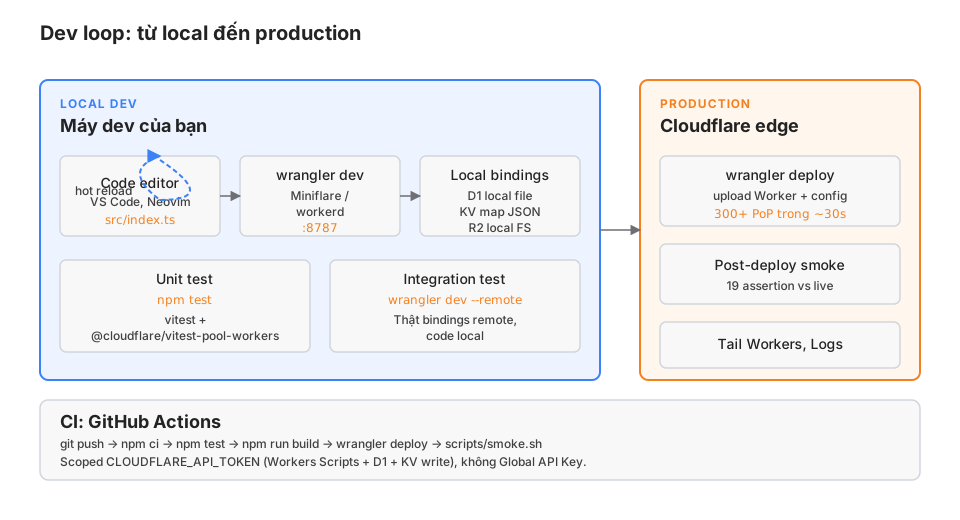
Two main cycles:
Short cycle (seconds): edit code → Miniflare reload → reload browser. The fastest one. You’ll spend 80% of your time here.
Medium cycle (~1 minute): commit → push → CI runs tests → CI deploys → smoke test. Used every time you finish a feature.
There’s no “long cycle” of 10-minute container builds. Workers have no Docker image, no AMI, no container registry.
Starting from empty
Scaffolding
npm create cloudflare@latest my-workerThe wizard asks:
- Template? Pick
"Hello World" Workerfor a minimal TypeScript setup. - TypeScript? Yes.
- Use git? Yes.
- Deploy now? No (look at the files first).
The layout:
my-worker/
├── src/
│   └── index.ts        # Main handler
├── test/
│   └── index.test.ts   # Vitest setup
├── wrangler.jsonc      # Config + bindings
├── package.json
├── tsconfig.json
└── vitest.config.ts
src/index.ts has the template:
export default {
  async fetch(request, env, ctx): Promise<Response> {
    return new Response("Hello World!");
  },
} satisfies ExportedHandler<Env>;
wrangler.jsonc: the config center
{
  "$schema": "node_modules/wrangler/config-schema.json",
  "name": "my-worker",
  "main": "src/index.ts",
  "compatibility_date": "2026-05-01",
  "compatibility_flags": ["nodejs_compat"],

  // Bindings: add as needed
  "vars": {
    "ENVIRONMENT": "production"
  }
  // "kv_namespaces": [{ "binding": "KV", "id": "..." }],
  // "d1_databases": [{ "binding": "DB", "database_name": "my-db", "database_id": "..." }],
  // "r2_buckets": [{ "binding": "BUCKET", "bucket_name": "my-bucket" }]
}
Three mandatory fields:
name: Worker name on Cloudflare (unique per account).main: entry point.compatibility_date: freezes runtime behaviour. Never change it after deploying (the behaviour can change in breaking ways).
compatibility_flags: nodejs_compat turns on Node-like APIs (Buffer, process). Needed for most npm libraries.
wrangler dev: 3 modes
Mode 1: Miniflare local (default)
wrangler devRuns Miniflare, local server on http://localhost:8787. Hot-reloads on file changes.
Bindings are simulated:
- KV: stored in JSON files under
.wrangler/state/v3/kv/. - D1: a local SQLite file under
.wrangler/state/v3/d1/. - R2: local filesystem under
.wrangler/state/v3/r2/. - Queues: in-memory queue.
- Workers AI: NOT simulated (calls the real remote).
- Vectorize: NOT simulated (calls the real remote).
Upside: fast (< 1s reload), no Cloudflare cost, works offline.
Downside: bindings aren’t a perfect match for production. KV eventual consistency isn’t simulated. D1 replication lag isn’t simulated either.
Mode 2: --remote (real bindings)
wrangler dev --remoteCode runs locally on your dev machine, but bindings hit real production resources (the real D1 database, the real KV namespace, …).
When to use it:
- Integration testing against real production data.
- Debugging behaviour differences between Miniflare and production.
- Testing Workers AI / Vectorize (which can’t be simulated).
Be careful: wrangler dev --remote writes into real production data. A DELETE FROM users without a WHERE id = ? will blow away production.
Mode 3: preview environment (staging-lite)
{
  "env": {
    "staging": {
      "name": "my-worker-staging",
      "kv_namespaces": [{ "binding": "KV", "id": "staging-kv-id" }],
      "d1_databases": [{ "binding": "DB", "database_name": "my-db-staging", "database_id": "..." }]
    }
  }
}
Deploy to staging:
wrangler deploy --env stagingRuns at my-worker-staging.<subdomain>.workers.dev with its own bindings. This is the “staging” pattern on Cloudflare.
Testing with vitest + vitest-pool-workers
The standard pattern for unit-testing a Worker.
Install
npm install -D vitest @cloudflare/vitest-pool-workersvitest.config.ts
import { defineWorkersConfig } from "@cloudflare/vitest-pool-workers/config";

export default defineWorkersConfig({
  test: {
    poolOptions: {
      workers: {
        wrangler: { configPath: "./wrangler.jsonc" },
      },
    },
  },
});
A first test
// test/index.test.ts
import { SELF, env } from "cloudflare:test";
import { describe, it, expect } from "vitest";

describe("Worker", () => {
  it("returns Hello World", async () => {
    const response = await SELF.fetch("https://example.com");
    expect(await response.text()).toBe("Hello World!");
    expect(response.status).toBe(200);
  });

  it("has the D1 binding available", async () => {
    await env.DB.prepare("CREATE TABLE IF NOT EXISTS users (id TEXT PRIMARY KEY, name TEXT)").run();
    await env.DB.prepare("INSERT INTO users VALUES (?, ?)").bind("u1", "Alice").run();

    const row = await env.DB.prepare("SELECT * FROM users WHERE id = ?").bind("u1").first();
    expect(row).toEqual({ id: "u1", name: "Alice" });
  });
});
The trick: tests run inside a real isolate powered by Miniflare. env.DB is a real D1 (in local mode), not a mock. SELF.fetch() hits the real handler.
This is very different from the usual Jest/vitest jest.mock() approach. You don’t need mocks because the runtime is real.
Running tests
npm test                 # vitest run (CI mode)
npm run test:watch       # watch mode
npm test -- --coverage   # coverage report
Tests run at ~50ms per suite because isolate cold starts are cheap.
D1 migration workflow
If the Worker uses D1, migrations are unavoidable.
Create a migration
wrangler d1 migrations create my-db add-users-tableCreates migrations/0001_add-users-table.sql:
CREATE TABLE users (
  id TEXT PRIMARY KEY,
  email TEXT UNIQUE NOT NULL,
  created_at INTEGER NOT NULL
);

CREATE INDEX idx_users_email ON users(email);
Apply locally
wrangler d1 migrations apply my-db --localRuns the migration against the local D1 SQLite file.
Apply remotely (production)
wrangler d1 migrations apply my-db --remoteAlways test locally first. Production migrations don’t auto-rollback — you have to write the reverse migration manually.
Gotchas
- D1 doesn’t fully support
ALTER TABLE. You can’tDROP COLUMNor change a column’s type. Workaround: create a new table, copy data, drop the old, rename. - Migrations run one file per step. No auto-rollback if something fails mid-way.
- For large production data, test the migration on D1 staging first (a preview environment).
Secret management
Local
.dev.vars at the project root (gitignored):
API_KEY=dev-key-123
RESEND_API_KEY=re_dev_...
Wrangler loads these automatically into env when you run wrangler dev.
Production
wrangler secret put API_KEY
# type the value when prompted
The secret is encrypted inside Cloudflare and exposed to the Worker as a string binding:
async fetch(request, env) {
  const key = env.API_KEY; // string, not a getter
}
List / delete
wrangler secret list
wrangler secret delete API_KEY
Gotchas
- Secrets don’t show up in
wrangler.jsonc. Don’t hardcode them. - No automatic rotation — you have to
putagain by hand. - Secrets are injected at deploy time. After changing a secret, you must
wrangler deployagain or the Worker will keep the old value.
Deploying: 30 seconds to 300+ PoPs
First deploy
wrangler deployPrompts for authentication the first time (browser OAuth). After that:
Total Upload: 3.41 KiB / gzip: 1.22 KiB
Worker Startup Time: 5 ms
Uploaded my-worker (1.23 sec)
Deployed my-worker triggers (4.56 sec)
  https://my-worker.<subdomain>.workers.dev
The Worker is live after ~6 seconds and fully propagated across 300+ PoPs in another ~30 seconds.
Re-deploying
Just wrangler deploy again. No separate build step, no container registry, no orchestration.
Custom domain
In wrangler.jsonc:
{
  "routes": [
    { "pattern": "my-app.com/*", "zone_name": "my-app.com" }
  ]
}
The zone must be on Cloudflare DNS for this account. After deploy, my-app.com/* traffic runs through the Worker.
Rollback
If a deploy is broken:
wrangler rollbackOr to a specific version:
wrangler rollback --version-id <id>Rollback completes in ~10 seconds. This is one of the real advantages of Workers over Lambda (where you’d need to re-deploy an old artifact).
CI/CD pattern
This is the pattern this blog uses in GitHub Actions.
.github/workflows/deploy.yml
name: Deploy to Cloudflare Workers

on:
  push:
    branches: [main]
  workflow_dispatch:

concurrency:
  group: deploy-${{ github.ref }}
  cancel-in-progress: true

permissions:
  contents: read

jobs:
  deploy:
    runs-on: ubuntu-latest
    timeout-minutes: 10
    steps:
      - uses: actions/checkout@v4

      - uses: actions/setup-node@v4
        with:
          node-version: 22
          cache: npm

      - run: npm ci

      - run: npm test

      - run: npm run build

      - name: Deploy
        run: npx wrangler deploy
        env:
          CLOUDFLARE_API_TOKEN: ${{ secrets.CLOUDFLARE_API_TOKEN }}
          CLOUDFLARE_ACCOUNT_ID: ${{ secrets.CLOUDFLARE_ACCOUNT_ID }}

      - name: Smoke test
        run: scripts/smoke.sh
A scoped API token
Don’t use the Global API Key in CI. Create a scoped token in the dashboard:
- Cloudflare dashboard → My Profile → API Tokens → Create Token.
- Permissions:
- Account → Workers Scripts → Edit.
- Account → Account Settings → Read.
- Account → D1 → Edit (if used).
- Account → Workers KV Storage → Edit (if used).
- Account → Workers R2 Storage → Edit (if used).
- Zone → Workers Routes → Edit (if you use a custom domain).
Store the token in the repo secret CLOUDFLARE_API_TOKEN.
Smoke test
scripts/smoke.sh verifies the real live site after deploy:
#!/usr/bin/env bash
set -euo pipefail

SITE="https://my-app.workers.dev"

# 1. Home page 200
[[ "$(curl -sI "$SITE/" -o /dev/null -w '%{http_code}')" = "200" ]] || { echo "Home not 200"; exit 1; }

# 2. 404 page actually returns 404
[[ "$(curl -sI "$SITE/nonexistent" -o /dev/null -w '%{http_code}')" = "404" ]] || { echo "404 page broken"; exit 1; }

# 3. API returns JSON
curl -s "$SITE/api/health" | jq -e '.ok == true' > /dev/null || { echo "API health fail"; exit 1; }

# 4. HSTS header is set
curl -sI "$SITE/" | grep -qi 'strict-transport-security' || { echo "HSTS missing"; exit 1; }

echo "✓ Smoke test passed"
Any failure kills the CI run. This blog has 19 assertions, running in ~8 seconds.
Gotchas
① Mixing up wrangler dev and wrangler dev --remote
Don’t get used to --remote and forget to turn it off. A single DELETE FROM users WHERE ... without a proper WHERE id = ? can wipe production data. Miniflare local is the default for a reason.
② Secrets not loading into tests
@cloudflare/vitest-pool-workers doesn’t auto-load .dev.vars. Set them explicitly in the config:
defineWorkersConfig({
  test: {
    poolOptions: {
      workers: {
        miniflare: {
          bindings: { API_KEY: "test-key" },
        },
      },
    },
  },
});
③ Compatibility date freeze
compatibility_date is a snapshot of runtime behaviour. Changing it can be breaking. If you want to try a newer runtime feature, create a preview env:
{
  "compatibility_date": "2026-01-01",  // production safe
  "env": {
    "preview": {
      "compatibility_date": "2026-05-01"  // try newer features
    }
  }
}
④ Framework build step
If you use Astro/Remix, you must build before deploying:
{
  "build": {
    "command": "npm run build",
    "cwd": ".",
    "watch_paths": ["src/**"]
  }
}
Or run build manually in CI before wrangler deploy.
⑤ Env variables vs bindings
vars in wrangler.jsonc is plain text and shows in the dashboard. Don’t use it for secrets. Secrets go through wrangler secret put.
{
  "vars": {
    "ENVIRONMENT": "production",
    "SITE_ORIGIN": "https://cloudsecop.net"
  }
}
Production checklist
-
compatibility_dateis set and isn’t changed casually. -
.dev.varsis in.gitignore. - Production secrets go through
wrangler secret put, never hardcoded. - CI uses a scoped token, not the Global API Key.
- Unit tests run through
vitest-pool-workers, not Jest with mocks. - A post-deploy smoke test verifies at minimum: home 200, 404 is really 404, one API endpoint, security headers.
- D1 migrations are tested locally before being applied remotely.
- GitHub Actions has
concurrency: cancel-in-progress: trueso concurrent deploys don’t race.
Wrap-up
The Workers dev loop is faster than most other platforms: short cycle under a second (Miniflare reload), deploy cycle around 30 seconds (upload + propagate). No containers, no orchestration, no heavyweight staging environment.
What to remember: use the right wrangler dev mode (local vs --remote), run tests inside real isolates via vitest-pool-workers, let CI use a scoped token, and keep rollback ready.
From Part 5 we’ll dive into individual storage primitives. Starting with KV: cache, feature flags, sessions, and when KV loses to D1.