

TL;DR
D1 is SQLite running on the Cloudflare edge with a primary-replica architecture. Writes go to the primary (one region); reads can go to a replica closer to the Worker if the Sessions API is in use.
The key claim:
D1 isn’t SQLite running inside your Worker. It’s managed SQLite with real network overhead (each query is a subrequest, ~5-50ms) and a consistency model that differs from local SQLite. Designing access correctly from the start avoids both burning the subrequest budget and hitting stale reads.
This post covers: primary-replica architecture, the 5 query methods and their subrequest cost, the Sessions API for read-your-write, prepared statements, safe migration patterns, and 7 production gotchas from building this blog.
This is the platform-level reference. For a retrospective on schema design, FTS, and indexing from real experience, see Five lessons on D1 schema design.
Who this is for
- Developers who’ve read Part 5 (KV) and are moving to relational data.
- Postgres/MySQL users evaluating D1 for an edge workload.
- Anyone burning subrequest budget or seeing stale reads with D1.
Read first: Part 2 (subrequest limits), Part 3 (Storage layer).
After this post you’ll:
- Understand the primary-replica architecture and when you’ll see replication lag.
- Pick the right query method (first vs all vs batch) to save subrequests.
- Use the Sessions API for read-your-write.
- Write safe migrations (no auto-rollback).
- Avoid 7 common production gotchas.
What this post isn’t about
- Schema design, indexes, FTS, sharding: already covered in d1-schema-tips.
- ORMs (Drizzle, Prisma): Part 10.
- Backups / disaster recovery: Part 19.
Architecture: primary + replica
Primary
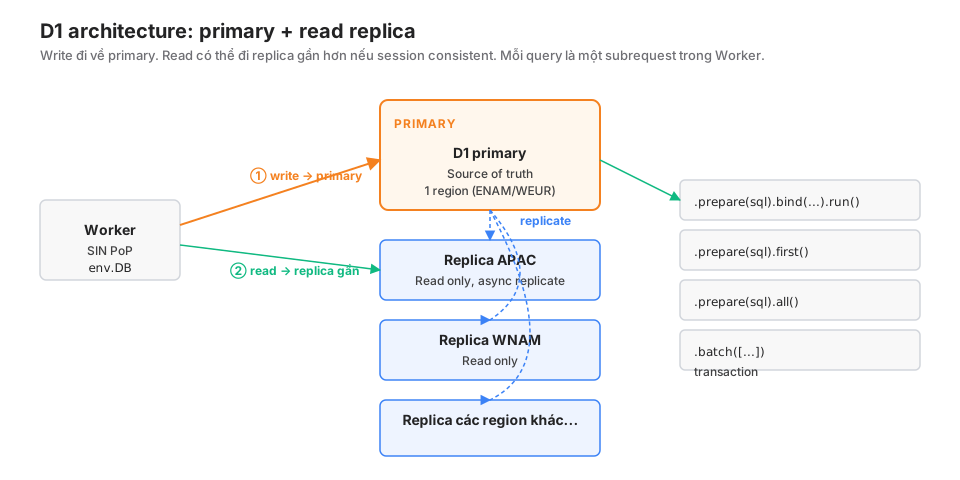
Each D1 database has one primary in a region you pick at creation (typically ENAM, WEUR, or APAC). The primary is the source of truth. All writes flow through it with strong ordering.
Read replicas
Cloudflare automatically creates replicas in other regions. Replicas sync asynchronously from the primary, with replication lag usually < 1 second, though it can spike to a few seconds under high write load.
Request routing
By default, env.DB.prepare(...) goes to the primary. If you enable the Sessions API, reads will:
- Try the replica nearest the Worker.
- Check a commit token to ensure the replica has caught up to at least the transactions you submitted.
- Fall back to the primary if the replica has fallen too far behind or hasn’t seen your commit.
The result: reads are faster (~10ms vs 50-100ms cross-region), and you still “read your own writes”.
Size
- Up to 10 GB per database (5 GB on the free tier).
- Unlimited databases per account.
- Need > 10 GB: shard across databases or move to a different service.
Binding
{
  "d1_databases": [
    {
      "binding": "DB",
      "database_name": "my-app-prod",
      "database_id": "01234567-89ab-cdef-0123-456789abcdef",
      "migrations_dir": "migrations"
    }
  ]
}
Typed in the Worker:
interface Env {
  DB: D1Database;
}
The 5 query methods
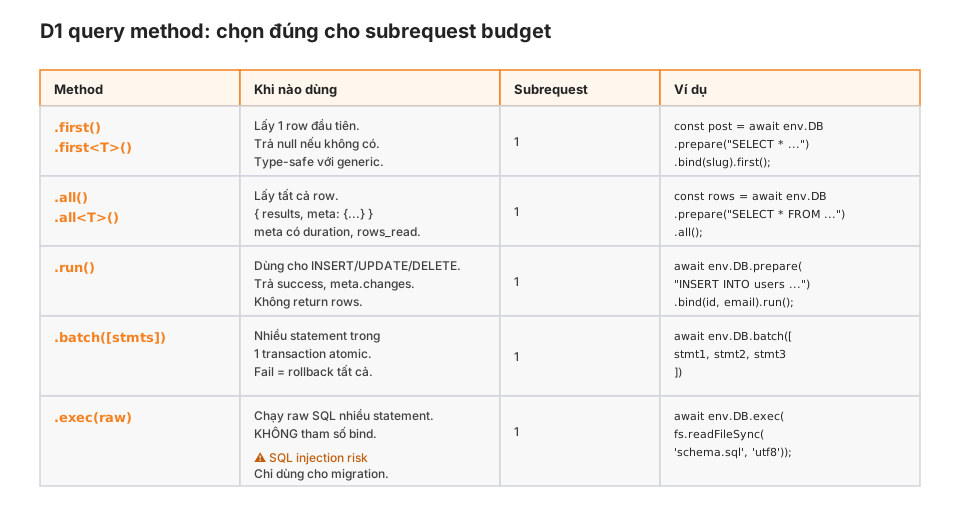
① .first() — one row
interface Post { id: string; title: string; body: string; }

const post = await env.DB
  .prepare("SELECT * FROM posts WHERE slug = ?")
  .bind(slug)
  .first<Post>();

if (!post) return new Response("Not found", { status: 404 });
The <Post> generic gives type safety. Returns null if no row matches.
② .all() — every row
const { results, meta } = await env.DB
  .prepare("SELECT * FROM posts WHERE author = ? ORDER BY published_at DESC")
  .bind(authorId)
  .all<Post>();

console.log(`Fetched ${results.length} posts in ${meta.duration}ms`);
console.log(`Rows scanned: ${meta.rows_read}`);
meta exposes duration, rows_read, rows_written. Useful for catching slow queries.
③ .run() — write statements
const result = await env.DB
  .prepare("INSERT INTO subscribers (email, token, confirmed) VALUES (?, ?, false)")
  .bind(email, token)
  .run();

console.log(`Inserted, rows affected: ${result.meta.changes}`);
For INSERT, UPDATE, DELETE. Doesn’t return rows.
④ .batch([stmts]) — atomic transaction
const stmts = [
  env.DB.prepare("INSERT INTO posts (id, title) VALUES (?, ?)").bind(id, title),
  env.DB.prepare("INSERT INTO post_tags (post_id, tag) VALUES (?, ?)").bind(id, "cf"),
  env.DB.prepare("UPDATE stats SET post_count = post_count + 1").bind(),
];

const results = await env.DB.batch(stmts);
// results[0], results[1], results[2] all run in a single transaction.
// Failure mid-way rolls back everything.
Only 1 subrequest for the whole batch, not N. Use when you need atomicity or to save subrequests.
⑤ .exec(raw) — raw SQL, no bind
const schema = `
  CREATE TABLE users (id TEXT PRIMARY KEY, email TEXT);
  CREATE INDEX idx_users_email ON users(email);
`;
await env.DB.exec(schema);Warning: exec() does not support .bind(). Concatenating user input into the SQL string = SQL injection. Only use for migrations or schema setup, never for user-facing queries.
Sessions API: read-your-write
The classic replica problem: you write to primary, then read immediately from a replica that hasn’t caught up yet.
The Sessions API fixes it:
async fetch(request, env) {
  // Start a session, using any existing bookmark from the client
  const bookmark = request.headers.get("x-d1-bookmark") ?? "first-unconstrained";
  const session = env.DB.withSession(bookmark);

  // Write
  await session.prepare("INSERT INTO posts (id, title) VALUES (?, ?)")
    .bind(id, title)
    .run();

  // Read — session guarantees you'll see the write above
  const post = await session.prepare("SELECT * FROM posts WHERE id = ?")
    .bind(id)
    .first();

  // Return the bookmark so the next request continues the session
  return Response.json({ post }, {
    headers: { "x-d1-bookmark": session.getBookmark() }
  });
}"first-unconstrained": start a session, no replica binding yet."first-primary": start from the primary (strong, slower).<bookmark>: client supplies a bookmark from a prior request, continuing the session.
When you need it:
- Form submit → immediately show the result.
- POST API → follow-up GET in the same flow.
When you don’t:
- Read-only dashboards (a few seconds of staleness is fine).
- Analytics queries or rollups (old data is OK).
Prepared statements
// Bad: preparing inside a loop, wasteful
for (const id of ids) {
  const row = await env.DB
    .prepare("SELECT * FROM posts WHERE id = ?")
    .bind(id)
    .first();
}

// Better: prepare once, bind many
const stmt = env.DB.prepare("SELECT * FROM posts WHERE id = ?");
const rows = await Promise.all(ids.map(id => stmt.bind(id).first()));

// Best: IN clause, single subrequest
const placeholders = ids.map(() => "?").join(",");
const { results } = await env.DB
  .prepare(`SELECT * FROM posts WHERE id IN (${placeholders})`)
  .bind(...ids)
  .all();
D1 caches compiled statements automatically. But each .bind().run() is still a subrequest. An IN (?) clause with an array collapses them into one.
Subrequest budgets (Part 2): 50 on Free, 1000 on Paid, per request. A 100-item loop at 1 query each burns the Free tier.
Migration pattern
Create a migration
wrangler d1 migrations create my-app add-subscribers-tableThat creates migrations/0001_add-subscribers-table.sql:
CREATE TABLE subscribers (
  email TEXT PRIMARY KEY,
  token TEXT NOT NULL,
  confirmed INTEGER NOT NULL DEFAULT 0,
  created_at INTEGER NOT NULL,
  confirmed_at INTEGER
);

CREATE INDEX idx_subscribers_token ON subscribers(token);
CREATE INDEX idx_subscribers_confirmed ON subscribers(confirmed);
Apply
# Local dev first
wrangler d1 migrations apply my-app --local

# Production
wrangler d1 migrations apply my-app --remote
Additive-only pattern
D1 has limited ALTER TABLE support. No DROP COLUMN, no type changes. The safe pattern:
Add a new column: fine, ALTER TABLE posts ADD COLUMN reading_time INTEGER works.
Change a column’s type: not supported. Workaround:
-- 0002_rename-posts-schema.sql
CREATE TABLE posts_new (
  id TEXT PRIMARY KEY,
  reading_time REAL,  -- changed from INTEGER to REAL
  -- other columns unchanged
  title TEXT,
  body TEXT
);

INSERT INTO posts_new SELECT id, CAST(reading_time AS REAL), title, body FROM posts;

DROP TABLE posts;
ALTER TABLE posts_new RENAME TO posts;

-- Don't forget to recreate the indexes!
CREATE INDEX idx_posts_... ON posts(...);
Rename a column: Cloudflare recently added ALTER TABLE ... RENAME COLUMN (check your compatibility date). If not available, do the create-copy-drop dance above.
Rollback
D1 doesn’t auto-rollback. Write a reverse migration:
-- 0002_undo-add-reading-time.sql
CREATE TABLE posts_old AS SELECT id, title, body FROM posts;
DROP TABLE posts;
ALTER TABLE posts_old RENAME TO posts;
Apply it by hand when needed.
Test migrations before production
Always:
- Apply to local D1 with production-like seed data.
- Run the test suite.
- Apply to a preview environment (a separate D1).
- Run smoke tests.
- Only then apply to production.
This blog has 12 migrations; three of them needed a reverse migration after production deploy. It’s not perfect.
7 production gotchas
① Store timestamps as INTEGER (ms since epoch)
-- WRONG: TEXT sorts incorrectly too easily
created_at TEXT  -- "2026-05-04T10:30:00Z"

-- RIGHT: INTEGER unix ms
created_at INTEGER NOT NULL  -- 1746354600000
TEXT ISO strings sort correctly when formatting is consistent, but are easy to break with timezones. INTEGER is simpler, O(1) to compare, and indexes faster.
JavaScript side:
const now = Date.now();  // 1746354600000
await env.DB.prepare("INSERT INTO posts (id, created_at) VALUES (?, ?)")
  .bind(id, now)
  .run();
② No native Boolean
SQLite has no BOOLEAN type. Neither does D1. Use INTEGER 0/1:
confirmed INTEGER NOT NULL DEFAULT 0 CHECK (confirmed IN (0, 1))JavaScript:
const user = await env.DB.prepare("SELECT confirmed FROM users WHERE id = ?").bind(id).first<{confirmed: number}>();
const isConfirmed = user?.confirmed === 1;  // not `=== true`
③ null vs a missing column
// WRONG
await env.DB.prepare("INSERT INTO posts (id, title) VALUES (?, ?)")
  .bind(id, undefined)  // D1 coerces to null? or throws?
  .run();
With undefined, the behaviour isn’t well-defined. Always coerce explicitly:
await env.DB.prepare("INSERT INTO posts (id, title) VALUES (?, ?)")
  .bind(id, title ?? null)
  .run();
④ RETURNING clause support varies
SQLite 3.35+ supports RETURNING. D1 does too, but not across all versions:
-- May or may not work depending on compatibility date:
INSERT INTO posts (id, title) VALUES (?, ?) RETURNING *;
Check your compatibility date. For wide portability, use last_insert_rowid():
const result = await env.DB.prepare("INSERT INTO posts (title) VALUES (?)")
  .bind(title)
  .run();
const newId = result.meta.last_row_id;
⑤ Query text size limit
D1 caps query text at ~100KB. That’s easy to hit with INSERT ... VALUES (?, ?, ?), (?, ?, ?), ... patterns at hundreds of rows. Use .batch() instead of multi-VALUES:
// WRONG: 1000 rows in one INSERT → ~200KB query text, fails
const sql = `INSERT INTO events VALUES ${rows.map(() => "(?, ?, ?)").join(",")}`;
await env.DB.prepare(sql).bind(...allParams).run();

// RIGHT: batch, 1 subrequest, no per-statement size problem
const stmts = rows.map(r =>
  env.DB.prepare("INSERT INTO events VALUES (?, ?, ?)").bind(r.a, r.b, r.c)
);
await env.DB.batch(stmts);
⑥ .all() loads everything into memory
// Watch out: 100k rows will load 100k objects into the isolate
const { results } = await env.DB.prepare("SELECT * FROM events").all();
Isolate memory caps at 128MB (Part 2). 100k heavy rows can OOM. Use LIMIT + pagination:
const page = 1;
const size = 100;
const { results } = await env.DB.prepare("SELECT * FROM events LIMIT ? OFFSET ?")
  .bind(size, (page - 1) * size)
  .all();
⑦ Indexes only get used if the query matches the leftmost prefix
CREATE INDEX idx_posts_author_published ON posts(author_id, published_at);

-- Hits the index:
SELECT * FROM posts WHERE author_id = ? ORDER BY published_at DESC;

-- Hits the index (prefix only):
SELECT * FROM posts WHERE author_id = ?;

-- Does NOT hit the index:
SELECT * FROM posts WHERE published_at > ?;  -- skips the first column
SELECT * FROM posts ORDER BY published_at;   -- no WHERE author_id
Composite indexes work by left-prefix. Check with EXPLAIN QUERY PLAN:
const { results } = await env.DB.prepare("EXPLAIN QUERY PLAN SELECT ... ").all();
console.log(results);  // SCAN vs SEARCH
SCAN = full-table scan. SEARCH = index hit.
Production checklist
- Primary region matches where most writes originate.
- Sessions API is enabled on endpoints that need read-your-write.
- Timestamps stored as INTEGER (ms since epoch), not TEXT.
- Booleans use INTEGER 0/1 with a CHECK constraint.
- Parameters bound, never string-concatenated.
- Multi-statement writes use
batch(), not loops. - Queries with
WHEREmatch an index (verified withEXPLAIN QUERY PLAN). -
LIMIT+ pagination for queries that return many rows. - Migrations tested locally first, with a reverse migration ready.
-
meta.rows_readis monitored to catch slow queries.
Wrap-up
D1 is managed edge SQLite with a primary-replica architecture — not “SQLite inside your Worker”. Each query is a real subrequest with real network overhead. Designing access around that avoids both burning budget and seeing stale reads.
Five query methods cover 99% of use cases. The Sessions API solves read-your-write where you need it. Migrations are additive-only; rollbacks are written by hand. The 7 gotchas above are things I’ve paid for while building this blog.
For retrospective experience on schema design, see d1-schema-tips.
Part 7 covers R2 object storage — S3-compatible, egress-free, presigned URLs, and when R2 replacing S3 stops being a trick question.
References
- D1 documentation
- D1 Sessions API
- D1 Worker API
- SQLite syntax (D1 follows SQLite)