TL;DR
- AWS-native stack: Lambda + EventBridge + Secrets Manager + SES + StackSets — no DynamoDB, no Step Functions, IAM is the source of truth.
- State machine ACTIVE → ROTATED → DISABLED → DELETED with defaults
RotationPeriod=90,InactivePeriod=100,RecoveryGracePeriod=10days — preserves a rollback window when a pipeline breaks.- Always start with
DryRunFlag=Trueand run it ~2 weeks to surface CI pipelines still hard-coding old keys.- Member-account role gets only
iam:ListUsers,iam:CreateAccessKey,iam:UpdateAccessKey,iam:DeleteAccessKey+ Secrets Manager scoped byAccount_*_User_*_AccessKeyprefix — noiam:*, noiam:PassRole.- The exemption group is a potential backdoor: enable a CloudTrail alarm on
iam:AddUserToGroupforIAMKeyRotationExemptionGroupand review it quarterly.- Rotation is not a substitute for removing IAM users — set a quarterly KPI on reducing IAM user count, not just average key age.
- Secrets Manager $0.40/secret/month adds up at thousand-user scale; consider deleting secrets once owners have fully migrated.
IAM access keys are one of the most leak-prone artifacts in AWS: they end up in developer dotfiles, CI runners, Docker images, Postman workspaces, Slack DMs. When an organisation has dozens of accounts and hundreds of IAM users, nobody rotates them by hand on a schedule. This post describes an AWS-native solution (Lambda + EventBridge + Secrets Manager + SES + CloudFormation StackSets) that automates rotate → disable → delete against a policy — and, more importantly, the trade-offs to understand before deploying it to production. Reference implementation: vanhoangkha/aws-iam-access-key-auto-rotation.
Context
A typical AWS Organization looks like this:
- 20–100 AWS accounts, managed through Control Tower or a home-grown landing zone.
- Most workloads have moved to IAM roles (EC2 instance profile, IRSA, Lambda execution role). A residual set of stubborn IAM users remains: legacy CI/CD service users, third-party SaaS that needs programmatic access, vendor tools with no OIDC support, and developers using access keys locally because setting up an SSO profile feels like a tax.
- Each account averages 5–20 IAM users with active access keys. Average key age: over 180 days.
- Compliance frameworks (ISO 27001, SOC 2, PCI-DSS, CIS AWS Benchmark 1.14) all require periodic credential rotation — usually 90 days.
The goal of this solution: bring the “average key age” number below 90 days without human intervention, and preserve a grace window for rollback when something breaks.
Problem
Rotating access keys by hand hits three concrete pain points:
- Nobody knows where a key is being used. Deleting it breaks a CI pipeline → rollback → nobody dares delete again. Result: three-year-old keys still active.
- The work spreads across many accounts. An administrator has to assume a role into each account, list users, create new keys, hand them to owners, wait for confirmation, and only then disable the old keys. Does not scale.
- No audit trail. When an auditor asks “who rotated this key, when, and was the owner notified?” — there is no structured log to answer from.
Half-solutions fall short:
- IAM Access Analyzer → unused access finder: only detects unused keys, does not rotate them.
- Secrets Manager rotation for RDS/Aurora: built-in, but there is no equivalent built-in rotation template for IAM access keys — a Lambda has to be written.
- Remove IAM users entirely and move to IAM Identity Center (SSO) + IAM roles: the right direction, but the migration takes quarters and the problem needs a bridge during that time.
This solution fills that gap: it assumes IAM users still exist, and automates key lifecycle until they can be removed.
Architecture
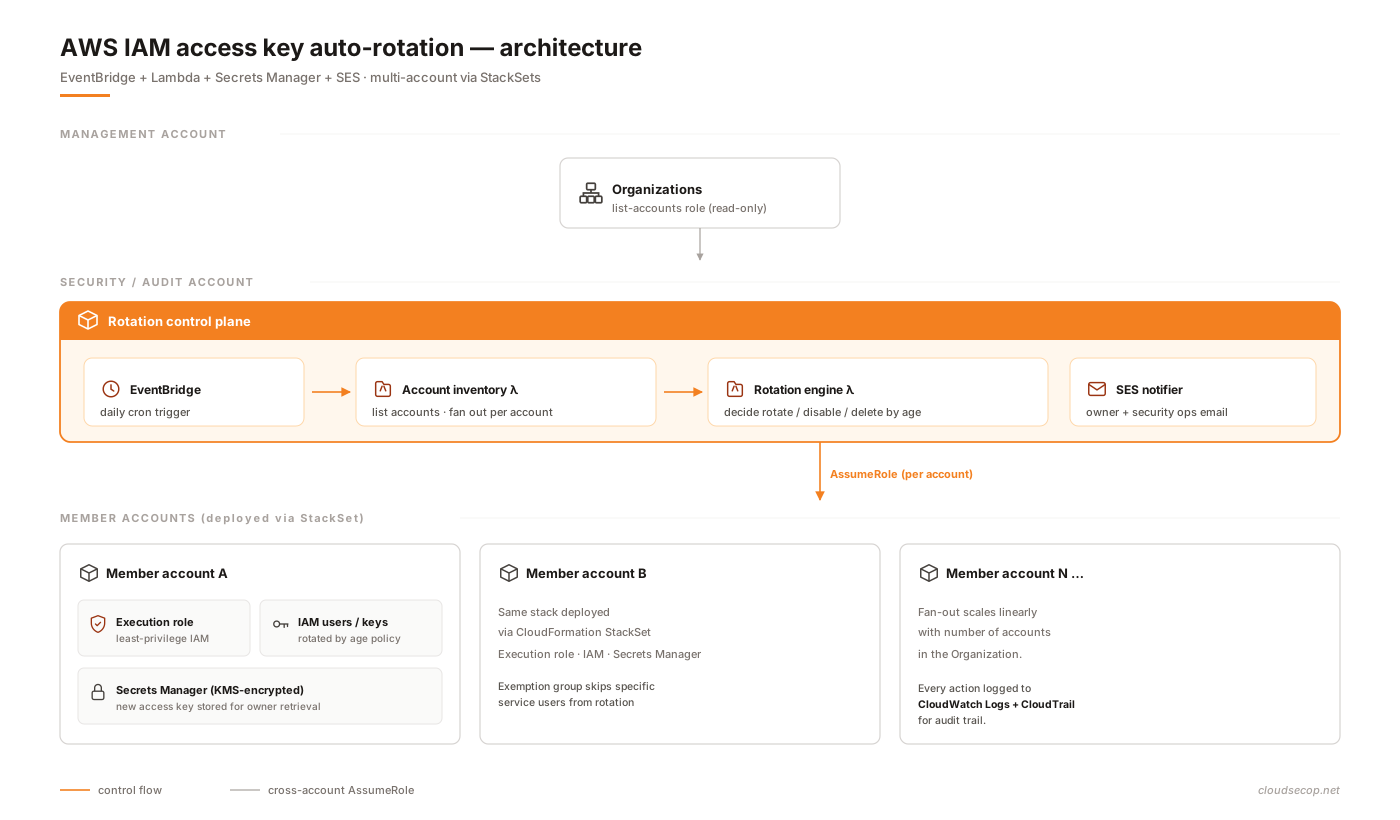
| Component | Purpose | Technology |
|---|---|---|
| Account inventory | Lists every account in the Organization; fans out work | Lambda (Python 3.13) + Organizations API |
| Rotation engine | Decides rotate/disable/delete from key age | Lambda (Python 3.13) + IAM API |
| Key storage | Stores new keys encrypted after creation | AWS Secrets Manager (KMS CMK) |
| Notifier | Emails owner + admin before and after each action | Amazon SES with an HTML template |
| Scheduler | Daily trigger | EventBridge rule (cron) |
| Cross-account access | Assumes role into member accounts | IAM role (ExecutionRole) deployed via StackSet |
| Exemption | Excludes specific service users | IAM group IAMKeyRotationExemptionGroup |
| Audit | Logs every action | CloudWatch Logs + CloudTrail (default) |
Lifecycle state machine
A key passes through four states — ACTIVE → ROTATED → DISABLED → DELETED — controlled by the RotationPeriod, InactivePeriod, and RecoveryGracePeriod parameters.
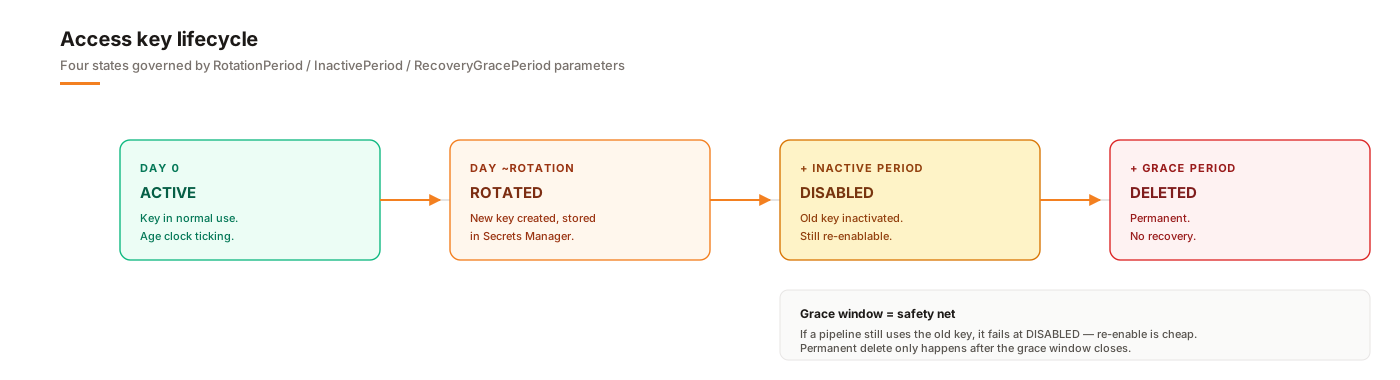
Three parameters are tunable through CloudFormation:
RotationPeriod= 90 daysInactivePeriod= 100 daysRecoveryGracePeriod= 10 days (the window between disable and delete)
The 10-day window between “disable” and “delete” is the safety net — if a user still has the old key hard-coded somewhere, their pipeline will fail on day 100 rather than silently work until the key disappears permanently. Re-enabling a disabled key is much faster than recreating the user.
Deployment
The entire solution deploys through CloudFormation. The repo has four main templates:
ASA-iam-key-auto-rotation-and-notifier-solution.yaml— the core template, deployed into the security/audit accountASA-iam-key-auto-rotation-iam-assumed-roles.yaml— the cross-account role, deployed via StackSet to every member accountASA-iam-key-auto-rotation-list-accounts-role.yaml— the role that reads the Organizations API, deployed into the management accountASA-iam-key-auto-rotation-vpc-endpoints.yaml— optional, if the Lambda runs inside a VPC
1. Prepare the SES identity
SES in sandbox mode only sends to verified addresses. Request production access before using it in production.
aws ses verify-email-identity \
  --email-address security-ops@example.com \
  --region us-east-1
2. Upload artifacts to S3
Lambda packages and templates are pulled from S3, not inlined. Create a bucket in the security account:
export AWS_ACCOUNT_ID=$(aws sts get-caller-identity --query Account --output text)
export BUCKET_NAME="asa-iam-rotation-${AWS_ACCOUNT_ID}-us-east-1"

aws s3 mb "s3://$BUCKET_NAME" --region us-east-1
aws s3 cp Lambda/    "s3://$BUCKET_NAME/asa/asa-iam-rotation/Lambda/"   --recursive
aws s3 cp template/  "s3://$BUCKET_NAME/asa/asa-iam-rotation/Template/" --recursive
3. Deploy the execution role to every member account
Use a CloudFormation StackSet with the service-managed permission model (requires Organizations and trusted access for CloudFormation enabled):
aws cloudformation create-stack-set \
  --stack-set-name asa-iam-rotation-member-role \
  --template-body file://CloudFormation/ASA-iam-key-auto-rotation-iam-assumed-roles.yaml \
  --permission-model SERVICE_MANAGED \
  --auto-deployment Enabled=true,RetainStacksOnAccountRemoval=false \
  --capabilities CAPABILITY_NAMED_IAM

aws cloudformation create-stack-instances \
  --stack-set-name asa-iam-rotation-member-role \
  --deployment-targets OrganizationalUnitIds=ou-xxxx-yyyyyyyy \
  --regions us-east-1
This role has the minimum policy needed: iam:ListUsers, iam:ListAccessKeys, iam:CreateAccessKey, iam:UpdateAccessKey, iam:DeleteAccessKey, iam:GetGroup, and secretsmanager:CreateSecret / PutSecretValue scoped by prefix. No iam:*.
4. Deploy the core stack — keep DryRun on
aws cloudformation deploy \
  --template-file CloudFormation/ASA-iam-key-auto-rotation-and-notifier-solution.yaml \
  --stack-name iam-key-auto-rotation \
  --capabilities CAPABILITY_NAMED_IAM \
  --parameter-overrides \
    S3BucketName="$BUCKET_NAME" \
    S3BucketPrefix="asa/asa-iam-rotation" \
    AdminEmailAddress="security-ops@example.com" \
    AWSOrgID="o-xxxxxxxxxx" \
    OrgListAccount="111111111111" \
    DryRunFlag="True" \
    RotationPeriod="90" \
    InactivePeriod="100"
DryRunFlag=True is required for the first run. In this mode the Lambda will:
- Enumerate users and keys
- Compute key ages
- Email simulated actions that would be taken
- Create, modify, or delete nothing in IAM
This is the window to discover which keys exceed the threshold, which users will be affected, and whether owner emails are verified.
5. Test a specific account
Invoke directly instead of waiting for the EventBridge cron:
aws lambda invoke \
  --function-name ASA-IAM-Access-Key-Rotation-Function \
  --payload '{"account":"222222222222","email":"owner@example.com","name":"prod-workload"}' \
  --cli-binary-format raw-in-base64-out \
  /tmp/out.json

cat /tmp/out.json
Check the function’s CloudWatch Logs for the rotation decision:
[INFO] User: deploy-bot
[INFO] Oldest active key: AKIA...  age=137d
[INFO] Decision: DISABLE (age >= InactivePeriod=100)
[INFO] DryRun=True → skipping iam:UpdateAccessKey
6. Flip to enforcement
Once the DryRun output has been reviewed:
aws cloudformation update-stack \
  --stack-name iam-key-auto-rotation \
  --use-previous-template \
  --capabilities CAPABILITY_NAMED_IAM \
  --parameters \
    ParameterKey=DryRunFlag,ParameterValue=False \
    ParameterKey=S3BucketName,UsePreviousValue=true \
    ParameterKey=S3BucketPrefix,UsePreviousValue=true \
    ParameterKey=AdminEmailAddress,UsePreviousValue=true \
    ParameterKey=AWSOrgID,UsePreviousValue=true \
    ParameterKey=OrgListAccount,UsePreviousValue=true
7. Retrieve the newly created key
New keys are stored in the member account:
aws secretsmanager get-secret-value \
  --secret-id Account_222222222222_User_deploy-bot_AccessKey \
  --query SecretString --output text
The secret is encrypted with KMS. Only a principal with kms:Decrypt on the corresponding CMK can read it — typically the owner themselves, or a Lambda in that account.
Security considerations
A credential-rotation solution is itself a high-value target. An attacker who takes over the rotation Lambda can create new keys for any IAM user, delete keys in use (DoS), or read the secret holding the freshly created key. The review checklist for this solution:
- Least privilege on the ExecutionRole. The member-account role has a narrow IAM write scope and Secrets Manager access scoped to the
Account_*_User_*_AccessKeyprefix. Noiam:PassRole,iam:AttachPolicy,iam:CreateUser. Where possible, further restrict with anaws:PrincipalArncondition so only the security-account Lambda role can assume it. - Never log the secret into CloudWatch. Audit the Lambda code for stray
print()calls on access-key secrets. CloudWatch log groups often have long retention and may be forwarded to a SIEM — a leak there is a real leak. - KMS CMK rather than AWS-managed key. A CMK provides access logs (CloudTrail
kms:Decryptevents) and policies that control who can re-share the secret. - The exemption group is not a backdoor.
IAMKeyRotationExemptionGroupis a convenience, but it is also a way around rotation. Enable a CloudTrail alarm oniam:AddUserToGroupwhen the target is this group, and include it in the periodic compliance review. - VPC endpoints for paranoid environments. The
vpc-endpoints.yamltemplate provisions endpoints for IAM, Secrets Manager, STS, SES, and CloudWatch Logs — so a Lambda inside a VPC doesn’t need egress to the internet. Useful in accounts with egress restrictions; overkill for simpler ones. - The grace period is mandatory. Setting
InactivePeriod == RecoveryGracePeriod + RotationPeriod(disable and delete on the same day) turns every misconfiguration into downtime. Ten days is a reasonable default; some production environments set 14–30 days.
What this solution does not protect against:
- Keys leaked through non-AWS channels (public GitHub repos, Slack, screenshots). GitHub secret scanning and the Access Analyzer unused finder need to run in parallel.
- Keys compromised between rotations. A 90-day rotation means a leaked key can be used for up to 90 days before rotation — that is a trade-off, not a mitigation.
- IAM users nobody knows about (shadow users created by former administrators). That is an IAM inventory and access-review problem, not a rotation one.
Operations
The cron runs daily, not in real time. Observability setup:
Mandatory CloudWatch alarms:
- Rotation Lambda error rate > 0 in 24 hours → page on-call.
- Duration > 50% of timeout → the fan-out is stalling, likely IAM API throttling.
Throttlesmetric > 0 → increase reserved concurrency or split into smaller batches.
Periodic reports:
- Weekly: list users with keys past
RotationPeriodthat are still in the exemption group → review whether the exemption is still justified. - Monthly: report on keys rotated / disabled / deleted → feed into the compliance dashboard.
Incident runbook:
- “Pipeline X broke after the key was disabled” → re-enable the old key with
iam:UpdateAccessKey Status=Active, hand over the new key from Secrets Manager to the owner, and push for migration beforeRecoveryGracePeriodexpires. - “The rotation Lambda did not run today” → check the EventBridge rule state and the Lambda concurrency quota. The solution is idempotent: skipping a day breaks nothing, keys just rotate a day late.
- “SES bounces” → a high bounce rate damages the SES reputation; verify owner email addresses before enforcement, and fall back to a team alias.
Do not treat rotation as fire-and-forget. The value of this solution is that it turns every key into an observable event. If nobody reads the emails and nobody watches the dashboard, keys still rotate, but during an incident there is no way to trace who touched what.
Trade-offs
| Decision | Options | Chosen | Why |
|---|---|---|---|
| Source of truth | DynamoDB state table vs. read IAM directly every run | Read IAM directly | Less infrastructure; IAM is the real source of truth, no sync needed |
| New key storage | Secrets Manager vs. SSM Parameter Store | Secrets Manager | Has a rotation API, built-in audit, per-secret KMS, acceptable cost |
| Scheduler | EventBridge cron vs. Step Functions | EventBridge + fan-out Lambda | Simpler; no state machine needed for a single-step process |
| Notification | SES vs. SNS email vs. Slack webhook | SES | Custom HTML templates, no subscription required, suitable for sensitive content |
| Multi-account | STS AssumeRole vs. per-account Lambda | AssumeRole from the security account | One code path, one log group, one alarm — much easier to operate than N copies |
| DryRun default | Default True vs. default False | Default True | Safer; forces the administrator to read the report before enforcement |
| Exemption | Tag on IAM user vs. IAM group | IAM group | Groups produce a clearer audit trail when membership changes; tags are easier to edit unnoticed |
| Language | Python 3.13 vs. TypeScript | Python 3.13 | boto3 is the most complete; AWS sample code is available in Python |
Lessons
After deploying and running this for a while, the things worth doing differently next time:
- Run DryRun for two weeks, not two days. The first run enforced too early and uncovered ~7 CI pipelines still using old keys that nobody remembered. The rollback conversation with the team was worse than the wait would have been.
- Rotation is better than no rotation, but it is not a substitute for removing IAM users. Set a quarterly KPI on reducing the number of IAM users, not just average key age. The former is real progress.
- Keep the exemption group as small as possible. The rule to enforce: every user in the exemption group must have a ticket justifying it and an expiry date; auto-remove them each quarter and force owners to re-justify.
- Email is not enough. Owners ignore internal email as a rule. Integrate Slack DMs or auto-created Jira tickets when a key crosses
RotationPeriod - 14— then people act. - Measure cost from day one. Lambda + Secrets Manager is nearly free at small scale, but for an organisation with thousands of IAM users, Secrets Manager ($0.40/secret/month) adds up. Consider a lifecycle that deletes secrets once the owner has fully migrated to the new key.
References
- vanhoangkha/aws-iam-access-key-auto-rotation — the source repository for the solution described here
- AWS IAM Best Practices — Rotate credentials regularly
- Rotating IAM access keys (official doc)
- AWS Secrets Manager pricing and KMS considerations
- IAM Access Analyzer — unused access findings
- CIS AWS Foundations Benchmark 1.14 — controls on access key age