TL;DR
Workload Identity Federation (WIF) lets workloads running on AWS (EC2, Lambda, EKS, CodeBuild) authenticate to Google Cloud without a Service Account Key JSON. An AWS STS token is exchanged through Google STS for a short-lived access token that impersonates a Google Service Account; the entire chain expires in at most an hour.
Use WIF when:
- Multi-cloud workloads need to call BigQuery, GCS, Cloud Logging, Compute Engine, or Vertex AI from AWS.
- You want long-lived secrets entirely out of your images, filesystems, and CI/CD secret stores.
- You need an audit trail that traces back to the original AWS ARN, not just the GCP Service Account.
The main pitfalls: subject mismatch when EC2 instances are replaced (the Instance ID changes) and overly broad attribute mapping (mapping assumed-role/ROLE/* instead of a specific ARN) — the latter turns WIF into a back door if the role is shared across workloads.
Sample code and full Terraform: github.com/vanhoangkha/workload-identity-federation-guide.
Who this is for
- Audience: cloud security engineers, platform engineers, SREs operating multi-cloud (AWS + GCP), or data teams running AWS → BigQuery pipelines.
- Assumed knowledge: AWS IAM (Role, STS, Instance Metadata), basic OIDC/OAuth concepts, the gcloud CLI.
- After reading you will:
- Understand the token flow between AWS STS ↔ Google STS ↔ Service Account precisely.
- Know how to write attribute mappings and conditions that restrict exactly which workloads can impersonate each Service Account.
- Avoid the five most common mistakes when first setting up WIF.
- Have a Terraform reference ready to adapt for production.
This post runs long (~5,500 words). For a quick-start, see the repo’s README.
Concepts
A deep dive starts with vocabulary. WIF stitches three identity systems together — drift in any term drifts the mental model.
- Service Account Key — A JSON file containing an RSA private key issued for a Google Service Account. Lives forever until revoked. This is what WIF replaces.
- Workload Identity Pool — A logical container on Google Cloud that represents a set of trusted external identities. Each cloud provider or external IdP usually gets its own pool.
- Workload Identity Pool Provider — A specific trust configuration such as “trust AWS account 123456789012” or “trust the OIDC issuer https://token.actions.githubusercontent.com”. A pool can have many providers.
- STS (Security Token Service) — The service that exchanges tokens. AWS STS issues tokens for EC2/Lambda; Google STS (
sts.googleapis.com) accepts external tokens and returns a Google Federated Token. - Federated Token — A short-lived access token issued by Google STS, bound to an external identity rather than to a Service Account. The Federated Token is then used to call
iamcredentials.generateAccessTokenand impersonate a Service Account. - Service Account Impersonation — The mechanism that lets a principal (external identity, user, or another SA) assume a Service Account and obtain its access token, valid for up to an hour.
- Attribute mapping — CEL expressions that map claims from the external token (e.g. AWS
assertion.arn) to the Google attributes used for authorisation (google.subject,attribute.aws_role, and so on). - Attribute condition — A filter expression that decides who is allowed into the pool. For example, only ARNs with prefix
assumed-role/prod-are admitted to the production pool. - Principal identifier — A string of the form
principal://iam.googleapis.com/projects/PROJECT_NUMBER/locations/global/workloadIdentityPools/POOL/subject/FULL_ARN. This is what gets bound in the Service Account’s IAM policy. - IMDSv2 — AWS Instance Metadata Service v2 (session-token based). WIF supports both IMDSv1 and v2; default to v2.
Why Service Account Keys are an anti-pattern
Before WIF, the standard way for an AWS workload to call a GCP API was to create a Google Service Account, generate a JSON key, scp it to the instance or drop it into a secret manager, and set GOOGLE_APPLICATION_CREDENTIALS=/path/to/key.json.
This approach breaks at multiple layers:
1. Long-lived credential. A JSON key never expires. Revocation is manual. If it leaks, the attacker has unlimited time to use it — until someone notices and revokes it.
2. Supply-chain surface. The JSON key wanders through many places: developer laptops, CI artifacts, Docker image layers, accidental git pushes, backups, Slack DMs. Each point is an attack surface. A GitHub search for “BEGIN PRIVATE KEY” service_account returns hundreds of leaked keys within a minute.
3. Broken audit trail. GCP Cloud Audit Logs record which Service Account called the API, but not which workload used the key. When three EC2 instances mount the same key, incident response is blind.
4. Modern compliance cannot be met. SOC 2 Type II, PCI-DSS 4.0, and ISO 27001:2022 all prefer short-lived credentials and automated rotation. A forever-valid JSON key drags posture down.
5. Rotation is misery. The correct rotation sequence — create a new key, deploy side by side, verify, revoke the old key — done every quarter. In practice: when was the last time your team rotated?
WIF removes this entire layer. There is no key to rotate. There is no file to leak. Identity is derived from the workload’s own metadata (EC2 Instance Role, Lambda Execution Role, EKS ServiceAccount), not from a secret.
The trade-off is that the token flow needs to be understood more carefully — because when it breaks, the error messages are not obvious.
Architecture
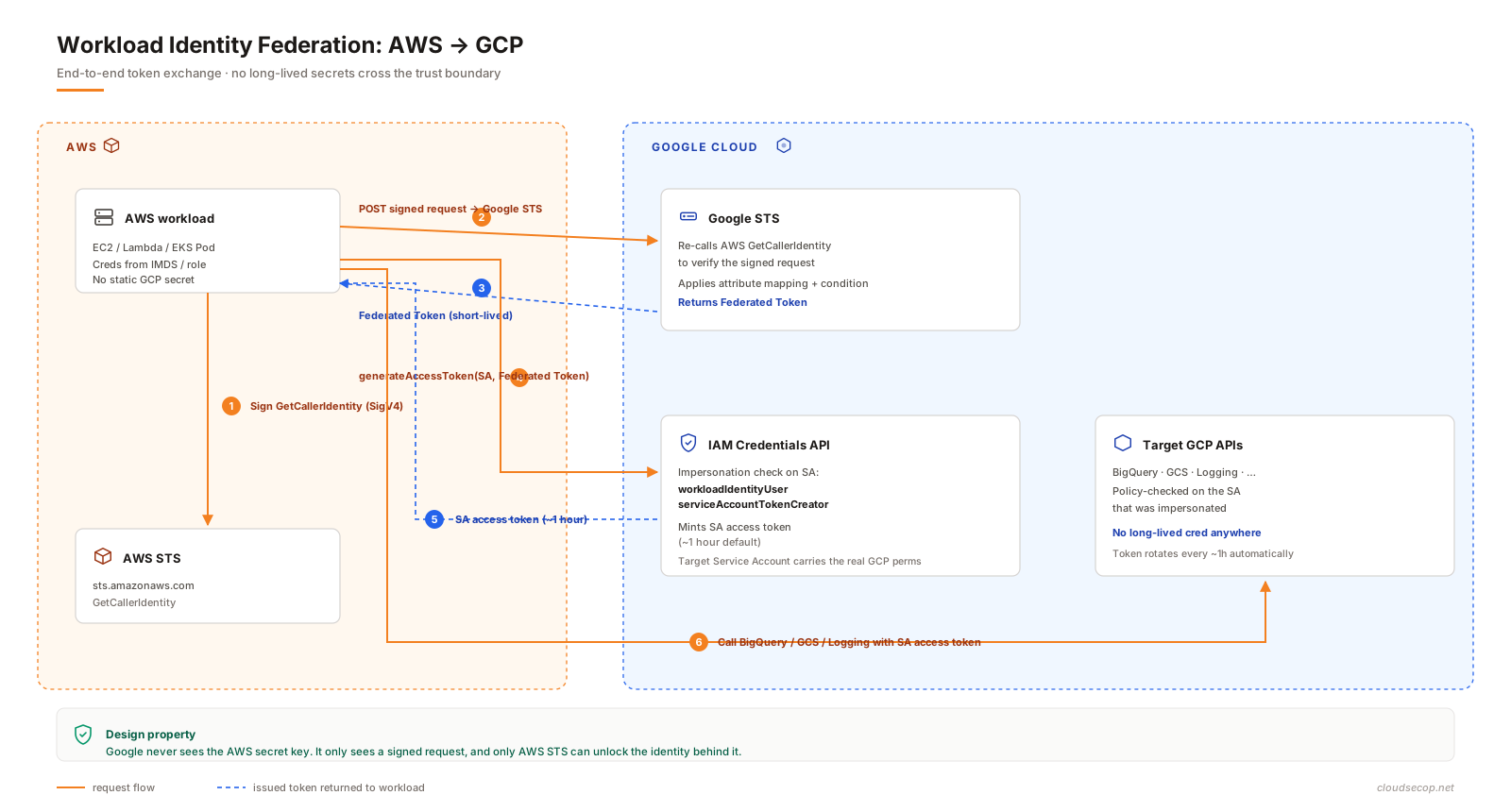
The end-to-end token flow is six steps, crossing both AWS STS and Google STS:
Key details at each step:
- Steps 1–2 (AWS signing): the workload calls the AWS STS endpoint with a
GetCallerIdentityrequest and signs it with AWS Signature V4. The result is a signed request, not a token yet. This signed request is what gets sent to Google STS. - Step 2 (Google verifies AWS): Google STS itself calls back to AWS STS
GetCallerIdentityusing that signed request. If AWS returns a valid ARN, Google considers the identity verified. This is why the provider needs theAWS Account ID— to validate that the returned ARN belongs to a trusted account. - Step 3 (Federated Token): the token represents the mapped external identity, not a Service Account. It carries minimal authority — essentially just enough to call
iamcredentials.generateAccessToken. - Steps 4–5 (impersonation): the Federated Token is used to impersonate a specific SA. If the external identity does not have the IAM bindings
workloadIdentityUser+serviceAccountTokenCreatoron that SA, this step fails. - Step 6: the SA access token behaves exactly as if the application were running inside GCP — all of the SA’s IAM policies apply.
Architectural note: Google never sees your AWS secret access key. It only sees a signed request, and only AWS STS can unlock the identity. This is the design property that makes WIF secure — Google can verify who you are without having to share secret material.
Core components
| Component | Purpose | Scope |
|---|---|---|
| Workload Identity Pool | Logical namespace for external identities from the same group (AWS account, GitHub org, etc.) | Project-level, GCP |
| Pool Provider | Trust configuration for a specific external IdP: AWS, OIDC, SAML | Pool-scoped, GCP |
| Attribute Mapping | Maps external claims → Google attributes used for authorisation | Provider-scoped |
| Attribute Condition | Filters who can enter the pool (CEL expression) | Provider-scoped |
| Google Service Account | The actual identity that calls Google APIs, holder of permissions | Project-level |
IAM binding workloadIdentityUser | Allows an external principal to impersonate the SA | Service Account resource |
IAM binding serviceAccountTokenCreator | Allows an external principal to mint SA tokens | Service Account resource |
| AWS IAM Role | The original AWS-side identity, attached to an EC2 instance / Lambda / pod | AWS account |
| Credential Config JSON | A non-secret file that points the workload at the right pool/provider/SA | Shipped with the workload |
The most common confusion: workloadIdentityUser and serviceAccountTokenCreator must both be granted, and both are bound on the Service Account, not on the project. Many online guides grant only one, causing requests to fail with a generic “Permission denied” that is hard to debug.
Step-by-step deployment
This section distills the nine steps that matter. Each carries a gotcha — that is the value over reading the raw docs.
Step 1: Collect AWS information
On the AWS workload (SSH into the EC2, or run inside the Lambda):
aws sts get-caller-identitySample output:
{
  "UserId": "AROAXXXXXXXXXXXXXXXXX:i-0abc123def456",
  "Account": "123456789012",
  "Arn": "arn:aws:sts::123456789012:assumed-role/prod-data-sync-role/i-0abc123def456"
}Gotcha: the ARN above is the assumed-role ARN (with the Instance ID at the end), not the original IAM Role ARN. This ARN is what maps into Google — verbatim. But the same property means that when the EC2 instance is replaced, the Instance ID changes, the ARN changes, and the binding breaks. The correct production pattern is to map by role (strip the Instance ID); see the Security section below.
Step 2: Enable APIs on GCP
gcloud services enable \
  iam.googleapis.com \
  sts.googleapis.com \
  iamcredentials.googleapis.com \
  --project=PROJECT_ID
Add the destination-service APIs (BigQuery, GCS, Logging, and so on) as the workload needs them.
Gotcha: iamcredentials.googleapis.com is commonly missed because the name does not map obviously onto the flow. Without it, the impersonation step (4–5 in the diagram) fails.
Step 3: Create the Workload Identity Pool
gcloud iam workload-identity-pools create aws-pool \
  --project=PROJECT_ID \
  --location=global \
  --display-name="AWS Workload Pool" \
--description="Pool for AWS-side workloads"Gotcha: --location is always global for Workload Identity Pools today. Do not try to use a region.
Step 4: Create the AWS Provider with a tight attribute mapping
gcloud iam workload-identity-pools providers create-aws aws-provider \
  --project=PROJECT_ID \
  --location=global \
  --workload-identity-pool=aws-pool \
  --account-id=123456789012 \
  --attribute-mapping="google.subject=assertion.arn,attribute.aws_role=assertion.arn.extract('assumed-role/{role}/'),attribute.aws_account=assertion.account" \
  --attribute-condition="assertion.arn.startsWith('arn:aws:sts::123456789012:assumed-role/prod-')"
Breaking it down:
google.subject=assertion.arn→ use the full ARN as the subject. This is what IAM bindings key on.attribute.aws_role=assertion.arn.extract('assumed-role/{role}/')→ pull out the role name, so binding by role (rather than by instance) becomes possible.attribute.aws_account=assertion.account→ useful for logging and analytics.attribute-condition→ only ARNs with prefixprod-enter the pool. This is the first line of defence.
Gotcha: when an attribute condition fails, Google STS returns a generic unauthorized_client without identifying which claim did not match. Debug by logging the raw AWS ARN and testing the condition on a CEL playground.
Step 5: Create the Google Service Account
gcloud iam service-accounts create aws-bigquery-reader \
  --project=PROJECT_ID \
  --display-name="BigQuery reader for AWS workloads"
Principle: one Service Account per use case. Do not share a single SA across BigQuery reads, GCS writes, and Vertex AI calls. If it gets compromised, the blast radius should be as small as possible.
Step 6: Grant impersonation to the external principal
Grant by role, not by full ARN:
PROJECT_NUMBER=$(gcloud projects describe PROJECT_ID --format='value(projectNumber)')

MEMBER="principalSet://iam.googleapis.com/projects/${PROJECT_NUMBER}/locations/global/workloadIdentityPools/aws-pool/attribute.aws_role/prod-data-sync-role"

gcloud iam service-accounts add-iam-policy-binding \
  aws-bigquery-reader@PROJECT_ID.iam.gserviceaccount.com \
  --project=PROJECT_ID \
  --role=roles/iam.workloadIdentityUser \
  --member="${MEMBER}"

gcloud iam service-accounts add-iam-policy-binding \
  aws-bigquery-reader@PROJECT_ID.iam.gserviceaccount.com \
  --project=PROJECT_ID \
  --role=roles/iam.serviceAccountTokenCreator \
  --member="${MEMBER}"
Gotcha 1: principalSet:// with attribute.aws_role/ binds by role, so when EC2 instances are replaced, the new ARN (same role, different Instance ID) is still accepted. Binding by principal:// with subject/ (full ARN) forces a binding update on every autoscale event — not workable.
Gotcha 2: PROJECT_NUMBER is a 12-digit number, not the PROJECT_ID string. Confusing the two is the single most common setup error.
Gotcha 3: IAM propagation takes 30–60 seconds. Testing immediately after binding often fails with “Permission denied” due to eventual consistency.
Step 7: Grant the Service Account access to the target resource
gcloud projects add-iam-policy-binding PROJECT_ID \
  --role=roles/bigquery.dataViewer \
  --member="serviceAccount:aws-bigquery-reader@PROJECT_ID.iam.gserviceaccount.com"

gcloud projects add-iam-policy-binding PROJECT_ID \
  --role=roles/bigquery.jobUser \
  --member="serviceAccount:aws-bigquery-reader@PROJECT_ID.iam.gserviceaccount.com"
Prefer dataset-level or table-level bindings to project-level when possible. Least privilege applies to the Service Account itself, not just to the external identity.
Step 8: Create the credential config
gcloud iam workload-identity-pools create-cred-config \
  projects/PROJECT_NUMBER/locations/global/workloadIdentityPools/aws-pool/providers/aws-provider \
  --service-account=aws-bigquery-reader@PROJECT_ID.iam.gserviceaccount.com \
  --aws \
  --enable-imdsv2 \
  --output-file=gcp-credentials.json
The generated file looks like:
{
  "type": "external_account",
  "audience": "//iam.googleapis.com/projects/PROJECT_NUMBER/locations/global/workloadIdentityPools/aws-pool/providers/aws-provider",
  "subject_token_type": "urn:ietf:params:aws:token-type:aws4_request",
  "service_account_impersonation_url": "...",
  "token_url": "https://sts.googleapis.com/v1/token",
  "credential_source": {
    "environment_id": "aws1",
    "region_url": "http://169.254.169.254/latest/meta-data/placement/availability-zone",
    "url": "http://169.254.169.254/latest/meta-data/iam/security-credentials",
    "regional_cred_verification_url": "https://sts.{region}.amazonaws.com?Action=GetCallerIdentity&Version=2011-06-15",
    "imdsv2_session_token_url": "http://169.254.169.254/latest/api/token"
  }
}
This file is not a secret. It contains no key material. It can be committed to git, baked into a Docker image, or placed in a public config. Compromise of this file alone accomplishes nothing — the attacker still needs to run inside an AWS workload with the right IAM Role to obtain an AWS STS token.
Step 9: Wire it into the workload
Set the environment variable and install the library:
export GOOGLE_APPLICATION_CREDENTIALS=/opt/gcp/gcp-credentials.json
pip install google-cloud-bigquery
Basic test:
from google.cloud import bigquery

client = bigquery.Client(project="PROJECT_ID")
query = "SELECT corpus, COUNT(*) c FROM `bigquery-public-data.samples.shakespeare` GROUP BY corpus ORDER BY c DESC LIMIT 3"
for row in client.query(query).result():
    print(row.corpus, row.c)
If this passes, the hardest part is behind you.
Reference configuration (Terraform)
A production-grade setup belongs in Terraform. A baseline module:
terraform {
  required_providers {
    google = {
      source  = "hashicorp/google"
      version = "~> 5.0"
    }
  }
}

variable "project_id" { type = string }
variable "aws_account_id" { type = string }
variable "allowed_role_prefix" {
  type    = string
  default = "prod-"
}

data "google_project" "current" {
  project_id = var.project_id
}

resource "google_project_service" "required" {
  for_each = toset([
    "iam.googleapis.com",
    "sts.googleapis.com",
    "iamcredentials.googleapis.com",
    "bigquery.googleapis.com",
  ])
  project = var.project_id
  service = each.value
}

resource "google_iam_workload_identity_pool" "aws" {
  project                   = var.project_id
  workload_identity_pool_id = "aws-pool"
  display_name              = "AWS Workload Pool"
  description               = "External identities from AWS account ${var.aws_account_id}"
}

resource "google_iam_workload_identity_pool_provider" "aws" {
  project                            = var.project_id
  workload_identity_pool_id          = google_iam_workload_identity_pool.aws.workload_identity_pool_id
  workload_identity_pool_provider_id = "aws-provider"
  display_name                       = "AWS ${var.aws_account_id}"

  aws {
    account_id = var.aws_account_id
  }

  attribute_mapping = {
    "google.subject"         = "assertion.arn"
    "attribute.aws_role"     = "assertion.arn.extract('assumed-role/{role}/')"
    "attribute.aws_account"  = "assertion.account"
  }

  attribute_condition = "assertion.arn.startsWith('arn:aws:sts::${var.aws_account_id}:assumed-role/${var.allowed_role_prefix}')"
}

resource "google_service_account" "aws_bigquery_reader" {
  project      = var.project_id
  account_id   = "aws-bigquery-reader"
  display_name = "BigQuery reader for AWS workloads"
}

locals {
  principal_set = "principalSet://iam.googleapis.com/projects/${data.google_project.current.number}/locations/global/workloadIdentityPools/${google_iam_workload_identity_pool.aws.workload_identity_pool_id}/attribute.aws_role/${var.allowed_role_prefix}data-sync-role"
}

resource "google_service_account_iam_binding" "workload_identity_user" {
  service_account_id = google_service_account.aws_bigquery_reader.name
  role               = "roles/iam.workloadIdentityUser"
  members            = [local.principal_set]
}

resource "google_service_account_iam_binding" "token_creator" {
  service_account_id = google_service_account.aws_bigquery_reader.name
  role               = "roles/iam.serviceAccountTokenCreator"
  members            = [local.principal_set]
}

resource "google_project_iam_member" "bq_data_viewer" {
  project = var.project_id
  role    = "roles/bigquery.dataViewer"
  member  = "serviceAccount:${google_service_account.aws_bigquery_reader.email}"
}

resource "google_project_iam_member" "bq_job_user" {
  project = var.project_id
  role    = "roles/bigquery.jobUser"
  member  = "serviceAccount:${google_service_account.aws_bigquery_reader.email}"
}

output "credential_config_command" {
  value = <<-EOT
    gcloud iam workload-identity-pools create-cred-config \
      projects/${data.google_project.current.number}/locations/global/workloadIdentityPools/${google_iam_workload_identity_pool.aws.workload_identity_pool_id}/providers/${google_iam_workload_identity_pool_provider.aws.workload_identity_pool_provider_id} \
      --service-account=${google_service_account.aws_bigquery_reader.email} \
      --aws \
      --enable-imdsv2 \
      --output-file=gcp-credentials.json
  EOT
}
Run:
terraform apply
eval "$(terraform output -raw credential_config_command)"
The result: a gcp-credentials.json ready to ship alongside the workload.
Three use cases worth calling out
The repo covers eight scenarios. These three are worth naming because each has a distinct edge case:
1. AWS Lambda → BigQuery. Lambda has no IMDS; it exposes credentials through the environment variables AWS_ACCESS_KEY_ID / AWS_SESSION_TOKEN. The credential-config JSON is packaged with the deployment. Gotcha: cold-start latency increases by ~300–600ms because of the three-HTTP-call chain (AWS STS → Google STS → IAM Credentials). Use the ADC token cache to amortise it.
2. Terraform on AWS managing GCP. This is the golden pattern — a CI/CD pipeline running on AWS CodeBuild uses WIF to terraform apply GCP resources. No Google key sits in Secrets Manager. The CodeBuild IAM Role is bound to an SA with roles/editor (or tighter) — a compromised CodeBuild run does not leak a permanent GCP credential.
3. EKS Pod → GCS. The trickiest use case. A pod can either:
- Use AWS IRSA (IAM Roles for Service Accounts) to get an AWS STS token, then chain through WIF into GCP — the “double federation” pattern.
- Or, if migrating to GKE, use Workload Identity Federation for GKE (similar name, entirely different mechanism).
For EKS + WIF, mount gcp-credentials.json via a Kubernetes Secret (the file is not secret, but the mount pattern is familiar), set GOOGLE_APPLICATION_CREDENTIALS, and the workload is ready.
Full code for all eight use cases lives in examples/ in the repo.
Security considerations
WIF removes one class of risk (long-lived keys) but introduces another (misconfiguration). These are the points to nail down in the threat model.
1. The attribute condition is the trust boundary, not the IAM binding
IAM bindings run after a token has been minted. If the attribute condition is too broad, thousands of other ARNs in the same AWS account can reach Google STS successfully, only to be blocked later at the IAM layer. That creates noise in audit logs and makes detection harder.
Good pattern:
attribute.aws_role.startsWith("prod-") &&
attribute.aws_account == "123456789012"
Bad pattern:
# No condition → any ARN from account 123456789012 passes2. Map by role, bind by role
As shown in Step 6: bind principalSet://.../attribute.aws_role/ROLE_NAME, not principal://.../subject/FULL_ARN. Benefits:
- EC2 auto-replacement does not break the binding.
- Terraform churn is lower.
- Audit logs still carry the full ARN (logged as
subject), so per-instance tracing remains possible.
3. One SA per use case
If aws-bigquery-reader gets compromised, the attacker reads BigQuery. If the same SA is shared across BigQuery + GCS + Secret Manager, the damage is much larger. Use a naming convention like <source>-<service>-<verb>: aws-bq-reader, aws-gcs-writer, aws-logging-writer.
4. Audit both clouds
Configuration:
- AWS CloudTrail — log
sts:GetCallerIdentitycalls originating from Google IPs (in AS15169). This is step 2 in the flow — the verify request. - GCP Cloud Audit Logs — enable Data Access logs for the Workload Identity Pool. Each token exchange is logged with the full AWS ARN.
- Alerting: token exchanges from unexpected ARNs, or from unexpected regions (via the
assertion.regionmapping).
Baseline recipe: sink Audit Logs into a BigQuery dataset, join with a table of expected ARNs, alert on the diff.
5. Do not backslide on IMDSv1
IMDSv2 requires a session token and blocks SSRF-based token theft. The credential config has an --enable-imdsv2 flag — keep it. IMDSv1 is only acceptable for a concrete legacy reason (a legacy AMI that does not support v2).
6. What Google handles, and what you still handle
| Google handles | You handle |
|---|---|
| Verifying the AWS signature | IAM Roles on AWS not getting sprayed around |
| Issuing short-lived Federated Tokens | Attribute mappings that match the threat model |
| Enforcing IAM bindings on the SA | Granting the SA the minimum role it needs |
| Logging token exchanges | Alerting on those logs, periodic review |
| Keeping AWS IMDS available | Enabling IMDSv2 on every EC2 |
7. Blast radius if an AWS Role is compromised
Suppose an attacker compromises prod-data-sync-role (for example, via an SSRF that pulls credentials from IMDS).
- The attacker has at most an hour within each token window.
- The attacker can only reach Service Accounts bound to that role.
- The attacker has only that SA’s permissions, not full
roles/owner. - Audit logs carry the full ARN → the response team knows exactly where to start.
Compared to a leaked SA key: no time bound, no source bound, no way to trace the caller. The difference is significant.
Operations and monitoring
A successful deployment is step one. Running WIF long-term requires the following:
Minimum dashboard (Grafana or Cloud Monitoring):
- Token exchange rate per provider, per role.
- Failure rate (
sts.googleapis.com/token.error). - Chain latency p50/p95/p99 (client-side instrumentation).
- Unique AWS ARN count over 24 hours — a spike is a sign of misbinding or an attack.
Alerts to have:
- Unusual rise in
attribute_condition_failed— the condition is blocking traffic that should be allowed. - Unusual rise in
permission_deniedoniam.serviceAccounts.getAccessToken— a binding is missing or a role has been removed. - Token exchange from an ARN outside the allowlist (join with inventory).
2 a.m. runbook:
- BigQuery queries on the AWS workload are failing with
401. - Check CloudTrail: is there a recent
GetCallerIdentitycall from a Google IP? → If not, IMDS or the AWS IAM Role is broken. - Check Cloud Audit Logs
Token exchangefor the pool: are there entries? → If not, the credential-config file is broken. - Check the IAM bindings on the SA: are
workloadIdentityUser+serviceAccountTokenCreatorstill present? → If not, re-apply Terraform. - Wait 60 seconds for IAM propagation, then retry.
Periodic review:
- Quarterly: look for SAs with no access calls in 90 days → remove them or scope down their permissions.
- Quarterly: review attribute conditions — has the role prefix drifted because a team renamed things?
- Annually: rotate the Workload Identity Pool (create a new pool, migrate, delete the old one) — not mandatory, but good for posture.
Common troubleshooting
Error: “Permission ‘iam.serviceAccounts.getAccessToken’ denied on resource”
Cause: roles/iam.serviceAccountTokenCreator is missing on the SA, or the binding has not yet propagated.
Check:
gcloud iam service-accounts get-iam-policy \
  aws-bigquery-reader@PROJECT_ID.iam.gserviceaccount.com
Both workloadIdentityUser and serviceAccountTokenCreator must be present.
Fix: re-apply the binding, wait 60 seconds.
Error: “Invalid token — Unable to parse AWS token”
Cause: the credential config points to an IMDSv1 endpoint while the EC2 instance enforces IMDSv2, or vice versa.
Check:
# Check IMDS hop limit and token requirement
aws ec2 describe-instance-attribute \
  --instance-id i-0abc \
--attribute metadataOptionsFix: regenerate the credential config to match the instance’s IMDS setting.
Error: “Unauthorized client”
Cause: the attribute condition failed. The error message does not identify which claim did not match.
Check: dump the workload’s aws sts get-caller-identity output and compare the ARN against the condition. Test the CEL expression on the CEL playground.
Fix: adjust the condition, or rename the AWS role to match the convention.
Error: “The caller does not have permission” when querying BigQuery
Cause: the SA minted a token successfully but does not have bigquery.dataViewer / bigquery.jobUser on the dataset or project.
Check:
gcloud projects get-iam-policy PROJECT_ID \
  --flatten="bindings[].members" \
--filter="bindings.members:aws-bigquery-reader@"Fix: grant the right role at the right scope (prefer dataset over project where possible).
Error: subject mismatch after an autoscaling event
Cause: the binding uses principal://.../subject/<FULL_ARN> with a specific Instance ID. The new EC2 instance has a different Instance ID.
Fix: switch to principalSet://.../attribute.aws_role/<role-name>. See Step 6.
Trade-offs and design decisions
| Decision | Option A | Option B | Recommendation |
|---|---|---|---|
| Binding scope | Full ARN (subject) | Role (attribute.aws_role) | Role — survives autoscaling |
| Number of SAs | 1 SA for many use cases | 1 SA per use case | Per use case — smaller blast radius |
| Attribute condition | None | Filter by role prefix | Condition present — defence in depth |
| IMDS | v1 | v2 | v2 — mitigates SSRF |
| Credential config location | Baked into the image | Mounted at runtime via Secret | Runtime mount — rotate config without rebuilding |
| Identity pool | One pool for every AWS account | One pool per AWS account | Per account — clearer isolation |
| Alternative | WIF | SA Key JSON | WIF — no remaining reason to use keys |
Performance note: the WIF chain adds two or three HTTP round-trips on the first token fetch (~300–800ms depending on region). Google SDKs cache the SA token for ~1 hour, so the amortised cost is close to zero. Lambda cold starts are the only place where the latency is noticeable — use provisioned concurrency or initialise the token in the init phase.
Multi-region note: Workload Identity Pools are always global. AWS STS calls are routed to regional endpoints (sts.ap-southeast-1.amazonaws.com) to reduce latency. The credential config generated by gcloud already contains the sts.{region}.amazonaws.com pattern — no edits required.
When not to use WIF
- Workload runs inside Google Cloud — use GKE’s native Workload Identity or the attached Service Account of GCE/Cloud Run. WIF is not needed.
- Service-to-service within AWS — use IAM Role + AssumeRole; there is no reason to chain through Google.
- User-facing authentication — use plain OAuth/OIDC. WIF is for workloads.
- Extremely short burst workloads with a first-call latency budget under 50ms — if a 1-hour token cache is not enough to amortise, consider a different architecture (a centralised proxy, for example).
References
- Source repository with code and full Terraform: github.com/vanhoangkha/workload-identity-federation-guide
- Google Cloud — Workload Identity Federation with other clouds
- Google Cloud — Best practices for using Workload Identity Federation
- Google Cloud — Manage attribute mappings and conditions
- AWS — IAM Roles for Amazon EC2
- AWS — Instance Metadata Service v2
- RFC 8693 — OAuth 2.0 Token Exchange
- Related posts:
- CSPM across multiple AWS landing zones — complementary multi-account AWS posture view.
- Service tokens and mTLS for non-human clients — a non-human auth pattern on the Cloudflare side.