
TL;DR
IdP (Part 5) solves authentication for human clients — they have a browser, they can wait on an MFA prompt. Many clients in an enterprise are not human, though: CI/CD runners, cron jobs, monitoring probes, IoT devices, SDKs calling an API. They have no browser, and they cannot type a password.
Cloudflare Access has two mechanisms for the non-human case:
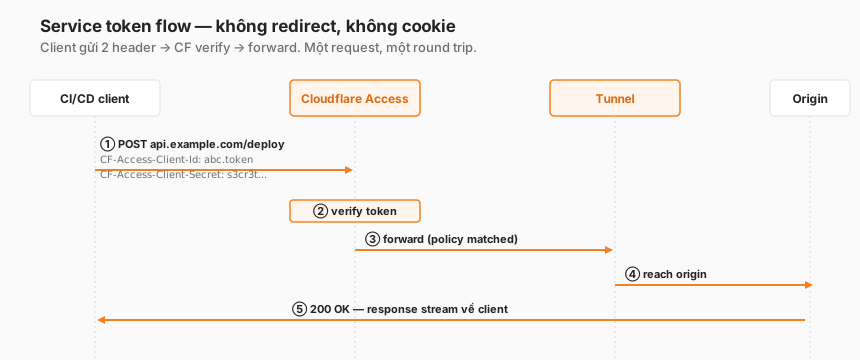
- Service token — two HTTP headers (
CF-Access-Client-Id+CF-Access-Client-Secret). Five-minute setup. Audit through logs. - mTLS — the client presents a certificate, Cloudflare verifies the chain against a root CA you have uploaded. Needs PKI to set up. Stronger when the organisation already has PKI or requires device identity.
This post covers:
- When to use service tokens, when to use mTLS.
- End-to-end setup for both.
- A rotation strategy with an overlap window for zero-downtime changes.
- Audit logs for non-human traffic.
- Four common anti-patterns.
The thesis:
A service token is “an API key with a log”. mTLS is “device identity with cryptographic proof”. Don’t use a service token where proof is required. Don’t use mTLS where it isn’t.
This is Part 6 of the Cloudflare One Handbook.
Who this is for
- DevOps/SRE setting up CI/CD, cron jobs, or monitoring that reaches an app behind Access.
- Platform engineers building SDKs or device firmware that phones home to a protected endpoint.
- Security engineers designing Zero Trust for all traffic, not just the human slice.
Recommended prior reading:
- Part 4 — Access ZTNA fundamentals (policy evaluation)
- Part 5 — IdP integration (to understand what “human” means)
After this post you will:
- Know when to pick service token vs mTLS.
- Be able to set up both end-to-end with working code examples.
- Have a rotation playbook that avoids downtime.
- Know how to audit non-human traffic in Zero Trust logs.
What this post does not cover
- Origin-side mTLS (client cert between Cloudflare ↔ origin) — different from the client-side mTLS covered here.
- Cloudflare platform API tokens (for managing zones, DNS) — entirely separate, unrelated to Access.
- OAuth client credentials flow — Cloudflare Access does not support this flow natively; the equivalent pattern is a service token.
Concepts
- Service token — a (Client ID, Client Secret) pair generated by Cloudflare. The client sends both via headers:
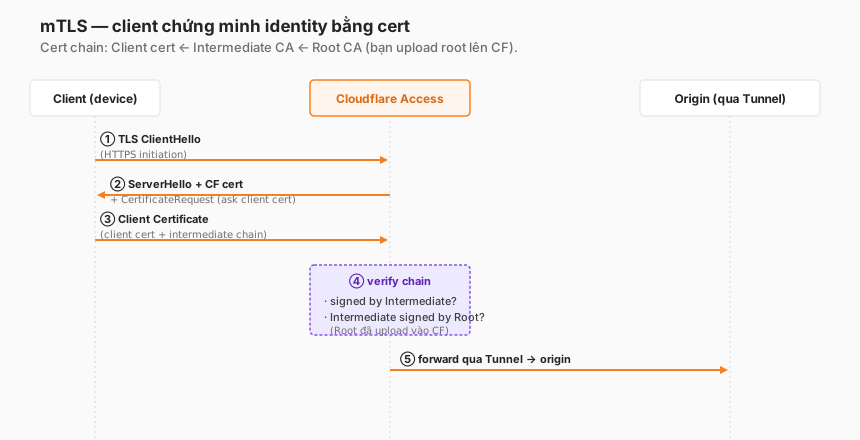
CF-Access-Client-IdandCF-Access-Client-Secret. Cloudflare verifies and matches policy. - mTLS (mutual TLS) — both sides of the TLS handshake present certificates. The client presents a cert, Cloudflare verifies the chain up to a trusted root CA.
- Root CA — the CA certificate you upload into Cloudflare. Every client cert must chain up to this root to be valid.
- Cert chain — a sequence of certificates: client cert → intermediate CA → root CA.
- Policy action
Service Auth— a special action in Access policy to match service tokens (not users). - Non-human identity — identity not tied to a user in the IdP. Tied to a workload (service, device, CI job).
Human vs non-human — where they differ
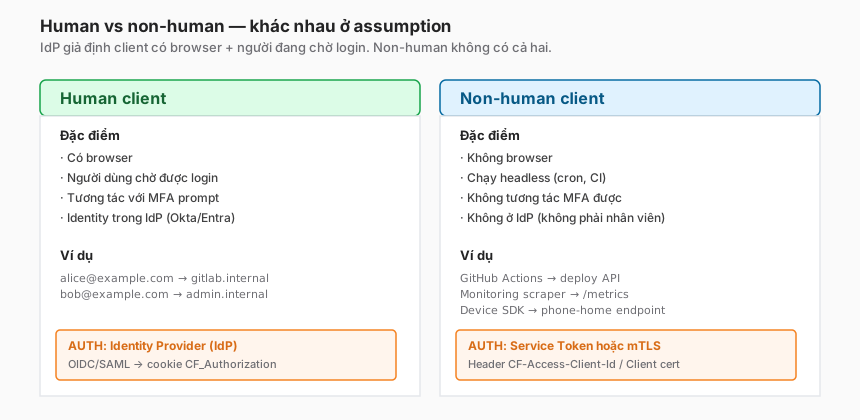
Why not use an IdP for bots?
- No browser — the IdP’s authorize endpoint returns a 302 redirect; a cron job or script cannot follow it.
- No interactive MFA — the IdP often requires step-up MFA. A bot cannot respond to the prompt.
- No IdP identity — creating
github-actions-bot@example.comin Okta costs a license, and that user becomes a more valuable target than a proper bot. - Rotation cadence — IdP passwords typically have long expiry (years). Service tokens are designed for more frequent rotation.
Are there workarounds?
- OAuth client_credentials in a headless flow: does not work directly with Cloudflare Access — Cloudflare Access’s OIDC flow is authorization_code, not client_credentials.
- Robot account with password + stored token: technically possible but an anti-pattern — the robot account becomes a privileged identity, and policy becomes hard to write.
The right answer: service token or mTLS.
Service token vs mTLS — which to choose
| Factor | Service token | mTLS |
|---|---|---|
| Setup complexity | Low — click to create, copy headers | High — root CA, client-cert pipeline |
| Secret type | String (ID + secret) | X.509 cert + private key |
| Rotation effort | Create new token, update config | Re-issue cert, distribute, revoke old |
| Per-client identity | Yes (one token per client) | Yes (one cert per identity) |
| Hardware identity proof | No | Yes — cert can be bound to TPM/HSM |
| PKI dependency | None | Required (root CA, intermediate, pipeline) |
| Audit granularity | Token ID in logs | Cert subject in logs |
| Fits | CI/CD, quick integration, SDKs | IoT fleet, devices with PKI, compliance mandate |
Rule of thumb:
- Start with service tokens. Simple, sufficient for 80% of use cases.
- Move to mTLS when:
- The organisation already has PKI.
- Regulation requires cryptographic device identity (finance, healthcare).
- Scaling to thousands of devices (manual service-token rotation doesn’t scale).
- Identity has to be bound to hardware (TPM).
Setup 1 — Service token
Step 1 — Create the token
Zero Trust dashboard → Access → Service Auth → Service Tokens → Create Service Token.
- Name:
ci-deploy-prod(pick a descriptive name — pattern<team>-<purpose>-<env>) - Duration: defaults to 1 year. Set shorter for higher-risk use cases.
Save. Cloudflare shows the Client ID and Client Secret once. Copy both to a secret manager immediately.
- Client ID format:
abc123.access(human-readable prefix) - Client Secret format: base64-like long string, not recoverable if missed.
Step 2 — Add to an Access policy
Edit the Access application (e.g. api.example.com) → Add policy:
- Name:
CI deployment - Action:
Service Auth(the key choice — not a regular Allow) - Include:
Service Token→ selectci-deploy-prod.
Save. No Require block — service tokens do not go through posture checks.
Step 3 — Use from the client
curl:
curl https://api.example.com/deploy \
  -H "CF-Access-Client-Id: abc123.access" \
  -H "CF-Access-Client-Secret: s3cr3t_long_string_here" \
  -X POST -d '{"version":"v1.2.3"}'
GitHub Actions:
- name: Trigger deployment
  env:
    CF_ACCESS_CLIENT_ID: ${{ secrets.CF_ACCESS_CLIENT_ID }}
    CF_ACCESS_CLIENT_SECRET: ${{ secrets.CF_ACCESS_CLIENT_SECRET }}
  run: |
    curl https://api.example.com/deploy \
      -H "CF-Access-Client-Id: $CF_ACCESS_CLIENT_ID" \
      -H "CF-Access-Client-Secret: $CF_ACCESS_CLIENT_SECRET" \
      -X POST -d '{"version":"${{ github.sha }}"}'
Terraform (if the Cloudflare provider calls an Access-protected endpoint):
provider "cloudflare" {
  api_token = var.cf_api_token
}

data "http" "deploy" {
  url = "https://api.example.com/deploy"
  request_headers = {
    "CF-Access-Client-Id"     = var.cf_access_client_id
    "CF-Access-Client-Secret" = var.cf_access_client_secret
  }
}
Python (requests):
import requests

resp = requests.post(
    "https://api.example.com/deploy",
    headers={
        "CF-Access-Client-Id": os.environ["CF_ACCESS_CLIENT_ID"],
        "CF-Access-Client-Secret": os.environ["CF_ACCESS_CLIENT_SECRET"],
    },
    json={"version": "v1.2.3"},
    timeout=10,
)
resp.raise_for_status()
Step 4 — Verify in logs
Zero Trust → Logs → Access → filter by Application api.example.com. Service-token events show:
- User:
ci-deploy-prod.access(token name as identifier) - Connection method:
Service Token - Policy matched:
CI deployment
Missing events → wrong headers, wrong secret, or the policy does not include the token.
Service token flow — visual
Setup 2 — mTLS
mTLS is more involved. When PKI is already in place, it is meaningfully stronger.
Step 1 — Prepare a root CA
A root CA is needed — options:
- Existing organisation CA (AD CS, HashiCorp Vault PKI, Smallstep, AWS Private CA).
- Self-signed test CA:
openssl req -x509 -sha256 -days 3650 -newkey rsa:4096 -keyout ca.key -out ca.crt.
Requirements:
- Cert in PEM format.
- Corresponding private key to sign client certs (the private key is not uploaded to Cloudflare).
Step 2 — Upload the root CA to Cloudflare
Zero Trust → Settings → Authentication → Mutual TLS authentication → Add mTLS certificate.
- Paste the contents of
ca.crt(including the-----BEGIN CERTIFICATE-----lines). - Name:
Corporate Device CA - Associated hostnames:
api.example.com(and any other hostnames where mTLS should apply).
Save. Cloudflare validates the cert format → status Active.
Step 3 — Issue a client cert
From the CA, issue a cert for the client:
# Generate CSR from the client
openssl req -newkey rsa:2048 -keyout client.key -out client.csr \
  -subj "/CN=github-actions-bot/O=Example Corp"

# CA signs the CSR into a cert
openssl x509 -req -in client.csr \
  -CA ca.crt -CAkey ca.key -CAcreateserial \
  -out client.crt -days 365 -sha256
Outputs: client.crt (public cert) + client.key (private key, keep secret).
Step 4 — Policy matching by cert attribute
Create an Access application policy:
- Name:
mTLS from Corporate CA - Action:
Non-Identity(the mTLS action, distinct from Allow). - Include:
Common Name→github-actions-bot(or a pattern match, e.g. ends-with.corp.example.com).
Save.
Matching can be by:
- Common Name (CN) — the subject’s CN.
- Issuer — who signed the cert (for multi-CA setups).
- Country / Organization — other subject attributes.
Step 5 — Client usage
curl:
curl https://api.example.com/deploy \
  --cert client.crt \
  --key client.key \
-X POST -d '{"version":"v1.2.3"}'Python:
resp = requests.post(
    "https://api.example.com/deploy",
    cert=("client.crt", "client.key"),
    json={"version": "v1.2.3"},
    timeout=10,
)Go:
cert, _ := tls.LoadX509KeyPair("client.crt", "client.key")
client := &http.Client{
    Transport: &http.Transport{
        TLSClientConfig: &tls.Config{
            Certificates: []tls.Certificate{cert},
        },
    },
}
resp, _ := client.Post("https://api.example.com/deploy", ...)
mTLS handshake flow
Rotation — the overlap window pattern
Both service tokens and mTLS certs need periodic rotation. A bad rotation causes downtime.
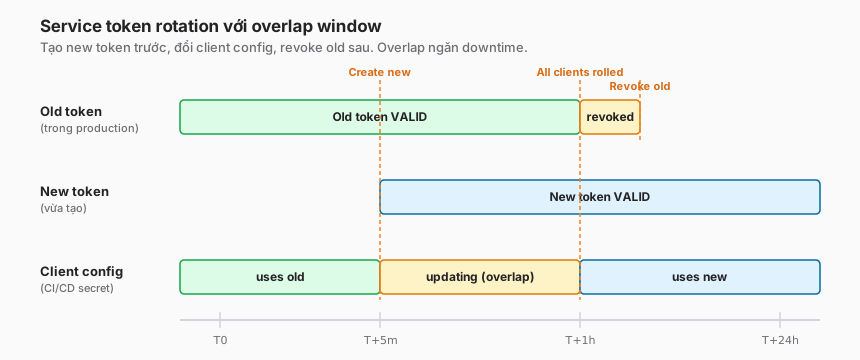
Service token rotation
The correct sequence:
- T0 — Create a new token. Dashboard → Create new token
ci-deploy-prod-v2. - T0 — Add the new token to the same policy. The
CI deploymentpolicy now includes both old and new. - T0 → T+1h — Update the client secret in the secret manager (GitHub secrets, Vault, etc.). Staggered rollout — do not update all CI pipelines simultaneously.
- T+1h — Verify the new token is in use. Check logs — events should show
ci-deploy-prod-v2. - T+1h — Revoke the old token. Dashboard → old token → Delete.
The overlap window (T0 → T+1h) is when both tokens are valid. Revoking old before rollover = downtime.
mTLS cert rotation
Similar, but via the CA:
- T0 — Issue a new cert with the same CN (or a different CN, depending on policy matching).
- T0 — Ensure the CA trust chain is unchanged (if an Intermediate CA is changing at the same time, upload the new one into Cloudflare first).
- T0 → T+1h — Roll over the client cert file on the CI or device.
- T+24h — Revoke the old cert in the CA (CRL or OCSP).
Note: Cloudflare does not check CRL for mTLS client certs natively — if revocation has to be enforced, explicitly remove the cert ID from the policy, or change the matching pattern (different CN).
Recommended rotation cadence
| Client type | Service token | mTLS cert |
|---|---|---|
| Short-lived CI job | 90 days | N/A (typically service token) |
| Long-running service | 180 days | 1 year |
| Device fleet | N/A | 1–2 years |
| High-security / compliance | 30 days | 90 days |
Policy patterns for non-human clients
Pattern 1 — Service endpoint for CI only
# Access application: api.example.com
policies:
  - name: "CI deployment"
    action: service_auth
    include:
      - service_token: "ci-deploy-prod"
      - service_token: "ci-deploy-staging"
CI tokens only. No users, not reachable from a browser.
Pattern 2 — Endpoint for both humans and bots
# Access application: api.example.com
policies:
  # Policy 1: human users (order 1)
  - name: "Developers manual"
    action: allow
    include:
      - groups: [Engineering]
    require:
      - device_posture: [managed_device]

  # Policy 2: CI service tokens (order 2)
  - name: "CI auto-deploy"
    action: service_auth
    include:
      - service_token: "ci-deploy-prod"
The same application endpoint supports both developers (browser + IdP) and CI (service tokens). One endpoint, two auth paths.
Pattern 3 — mTLS for a device fleet
# Access application: telemetry.example.com
policies:
  - name: "Factory devices"
    action: non_identity
    include:
      - common_name: "^device-[a-z0-9-]+\\.factory\\.corp$"
Pattern-matching the CN allows thousands of devices without having to register each one.
Audit logs for non-human
Zero Trust → Logs → Access → filter:
- Connection method:
Service Token/Non-Identity mTLS - User: token name or cert CN
Each event carries:
- Timestamp
- Application
- Policy matched
- Token name or cert CN
- Source IP
- Country
- User agent
Export to SIEM
Logs are pushed to SIEM through Logpush (covered in Part 17). Dataset: access_requests. Important fields for non-human:
{
  "app_name": "api.example.com",
  "allowed": true,
  "service_token_id": "abc123.access",
  "service_token_name": "ci-deploy-prod",
  "connection_method": "service_token",
  "created_at": "2026-05-07T10:24:33Z",
  "ip_address": "203.0.113.42",
  "country": "SG"
}
Anomaly detection
Event patterns worth flagging:
- Service token called from an unexpected country — CI usually calls from the CI provider’s IP. Requests from elsewhere = credential leak.
- Frequency spike — baseline 100 req/hour, a 10,000 spike = abuse or runaway script.
- Failed auth after rotation — old token still trying = client did not roll over.
Trade-offs
| Decision | Option A | Option B | Recommendation |
|---|---|---|---|
| Auth type | Service token | mTLS | Token for most. mTLS when PKI or compliance requires it. |
| Token scope | One token for many policies | One token per use case | One per use case — granular audit + revoke. |
| Secret storage | GitHub secrets / Vault | Plaintext env vars | Secret manager always. Never plaintext. |
| Rotation cadence | Policy-driven (90/180 days) | Manual when something goes wrong | Automated — calendar, runbook, drills. |
| Expiration | Token never expires | 1-year expiry | Expire — forces the rotation cadence. |
| Policy action | Service Auth | Allow (Access bypass) | Service Auth — keep the log trail, don’t bypass. |
Common anti-patterns
1. “Hardcode the secret into source”
# BAD
CF_SECRET = "s3cr3t_long_string_here"
Secrets leak into git history. Rotation becomes hard — the container has to be rebuilt. Use a secret manager.
2. “Use one service token for every CI job”
One token → one identity in the logs → no way to tell which job deployed. The audit trail becomes useless. Create separate tokens for each important pipeline.
3. “Bypass Access for an API endpoint”
policies:
  - name: "API public"
    action: bypass       # anti-pattern
Bypass = traffic never hits the Access check, with no log. Instead, use Service Auth with a token. Logs and policy still function.
4. “Keep the mTLS root CA private key on a CI runner”
The root CA private key belongs in an HSM or offline. Only intermediate CAs should live on runners or vaults. If the root CA key leaks, the entire trust chain breaks and every client cert has to be re-issued.
5. “Service tokens with no expiration”
A non-expiring token = a secret that lives forever. If the CI provider leaks (it has happened to GitHub, CircleCI), the attacker uses it until you notice. Cap at 1 year.
6. “Rotate by disabling the old first, then creating the new”
Guaranteed downtime window. Always create new → roll over → revoke old.
Checklist — before non-human auth goes to production
Setup:
- Token/cert names follow the naming convention (
<team>-<purpose>-<env>). - Secret stored in a secret manager, not hard-coded.
- Policy action correct:
Service Authfor tokens,Non-Identityfor mTLS. - Session duration / cert validity set explicitly, not left on default.
Rotation:
- Rotation runbook documented (when, who, which steps).
- Calendar reminder for the rotation date.
- Overlap-window procedure tested at least once in staging.
Audit:
- Logs pushed to SIEM.
- Alerts configured for: token from unexpected country, failed-auth spike, expiring cert.
- Dashboard monitoring non-human traffic volume.
mTLS-specific:
- Root CA private key offline or in HSM.
- Intermediate CA used to issue client certs.
- Revocation process (manual policy update) documented.
Lessons from practice
- CI pipeline downtime from bad rotation — revoking old before rollover. Classic mistake, easily avoided with the overlap pattern.
- Service token leaked into a GitHub commit — hard-coded to “test quickly”, never revoked. Two weeks later a script kiddie uses it to crawl an internal API. Lesson: secret scanning in CI + a pre-commit hook.
- mTLS cert expired in production at 2am — no monitoring on expiration. One morning, 100% of phone-home traffic fails. Cert expiry = first-class alert.
- Token names
token-1,token-2,temp-token— audit becomes useless. A naming convention is a cheap investment with a large payoff. - Never write an “allow any service token” policy. Every token needs its own policy or an explicit list. Wildcards mean you don’t know who is accessing what.
Summary
Non-human authentication is often the under-invested part of a Zero Trust rollout. Human flows are more numerous and more visible — but bot accounts are where attackers often land because:
- Monitoring is lighter.
- Rotation is routinely skipped.
- Secrets leak through CI/CD history.
Cloudflare Access’s service tokens + mTLS solve the right problem. They only work well when:
- Naming conventions are consistent.
- Rotation schedules are automated (not memory-based).
- Audit logs flow to SIEM with anomaly alerting.
- Secret storage uses a secret manager, not hard-coded values.
One line to remember:
A service token is five minutes to set up. Operating it correctly — naming, rotation, audit, no hard-coding — is a week. That week is where production bugs wait.
Part 7 covers SCIM + group sync — the proper fix for the stale-claim problem from Part 5, with real-time off-boarding.
References
- Cloudflare Access — Service tokens
- Cloudflare Access — mTLS
- Logpush dataset: access_requests
- OpenSSL x509 docs
In this series:
- ← Part 5: IdP integration
- Next → Part 7: SCIM and group sync
- All parts: Cloudflare One Handbook series
