
TL;DR
HTTP filtering is Gateway’s layer 3 (after DNS and Network): it inspects HTTP/HTTPS requests once Gateway terminates TLS, and runs URL/header/body rules, DLP, and CASB. Unlike DNS filtering, it is granular down to path, method, and body — not just domain.
TLS decryption is required for most of the useful HTTP rules. Without it, Gateway only sees the SNI and connection metadata — no full URL, headers, or body.
This post covers:
- When HTTP filtering adds value on top of DNS.
- TLS decrypt mechanics: Gateway-as-MITM, the Cloudflare root CA, endpoint installation.
- Cert pinning — which apps refuse decryption (banking, Apple, many mobile apps) and how to exempt them.
- HTTP rule examples: file upload control, shadow-IT login blocks, CASB tenant lock.
- DLP — pattern matching on credit cards, PII, source code inside HTTP bodies.
- Legal and privacy — GDPR and local-law considerations before decrypting user traffic.
- Rollout playbook — avoid the day-one outage when decryption flips on.
The thesis:
TLS decryption is powerful but expensive — performance overhead, user-trust risk, legal complexity. Turn it on when you actually need DLP, CASB, or granular URL control. Do not turn it on “just to see better”. Start with DNS + Network; decrypt only when there’s a concrete business use case.
This is Part 12 of the Cloudflare One Handbook, following Part 11 (DNS) and preceding Part 13 (Network L4).
Who this is for
- Security engineers who need DLP, CASB, or URL-level control.
- Compliance teams that require inspection of outbound traffic (PCI, HIPAA, trade-secret).
- Platform engineers preparing an MDM rollout of the CA cert.
Recommended prior reading:
- Part 9 — WARP (the client that hands traffic to Gateway).
- Part 11 — DNS filtering (the layer before HTTP).
After this post you will:
- Know when to enable TLS decryption (and when not to).
- Have a playbook for pushing the Cloudflare CA via MDM (Jamf, Intune, Chrome, GPO).
- Know the exception list for cert-pinned apps so you don’t trigger an outage.
- Be able to write HTTP rules for DLP and CASB tenant control.
- Understand the legal/privacy framework needed to get Legal onboard.
What this post does not cover
- Network policy L4 — Part 13 (non-HTTP filtering, DoH blocking, app rules).
- Browser Isolation — a later post (risky links rendered in a remote browser).
- Native CASB integrations in detail (Salesforce, Workday, Box API connectors) — mentioned only.
- Email Security (Area 1) — separate from Gateway.
- Advanced DLP tuning (custom ML models, fine-grained fingerprinting) — enterprise feature, briefly referenced.
Concepts
- SWG (Secure Web Gateway) — a forward proxy that inspects client HTTP(S) traffic.
- TLS interception / MITM — Gateway sits in the middle, terminates TLS from the client, and re-establishes TLS to the origin.
- Root CA — Cloudflare’s CA cert that endpoints must trust to avoid browser warnings.
- Cert pinning — an application inspects the origin’s public key/cert and refuses any other CA, even a trusted root — so decryption fails.
- SNI (Server Name Indication) — the hostname inside the TLS ClientHello. Gateway sees it even without decryption.
- ECH (Encrypted ClientHello) — next-gen SNI encryption. Endpoints need ECH disabled for decryption to work.
- DLP (Data Loss Prevention) — pattern matching on request bodies (credit card, PII, source code).
- CASB (Cloud Access Security Broker) — granular SaaS control (Google Workspace, Microsoft 365, Salesforce): tenant lock, action control.
- Shadow IT — tools employees use without IT approval (personal Gmail, consumer Dropbox).
When HTTP filtering earns its keep over DNS
DNS already blocks 60–80% of commodity threats. What does HTTP add?
Things DNS doesn’t see
- URL path:
legit-cms.com/adminvslegit-cms.com/public— DNS sees the same domain. - HTTP method: block POST but allow GET.
- Headers: User-Agent, Referer, Cookie.
- Body: file uploads, form data, JSON payloads — DLP needs the body.
- TLS client identity: tenant cookies for CASB.
Shared infrastructure
- Workspaces (Google Docs, Microsoft 365): everything lives under
docs.google.com/onedrive.live.com. - CDNs: many sites share the same edge domain. A DNS block hits all of them.
- Serverless (Vercel, Netlify, Cloudflare Pages): dev apps and phishing co-exist on the same base domain.
Granular use cases
- CASB: allow only the company Google Workspace tenant; block personal
@gmail.com. - DLP: block uploads of CSVs containing PII to external storage.
- Risky URL: block
evil-ui.legit-saas.combut allow the rest. - Browser Isolation trigger: a risky click goes to isolation rather than a hard block.
If the use case is purely “block malware domains”, DNS is enough. If you need DLP, CASB, or granular URL control, HTTP + TLS decryption is required.
TLS decrypt mechanics
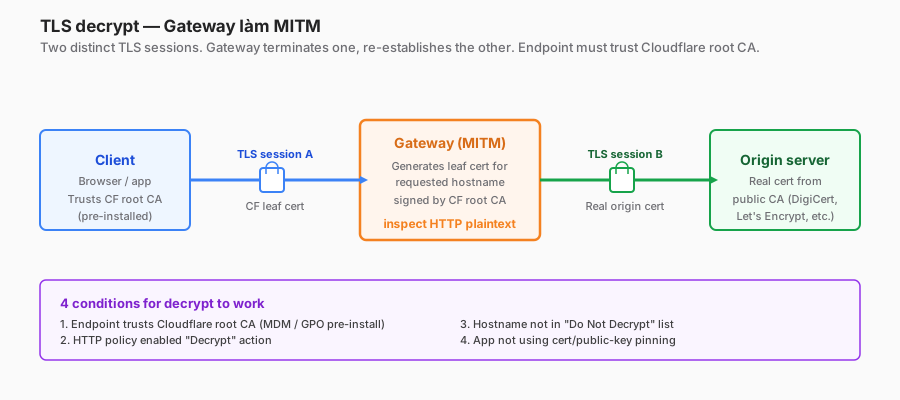
Gateway as MITM
Without decryption:
Client ═TLS═> Gateway ═TLS═> Origin
                (SNI, size, timing only)
With decryption:
Client ═TLS(A)═> Gateway ═TLS(B)═> Origin
   ↑ uses CF leaf cert            ↑ real origin cert
     (signed by CF root CA)         (Gateway verifies as normal)
Gateway generates a leaf cert per hostname on the fly, signed by the Cloudflare root CA. Endpoints that trust the root CA see no warning.
Four preconditions for decryption to work
- Endpoints trust the CF root CA — pre-installed via MDM/GPO or manually.
- HTTP policy has “Decrypt” enabled — Gateway UI → policy → Enable Decrypt action.
- Hostname falls inside the decrypt scope — either decrypt everything, or an allow/exclude list.
- The app doesn’t pin — if the app pins the public key, decryption fails.
Cost
- CPU: client + Gateway decrypt and re-encrypt. Modern hardware handles 1 Gbps+.
- Latency: +5–15 ms round-trip.
- Memory: Gateway needs enough buffer for inspection.
- Privacy: handle carefully — see the “Legal & privacy” section.
Installing the Cloudflare root CA on endpoints
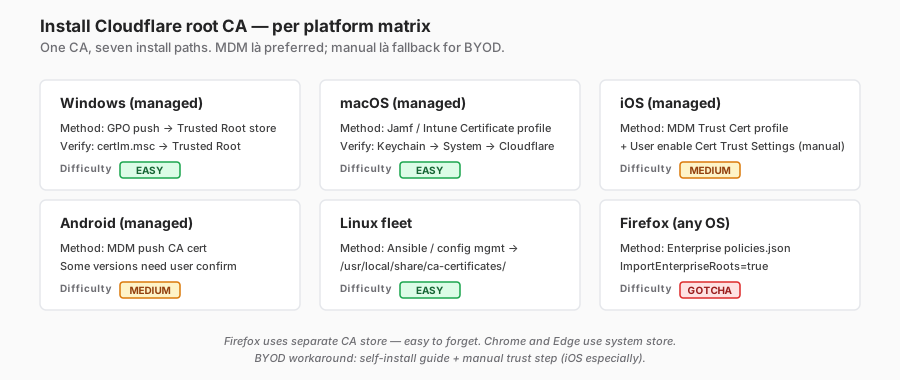
Download the CA
Cloudflare dashboard → Zero Trust → Settings → Network → Root Certificate → Download. Formats:
.pem— Linux, Firefox..crt— Windows, Android..cer— iOS, macOS.
One root CA per tenant. Rotates roughly every 5 years — plan a re-install window.
Windows — GPO
# Import to the trusted root on domain-joined machines
Import-Certificate -FilePath "\\share\cloudflare-root.crt" `
  -CertStoreLocation "Cert:\LocalMachine\Root"
GPO path: Computer Config → Policies → Windows Settings → Security Settings → Public Key Policies → Trusted Root Certification Authorities → import.
Verify on the endpoint: certlm.msc → Trusted Root → find “Cloudflare”.
macOS — MDM (Jamf, Intune)
Jamf: Configuration Profile → Certificate payload → upload the CA.
Intune: Devices → Configuration Profiles → Trusted certificate (macOS) → upload the .cer.
Verify: Keychain Access → System → find the Cloudflare cert → “Always Trust”.
iOS / Android — MDM
iOS: same MDM Trusted Certificate profile. Extra step: Settings → General → About → Certificate Trust Settings → the user must manually enable trust (iOS security design; MDM can’t auto-enable).
Android: MDM pushes the CA. Some Android versions require user confirmation.
Linux
# Debian/Ubuntu
sudo cp cloudflare-root.crt /usr/local/share/ca-certificates/
sudo update-ca-certificates

# RHEL/CentOS
sudo cp cloudflare-root.pem /etc/pki/ca-trust/source/anchors/
sudo update-ca-trust
Firefox — separate store
Firefox doesn’t use the system CA. Options:
- Enterprise policy:
policies.json→"Certificates": { "ImportEnterpriseRoots": true }— Firefox trusts the system root. - Manual:
about:preferences#privacy→ Certificates → Import.
Chrome — OS store
Chrome uses the system CA. No separate step.
Rollout order
- IT team first (1 week) — validate the process + catch rough edges.
- Pilot group of 5–10% users (2 weeks) — catch app-compatibility issues.
- Broad rollout — MDM push to all managed devices.
- BYOD policy — require installation before corporate resource access; document the process.
Cert pinning — what can’t be decrypted
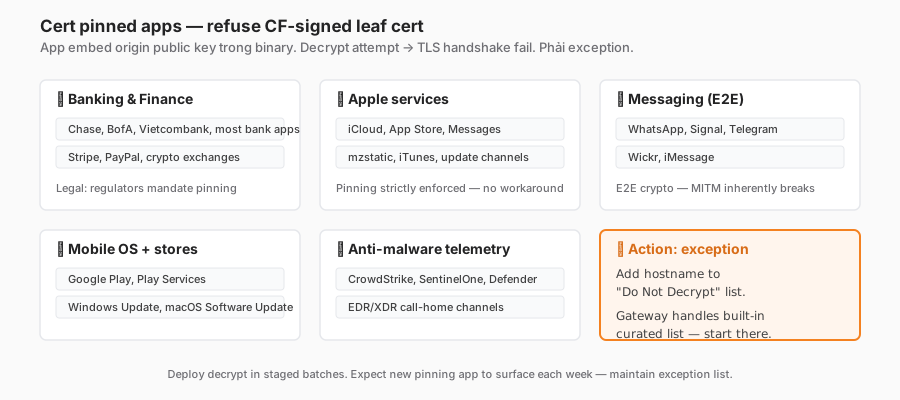
Some apps embed a public-key or cert fingerprint in the binary. If the CA chain doesn’t match, the app refuses the connection — no warning UI, it simply fails.
Real-world examples
- Banking apps (Chase, BofA, Vietcombank, etc.) — almost all pin.
- Apple services — iCloud sync, App Store checkout. Strictly pinned.
- Google Play and Google Workspace apps on mobile — pin.
- WhatsApp, Signal, Telegram — pin.
- Anti-malware (CrowdStrike, SentinelOne telemetry) — pin specifically to defeat MITM.
- Some enterprise VPNs (Cisco AnyConnect update channel) — pin.
Who controls pinning
- Mobile app: in the app code, developer-controlled.
- Desktop app: in the binary.
- Web browser: HSTS + HPKP (HPKP is deprecated; pinning is rare).
- Cert Transparency + DNS-based key fingerprints (CAA, DNSSEC) — not a strict pin.
Solution
You can’t “fix” pinning. You must exempt those hostnames from decryption.
# HTTP policy: Do Not Decrypt list
do_not_decrypt:
  - "*.apple.com"
  - "*.icloud.com"
  - "*.mzstatic.com"
  - "*.appstore.com"

  - "*.whatsapp.net"
  - "*.whatsapp.com"
  - "*.signal.org"

  - "*.vietcombank.com.vn"
  - "*.openbank.com"

  - "*.crowdstrike.com"
  - "*.sentinelone.com"

  - "*.windowsupdate.com"  # Microsoft pins the update CA
  - "*.microsoft.com"      # some paths pin
Cloudflare provides a curated list of commonly pinned services out of the box. Start with that and add custom entries as apps break.
Detecting cert pinning
When decryption is on and a user reports an app failing:
- Gateway logs → HTTP → filter by user + app hostname.
- Look for an error: “TLS handshake fail” or “Cert verification fail”.
- Check the Cloudflare built-in pinning list — is it already there?
- If not, add the hostname to Do Not Decrypt.
- Test: the user retries → works.
Best practice: deploy decryption in staged batches and be ready to add exceptions when users report problems.
HTTP rule examples
1. Block uploads > 10MB to external storage
name: "Block large upload to external storage"
action: block
condition: |
  http.request.method == "POST"
  and http.request.body.size > 10485760  # 10MB
  and any(http.request.uri.host in {
    "wetransfer.com",
    "sendanywhere.com",
    "dropbox.com",    # personal Dropbox — CASB whitelists the company tenant separately
    "pcloud.com"
  })
block_page: "Large uploads to external storage require approval — contact IT"
2. CASB: only the company Google Workspace tenant
name: "Google Workspace tenant lock"
action: allow
condition: |
  any(http.request.uri.host matches "*.google.com")
  and http.request.header["X-GOOGLE-HD"] == "company.com"

name: "Block other Google Workspace tenants"
action: block
condition: |
  any(http.request.uri.host matches "*.google.com")
  and http.request.header["X-GOOGLE-HD"] != "company.com"
# The X-GOOGLE-HD header is added by Google based on the user's domain;
# Gateway can inspect it once the traffic is decrypted.
3. DLP: block credit card in the body
name: "Block credit card number exfil"
action: block
condition: |
  http.request.method == "POST"
  and dlp.profiles["PCI-DSS"].matches
block_page: "Sensitive data detected — this action is blocked and logged"
# DLP profile "PCI-DSS": built-in pattern for Visa / MasterCard / Amex / Discover.
4. Block personal email upload/compose
name: "Block personal email"
action: block
condition: |
  any(http.request.uri.host in {
    "mail.google.com/u/0/#inbox",  # personal, not workspace
    "outlook.live.com",            # personal Outlook
    "yahoo.com/mail"
  })
  and http.request.method == "POST"
  # Block POST (compose/send) while allowing GET (passive read).
5. Risky download → Browser Isolation
name: "Isolate risky download"
action: isolate
condition: |
  http.request.uri.path matches ".*\\.(exe|msi|dmg|bat|ps1)$"
  and not (http.request.uri.host in $trusted_download_list)
# File renders in a remote browser; the user can choose to proceed or cancel.
6. Warn on AI chat when DLP is a concern
name: "Warn AI chat"
action: warn
condition: |
  any(http.request.uri.host in {
    "chat.openai.com", "claude.ai", "gemini.google.com"
  })
  and http.request.method == "POST"
# Warn page: "Sensitive data policy applies. Do not paste customer PII or source code."
# If the user clicks "Proceed" → log + allow. For stricter scopes, switch to "isolate" or "block".
DLP — Data Loss Prevention
Built-in profiles
Cloudflare provides DLP profiles for common patterns:
- PCI: credit card Luhn + BIN.
- PII: SSN, passport, national IDs.
- PHI (HIPAA): medical identifiers.
- Secrets: AWS access keys, Google service-account keys, private-key blocks.
- Source code: fingerprints of common frameworks.
Custom profile
name: "Customer PII"
patterns:
  - type: regex
    value: '\\b\\d{9}\\b'        # Vietnam national ID (simplified)
    name: "VN ID"
    confidence: medium
  - type: regex
    value: '\\b\\d{10,12}\\b'    # phone
    name: "VN phone"
    confidence: low

# Logic: block if ≥ 2 PII types in the same body
trigger: "count >= 2"
Triggers
- Block: refuse the request, log the event, notify the user.
- Warn: show a warning page; the user clicks to proceed; log the decision.
- Log-only: allow but log (monitoring mode).
DLP rollout
- Log-only for 2–4 weeks — measure false-positive rate.
- Warn for 2 weeks — educate users.
- Block the high-confidence rules (credit card, obvious secret).
- Iterate on lower-confidence rules based on feedback.
DLP pitfalls
- False-positive rate is high when regexes are loose — a 9-digit number could be an order ID, not a national ID.
- Base64 / encoded data bypasses regex — advanced DLP needs content decoding (Cloudflare has limits here).
- Image data — text patterns don’t see text inside screenshots. OCR-based DLP is enterprise-only at the moment.
- Compressed / encrypted bodies — reasonable expectation that inspection is not possible.
CASB — Cloud Access Security Broker
What CASB does
- Tenant control: only the company tenant on Google/Microsoft/Dropbox.
- Action control: allow downloads but block external sharing.
- Data governance: classify sensitive documents, prevent external shares.
- Shadow IT discovery: log access to unknown SaaS.
Cloudflare CASB modes
Mode 1 — Inline (via Gateway HTTP filter):
- Real-time block based on decrypted traffic + header inspection.
- Example: block personal Gmail, tenant-lock Workspace.
- Fast, no app integration needed.
Mode 2 — API-based (CASB integration):
- Gateway connects to SaaS APIs (Google Drive API, Microsoft Graph).
- Scans existing files for violations.
- Detects external shares and risky permissions.
- Slower (scan minutes to hours).
- Requires an OAuth grant from the SaaS admin.
Typical enterprises use both: inline for real-time prevention, API for posture audit.
CASB quick wins
- Google Workspace:
X-GOOGLE-HDheader tenant check. - Microsoft 365:
Restrict-Access-To-Tenantsheader (set via a decryption rewrite). - Dropbox:
X-Dropbox-Useheader (older) or OAuth enforcement. - Salesforce: IP-based CIDR restrictions at the Salesforce side + Gateway enforcing IPs.
Legal and privacy — not skippable
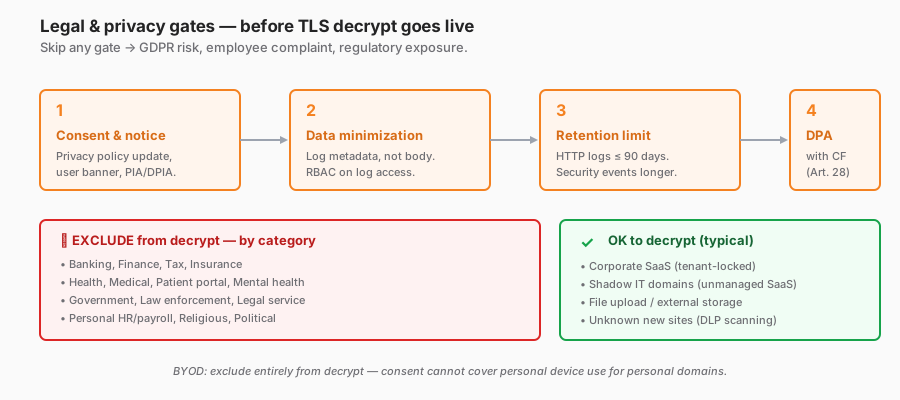
TLS decryption means you read the user’s HTTPS traffic. That touches privacy law.
GDPR (EU) / equivalents
- Transparency: users must know traffic is being inspected. Privacy policy + banner.
- Proportionality: decrypt only as much as the specific purpose (security) requires — not mass surveillance.
- Data minimisation: log the minimum necessary. Don’t log decrypted bodies by default.
- Employee consent / BYOD: you cannot decrypt a personal device without explicit consent. BYOD should be excluded entirely or require opt-in.
Sensitive domains to exclude
Must exclude from decryption:
- Banking, finance.
- Healthcare (health insurance, patient portals).
- Government / tax (an employee may file personal tax on a work device).
- HR/payroll for the employee’s own account.
- Mental health, religious, political.
- Legal services.
These aren’t “nice to have” — many jurisdictions legally require the exclusion.
Pre-decrypt checklist
- Privacy Impact Assessment (PIA) / DPIA completed.
- Legal sign-off.
- User notification — announcement, banner, updated privacy policy.
- Scope document: what is decrypted, what is excluded.
- Retention policy: maximum log lifetime, who has access.
- Data Processing Agreement with Cloudflare (GDPR Article 28 — Cloudflare provides a DPA).
- Exclusion list: bank / health / gov / HR / personal.
- Clear BYOD policy — decrypt or not.
- Incident response: log breaches, handle user complaints.
Safer defaults
- Decrypt only corporate-managed traffic (WARP enrolled via corporate IdP).
- Exclude common personal categories (Financial, Health, Government, Adult).
- Log metadata only (URL, method, decision) — not the body.
- Body inspection on the fly for DLP — scan, trigger rules, discard (don’t store).
- Retention ≤ 90 days for HTTP logs (vs. 1+ year for security events).
Reference configuration
Starter decrypt scope
decrypt:
  enable: true
  default: decrypt
  do_not_decrypt:
    # Cert-pinned services
    - "*.apple.com"
    - "*.icloud.com"
    - "*.mzstatic.com"
    - "*.whatsapp.*"
    - "*.signal.org"
    - "*.crowdstrike.com"
    - "*.sentinelone.com"

    # Privacy-sensitive (GDPR)
    - category: "Financial Services"
    - category: "Health and Medicine"
    - category: "Government"

    # Personal productivity (BYOD)
    - "*.apple.com"
    - "*.icloud.com"
    - "mail.google.com/u/0/#inbox"  # personal Gmail inbox path
    - "outlook.live.com"            # personal Outlook

    # Updates / packages
    - "*.windowsupdate.com"
    - "*.microsoft.com/update"
    - "*.microsoftonline.com/update"
    - "*.apt.ubuntu.com"
    - "*.debian.org"
    - "*.npmjs.com"
    - "*.pypi.org"
Warn instead of block — for user training
name: "AI assistants — warn about DLP"
action: warn
condition: |
  any(http.request.uri.host in {
    "chat.openai.com", "claude.ai", "gemini.google.com", "copilot.microsoft.com"
  })
warn_page: |
  Your organization allows AI assistants but reminds you:
  - Do not paste customer PII, source code, or secrets.
  - Do not rely on AI output for legal/medical/financial decisions.
  [Proceed] [Cancel]
Security considerations
Gateway side
- CA private key — managed by Cloudflare, stored in an HSM. Customers never see it.
- Cert Transparency — CF leaf certs are NOT published to public CT logs (privacy).
- Rotation — root CA roughly every 5 years. Plan the re-install window.
Customer side
- Root CA trust management — a compromised CA = attacker can MITM everything. Protect the distribution channel (MDM signing, GPO integrity).
- Local admin / BYOD — users with local admin can install a rogue CA. Audit periodically.
- Cert rotation playbook — when Cloudflare rotates, endpoints must receive the new cert before the old one expires.
New attack surfaces
- Users seeing “Cloudflare” issuing a TLS cert for
bank.com— legitimate users may report it as a MITM attack. Communicate ahead of time. - Cert-pinning bypass (jailbreak, patched app) — attackers can decrypt after a root compromise.
- DLP bypass via encoded/encrypted body content — active offensive research area.
Operations and monitoring
Metrics
- Decrypt throughput — monitor per tenant at the Cloudflare side.
- Do Not Decrypt hit count — make sure it isn’t excessive (> 30% of traffic exempt = config is too permissive).
- TLS error rate — spikes = potentially new cert pinning, a rogue endpoint, or a CA issue.
- DLP trigger count — baseline + anomaly (spike = campaign; drop = rule broken).
- CASB tenant violations — per user, identify risky behaviour.
Alerting
- TLS error > 5% at any PoP → Cloudflare support.
- Critical DLP rule triggers (credit card, secrets) > N/hour → SOC.
- A single user triggering DLP ≥ 3×/day → manager notification + training.
- Gateway throughput close to 80% of the plan cap → capacity planning.
Log pipeline — HTTP
- Same Logpush mechanism as DNS.
- HTTP log volume is much larger (metadata per request vs. per query).
- Dataset:
gateway_http. - Fields: URL, method, response status, decrypt decision, DLP triggers.
- Do NOT log body by default — privacy + storage.
{
  "Timestamp": "2026-05-13T09:22:17Z",
  "UserID": "u_abc",
  "Email": "alice@company.com",
  "URL": "https://personal-dropbox.com/upload",
  "Method": "POST",
  "Host": "personal-dropbox.com",
  "Action": "block",
  "PolicyID": "p_block_personal_storage",
  "DLPProfiles": [],
  "Decrypted": true,
  "UpstreamStatus": 0
}
Common troubleshooting
”App X doesn’t work after decryption was enabled”
- Gateway logs → HTTP → filter by user + app hostname.
- Error “TLS handshake fail” or “Cert mismatch”.
- Add the hostname to Do Not Decrypt.
- Test: user retries.
- Document: update the pinning exception list.
”Browser warns that the cert is untrusted”
- The endpoint is missing the CF root CA. Check MDM push status.
- Firefox uses a separate store; the policy may not enable it.
- Chrome on Linux: check
/etc/ssl/certs/and thatupdate-ca-certificatesran.
”DLP false positive”
- A user uploaded a benign file and DLP blocked it.
- Logs → see which profile triggered + the matched pattern.
- Adjust the confidence threshold, tighten the pattern, or add an allowlist for the department/hostname.
- If it’s a true positive: user education, possibly redirect to an approved DLP channel.
”Decryption breaks the mobile banking app”
- Expected — banking apps pin.
- Add the bank’s domain to Do Not Decrypt.
- User retests → works.
”Performance degraded after decryption was enabled”
- Small overhead is expected (5–15 ms).
- Over 100 ms = investigate: PoP geography, tenant throughput limit, an expensive specific rule.
- Engage Cloudflare support for tenant-level tuning.
”Privacy complaint from an employee”
- Check that the privacy notice went out.
- Verify the decrypt scope matches what was announced.
- Document the use case and forward to Legal/HR.
- Consider adding more to the exclusion list.
Rollout playbook — avoiding outage
Phase 1 — Plan (2–4 weeks)
- Legal + privacy sign-off.
- Use-case document (what to block / detect).
- Exclusion list draft.
- Communication plan for employees.
Phase 2 — CA deployment (2–4 weeks)
- MDM push the CA to managed devices.
- Verification check (MDM compliance).
- BYOD policy + manual install guide.
- IT team first, then the pilot group.
Phase 3 — Decrypt in log-only mode (2–4 weeks)
- Enable decryption, but every rule action is
log. - Monitor Gateway logs: TLS error rate, Do Not Decrypt hits.
- Add exceptions whenever a user reports breakage.
Phase 4 — Enable rules (progressive)
- Start with high-confidence rules (cert compromise, clear malware category with HTTP context).
- Warn action → educate users.
- Block action only when confidence is high and the exception process is ready.
Phase 5 — DLP + CASB
- DLP rules log-only first → adjust patterns.
- Then warn → block progressively.
- CASB tenant control — start with Google Workspace / Microsoft 365 (the biggest surface).
Phase 6 — Operational maturity
- A runbook per rule type.
- User feedback loop.
- Quarterly review: add/remove rules based on threat landscape + business change.
Trade-offs and design decisions
| Decision | Option A | Option B | Recommendation |
|---|---|---|---|
| Enable decryption? | Always (all traffic) | Never (DNS + Network only) | Only when there’s a specific use case (DLP, CASB, granular URL). Not the default. |
| CA install method | MDM only | MDM + manual | MDM + manual fallback. Scales with BYOD. |
| Do Not Decrypt scope | Minimal | Generous | Generous — include Finance/Health/Gov categories. Privacy > visibility. |
| Log body | Yes (forensic) | No (privacy) | No by default. Opt-in per high-risk user group with legal sign-off. |
| DLP action at launch | Block | Warn / Log | Log 4 weeks → Warn 2 weeks → Block. Don’t start with block. |
| BYOD decryption | Include | Exclude | Exclude. BYOD gets DNS + Network only. Decryption needs consent, and often crosses a legal line. |
| AI chat (ChatGPT, Claude) | Block | Warn | Warn — banning AI kills productivity. Educate on DLP instead. |
Checklist — before production HTTP decryption
Legal & compliance:
- PIA / DPIA completed.
- Legal sign-off.
- User notification sent (email + portal banner).
- Privacy policy updated.
- Data Processing Agreement with Cloudflare.
- Retention policy (≤ 90 days for detailed HTTP).
CA deployment:
- MDM push CA (Windows, macOS, iOS, Android).
- Linux managed fleet updated.
- Firefox policy deployed.
- BYOD self-install guide published.
- Verification query (endpoint compliance).
Decryption scope:
- Do Not Decrypt list includes: banking, health, gov, HR personal, OS updates.
- Cert-pinned apps excluded (Apple, Microsoft update, security agents).
- BYOD scope separated (exclude without consent).
Rules:
- Rules tested in log-only mode for 2–4 weeks.
- DLP patterns tuned for false-positive rate.
- CASB tenant control tested per SaaS.
- Warn page customised (company branding, helpdesk contact).
Operations:
- Runbook: user app failure → diagnose + exception process.
- Alerts: TLS error spike, critical DLP trigger, throughput cap.
- Logpush → SIEM for HTTP.
- Quarterly review cadence scheduled.
Privacy safeguards:
- No body logging by default.
- Access to HTTP logs restricted (RBAC).
- Audit access to logs (who queried what, when).
- Employee complaint mechanism.
Lessons from practice
- Decryption isn’t free — performance, legal, user-trust cost. Justify the business case before turning it on.
- The cert-pinning list grows monthly. Every app release can start pinning. Maintain the list.
- BYOD is always the pain point. Separate the scope entirely — BYOD = no decryption.
- DLP false positives are the norm in month one. 40–60% of triggers are benign. Don’t panic, adjust patterns.
- User education > strict block. Warn + proceed-with-log beats hard block in 80% of cases. Reserve hard blocks for high-confidence DLP rules.
- Log storage blows up. HTTP logs are 10–100× bigger than DNS. Build sampling / aggregation from day one.
- Firefox is always the gotcha. A separate cert store = a separate deployment path. Don’t forget.
- Don’t decrypt iCloud / WhatsApp out of curiosity. Legal risk + user backlash outweigh any gain.
- Test the exception flow before launch. User with a failing app → who do they contact → how fast is the fix? Document it.
Summary
HTTP filtering + TLS decryption is the most powerful layer of the SWG, and also the riskiest. It needs to be paired with a concrete DLP/CASB use case, a solid legal framework, and a staged rollout.
Done right, you get:
- DLP preventing accidental data exfiltration.
- CASB tenant lock keeping shadow IT out.
- Browser Isolation absorbing risky clicks.
- Granular URL control instead of block-the-whole-domain.
Done wrong, you get:
- Users losing trust (cert warnings, privacy concerns).
- App outages from cert pinning.
- Legal exposure from decrypting sensitive areas.
- Performance issues hurting productivity.
One line to remember:
TLS decryption is a powerful tool — use it like a scalpel, not a chainsaw. Narrow scope, privacy-aware, staged rollout. Decrypting everything “to see better” is an anti-pattern.
Part 13 moves to Network policy (L4): blocking non-HTTP traffic, preventing DoH bypass, app rules (SSH, RDP, SMTP), and closing the Policy & Filtering block.
References
- Cloudflare Gateway HTTP policies
- TLS decryption overview
- Install Cloudflare root CA
- Cloudflare DLP
- Cloudflare CASB
- Browser Isolation
In this series:
