
TL;DR
Gateway DNS filtering is the simplest layer of Cloudflare’s Secure Web Gateway (SWG): it blocks resolution of malicious or disallowed domains before the client ever opens a connection. No decryption required, no app-layer agent, and very little breakage.
Three deployment modes:
- DoH per-device (via WARP) — identity-bound, for mobile workers.
- DNS location — a fixed resolver IP on the Internet, for branch offices, guest wifi, OT networks.
- Resolver policy via IPv4/IPv6 — a legacy IP allowlist, rarely used.
This post covers:
- The four Gateway layers and where DNS sits.
- Policy evaluation order — which rule wins when they conflict.
- Categories (threat intelligence), custom lists, identity-based policy.
- DoH per-device vs DNS location — when to use which.
- Bypasses for OS update, captive portals, split DNS.
- The logs pipeline: Gateway logs → Logpush → SIEM/R2.
The thesis:
DNS filtering is the low-cost, high-coverage first step. Deploy it before HTTP filtering. A category filter alone blocks 60–80% of commodity phishing and malware C2 with no TLS decryption. But it is not complete security on its own — modern malware speaks DNS over HTTPS straight to a different resolver to bypass. The complete picture needs L4/L7 controls at the Network and HTTP layers (Part 12).
This is Part 11 of the Cloudflare One Handbook, opening the Policy & Filtering block (Parts 11–13).
Who this is for
- Security engineers standing up a Secure Web Gateway from scratch.
- IT admins looking for a malware/phishing control without the operational weight of OpenDNS/Umbrella.
- Network teams evaluating Cloudflare Gateway as an alternative to Zscaler ZIA or Netskope SWG.
Recommended prior reading:
- Part 3 — The four-layer mental model (Client, Identity, Policy, Resource).
- Part 9 — WARP (the client that delivers DNS queries to Cloudflare).
After this post you will:
- Understand how Gateway DNS fits into the SWG stack.
- Be able to configure policies by category, custom list, and identity.
- Know when to pick DoH via WARP vs a DNS location.
- Avoid the common breakages: OS updates, captive portals, internal split DNS.
- Have a pipeline that ships DNS logs to a SIEM.
What this post does not cover
- HTTP filtering + TLS decryption — Part 12.
- Network policy (L4, non-HTTP) — Part 13.
- DLP + CASB — later in the series.
- 1.1.1.1 consumer resolver — same infrastructure, but consumer 1.1.1.1 has no policy or logging.
- Cloudflare for Families — home DNS filtering, different scope from enterprise.
Concepts
- Gateway — Cloudflare’s Secure Web Gateway. Four layers: DNS, Network, HTTP, Browser Isolation.
- DNS policy — a rule that allows or blocks based on domain name or category.
- DoH — DNS over HTTPS. The WARP client uses DoH to send queries to Gateway.
- DNS location — a set of public IPs Gateway recognises as belonging to a site. Queries from those IPs get tenant policy applied.
- Category — a domain classification derived from threat intelligence (malware, phishing, gambling, adult, etc.).
- Custom list — a domain list you define yourself (allow or block).
- Identity — user identity from the IdP (via WARP enrollment). Policies can key on user/group.
- Block page — the HTML page returned when a lookup is blocked (as a redirect) — the alternative is plain NXDOMAIN.
- Logpush — the Cloudflare service that streams logs to a destination (R2, S3, Splunk, Sumo Logic, etc.).
The four Gateway layers
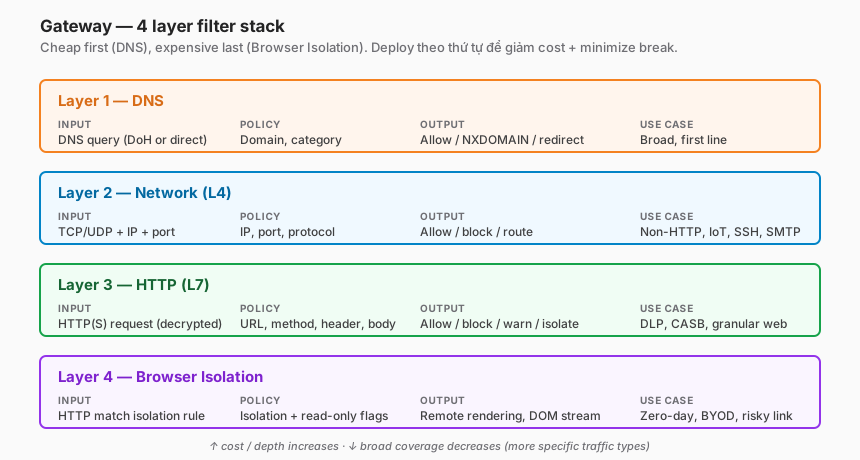
Layer 1 — DNS
- Input: a DNS query (via DoH or directly from a resolver IP).
- Policy: domain match, category match.
- Output: allow, block (NXDOMAIN), safe-search redirect.
- Use case: the first line of defence. Low cost, works for every protocol (HTTP, SMTP, direct IP applications) because nearly everything begins with a name lookup.
Layer 2 — Network (L4)
- Input: an L4 connection (TCP/UDP + IP + port).
- Policy: IP, port, protocol, application (for non-HTTP).
- Output: allow, block, route.
- Use case: non-HTTP traffic (SMTP, SSH, RDP), IoT traffic, apps that skip HTTP.
Layer 3 — HTTP (L7)
- Input: an HTTP/HTTPS request (after TLS decryption, when enabled).
- Policy: URL, method, header, body (with DLP), file type.
- Output: allow, block, warn, isolate.
- Use case: granular web filtering, DLP, CASB.
Layer 4 — Browser Isolation
- Input: an HTTP request that matches the isolation policy.
- Output: rendered in a remote browser at the Cloudflare edge, streamed back to the user as pixels or DOM.
- Use case: zero-day web threats, phishing click containment, read-only BYOD access.
Why DNS first
- Cheap: no decryption, no payload inspection.
- Broad: every application, protocol, and endpoint eventually needs to resolve a name.
- Early: blocking the lookup blocks everything downstream.
- Reversible: DNS is stateless; a rule can be reverted in seconds.
DNS alone is not enough:
- Apps that hard-code IPs bypass the lookup.
- Malware that speaks DoH directly (Google DoH, public Cloudflare DoH) bypasses the resolver.
- Phishing on legitimate hosts (a Google Docs link) doesn’t look malicious at the DNS layer.
That’s why Network and HTTP layers still matter on top.
DNS resolution through Gateway
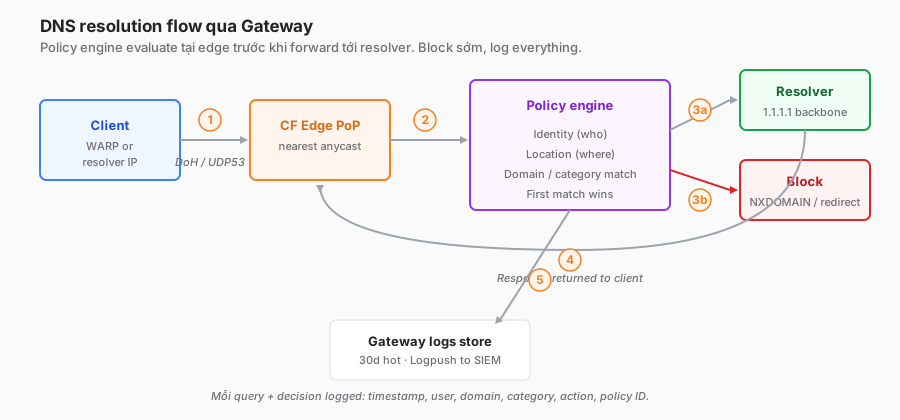
Flow, step-by-step
- The client sends a DNS query — via DoH (TLS/443) when WARP is enabled, or direct UDP/53 in DNS-location mode.
- The Cloudflare edge receives it.
- The policy engine evaluates:
- Identity (who) — from the WARP session, or null for DNS-location queries.
- Location (where) — IP-derived location or the WARP client’s location.
- Domain/category match — against threat intel feeds + custom lists.
- Decision: allow → forward to the resolver; block → return NXDOMAIN or a redirect IP.
- On allow, Cloudflare’s recursive resolver (the 1.1.1.1 backbone) resolves upstream.
- The response goes back to the client.
- Query + decision land in the Gateway logs store.
Speed
- Policy eval happens at the edge, in the same data centre as the resolver.
- Added latency is typically < 5 ms compared to a plain resolver.
- Users don’t notice a difference from hitting 1.1.1.1 directly.
Encryption
- WARP uses DoH (HTTPS) for client-to-Cloudflare traffic.
- Resolver-to-upstream: Cloudflare uses DoT (DNS over TLS) whenever the upstream supports it.
Core components
| Component | Purpose | Plan |
|---|---|---|
| WARP client | Sends DoH queries to Gateway | Free+ |
| DNS locations | Maps public IPs → tenant, applies policy | Standard+ |
| Categories | 100+ groupings from Cloudflare Radar + third-party feeds | Standard+ |
| Custom lists | Self-defined allow/block lists, with bulk import | Standard+ |
| Block page | HTML shown on block, customisable | Standard+ |
| Identity provider | Binds policy to user/group from the IdP | Advanced |
| Logs | Every query + decision, retained 30 days (extendable) | Standard+ |
| Logpush | Streams logs to R2 / SIEM / object store | Advanced |
Policy evaluation order
Order matters
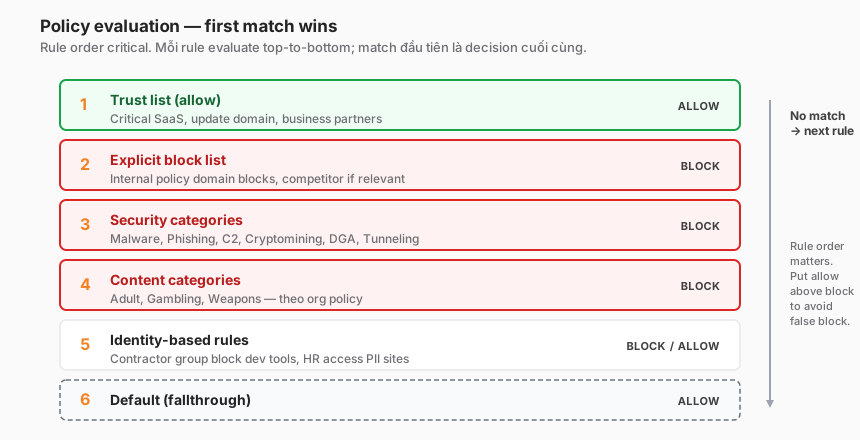
Cloudflare Gateway evaluates policies in list order. First match wins — there is no priority-based resolution.
Recommended order:
- Trust list (allow) — domains you must NOT block regardless of category (partner SaaS, payroll, update servers).
- Explicit block list — domains you definitely block (internal policy, relevant competitor).
- Security categories — Malware, Phishing, Command & Control, Spam, Suspicious, Cryptomining.
- Content categories (per org policy) — Adult, Gambling, Weapons, Streaming, and so on.
- Identity-based rules — e.g. the Contractor group cannot reach dev tools.
- Default — allow everything else.
Pitfall: wrong order blocks the wrong thing
Say you want salesforce.com allowed for everyone. If rule 1 is “block Business category” and Salesforce falls into Business, the first match wins and Salesforce is blocked. Put the allow list first.
Identity + location operators
user.email in ["contractor@..."]— match a specific user.user.groups in ["Contractor"]— match a group from the IdP.location in ["HQ", "Branch-A"]— match a DNS location.- Composable:
(user.groups in ["Engineering"]) AND (dns.query matches "*.internal.prod.*")— engineers on internal prod paths.
DoH per-device vs DNS location
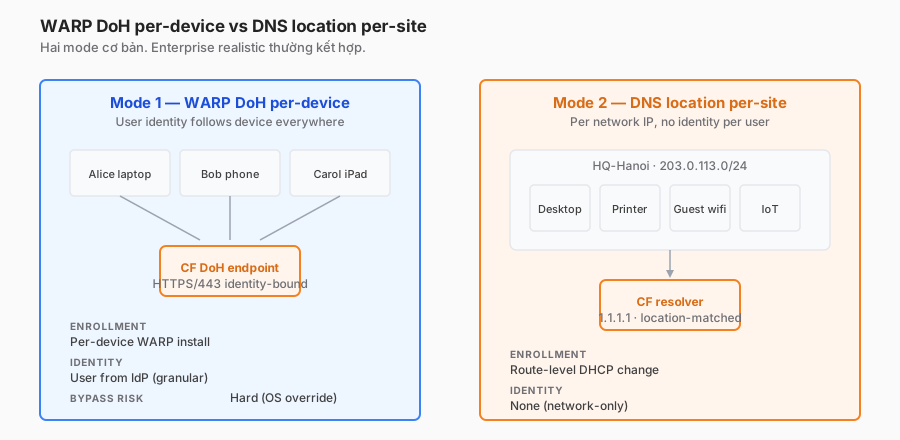
Mode 1 — DoH per-device (via WARP)
Setup:
- User devices install the WARP client (Part 9).
- The client sends DoH queries (HTTPS/443) to
1.1.1.1using a tenant-specific DoH endpoint. - Policy applies per user identity.
Pros:
- Identity-bound → granular policy per user/group.
- Follows the user: home, café, mobile.
- Harder to bypass (the OS resolver is redirected to WARP).
Cons:
- Requires enrollment on every device.
- Doesn’t cover non-WARP devices (IoT, legacy, guest).
Use: knowledge workers, engineers, sales.
Mode 2 — DNS location
Setup:
- Configure the site’s public IP / IP range in Gateway as a “DNS location”.
- The site router points its DNS resolver at Cloudflare (
1.1.1.1/1.0.0.1) or the dedicated IP Gateway hands out. - Policy applies per location name.
Pros:
- No client deployment.
- Covers every device on the network (IoT, guest, printers).
- Simple — it’s a DHCP DNS change.
Cons:
- No identity (you only know “queries from HQ”).
- Policy doesn’t follow the user off-site.
- Easy to bypass if a user sets DNS manually (mobile hotspot, VPN).
Use: branch offices, guest wifi, OT networks, kiosks.
Mode 3 — Combined (recommended)
Realistic answer: use both.
- User laptops and phones → WARP (identity-bound).
- On-site desktops, IoT, guests → DNS location.
- Policies can overlap: a user off-site keeps their WARP policy; on-site they get both (WARP takes precedence).
Cloudflare Gateway handles precedence automatically: when there’s a WARP session, the user’s identity policy wins; the DNS-location policy only applies when no session exists.
Categories and custom lists
Built-in categories
Cloudflare curates around 100 categories. Recommended BLOCK:
- Security — high confidence: Malware, Phishing, Command and Control, Cryptomining, Spyware, DGA, DNS Tunneling.
- Security — medium: Suspicious, Spam, Newly Registered Domain (NRD < 30 days).
- Adult: Adult Themes, Gore, Violence.
- Threat-intel feeds (tight feeds, high confidence).
Recommended ALLOW (despite category):
- Some “Proxy/Anonymizer” entries for employees who need them to test.
- “Questionable Legality” in jurisdictions where it’s legitimate — review case by case.
- Ad tracking — sensitive. Often breaks important sites. Prefer blocking tracking at the Network/HTTP layer (content still renders, tracking doesn’t).
Custom lists
Format: CSV, one domain per line. Supports:
- Exact:
malicious.example.com - Wildcard:
*.malicious.example.com - Root + subdomain:
example.com(matchesexample.comand*.example.com, depending on configuration).
Sync automation:
- MISP/OpenCTI threat-intel platforms → script → Cloudflare API
/accounts/{id}/gateway/lists/{id}/items. - Schedule hourly: new IoCs block within 60 minutes.
API example
# Add IoC domains to a blocklist
curl -X PATCH \
  "https://api.cloudflare.com/client/v4/accounts/${ACCOUNT_ID}/gateway/lists/${LIST_ID}" \
  -H "Authorization: Bearer ${CF_API_TOKEN}" \
  -H "Content-Type: application/json" \
  --data '{
    "append": [
      {"value": "phish-campaign-2026.example.net"},
      {"value": "c2-cluster.badactor.io"}
    ]
  }'
Bypass configuration — what NOT to block
DNS filtering breaks unexpected things if these exceptions aren’t in place.
OS-level updates
*.windowsupdate.com,*.microsoft.com— Windows Update.*.apple.com,*.mzstatic.com— macOS/iOS updates.*.ubuntu.com,*.canonical.com— Ubuntu.*.googleapis.com,play.google.com— Android.
Blocking these leaves endpoints unpatched — a worse outcome than the DNS filter itself.
Captive portal
Hotel and airport wifi intercept DNS for their sign-in pages. The WARP client detects this and temporarily bypasses.
Setting: Gateway → WARP policy → “Allow captive portal”. Automatic.
For DNS-location mode: users have to disable the DNS override manually when they hit a captive portal. Document this in the user runbook.
Internal / split DNS
- Internal company domains:
*.corp.internal,*.prod.int. - They don’t exist in the global DNS, so they won’t resolve via the public path.
Solutions:
- Resolver policy in Gateway: internal domains → forward to the internal resolver via Magic WAN/Tunnel.
- Local resolver — the endpoint is configured to fall back to local DNS for internal names. The WARP client supports split-DNS configuration.
SaaS with rotating subdomains
Office 365 uses many rotating subdomains. Blocking Microsoft-owned domains breaks Outlook and Teams. Use Microsoft’s published IP + domain list as the allow reference.
Reference configuration
Starter policy pack
# Policy 1 — TRUST: allow critical SaaS regardless of category
- name: "Trust critical SaaS"
  action: allow
  expression: |
    any(dns.content.category[*].name in {
      "Microsoft Office 365", "Google Workspace", "Salesforce"
    })

# Policy 2 — BLOCK: explicit bad
- name: "Block internal bad domain list"
  action: block
  expression: |
    any(dns.resolved_ips.domains[*] in $BAD_LIST)

# Policy 3 — SECURITY: block high-confidence threats
- name: "Block security threats"
  action: block
  expression: |
    any(dns.content.category[*].id in {
      68, # Command and Control
      17, # Malware
      125, # Phishing
      32, # Spyware
      167  # Cryptomining
    })

# Policy 4 — SECURITY: block newly registered + DGA
- name: "Block NRD and DGA"
  action: block
  expression: |
    any(dns.content.category[*].id in {137, 138})
  # Custom block page: "This domain is newly registered and may be unsafe."

# Policy 5 — CONTENT: block adult, except for specific groups
- name: "Block adult — except Security team"
  action: block
  expression: |
    any(dns.content.category[*].id in {2, 9}) # Adult, Gambling
    and not (identity.email_domain == "security-research.corp")

# Policy 6 — DEFAULT
- name: "Default allow"
  action: allow
  expression: "true"
DNS location (HQ branch)
name: HQ-Hanoi
networks:
  - 203.0.113.0/24
  - 198.51.100.0/24
# Optional: dedicated resolver IP
dedicated_resolvers:
  - 172.64.36.1
policies_apply:
  - Trust critical SaaS
  - Block security threats
  - Block NRD and DGA
  # skip identity-bound policies
Block page — redirect vs NXDOMAIN
- NXDOMAIN: the client app throws a generic “can’t resolve host” error. Clean, but the user has no idea why.
- Redirect IP: Cloudflare returns the IP of a block page. The browser shows an explanation + how to request an exception.
Use redirect for end-user traffic, NXDOMAIN for headless/API.
Security considerations
What Cloudflare handles
- Threat-intel feed updates (categories) — hourly.
- DNS resolver infrastructure (anycast, DDoS-protected).
- DoH endpoint TLS cert and key rotation.
- Policy-eval isolation (tenant-level).
What you still own
- Policy correctness — rule order, coverage, exception management.
- Log retention & SIEM — 30 days by default; Logpush is required for long-term retention.
- Identity integrity — an IdP compromise is a policy compromise. Protect IdP admin accounts.
- Custom-list hygiene — stale IoCs bloat the list. Automate cleanup > 90 days.
- User education — when users hit a block page, they should know the helpdesk-exception path, not go looking for a bypass.
Anti-bypass considerations
Modern attackers know the DNS filter exists:
- DoH direct: malware sends DoH queries straight to
1.1.1.1ordns.google. → Block those resolvers at the Network layer (Part 13). Allow only the tenant’s WARP DoH endpoint. - Hard-coded IPs: C2 uses fixed IPs, no DNS. → Block IPs at the Network layer + IP-range threat intel.
- IP-over-DNS (DNS tunnelling): exfiltration over DNS. → “DNS Tunneling” category block + anomaly detection (query-length threshold).
- ESNI/ECH: the DNS layer no longer sees the SNI → HTTP inspection needs decryption.
Compliance mapping
- ISO 27001 — A.8.23 Web filtering.
- NIST CSF — PR.DS-5, DE.CM-1 (continuous network monitoring).
- PCI DSS 4.0 — 1.4.4 (traffic restriction), 10.4 (audit log).
- CIS — 9.3 (application-layer filtering), 13.3 (monitor URL traffic).
Operations and monitoring
Metrics
- Total queries/s: baseline; alarm on a sudden drop (could be a resolver issue).
- Block rate: 2–5% is normal. A spike up = new campaign or a misconfigured rule.
- Unique domains blocked per day: track the trend.
- Top blocked categories: reveals the current threat landscape.
- Top blocked users (with identity): training candidates or compromise victims.
Alerting
- Block rate > 10× baseline for an hour → page (outbreak or misconfig).
- Malware/C2 category blocked for the same user ≥ 3×/hour → SOC alert (possible compromise).
- Gateway resolver error rate > 1% → open a Cloudflare support ticket.
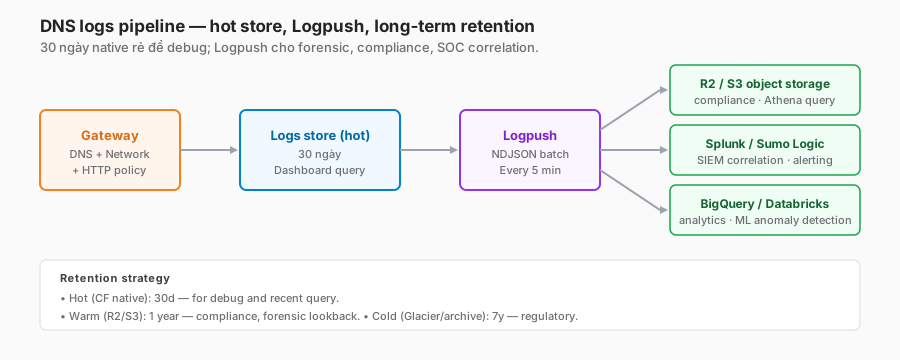
Logs pipeline
Important log fields
{
  "Timestamp": "2026-05-12T09:15:23Z",
  "UserID": "u_xyz",
  "Email": "alice@company.com",
  "DeviceID": "d_abc",
  "DNSQuestion": "phish.example.com",
  "DNSQueryType": "A",
  "Location": "HQ-Hanoi",
  "Action": "block",
  "PolicyID": "p_sec_threats",
  "Categories": ["Phishing", "Newly Registered"],
  "ResolverDecision": "NXDOMAIN"
}
Logpush setup
# Create a Logpush job to R2
curl -X POST \
  "https://api.cloudflare.com/client/v4/accounts/${ACCOUNT_ID}/logpush/jobs" \
  -H "Authorization: Bearer ${CF_API_TOKEN}" \
  -H "Content-Type: application/json" \
  --data '{
    "name": "gateway-dns-to-r2",
    "dataset": "gateway_dns",
    "destination_conf": "r2://gateway-logs/dns/{DATE}?account-id=${ACCOUNT_ID}&access-key-id=${R2_KEY}&secret-access-key=${R2_SECRET}",
    "output_options": {
      "output_type": "ndjson",
      "timestamp_format": "rfc3339"
    }
  }'
Retention strategy
- Hot (CF native): 30 days, query from the dashboard.
- Warm (R2/S3): 1 year, query via Athena/BigQuery.
- Cold (archive): 7 years, compliance.
Common troubleshooting
”A user says the site won’t load” — a rule is blocking it
- Get the domain + timestamp from the user.
- Gateway → Logs → DNS → filter by user email + time range.
- Find the log entry with
Action: block,PolicyID: <xxx>,Categories: [...]. - Check the rule — confirm the category classification is correct (Cloudflare may misclassify → report it).
- Fix: add the domain to the allow list, placed before the security block rule.
”OS update fails”
- Endpoint logs (Windows Update, apt, brew) show “cannot resolve”.
- Gateway DNS logs → filter the host (
windowsupdate.com, etc.). - Find a block entry → fix by allowing the “Software Updates” category before the Security rule.
”DNS latency spike”
- Check baseline: normal resolution is 10–30 ms.
- Cloudflare Status page — any incident?
- Endpoint check:
dig +stats phishtest.com— measure. - If only one region: likely a PoP issue → Cloudflare support.
”WARP isn’t redirecting DNS”
- Check
warp-cli status— must be Connected. - Test DoH resolution:
dig @1.1.1.1 +tls phishtest.com— should fail if Gateway blocked it. - OS-level DNS fallback — some Windows configurations bypass DoH during Wi-Fi quick-check. Fix with the WARP profile “Override DNS” → enforce.
”The block page doesn’t render; only a connection error”
- Check the action type: “Block” (NXDOMAIN) vs “Safe Search” (redirect).
- Modern browsers with DoH enabled bypass the local resolver → no redirect IP is seen. Solution: disable browser-level DoH or force it through WARP.
”Logs don’t appear in the dashboard”
- 1–3 minute delay before logs render.
- Check the account plan — Free plan doesn’t include detailed DNS logs.
- Logpush job status:
GET /accounts/{id}/logpush/jobs— status should be “active” with a recentlast_complete.
Trade-offs and design decisions
| Decision | Option A | Option B | Recommendation |
|---|---|---|---|
| Deployment mode | WARP DoH only | DNS location only | Combine — WARP for users, location for sites. Not either/or. |
| Category depth | Block everything possible | Block only security | Start narrow — security categories. Add content categories after 2 weeks of baseline. False positives run high. |
| Block response | NXDOMAIN | Redirect to a block page | Redirect for end-users (education). NXDOMAIN for automation/API/server traffic. |
| Custom-list source | Manual | Threat-intel automation | Automation is mandatory at scale. Keep manual for the exception list only. |
| Retention | 30 days (native) | Logpush 1+ year | Logpush when compliance or forensics requires it. R2 is cheap; prefer it over S3. |
| DoH endpoint enforcement | Soft (user can disable) | Hard (MDM-enforced) | Hard for corporate devices. Soft for BYOD. |
| Internal split DNS | Public Gateway only | Conditional forwarder | Conditional forwarder for .internal, .corp TLDs. Public Gateway for the rest. |
Migration playbook — from OpenDNS / Umbrella / Infoblox
Phase 1 — Audit the current state (1–2 weeks)
- Export the current DNS policy from the legacy system.
- Map category names (OpenDNS vs Cloudflare — not a 1:1 mapping).
- Identify custom-list sources (threat-intel subscriptions).
- Measure the baseline block rate.
Phase 2 — Shadow mode (2–4 weeks)
- Configure Cloudflare Gateway alongside the legacy system.
- Point WARP clients’ DoH at Cloudflare; leave the legacy system active.
- Log everything, block nothing. Compare: what Cloudflare would block that the legacy doesn’t, and vice versa.
- Close the gap: add custom rules for cases Cloudflare misses.
Phase 3 — Cutover by site/group (4–8 weeks)
- Enable blocking for one group first (typically the IT team).
- Monitor for a week, fix issues.
- Roll out group by group.
Phase 4 — Decommission the legacy system
- Cancel the legacy subscription (save money).
- Archive legacy logs to R2.
Checklist — before Gateway DNS in production
Scope & policy:
- DNS locations configured for every site.
- WARP enrolled on user devices.
- Policy order reviewed (Trust → Block → Security → Content → Identity → Default).
- Trust list includes Microsoft, Google, Apple update domains and business-critical SaaS.
- Security categories blocked: Malware, Phishing, C2, Cryptomining, DGA, DNS Tunneling.
- Exception process documented.
Identity & IdP:
- IdP connected (Part 5).
- User-group sync (Part 7).
- Identity-bound rules tested per group.
Bypass:
- Captive portal behaviour tested (laptop on hotel wifi).
- Internal split-DNS resolver configured.
- OS-update domains allowlisted.
Monitoring:
- Logpush to R2/SIEM enabled.
- Alert on block-rate spikes.
- Alert on malware category hits per user > N/hour.
- Dashboard with top blocked categories + users.
- Retention ≥ 1 year.
Operations:
- Runbook: “user reports block” → verify + unblock steps.
- Runbook: “malware category hit” → SOC triage steps.
- Block page customised with company branding + helpdesk contact.
- Test the exception-request flow end-to-end.
Lessons from practice
- Start with security-only categories. Enabling content categories (Social Media, Streaming) on day one floods the helpdesk. Roll out content rules one to two months after the security ruleset stabilises.
- Allowlist before blocklist. Common rule-order bug: a security block applies before the trust list, and Salesforce / Office 365 get blocked intermittently on category misclassification.
- Watch the block rate closely the first week. A 10× spike means a rule is too aggressive. A drop to zero means the rule isn’t matching (resolver settings wrong).
- NRD (Newly Registered Domain) has a high false-positive rate. But NRD is a strong phishing signal. Trade-off: block + whitelist for new partners.
- WARP bypass through browser DoH is common. Firefox/Edge ship with DoH on by default. Override via GPO/MDM on corporate devices.
- Don’t log everything forever. DNS logs are huge (10–100M events/day at enterprise scale). Sample 10% unless there’s a compliance case; keep 100% for compliance-critical users.
- Category classification isn’t perfect. Cloudflare occasionally misclassifies; report false positives via the dashboard — fixes typically land within 24–48 hours.
Summary
DNS filtering is the cheapest, highest-coverage, best-starting layer of a Secure Web Gateway. Deploy it before touching HTTP decryption. Each correct block saves one incident; each incorrect block costs one helpdesk ticket — balance with rule order and exception process.
One line to remember:
DNS filtering is the first step, not the last. It blocks 60–80% of commodity threats at the category layer, but Network/HTTP controls are still required to close the DoH bypass and IP-direct C2 gaps.
Part 12 continues the Policy & Filtering block with HTTP filtering + TLS decryption: when to decrypt, how to deploy the CA cert to endpoints, DLP/CASB patterns, and the legal/privacy considerations.
References
- Cloudflare Gateway — DNS policies
- DNS locations
- Gateway categories reference
- WARP DoH protocol
- Logpush destinations
- Cloudflare Radar threat intel
In this series:
