
TL;DR
Cloudflare One is Cloudflare’s SASE/SSE platform, consolidating a set of modern security capabilities behind a single control plane: Zero Trust access, secure web gateway, private network connectivity, data protection, browser isolation, and monitoring.
Rather than operating separate VPN, SWG, CASB, DLP, RBI, email security, and dashboards, Cloudflare One pushes those capabilities into one architecture: users traverse the Cloudflare edge, identity and device are verified, policy is enforced, logs are captured, and only then does the request reach a resource.
This is Part 1 of the Cloudflare One Handbook series. The goal is not to walk through every dashboard menu — it is to build a mental model clear enough that the later posts — Access, Gateway, Tunnel, WARP, DLP, CASB, DEX — have somewhere to attach.
The thesis of this post:
Do not learn Cloudflare One as a feature list. Learn it as a request path: client, identity, policy, resource. Once you know which layer a request passes through, you know which product applies and why.
Who this is for
This post is written for:
- Security engineers working through Cloudflare One, Zero Trust, or SASE for the first time.
- Platform engineers planning to replace a traditional VPN for internal applications.
- IT leads weighing Cloudflare One against Zscaler, Netskope, or a best-of-breed model.
- Teams already using Cloudflare for public-facing sites who want to extend into enterprise access and security.
Familiarity with DNS, HTTPS, VPN, SSO, and private networking helps. Prior Cloudflare One experience is not required.
After reading you will understand:
- The capability groups that actually make up Cloudflare One.
- How SASE, SSE, Zero Trust, and ZTNA differ.
- Where Access, Gateway, Tunnel, WARP, DLP, CASB, RBI, and DEX sit in the stack.
- When Cloudflare One fits, and when to reconsider.
- Where to start a rollout so Zero Trust does not degenerate into a pile of loose features.
What this post does not cover
This post does not dive into how to configure Access, Gateway, Tunnel, WARP, DLP, or CASB. Those details are covered in later parts of the series.
Part 1 builds the mental model first. Without it, the path of least resistance is turning features on one by one: enable WARP today, create an Access app tomorrow, add a Gateway rule next week — and no one on the team can say which policy controls which request.
Cloudflare One is not hard because it lacks features. It is hard because it has many features, and each feature only makes sense when placed in the right spot in the architecture.
Concepts
Before talking about Cloudflare One, a few terms that show up throughout the series need to be distinguished.
SASE
SASE — Secure Access Service Edge — combines network and security into a single cloud-native architecture. Rather than backhauling traffic to a datacentre, users go to the nearest edge, policy is enforced there, and traffic continues to the Internet, SaaS, or a private application.
A SASE platform typically includes:
- ZTNA — Zero Trust Network Access
- SWG — Secure Web Gateway
- CASB — Cloud Access Security Broker
- DLP — Data Loss Prevention
- FWaaS — Firewall as a Service
- SD-WAN or private connectivity
SSE
SSE — Security Service Edge — is the security slice of SASE. In practice, SSE covers SWG, CASB, ZTNA, DLP, and FWaaS, but not necessarily the full network/WAN layer.
Many teams start with SSE because the pain points are sharper: replacing VPN, controlling Internet access, enforcing device posture, logging access events, stopping data leaks.
Zero Trust
Zero Trust is not a product. It is a security model built on the principle: do not trust any user, device, or network by default.
Every request is evaluated against several signals:
- Who is the user?
- Which IdP authenticated them?
- Is the device managed?
- Does posture check out?
- Which app is the request targeting?
- Which location is it from?
- Does it match policy?
- Is there an exfiltration risk?
ZTNA
ZTNA — Zero Trust Network Access — applies Zero Trust to private-application access. Instead of letting users into the whole network as a traditional VPN would, ZTNA grants access per-application, per-user-group, per-device-posture, per-context.
Inside Cloudflare One, Cloudflare Access is the core ZTNA component.
SWG
SWG — Secure Web Gateway — controls user traffic outbound to the Internet. An SWG can filter DNS, inspect HTTP/HTTPS, block malware or phishing, enforce category controls, apply tenant restrictions, or layer DLP on top.
Inside Cloudflare One, Cloudflare Gateway is the core SWG component.
Part 2 digs deeper into the differences between SASE, SSE, Zero Trust, and ZTNA.
Cloudflare One, Cloudflare Zero Trust, and Magic WAN
One common source of confusion: Cloudflare One, Cloudflare Zero Trust, Access, Gateway, Tunnel, WARP, Magic WAN — these sound like separate products, but they sit inside the same larger architecture.
The clearest framing:
- Cloudflare One is the umbrella platform for SASE/SSE.
- Cloudflare Zero Trust is the user- and security-facing slice that most teams meet first: Access, Gateway, WARP, Tunnel, DLP, CASB, Browser Isolation, DEX.
- Magic WAN / Magic Transit covers the broader network connectivity layer — branch connectivity, WAN modernisation, network-level traffic steering, DDoS and network protection.
This series focuses on the Cloudflare Zero Trust slice inside Cloudflare One, since that is the part directly concerned with access control, device posture, Gateway policy, and private application access.
Context — why SASE emerged
Before SASE, the enterprise security stack was assembled from several separate products:
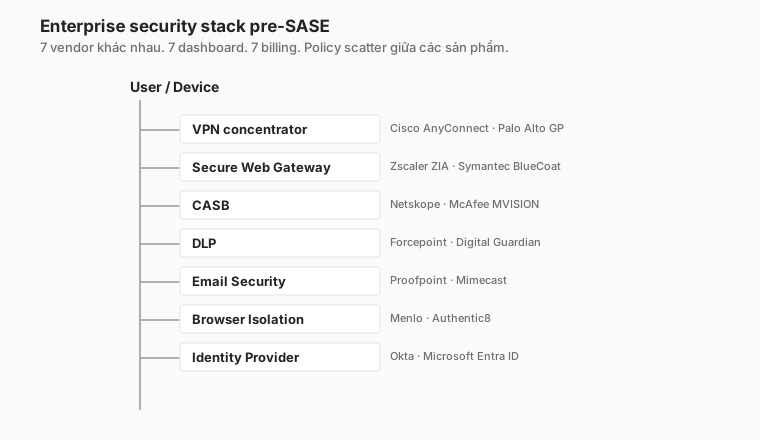
The model made sense when most users sat in an office, applications lived in a datacentre, and traffic could be backhauled to a fixed perimeter.
That model started to break when three things happened at once:
-
Users are no longer in one place. Hybrid work means they connect from home, cafés, hotels, airports, branch offices, and mobile networks.
-
Applications are no longer only in the datacentre. Workloads are scattered across on-prem, AWS, Azure, GCP, SaaS, and many dev/UAT/prod environments.
-
Compliance needs centralised visibility. The security team has to answer: who accessed which app, from which device, under which policy, what was blocked and why, and where the logs live.
The problem is not just “VPN is slow”. The bigger problem is that the old perimeter no longer reflects how the enterprise actually operates.
VPNs let users into the network. A modern enterprise needs control at the level of request, identity, device, application, data, and policy.
That is why SASE/SSE emerged as a more reasonable architecture: push the enforcement point to the cloud edge, closer to the user, more consistent, and easier to scale than traditional backhaul.
Why Cloudflare has an advantage building SASE
Cloudflare did not start from VPN or CASB. It started from network.
Cloudflare already operates a global anycast network for CDN, DNS, WAF, DDoS protection, and reverse proxying of the public Internet. Cloudflare One is Cloudflare extending that same edge network into enterprise security use cases: protecting not just public websites, but users, devices, private apps, SaaS access, and Internet-bound traffic.
The difference is that a single edge network can handle many different traffic flows.
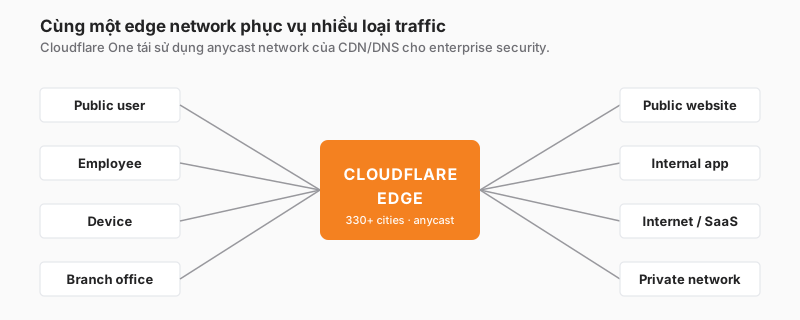
This is why Cloudflare One tells a different story from traditional SASE vendors. It is not just a security proxy. It is a security platform built on top of a global edge network that already existed.
Mental model: four layers of Cloudflare One
If only one section of this post is worth remembering, it is this one.
Cloudflare One is best reasoned about in four layers:
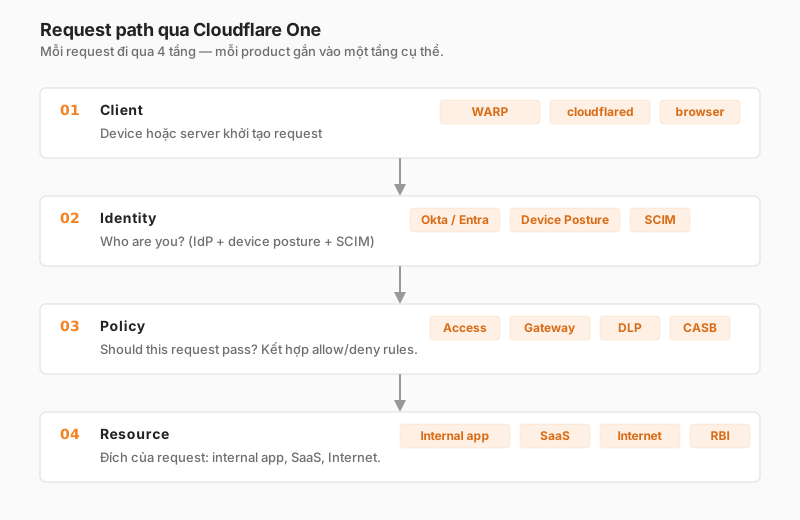
Whenever a capability is added to Cloudflare One, ask:
Which layer of the request path is this capability controlling?
For example:
| Capability | Layer | Role |
|---|---|---|
| WARP Client | Client | Brings device traffic into the Cloudflare edge |
| Cloudflare Tunnel | Resource / Connectivity | Connects private resources to Cloudflare without inbound ports |
| Microsoft Entra ID / Okta | Identity | Authenticates users and groups |
| SCIM | Identity | Synchronises user/group lifecycle |
| Device Posture | Identity / Context | Evaluates device state |
| Cloudflare Access | Policy | Decides whether a user can reach a private app |
| Cloudflare Gateway | Policy | Controls DNS/HTTP/Network traffic |
| DLP | Policy / Data | Detects and blocks sensitive data leaving the organisation |
| CASB | Policy / SaaS | Inspects SaaS configuration, permissions, and risk |
| Browser Isolation | Resource / Threat containment | Renders web content remotely to reduce endpoint risk |
| DEX | Cross-cutting | Monitors connection quality and user experience |
This layer-first framing avoids a common mistake: rolling out by feature rather than by architecture.
High-level request flow
For a private application, the request usually flows like this:

For a managed device reaching the Internet or SaaS:

For private network access via WARP:

These three flows differ in detail but share the same principle: the request traverses the Cloudflare edge, gets evaluated against identity, context, and policy, and only then reaches the resource.
The six capability groups of Cloudflare One
There are several ways to slice Cloudflare One. For practical rollout, six groups work well:
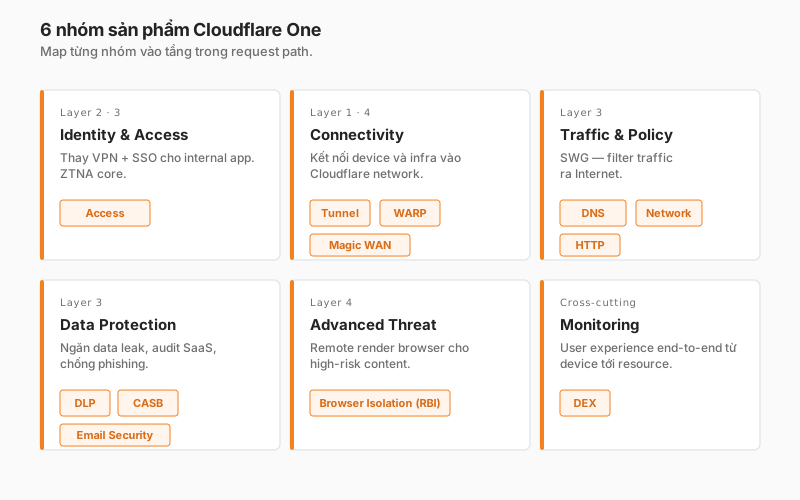
| Group | Main products | Layer | Problem solved |
|---|---|---|---|
| Identity & Access | Cloudflare Access | 2, 3 | Replace VPN for private apps, enforce ZTNA |
| Connectivity | WARP, Cloudflare Tunnel | 1, 4 | Bring devices and private resources into Cloudflare |
| Traffic & Policy | Cloudflare Gateway | 3 | SWG across DNS, Network, HTTP |
| Data Protection | DLP, CASB, Email Security | 3 | Reduce data leak, SaaS exposure, and phishing risk |
| Advanced Threat Protection | Browser Isolation | 3, 4 | Contain risky content away from the endpoint |
| Monitoring & Experience | DEX | Cross-cutting | Track connectivity quality and user experience |
1. Identity & Access
Cloudflare Access is the core ZTNA component.
If a traditional VPN lets users into a network, Access lets users into individual applications based on identity, group, posture, and policy.
Example flow — the same as the private-application flow above, seen from the Access perspective:
Access plays three roles:
-
SSO front door. Users authenticate through an IdP before the application is reachable.
-
Authorisation engine. Policy decides which user, group, device, or context is allowed.
-
Audit layer. Login events, allow/deny decisions, and session activity can all be logged for investigation and compliance.
Typical use cases:
- Internal admin portals
- Self-hosted GitLab / Jenkins / Jira
- Dev / UAT applications
- Database admin UIs
- Kubernetes dashboards
- Vendor / contractor access
- Applications that need MFA or device posture but lack native SSO
The key insight: Access is not just “SSO in front of an app”. The real value is turning private-application access into a policy decision with an audit trail.
2. Connectivity
Cloudflare One needs two connection points: one on the user/device side, one on the private-resource side.
WARP Client
WARP is an agent installed on laptops or mobile devices. It brings managed-device traffic into the Cloudflare edge so Gateway, Access, DLP, or private routing can enforce policy on it.
Common WARP use cases:
- DNS filtering
- HTTP/HTTPS inspection
- Private network access
- Device posture signals
- Split-tunnel routing
- User-to-application traffic steering
Cloudflare Tunnel
Cloudflare Tunnel is an outbound-only connector from your infrastructure to the Cloudflare edge. The cloudflared daemon runs inside a datacentre, VM, Kubernetes cluster, or cloud VPC.
Important property: Tunnel does not require any inbound port to be open from the Internet to the origin.

Tunnel fits:
- Private web apps
- Non-HTTP internal services
- SSH/RDP access
- Internal APIs
- Applications inside a VPC or datacentre
- Use cases that need less public exposure
WARP and Tunnel are the two ends of the same pipe: WARP brings the device into the Cloudflare network, Tunnel brings the private resource into the Cloudflare network, and policy at the Cloudflare edge decides which request can cross from WARP to Tunnel.
3. Traffic & Policy — Gateway
Cloudflare Gateway is the Secure Web Gateway of Cloudflare One. Where Access controls private apps, Gateway controls traffic going to the Internet, SaaS, or a private network.
Gateway has three policy layers:
DNS Policy
DNS filtering is the simplest and least intrusive layer.
Use cases:
- Block malware domains
- Block phishing
- Block categories like gambling, adult, newly seen domains
- Enforce safe search
- Log DNS queries
- Apply policy by user/group/device
DNS policy is a good starting point — low impact, easy to observe, easy to roll back.
Network Policy
Network policy operates at L3/L4: IP, port, protocol.
Use cases:
- Allow SSH/RDP to specific private IPs
- Block risky outbound ports
- Control traffic to private CIDRs
- Enforce rules by user group or device posture
Network policy matters when replacing VPN, because not every internal service is a web app.
HTTP Policy
HTTP policy inspects requests at the application layer.
Use cases:
- Block specific URLs or paths
- Apply tenant restrictions to SaaS
- Control uploads and downloads
- Enforce DLP
- Block risky file types
- Apply policy by HTTP hostname, path, method, or header
HTTP policy is more powerful, but also more complex — it may require TLS inspection. In an enterprise, this is the part that needs phased rollout; switching it on broadly at day one is a reliable way to create friction.
4. Data Protection
Cloudflare One does not only control connections. It also controls data movement.
DLP
Data Loss Prevention scans traffic for sensitive data — credentials, tokens, PII, financial data, or custom patterns.
Use cases:
- Block uploads of sensitive files to unapproved SaaS
- Detect secrets or tokens being copied out
- Log or block browser-based data exfiltration
- Apply different policies per user group or destination
CASB
CASB looks at SaaS from a configuration and posture angle, not just traffic.
Use cases:
- Detect public files in Google Workspace or Microsoft 365
- Flag overly broad permissions
- Audit SaaS misconfigurations
- Detect risky third-party app integrations
The important distinction:
- Gateway controls traffic.
- CASB inspects SaaS state and configuration.
- DLP controls data in motion.
The three complement each other; none replaces the others.
Email Security
Email Security detects phishing, malicious links, impersonation, and other threats — before an email reaches the user, or inside the mailbox itself.
Use cases:
- Anti-phishing
- Detect malicious attachments and links
- Protect executive mailboxes
- Reduce credential harvesting risk
For most organisations, email is still the most common attacker entry point. Email Security is a reasonable part of a SASE/SSE platform, even if it is not always day-one.
5. Advanced Threat Protection — Browser Isolation
Remote Browser Isolation renders web content in an isolated environment and streams the safe result back to the user.
Instead of letting a laptop’s browser directly handle a risky site, Cloudflare renders the browsing session remotely. If the site contains an exploit, it fires at the isolated environment, not the real endpoint.
Use cases:
- Users opening unknown links in email
- Administrators visiting untrusted websites
- Contractors reaching sensitive apps without direct data exposure
- High-risk user groups that need stricter isolation policies
- Read-only SaaS access — no download, copy, or paste
RBI is not something to enable across the board on day one. It fits better for high-risk destinations, high-risk user groups, or high-risk workflows.
6. Monitoring — DEX
Digital Experience Monitoring answers the question the security team usually cannot answer quickly:
“Why do users say ZTNA is slow?”
Not every complaint is a security issue. It could be Wi-Fi, ISP, DNS, the WARP client, the tunnel connector, the Cloudflare edge, the application backend, or an internal route.
DEX surfaces:
- Device connectivity
- WARP status
- Network quality
- Synthetic tests
- Application reachability
- End-to-end user experience from endpoint to resource
For a large-scale Zero Trust rollout, DEX is worth paying attention to — it short-circuits the finger-pointing between security, network, helpdesk, and application teams.
Comparing Cloudflare One with Zscaler and Netskope
The three vendors most often compared in the SASE/SSE space are Zscaler, Netskope, and Cloudflare One.
Each has a different origin:
| Dimension | Zscaler | Netskope | Cloudflare One |
|---|---|---|---|
| Origin | SWG-first | CASB-first | Network-first |
| Traditional strengths | Secure Web Gateway, policy maturity | SaaS visibility, CASB, DLP | Global edge network, developer experience, integration |
| ZTNA | ZPA | Netskope Private Access | Cloudflare Access |
| SWG | ZIA | Netskope Intelligent SSE | Cloudflare Gateway |
| CASB/DLP | Present | Very strong | Present, maturing |
| Developer experience | Enterprise-sales oriented | Enterprise-sales oriented | API/Terraform/docs are fairly open |
| Good fit for | Enterprises needing mature SASE | SaaS-heavy, data-centric orgs | Teams wanting a unified platform, strong network reach, fast rollout |
Cloudflare One is not necessarily the best in every individual category.
Zscaler has been operating at enterprise SWG/SASE scale for years. Netskope is especially strong in CASB, SaaS visibility, and data security. Cloudflare’s advantages are the global network, reverse-proxy heritage, developer-facing model, and the ability to pair security with an edge platform.
The right question is not “which vendor is absolutely best”. It is:
Given my organisation’s constraints — identity, network, SaaS footprint, compliance, team size, budget, operating model — which vendor removes the most complexity while still meeting the risk requirement?
When Cloudflare One fits
Cloudflare One is a good fit when one or more of the following applies.
1. Replacing VPN for private applications
If the biggest pain point is a VPN that is slow, hard to scale, grants too much, or lacks an audit trail, Cloudflare Access + Tunnel is a very reasonable entry point.
Starting with a few important applications — enforcing SSO/MFA/device posture — lets a team expand gradually rather than migrate everything at once.
2. Already using Cloudflare for public websites
An organisation already using Cloudflare DNS, CDN, WAF, or DDoS protection can extend into Cloudflare One on the same account, zones, dashboard, API, and operating model.
This does not automatically make the rollout easy, but it significantly reduces the learning curve and vendor sprawl.
3. The team wants automation and policy-as-code
Cloudflare’s API and Terraform provider are relatively accessible. For a platform or security-engineering team, that is a meaningful advantage.
At enterprise scale, clicking policy through the dashboard becomes technical debt quickly. Managing Access apps, Gateway rules, tunnel routes, lists, and reusable policies through GitOps/IaC is where Cloudflare becomes a strong choice.
4. Users are geographically distributed
For teams working from many countries or regions, Cloudflare’s edge footprint is a real advantage. Users do not need to backhaul to a datacentre just to reach the Internet or a private app.
5. Start small, scale later
Cloudflare One allows targeted entry points — Access for a private app, Gateway DNS filtering, or WARP for a pilot group. That suits organisations not yet ready to commit to a large SASE programme.
When to reconsider
Cloudflare One is not the default choice for every organisation.
1. Heavy on-prem footprint with strict data-locality requirements
Organisations with strict data residency, traffic locality, or country-level regulatory constraints need to evaluate Cloudflare One carefully — per log type, traffic path, inspection mode, and enterprise contract terms.
2. Deep existing investment in Zscaler or Netskope
If Zscaler or Netskope is already deployed, policies are mature, logs are integrated into the SIEM, and the ops team is trained, the switching cost likely outweighs the benefit in the first 1–2 years.
In this case, Cloudflare One may still fit a specific use case — Access for a particular group of apps, for example — without replacing the full platform immediately.
3. A single deep capability is the only requirement
If the requirement is deep CASB coverage for SaaS governance, Netskope may be a stronger choice. If the requirement is deep email security specifically, Proofpoint or a dedicated email security vendor may fit better.
Cloudflare One’s strength is platform integration. If the problem is narrow and deep, best-of-breed still has its place.
Common misconceptions
”Cloudflare One is the new VPN”
Not quite.
VPN is primarily about connectivity. Cloudflare One is broader: identity, device posture, access policy, secure web gateway, data protection, browser isolation, private routing, and monitoring.
Access + Tunnel replaces many VPN use cases, but Cloudflare One is not only a VPN replacement.
”Installing WARP equals a Zero Trust deployment”
It does not.
WARP is a client and traffic-steering layer. Zero Trust only becomes meaningful when the rest of the stack is in place:
- Clean identity
- A healthy group lifecycle
- Trustworthy device posture
- Well-designed policy
- Logs flowing to the SIEM
- A documented exception process
- A rollback path
- Named owners for each application and CIDR
Installing the agent is the easy part. Designing governance is the hard part.
”SASE is buying a vendor and turning everything on”
No.
SASE is an operating architecture, not a shopping list.
A single vendor can reduce integration cost, but it does not replace identity hygiene, network design, policy lifecycle, change management, or incident response playbooks.
”Zero Trust means blocking as much as possible”
Not really.
Zero Trust means verifying the right thing, at the right time, against the right risk context. A policy that is too strict to operate gets bypassed. A pragmatic policy — measurable, rolled out in phases, with clear exceptions — usually delivers better security outcomes.
Design decisions at the start
Single SASE vendor or best-of-breed?
| Option | Advantages | Disadvantages | Best when |
|---|---|---|---|
| Single SASE vendor | Fewer dashboards, more unified policy, simpler integration | May not be best in every category | Small or medium teams looking to reduce operational complexity |
| Best-of-breed | Can pick the strongest vendor in each category | More integration, contracts, log pipelines, policy drift | Large security teams with deep requirements and multi-platform capacity |
Practical recommendation: if the team is not large enough to operate five to seven separate security platforms, the single-platform approach usually wins.
Replace VPN first, or start with Gateway?
| Starting point | Advantages | Disadvantages |
|---|---|---|
| ZTNA first | Clear ROI, users see immediate benefit, easy to sell | Needs a good inventory of private apps and identity groups |
| Gateway first | Internet traffic visibility arrives early | Easy to create friction if TLS inspection rolls out too fast |
For most organisations, starting with ZTNA for a specific set of private applications is the right move, then expanding into Gateway and DLP.
The reason: replacing VPN is the easiest value story. Users experience less friction, security gets cleaner logs, application owners understand the benefit quickly.
Big bang or incremental rollout?
Not a big bang.
SASE/Zero Trust migration belongs in phases:
| Phase | Scope | Goal |
|---|---|---|
| Phase 1 | Security/IT pilot | Validate identity, posture, routing, logging |
| Phase 2 | 5–10 private apps | Replace VPN for clear use cases |
| Phase 3 | Engineering/admin groups | Enforce device posture and MFA |
| Phase 4 | Gateway DNS/HTTP | Control Internet and SaaS traffic |
| Phase 5 | DLP/CASB/RBI | Protect data and high-risk workflows |
| Phase 6 | Optimisation | IaC, SIEM dashboards, policy review, exception governance |
A good Zero Trust rollout looks more like a platform migration programme than a tool install.
Lessons from real deployments
1. Identity is the starting point, not WARP
Many teams start by pushing the agent to every laptop. It feels like fast progress, but it rarely leads to a strong security outcome.
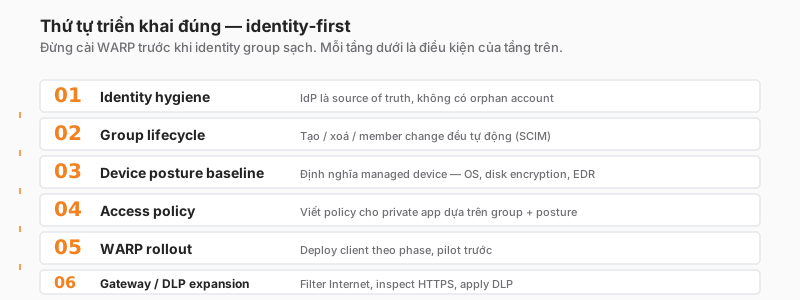
If identity groups are not clean, user lifecycle is unclear, SCIM is unstable, or device posture is untrustworthy, the policy layer above will be very hard to govern.
A better order — identity first, WARP later:
2. Do not enable every capability at once
Cloudflare One has many attractive pieces: Access, Gateway, Tunnel, WARP, DLP, CASB, RBI, DEX. Turning too many on simultaneously makes troubleshooting almost impossible.
When a user reports a problem, there is no way to tell whether it is:
- The IdP?
- The Access policy?
- Device posture?
- The WARP profile?
- A DNS policy?
- Split tunnelling?
- Gateway inspection?
- A tunnel route?
- The origin application?
Pick the use case with the clearest pain, drive it to completion, then expand.
3. Logging has to be designed from the start
Zero Trust is not only about allow/deny. It is also about auditability.
At minimum, the logs need to answer:
- Which user accessed?
- Which device?
- Which application?
- Which policy matched?
- Allowed or blocked?
- If blocked, why?
- Which posture check failed?
- What was the source IP/location?
- What is the request/session ID?
- Did the log reach the SIEM?
Without good logs, every incident turns into an argument between helpdesk, network, security, and application teams.
4. Private routing is the underrated hard part
Cloudflare Tunnel is easy to run for a simple private app. At enterprise scale, the real problems are usually in routing:
- CIDR overlap
- Route ownership
- Split-tunnel mode
- Local domain fallback
- DNS resolver path
- Multiple environments (dev/UAT/prod)
- Multiple VPCs or datacentres
- Non-HTTP protocols
- Port-based access control
Do not think of Tunnel as just a connector. Think of it as part of the private-access architecture.
5. Policy lifecycle must be managed as code
The dashboard is fine for pilots. Production at scale needs IaC/GitOps.
Reasons:
- Changes are reviewable
- Rollback is straightforward
- Policy drift is reduced
- Orphaned rules, lists, and groups are caught
- Naming conventions are enforceable
- Audit trails answer who changed what, when, and why
Policy-as-code is something to plan for early in a Cloudflare One rollout, not after several hundred rules have accumulated.
Checklist before rolling out Cloudflare One
Before a broad rollout, confirm the following:
- Is the first use case clear — VPN replacement, Gateway filtering, or SaaS/data protection?
- Is there a list of private applications to protect?
- Do the applications have named owners?
- Is the identity provider standardised?
- Is there a group naming convention?
- Is SCIM enabled or planned?
- Is the device posture baseline defined?
- Is there a pilot group?
- Is there a rollback path if a user cannot reach an app?
- Is there a decision on which logs go to the SIEM?
- Is there a dashboard for allow/block/posture failures?
- Has split-tunnel and private routing been validated?
- Is there an exception process?
- Are there owners for Access apps, Gateway policies, and tunnel routes?
- Is there a plan to move from dashboard clicks to IaC?
Where to start
If starting over, the first question is not “what features does Cloudflare One have?”
Better questions:
-
What is the first use case? Replacing VPN, filtering Internet, protecting SaaS, or preventing data leak?
-
Which resources matter most? Internal apps, private IPs, SaaS apps, or Internet destinations?
-
Who gets access? User groups, vendors, administrators, developers, contractors?
-
What conditions must the device meet? Managed device, OS version, EDR, disk encryption, domain joined?
-
What audit questions do the logs need to answer? Who accessed what, when, from which device, under which policy — allowed or blocked?
Once these five questions have answers, the product mapping becomes much clearer.
Summary
Cloudflare One should not be understood as a bundle of features. It should be understood as an enforcement-path architecture for enterprise access and security.
At the client layer, there is WARP and the browser. At the identity layer, there is the IdP, SCIM, user groups, and device posture. At the policy layer, there is Access, Gateway, DLP, CASB, and Browser Isolation. At the resource layer, there is the internal app, private network, SaaS, and the Internet.
The strength of Cloudflare One is not that every capability is deepest in the market. The strength is consolidating many controls onto one edge network and one relatively consistent control plane.
But tools do not produce Zero Trust on their own. Installing WARP does not equal Zero Trust. Creating a few Access policies does not equal a VPN replacement. Turning on Gateway does not equal a secure-web architecture.
Zero Trust only starts to deliver value when identity is clean, routes are clear, policies have owners, logs are complete, exceptions have a process, and the rollout is phased.
If only one line has to be remembered:
Cloudflare One is a platform. Zero Trust is the operating model. SASE is the architecture. Do not roll out by feature — roll out by request path.
References
In this series:
- Next → Part 2: SASE, SSE, Zero Trust — terminology
- All parts → Cloudflare One Handbook series
