
TL;DR
Network policy is Gateway’s layer 2 — the L4 filter between DNS (Part 11) and HTTP (Part 12). It inspects TCP/UDP connections without decrypting or reading the body. Its job:
- Block non-HTTP traffic — SSH, RDP, SMTP, MySQL, custom ports.
- Prevent DoH bypass — block DNS-over-HTTPS to third-party resolvers so the DNS policies in Part 11 can’t be routed around.
- App rules — allow/block by application (Dropbox, BitTorrent); Gateway maintains the app → domain / IP mapping.
- Direct-IP connections — malware using hard-coded IPs (no DNS) is only catchable at L4 by IP/CIDR.
- Country / ASN filters — geo-based blocking.
This post covers:
- Network vs DNS vs HTTP layers — which rule belongs where.
- DoH bypass as the big deal — how to detect and block.
- SNI inspection — Gateway sees the SNI without decryption and can rule on it.
- App rules vs raw IP/port rules.
- WARP tunnel vs DNS location — the L4 enforcement differences.
- Logs and SIEM integration.
The thesis:
The network layer is the glue between DNS and HTTP. It closes the DoH gap, handles non-HTTP, and provides a fallback when HTTP decryption is exempted. Without L4 rules, an attacker bypasses the DNS filter via DoH or direct IPs — completely invisible to Gateway.
This is Part 13 of the Cloudflare One Handbook and closes the Policy & Filtering block (Parts 11–13).
Who this is for
- Security engineers already running DNS + HTTP rules, needing to close the remaining gap.
- SOC analysts investigating L4 anomalies.
- Platform engineers setting up egress control for cloud workloads.
Recommended prior reading:
- Part 11 — DNS filtering (the layer below).
- Part 12 — HTTP filtering + TLS decryption (the layer above).
- Part 9 — WARP — the enforcement point for traffic.
After this post you will:
- Be able to write rules that block DoH bypass and non-HTTP traffic.
- Understand SNI inspection vs full decryption — when each is enough.
- Configure app rules for shadow IT.
- Integrate L4 logs into a SIEM with useful fields.
- Have a production checklist + hardening roadmap.
What this post does not cover
- Magic WAN / Magic Firewall — Part 10, different context (site-to-site traffic).
- Gateway API connectors for cloud egress — briefly referenced.
- Browser Isolation — L7-specific.
- WARP mode details — Part 9.
- Email security — separate product (Area 1).
Concepts
- Network policy — Gateway L4 rule: IP, port, protocol, SNI, app, country.
- SNI (Server Name Indication) — hostname inside the TLS ClientHello, in plaintext. Gateway sees it without decryption.
- DoH (DNS over HTTPS) — DNS queries over HTTPS, bypassing a plain DNS filter. Uses port 443 on the resolver host (Google
dns.google, Quad9dns.quad9.net). - DoT (DNS over TLS) — DNS over TLS, port 853. Less common but similar.
- App (application) — Gateway-maintained mapping: app name → domains + IP ranges. For example, “Dropbox” =
*.dropbox.com+ its IP list. - Egress — traffic from an internal network (WARP / Magic WAN) going out to the Internet.
- ASN (Autonomous System Number) — BGP network identifier; Gateway can filter by ASN (block sources in Russia, Iran, etc.).
- Geo-IP — IP → country mapping from Cloudflare Radar.
Three-layer positioning — where network fits
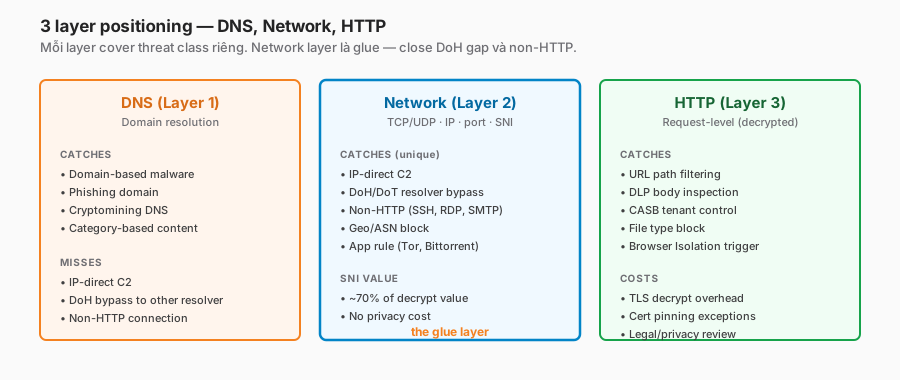
Threat coverage matrix
| Threat | DNS | Network | HTTP |
|---|---|---|---|
| Domain-based malware | ✓ | ✓ (SNI) | ✓ |
| IP-direct C2 | ✗ | ✓ | — |
| DoH bypass | ✗ | ✓ | — |
| Non-HTTP protocol | ✗ | ✓ | ✗ |
| URL-path exfil | ✗ | ✗ | ✓ |
| DLP body | ✗ | ✗ | ✓ |
| Country block | limited | ✓ | ✓ |
| Tor / VPN bypass | partial | ✓ (IP) | — |
| Cert-pinned app threat | ✗ | ✓ (SNI) | ✗ |
Network fills the gaps: IP-direct, DoH, non-HTTP, Tor.
SNI — the real value of L4 inspection
The SNI is a plaintext hostname inside the TLS handshake. Gateway sees it even without decryption:
ClientHello → SNI: c2.badactor.io
           → Gateway matches SNI against policy
           → Block before TLS completes
SNI rules recover about 70% of the value of full decryption without the privacy/legal cost. If compliance forbids decryption, SNI rules still catch domain-based threats.
Pitfall: ECH (Encrypted ClientHello) encrypts the SNI. Browsers and clients that support ECH hide the SNI entirely. Gateway has to detect + block ECH attempts if SNI-based rules are to remain effective.
DoH bypass — the big one
The problem
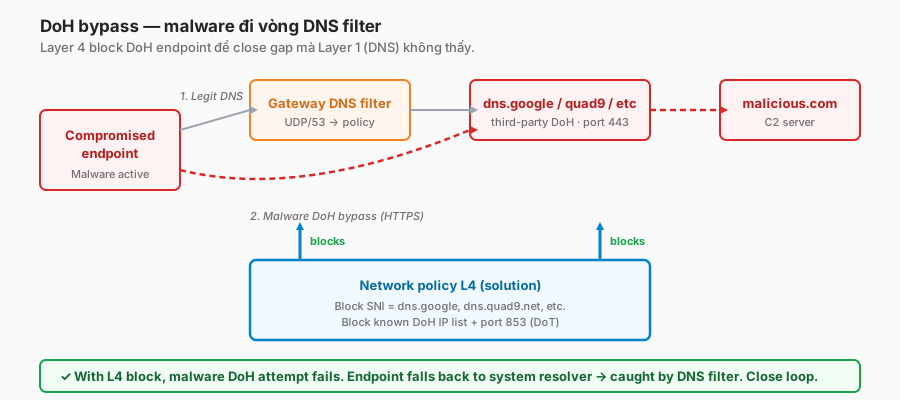
The DNS filter (Part 11) blocks malicious.com at the DNS layer. But:
- Malware doesn’t use the system resolver.
- Malware sends a DoH request to
dns.google/dns-queryon port 443. - The Gateway DNS filter doesn’t see it — it isn’t plain DNS (UDP/53).
- Malware resolves the malicious domain → connects → exfiltrates.
The DNS filter is fully bypassed.
Who uses DoH
- Modern browsers (Firefox, Edge, Chrome) have built-in DoH.
- Advanced malware (post-2022) uses DoH to evade DNS filters.
- Tech-savvy users who manually configure the OS resolver.
The L4 solution
Block third-party DoH hosts:
name: "Block third-party DoH resolvers"
action: block
condition: |
  net.dns.over_https
  or net.sni in {
    "dns.google",
    "dns.quad9.net",
    "cloudflare-dns.com",
    "mozilla.cloudflare-dns.com",
    "doh.opendns.com",
    "dns.nextdns.io",
    "dns.adguard.com"
  }
  or net.host in {
    "8.8.8.8", "8.8.4.4",
    "9.9.9.9", "149.112.112.112",
    "1.1.1.1", "1.0.0.1",
    "208.67.222.222"
  }
Allow only the tenant-specific DoH endpoint (WARP generates a tenant URL → whitelist that):
name: "Allow tenant DoH only"
action: allow
condition: |
  net.dns.over_https
  and net.sni == "[tenant-id].cloudflareaccess.com"
Block DoT (DNS over TLS, port 853)
name: "Block DoT"
action: block
condition: net.port == 853
Detecting DoH attempts in logs
Gateway logs filtered by Action: block, Policy: doh_block:
- Source IP / user.
- Destination SNI / IP.
- Time.
A spike = investigate: endpoint compromise or a user manually configured it.
SNI-based rule examples
Block SaaS shadow IT at the SNI level
name: "Block personal cloud storage"
action: block
condition: |
  net.sni in {
    "*.dropbox.com", "*.box.com",
    "*.drive.google.com",
    "www.icloud.com",
    "mega.nz", "*.mega.nz"
  }
# Exception: the HTTP-layer policy allows the corporate Dropbox tenant.
Block crypto exchanges (internal policy)
name: "Block crypto exchanges"
action: block
condition: |
  net.sni in {
    "*.binance.com", "*.coinbase.com",
    "*.kraken.com", "*.kucoin.com"
  }
Allow only company-approved AI services
name: "Default-block AI"
action: block
condition: |
  net.sni in {
    "*.openai.com", "*.anthropic.com",
    "gemini.google.com", "*.copilot.microsoft.com"
  }
  and not (identity.groups in {"AI-approved"})
App rules — shortcuts for common apps
Why app rules
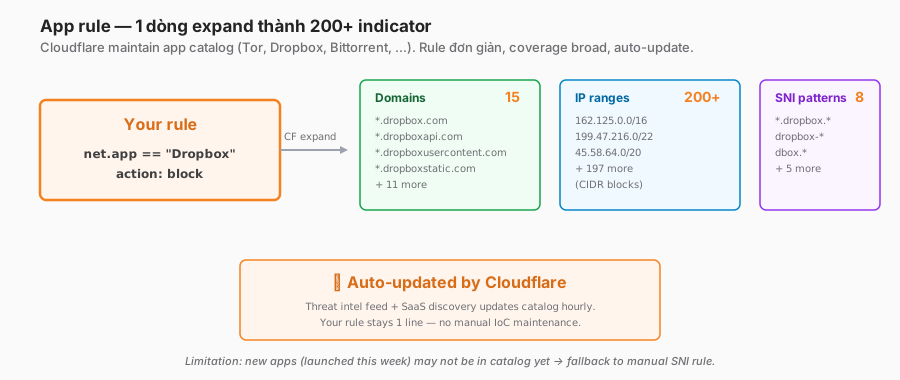
Shadow-IT apps use many domains, CDNs, and IP ranges. Maintaining the list manually means it goes stale.
Cloudflare Gateway ships an app catalogue: Tor, BitTorrent, Dropbox, WhatsApp, and so on. Each app is a group of domains + IPs + SNI patterns.
Rule examples
name: "Block Tor network"
action: block
condition: net.app == "Tor"
# Gateway expands to: Tor entry-node IPs + Tor domains + Tor bridge relays,
# auto-updated via Cloudflare threat intel.name: "Block torrents"
action: block
condition: net.app in {"Bittorrent", "eDonkey", "Gnutella"}name: "Allow corporate Dropbox tenant, block personal"
# HTTP layer does the tenant check;
# network layer just allows the Dropbox app base.
action: allow
condition: net.app == "Dropbox"Limitations
- App definitions are maintained by Cloudflare — a new app may not be in the catalogue yet.
- Fall back to a manual SNI/domain rule if an app is missing.
Non-HTTP traffic rules
Block outbound SSH, except approved hosts
name: "Block outbound SSH to non-corporate"
action: block
condition: |
  net.port == 22
  and not (net.host in $corporate_ssh_hosts)
# $corporate_ssh_hosts = approved jumpboxes, bastions, git.internal.
Block outbound RDP
name: "Block outbound RDP"
action: block
condition: |
  net.port == 3389
  and net.protocol == "TCP"
# RDP to the Internet = likely lateral movement from a compromised endpoint.
# Corporate RDP should go through ZTNA / Cloudflare Tunnel, not direct outbound.
Block direct SMTP (prevent spam)
name: "Block direct SMTP"
action: block
condition: |
  net.port in {25, 465, 587}
  and not (net.host in $approved_email_gateway)
# Only the approved gateway (e.g. Google Workspace MX) can send mail.
Block direct DB connections
name: "Block direct database connection to the Internet"
action: block
condition: |
  net.port in {3306, 5432, 1433, 27017, 6379}
  and net.direction == "outbound"
# MySQL, PostgreSQL, MSSQL, MongoDB, Redis.
# Internal DB access should go through Tunnel / Magic WAN.
Block Tor
name: "Block Tor"
action: block
condition: |
  net.app == "Tor"
  or net.port in {9001, 9030}
# Tor ORPort + DirPort.
Country / ASN rules
Block traffic to sanctioned countries
name: "Block sanctioned-country destinations"
action: block
condition: |
  net.geo.country in {"IR", "KP", "CU", "SY"}
# Compliance: the OFAC list. Review quarterly.
Allow admin access only from specific countries
name: "Admin tools only from office countries"
action: block
condition: |
  identity.groups in {"Admin"}
  and net.sni matches "*.admin.internal"
  and not (net.geo.country in {"VN", "SG", "US"})
WARP vs DNS location — L4 enforcement
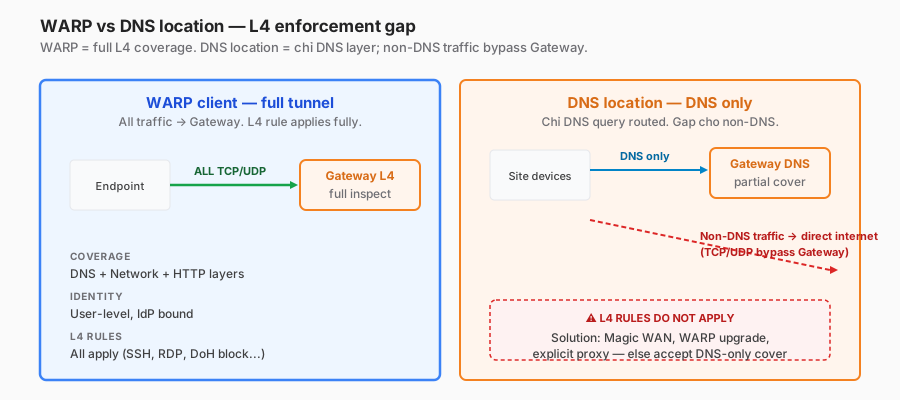
Different enforcement models
WARP client:
- Tunnels all network traffic (split-tunnel exceptions aside) to Cloudflare.
- Gateway sees every TCP/UDP connection → L4 rules apply fully.
- Identity-bound → per-user L4 rules.
DNS location:
- Only DNS queries route to Cloudflare.
- Non-DNS traffic goes direct to the Internet — Cloudflare never sees it.
- L4 rules don’t apply in location mode.
- Gap: malware on-site can still exfiltrate — only DNS is filtered.
Solutions for site mode
Option 1: Magic WAN — the site tunnels to Cloudflare, all traffic is inspected → Magic Firewall (not Gateway) — Part 10.
Option 2: an on-site proxy endpoint that routes HTTP to Cloudflare. Explicit proxy, not transparent — the workload has to know the proxy URL.
Option 3: upgrade to WARP per-device — best granularity.
Realistic enterprise mix: WARP (users) + Magic WAN (sites) + DNS location (guest/IoT). L4 coverage is complete for WARP + Magic WAN; guest/IoT gets DNS-only (acceptable as long as they don’t handle sensitive data).
Reference configuration — starter network policy
# Policy 1 — allow tenant infrastructure (whitelist first)
- name: "Allow corporate tenant DoH"
  action: allow
  condition: |
    net.sni == "[tenant].cloudflareaccess.com"

# Policy 2 — allow approved outbound
- name: "Allow approved outbound protocols"
  action: allow
  condition: |
    net.port in {80, 443, 53}
    or net.host in $approved_corp_hosts

# Policy 3 — block DoH bypass
- name: "Block third-party DoH/DoT resolvers"
  action: block
  condition: |
    net.dns.over_https
    or net.port == 853
    or net.sni matches "*.dns.google"
    or net.sni matches "*.quad9.net"
    or net.host in {"8.8.8.8","8.8.4.4","9.9.9.9","149.112.112.112","208.67.222.222"}

# Policy 4 — block risky non-HTTP outbound
- name: "Block dangerous outbound protocols"
  action: block
  condition: |
    net.port in {22, 23, 3389, 445, 1433, 3306, 5432, 6379, 27017}
    and net.direction == "outbound"
  # SSH, Telnet, RDP, SMB, SQL variants, Redis, MongoDB.
  # Exception: specific corporate bastions/DBs routed via Tunnel (Part 8).

# Policy 5 — block Tor, torrents, proxy apps
- name: "Block anonymiser / P2P"
  action: block
  condition: |
    net.app in {"Tor", "Bittorrent", "eDonkey", "UltraSurf", "Psiphon"}

# Policy 6 — block personal cloud storage
- name: "Block personal storage"
  action: block
  condition: |
    net.sni in {
      "www.icloud.com","*.mega.nz","*.terabox.com",
      "*.zippyshare.com","*.mediafire.com"
    }

# Policy 7 — block sanctioned countries
- name: "Block sanctioned country"
  action: block
  condition: |
    net.geo.country in {"IR","KP","CU","SY"}

# Policy 8 — identity-based admin geo-fence
- name: "Admin tools geo-fence"
  action: block
  condition: |
    identity.groups in {"Admin-Prod"}
    and net.sni matches "*.admin.prod.*"
    and not (net.geo.country in {"VN","SG","US"})

# Policy 9 — default allow
- name: "Default allow"
  action: allow
  condition: "true"
Security considerations
Trust model
- Gateway side: Cloudflare validates policy-evaluation correctness.
- Customer side: rule correctness, exception hygiene.
- Endpoint integrity: a user with local admin can disable WARP → bypass. MDM must enforce WARP is running.
Blind spots
- Outside WARP scope: split-tunnel exclusion lists, networks outside WARP (home IoT).
- ECH / encrypted SNI: future-proofing — plan to block ECH attempts until a fingerprint is available.
- VPN on top of WARP: a user running a VPN on top of WARP encrypts traffic before WARP sees it → Gateway can’t inspect. Block user-level VPN apps via app rules.
- Non-CF proxied sites: in DNS-location mode, only DNS is visible.
Anti-bypass playbook
- Block DoH/DoT resolver IPs + SNIs (Policy 3 above).
- Block Tor + anonymisers (Policy 5).
- Block VPN apps (NordVPN, ExpressVPN, etc.) via app rules.
- MDM enforces WARP running + auto-start.
- Alert on WARP disconnections > 5 minutes per user.
- Identity-bound rules with posture checks (device compliance) — covered in Part 16.
Compliance mapping
- ISO 27001 A.8.20 Network security.
- NIST CSF PR.AC-5 (network integrity), DE.CM-1 (continuous monitoring).
- PCI DSS 4.0 1.2.5 (permitted connections), 1.4.2 (anti-spoofing).
- CIS 12.1 (secure network infrastructure), 13.4 (perform traffic filtering).
Operations and monitoring
Metrics
- Blocked connections/s — baseline + spike alert.
- Top blocked ports — 22/3389/445 = lateral-movement attempts.
- Top blocked countries — reflects the geopolitical threat landscape.
- DoH block count — trend. Spikes = endpoint compromise or a browser defaulting to DoH.
- App rule hits — Tor/BitTorrent = policy violations.
Alerting
- Spike of 10× baseline in 15 minutes = incident.
- The same user hitting blocked outbound ≥ 3× per hour = SOC triage.
- WARP disconnect > 10 minutes = endpoint issue or bypass attempt.
- Unexpected country block (US → a random Russian IP connection) = possible C2.
Logs pipeline
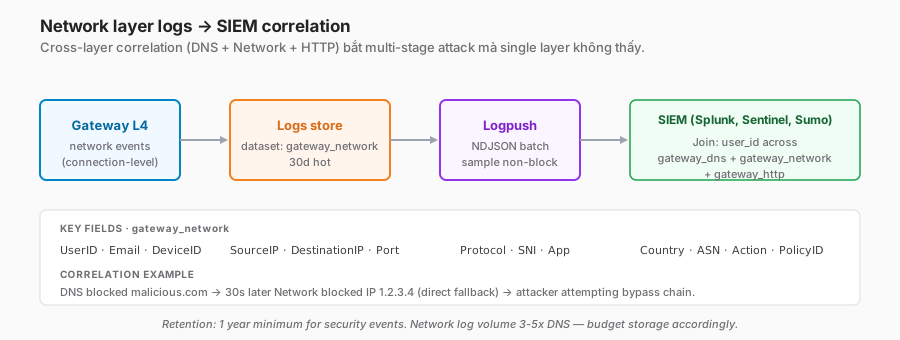
Important fields
{
  "Timestamp": "2026-05-14T10:15:42Z",
  "UserID": "u_abc",
  "Email": "alice@company.com",
  "DeviceID": "d_xyz",
  "SourceIP": "10.0.0.42",
  "DestinationIP": "8.8.8.8",
  "DestinationPort": 443,
  "Protocol": "TCP",
  "SNI": "dns.google",
  "App": "Google DNS",
  "DestinationCountry": "US",
  "DestinationASN": 15169,
  "Action": "block",
  "PolicyID": "p_block_doh",
  "PolicyName": "Block third-party DoH"
}
Dataset: gateway_network.
SIEM correlation
- Correlate DNS + Network + HTTP logs per user to identify multi-layer attacks.
- Example: a DNS log entry “malicious.com blocked” + 5 minutes later “direct IP 1.2.3.4 blocked” → the attacker tried DNS, fell back to IP.
- Detection rules in SIEM (Splunk, Sentinel): pattern-match across datasets.
Common troubleshooting
”A developer says SSH to GitHub is failing”
$ git clone git@github.com:company/repo.git
Connection to github.com port 22 refused- Logs → Network → filter by user + port 22.
- See a block hit on “Block outbound SSH to non-corporate”.
- Check: GitHub SSH for the dev workflow is legit. Add
github.com+ssh.github.comto$approved_ssh_hosts. - Test: retry clone → works.
Alternative: GitHub offers HTTPS clone — consider enforcing HTTPS-only.
”Redis monitoring from the jumpbox fails”
- Port 6379 is blocked outbound.
- Route Redis via Cloudflare Tunnel (Part 8) — the client talks to
redis.corp.internalthrough Gateway. - Or add the source IP (jumpbox) exception to
$internal_db_access.
”Zoom calls drop frequently”
- Zoom uses non-standard UDP ports (8801–8810, TCP 80/443/3478).
- Check:
net.app == "Zoom"rule explicitly allows. - Add the Zoom app rule with precedence ahead of generic UDP blocks.
”ECH domains no longer show up in logs”
- The browser upgraded to Encrypted ClientHello.
- Gateway can’t read the SNI → falls back to IP-based matching.
- Solution: block clients attempting ECH (via fingerprint) OR fully decrypt HTTPS (Part 12).
- Track Cloudflare’s ECH-detection feature timeline.
”A legitimate DoH endpoint is blocked”
- The corporate browser is using the vendor’s DoH instead of the company tenant.
- Verify: browser config → enforce the enterprise DoH endpoint or disable it.
- GPO/MDM: set Firefox
network.trr.urito the tenant endpoint. - Chrome:
DnsOverHttpsMode = automatic+ the company endpoint.
”Log volume is too high”
- Network logs are verbose — every connection.
- Sample 10% non-blocked, 100% blocked.
- Cloudflare supports sampling at Logpush.
Trade-offs and design decisions
| Decision | Option A | Option B | Recommendation |
|---|---|---|---|
| Block DoH comprehensively | Block all third-party | Block majors, allow rest | Block all third-party. Attackers use obscure DoH resolvers too. Allow only the tenant DoH. |
| Block outbound SSH | Hard block | Allow with audit | Hard block by default, whitelist specific. SSH is a ransomware vector. |
| App rule vs raw IP | Raw IP/domain list | App rule (CF catalogue) | App rule for common shadow IT. Raw for custom threat IoCs. |
| Country-block granularity | Whole-country block | Specific CIDR | Country initially (coverage), refine with CIDR for false positives. |
| Log sampling | 100% | Sample | Sample non-blocked (10%), 100% of blocks. Balance storage vs forensics. |
| SNI inspect vs full decrypt | SNI only (privacy) | Full decrypt | SNI + L4 is enough for most control. Full decrypt only for DLP/CASB needs. |
| ECH handling | Allow (future) | Block attempts | Block ECH until Cloudflare visibility catches up. Document for a future unblock. |
Rollout playbook
Phase 1 — Audit (1–2 weeks)
- Inventory the current L4 policy (existing firewall rules, existing blocks).
- Traffic analysis: top ports, SNIs, countries from current logs.
- Identify current gaps (DoH passing? Tor? SSH outbound allowed?).
Phase 2 — Log-only baseline (2 weeks)
- Enable every candidate policy in log-only mode.
- Measure the false-positive rate.
- Identify legitimate services that hit rules (build the exception list).
Phase 3 — Progressive blocking
- Start with the highest-confidence rules: DoH block, Tor block, sanctioned countries.
- Monitor for 1 week per batch.
- Next batch: non-HTTP outbound (SSH, RDP, SMTP block).
- Final batch: app rules (BitTorrent, anonymisers), granular personal cloud storage.
Phase 4 — Continuous refinement
- Monthly review: block hit rates, false-positive tickets, new threats.
- Quarterly: refresh the country list, app-catalogue update, IoC feed integration.
Checklist — before L4 in production
Policy coverage:
- Third-party DoH resolvers blocked.
- DoT (port 853) blocked unless whitelisted.
- Outbound SSH/RDP/SMTP/DB blocked except for the approved list.
- Tor + P2P apps blocked.
- Personal cloud storage blocked.
- Sanctioned countries blocked.
- Anonymiser/VPN apps blocked.
Enforcement:
- WARP enrolled on all user devices.
- MDM enforces WARP running + auto-connect.
- Alert on WARP disconnects > 10 minutes.
- Magic WAN for site egress (when applicable).
- Guest wifi / IoT routed via DNS location (accept DNS-only coverage).
Logs & SIEM:
- Logpush dataset
gateway_networkto SIEM. - Fields mapped: user, src IP, dst IP/SNI, port, action.
- Retention ≥ 1 year.
- SIEM correlation rules (DNS + Network + HTTP multi-layer).
- Dashboard: top blocked, trend, geo.
Monitoring:
- Baseline metrics: block rate, connection volume.
- Alert on 10× baseline spikes.
- Per-user block threshold → SOC triage.
- Runbook: user-ticket resolution flow.
Operations:
- Exception-request process documented.
- Whitelist hygiene: quarterly review, remove stale entries.
- Cert-pin exception list synced with the HTTP layer (Part 12).
- Sanctioned-country list refresh quarterly.
Lessons from practice
- DoH bypass is priority #1. Without a DoH block, most of the DNS filter is moot. Browser-default DoH is rising; the problem grows over time.
- Blocking SSH breaks developer workflows instantly. Communicate ahead and provide alternatives (HTTPS git, Cloudflare Tunnel for internal SSH).
- The app catalogue goes stale. When a new SaaS launches, Cloudflare may not have an entry yet. Fall back to manual SNI rules.
- Users look for WARP bypasses. Mobile hotspots, disconnecting WARP. MDM enforcement + posture checks are critical.
- Log volume explodes. The network layer is 3–5× more verbose than DNS. Sampling + retention tuning is necessary.
- Week-one false positives run high. Legitimate services hit the rules. Two weeks of log-only is the minimum.
- ECH is a ticking clock. When browsers default to ECH, SNI-based rules degrade. Plan a decrypt transition or an ECH block.
- Geo-block is a blunt instrument. It covers 80% of country-based threats but misses VPN-hopping attackers. Combine with ASN + CIDR.
Summary
The network layer closes the Policy & Filtering block. Together with DNS (Part 11) and HTTP (Part 12) it forms a three-tier SWG:
- DNS: broad, cheap, the first line.
- Network (L4): closes the DoH gap, catches non-HTTP, direct-IP, and geo-based threats.
- HTTP: granular URL, DLP, CASB, body inspection.
No single layer is sufficient on its own. Each handles a class of threats that the others can’t see. Skipping the network layer leaves a back door for experienced attackers.
One line to remember:
Network policy isn’t as glamorous as DLP or CASB, but without it, DNS + HTTP filters are trivial to bypass. Blocking DoH and controlling non-HTTP are the minimum bar for a production Gateway.
That closes the Policy & Filtering block (Parts 11–13). The next block covers Observability & Ops: the end-to-end logs pipeline, SIEM integration, DEX (Digital Experience Monitoring), and posture signals for continuous verification.
References
- Cloudflare Gateway Network policies
- App identifiers (Gateway catalogue)
- SNI inspection and ECH
- Block DoH bypass
- Gateway logs schema
- Block countries / ASN
In this series:
