
TL;DR
Cloudflare Access does not manage passwords — it trusts an IdP (identity provider) to authenticate. About 90% of “policy is behaving wrong” incidents in practice are not in Cloudflare — they are in how the IdP emits claims, especially group claims.
This post covers a matrix of the four most common IdPs (Okta, Entra ID, Google Workspace, generic SAML) and calls out:
- OIDC vs SAML — when to pick each.
- How group-claim formats differ across the four IdPs.
- Three major gotchas: Entra ID returns group object IDs instead of names, Google requires a service account and Admin SDK, generic SAML needs precise attribute mapping.
- Group sync timing — the gap between an admin removing a user and Cloudflare knowing.
- Multi-IdP patterns for employees + contractors.
The thesis:
IdP integration is not “click Next five times”. The quality of group claims determines the quality of every policy written afterwards. Spending one day setting up the IdP correctly saves three months of policy debugging.
This is Part 5 of the Cloudflare One Handbook.
Who this is for
- Security/platform engineers setting up Cloudflare Access + IdP for the first time.
- IAM engineers who want to understand how Cloudflare consumes IdP claims.
- Anyone stuck on a “policy group match doesn’t work” bug.
Recommended prior reading:
- Part 4 — Cloudflare Access ZTNA fundamentals
- Part 3 — The four-layer mental model (Layer 2: Identity)
After this post you will:
- Know when to choose OIDC vs SAML.
- Have a step-by-step setup for the four most common IdPs.
- Understand how claim → rule mapping works (and fails).
- Know what risks group sync lag creates and how to mitigate them.
- Have a production-readiness checklist for IdP integration.
What this post does not cover
- SCIM provisioning deep-dive — Part 7.
- Service tokens + mTLS for non-human clients — Part 6.
- Okta Workflows / Entra Conditional Access in their own right — advanced topics, out of scope for Cloudflare.
- Passkey / passwordless — evolving quickly; check the latest docs.
Concepts
- IdP (Identity provider) — the server that authenticates users and issues tokens. Okta, Entra ID, Google Workspace, Auth0, and so on.
- OIDC (OpenID Connect) — the modern SSO protocol, built on OAuth 2.0. Tokens are JWTs.
- SAML 2.0 — the legacy enterprise protocol; tokens are signed XML.
- Claims — key-value attributes about the user (email, groups, department) that the IdP returns to Cloudflare.
- Scope (OIDC only) — the permissions Cloudflare requests from the IdP. E.g.
openid profile email groups. - Attribute statement (SAML only) — the equivalent of claims, in XML form.
- IdP connector — the Cloudflare dashboard configuration object that maps to the real IdP.
- SCIM — the protocol that pushes user/group updates from the IdP to Cloudflare in near-real time.
OIDC vs SAML — which to pick
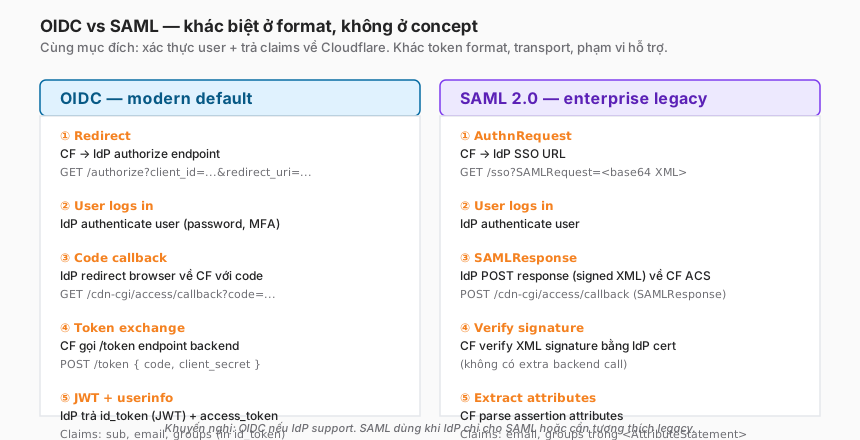
OIDC (recommended default)
When to use: modern IdPs (Okta, Entra ID, Google, Auth0, Keycloak). Most popular IdPs from 2020 onward support OIDC.
Pros:
- Transport is JSON — easier to debug than XML.
- Tokens are JWTs — can be decoded on
jwt.iowhen troubleshooting. - Granular scopes — request exactly what’s needed (email, groups), not more.
- Simpler setup — no certificate upload.
Cons:
- Token exchange happens backend-to-backend — the IdP must be reachable from the Cloudflare edge (usually fine).
SAML 2.0
When to use:
- The IdP only supports SAML (some older enterprise IdPs like Shibboleth, OpenAM).
- The organisation has an internal “everything must be SAML” rule for compliance.
- Federation is required with a partner already on SAML.
Pros:
- No backend token exchange — the SAMLResponse travels inside an HTTP redirect through the browser.
- Well supported by mature enterprise IdPs.
Cons:
- XML signature verification is harder to debug.
- Signing certificates must be uploaded and rotated on expiry.
- Attribute mapping has to be exact; typos are easy.
Recommendation
If the IdP supports both — pick OIDC. Use SAML only when required.
IdP matrix — the four common choices
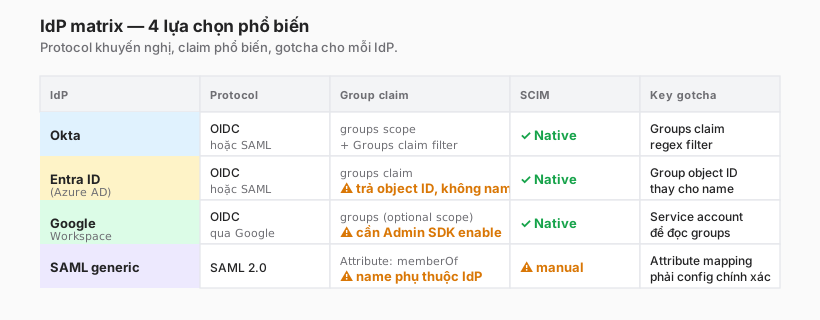
Per-IdP details below.
Setup 1 — Okta (OIDC)
Step 1 — Create the OIDC app in Okta
Okta admin console → Applications → Create App Integration → OIDC - OpenID Connect → Web Application.
- Name:
Cloudflare Access - Grant type: Authorization Code
- Sign-in redirect URIs:
https://<team>.cloudflareaccess.com/cdn-cgi/access/callback- Replace
<team>with the Cloudflare team name (Zero Trust dashboard → Settings → General → Team domain).
- Replace
- Sign-out redirect URIs:
https://<team>.cloudflareaccess.com - Controlled access: assignment (Allow everyone or specific groups).
Save → copy the Client ID and Client Secret that appear.
Step 2 — Configure the groups claim
This is where most Okta setups go wrong. By default, Okta does not include groups in the token — it has to be enabled explicitly.
In the Okta app → Sign On tab → OpenID Connect ID Token → Edit:
- Groups claim type: Filter (recommended) or Expression.
- Groups claim filter:
- Filter name:
groups - Filter:
Matches regex→.* - Or a prefix:
starts with→cf-(only sync groups whose names start withcf-).
- Filter name:
Recommendation: use a prefix to scope the set. If Okta has 500 groups and the filter is .*, the token becomes large (can exceed 8 KB) and slow.
Step 3 — Configure in Cloudflare
Zero Trust → Settings → Authentication → Login methods → Add new → Okta.
- Name: e.g.
Okta Corporate - App ID (Client ID): from Okta
- Client Secret: from Okta
- Okta account URL:
https://<yourcompany>.okta.com(no/oauth2/...)
Save → Test (Cloudflare redirects the browser through Okta and back — green means good).
Step 4 — Map to an Access Application
Create/edit the Access application → pick Okta Corporate under Identity providers → save.
Common Okta pitfalls
- Empty
groupsclaim → the user is not in the groups matched by the Groups Claim Filter on Okta. Check Okta → Directory → Groups → user membership. - Oversized token (413 error) → the groups filter is too broad; narrow the prefix.
- “Admin consent required” → the user is not in the application’s Assignment list. Add the user/group to the Assignment.
- Clock skew → IdP and Cloudflare timestamps drift, JWT is invalid. Rare, but check NTP if it happens.
Setup 2 — Microsoft Entra ID (OIDC)
Entra ID (formerly Azure AD) integrates via OIDC or SAML. OIDC is recommended.
Step 1 — Create the App Registration
Azure portal → Microsoft Entra ID → App registrations → New registration.
- Name:
Cloudflare Access - Supported account types: Single tenant (or multi-tenant for federation).
- Redirect URI: Web →
https://<team>.cloudflareaccess.com/cdn-cgi/access/callback
Register → copy the Application (client) ID and Directory (tenant) ID.
Step 2 — Create a client secret
App registration → Certificates & secrets → New client secret. Expiry 24 months (or shorter).
Copy the Value (not the Secret ID) — shown only once.
Step 3 — Configure the group claim
This is the biggest difference from Okta: Entra ID returns group object IDs by default, not names.
App registration → Token configuration → Add groups claim.
- Which groups: Security groups (or All groups, as needed).
- Customize: in the ID token, choose Group ID (default) OR sAMAccountName if the tenant syncs from on-prem AD.
Major gotcha: picking the default Group ID returns GUIDs like 00000000-0000-0000-0000-abc123.... Cloudflare rules then have to be written against GUIDs, not group names.
Solutions:
- Option A (recommended): Use SCIM provisioning (Part 7). SCIM pushes real group names into Cloudflare, so policies can refer to names.
- Option B: Use sAMAccountName if the tenant syncs from on-prem AD — the claim then contains real names.
- Option C: Write policies against GUIDs (not recommended — unreadable, hard to audit).
Step 4 — Permissions + admin consent
App registration → API permissions → Add a permission:
- Microsoft Graph → Delegated permissions →
openid,profile,email. - For groups: add
GroupMember.Read.All(application permission) — requires admin consent.
Click Grant admin consent for
Step 5 — Configure in Cloudflare
Zero Trust → Settings → Authentication → Add new → Azure AD (Cloudflare still uses the old name in the UI).
- Application (client) ID: the Client ID from Entra
- Client Secret: the Value from step 2
- Azure Cloud: Public (or the right match for the tenant)
- Directory ID: the Tenant ID
Save → Test.
Common Entra ID pitfalls
- Group claim returns GUIDs but the policy is written against names → no match. See the major gotcha above.
- “Groups overage claim” — Entra has a hard limit: users in more than 150 groups (with SAML) or 200 groups (with JWT) receive a claim containing a link instead of the group list. Cloudflare cannot resolve the link. Mitigation: SCIM, or reduce group membership.
- Client secret expiration — silent. The policy works, then one day it doesn’t. Put it on the calendar.
- Tenant ID confused with subscription ID — easy to mix up in the portal. The Tenant ID is a GUID under Microsoft Entra ID → Overview, not under Subscriptions.
Setup 3 — Google Workspace (OIDC)
Google is easy to set up at the basic level; groups are harder.
Step 1 — Create an OAuth 2.0 Client ID
Google Cloud Console → new (or existing) project → APIs & Services → Credentials → Create Credentials → OAuth client ID.
- Application type: Web application
- Authorized redirect URIs:
https://<team>.cloudflareaccess.com/cdn-cgi/access/callback
Save → copy Client ID and Client secret.
Step 2 — OAuth consent screen
APIs & Services → OAuth consent screen → configure:
- User type: Internal (for the tenant only).
- Scopes:
openid,profile,email.
Step 3 — Configure in Cloudflare
Zero Trust → Settings → Authentication → Add new → Google Workspace.
- Client ID, Client Secret: from GCP.
- Google Workspace Domain:
example.com(your tenant).
Save → Test.
Step 4 — Enable groups (the harder part)
Google does not return groups in the OIDC ID token by default. For Cloudflare to read groups:
- GCP Console → IAM & Admin → Service Accounts → Create Service Account.
- Name it, Create.
- Grant domain-wide delegation: enable in the service account’s details.
- Create a key (JSON) — download it.
- Google Workspace Admin Console → Security → API controls → Domain-wide Delegation → Add new:
- Client ID: the service account’s numeric ID.
- OAuth scopes:
https://www.googleapis.com/auth/admin.directory.group.readonly
- Cloudflare → Google IdP config → enable groups → paste the service account’s JSON key.
This is why Google is harder than Okta/Entra: Admin SDK + service account + domain-wide delegation. Without Google Workspace admin access, groups have to be skipped — policies will be written against email instead.
Common Google Workspace pitfalls
- Groups don’t appear → service account + Admin SDK not configured. Group-based policies fail.
- “User not a member of any Google Group” → user is in a Workspace OU but not in any group. Create a group or rely on email-based policy.
- Service account key leak → high-privilege credential. Rotate periodically, store in a secret manager.
Setup 4 — Generic SAML
Used when the IdP has no first-class integration (Shibboleth, ADFS, Keycloak, JumpCloud, PingOne, etc.).
Step 1 — Configure the IdP
On the IdP side, create a SAML application with:
- Entity ID / Audience:
https://<team>.cloudflareaccess.com/cdn-cgi/access/callback - ACS URL / Reply URL:
https://<team>.cloudflareaccess.com/cdn-cgi/access/callback - Name ID format: EmailAddress
- Signing algorithm: SHA-256 (not SHA-1)
- Want AuthnRequest signed: optional (Cloudflare supports both)
- Attributes:
email→ user emailgroupsormemberOf→ group membership (format depends on the IdP)
Download the IdP signing certificate (PEM or X.509) and record the SSO URL.
Step 2 — Configure in Cloudflare
Zero Trust → Settings → Authentication → Add new → SAML.
- Name: e.g.
Corporate SAML - Single Sign On URL: the SSO URL from the IdP
- IdP Entity ID or Issuer URL: IdP entity ID
- X509 Signing Certificate: paste the PEM cert
- Email attribute name:
email(or whatever the IdP uses) - Attributes: add
groupsif policies rely on it
Save → Test.
Common generic-SAML pitfalls
- Attribute name typo → the IdP sends
member-ofbut the policy expectsmemberOf→ no match. Case-sensitive. - Certificate expired → SAML assertion fails signature verification. Monitor cert expiry (usually 1–3 years).
- Wrong NameID format → Cloudflare cannot extract the email. Switch to EmailAddress.
- Clock skew → the SAML assertion has
NotBefore/NotOnOrAfter. A > 5-minute drift between IdP and Cloudflare → reject. Sync NTP.
Claim mapping anatomy
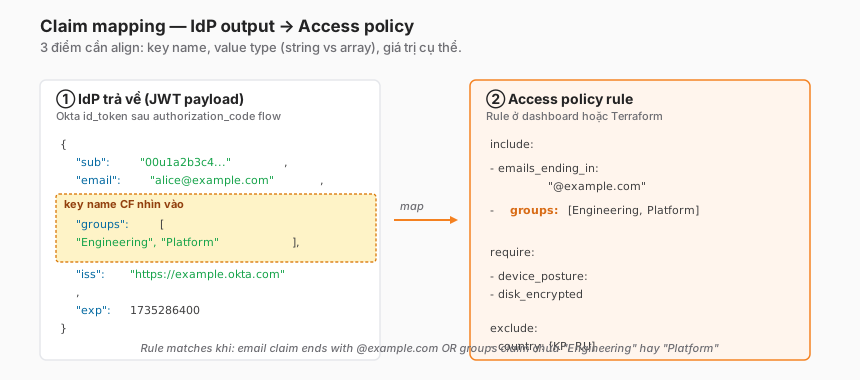
Three alignment points
1. Key name
A Cloudflare rule uses groups. The IdP may send:
- Okta:
groups(correct, when the filter is configured correctly) - Entra:
groups(correct), but the value is a GUID. - Google:
groups(only when the service account + Admin SDK is in place). - SAML:
memberOf,group,roles, varies by IdP.
If the IdP sends member-of while the rule looks for groups → no match.
2. Value type (string vs array)
Groups are typically an array of strings: ["Engineering", "Platform"].
Some IdPs send a single string with a separator: "Engineering;Platform". Cloudflare does not auto-split — the rule matches the entire string "Engineering;Platform" as a single group, not each one.
Mitigation: configure the IdP to emit an array, or use a SAML transformation to split.
3. Specific value
- Okta:
"Engineering"(group name) - Entra in Group ID mode:
"00000000-..."(GUID) - Entra with sAMAccountName:
"Engineering" - Google: email
group@example.comor name, depending on config - SAML: depends on the IdP
A Cloudflare rule must use the exact value. The dashboard autocompletes user/group values — but only after at least one user has logged in successfully and Cloudflare has cached the claim.
How to verify claim mapping
Zero Trust dashboard → Logs → Access → click a login event → Identity tab. This shows:
- Groups (if the IdP sent them)
- Custom claims
- IdP name
If the rule says groups: ["Engineering"] but a successful login doesn’t match — open the event → check the Identity tab → see what the IdP actually returned in the groups claim. Nine out of ten times, that’s the cause.
Group sync timing — the stale window
A question that usually gets missed: an admin removes a user from a group in the IdP. When does Cloudflare know?
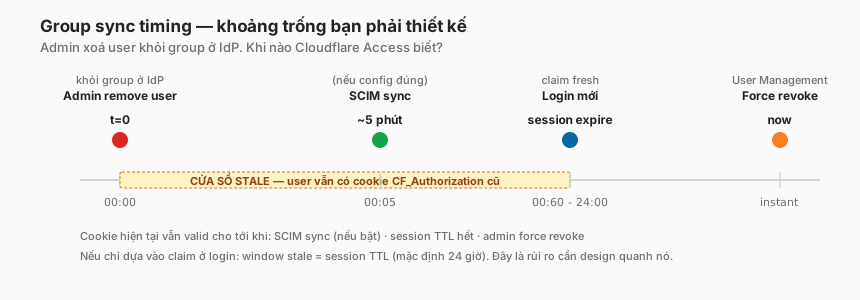
Mechanisms for updating claims
A. Claim at login time. At login, the IdP returns the current groups. But that claim is stored inside the CF_Authorization cookie until the session expires. With a 24-hour session duration, the user can carry a stale claim for 24 hours after the admin removes them.
B. SCIM provisioning. The IdP pushes user/group updates to Cloudflare in near-real time (< 5 minutes). This is the only near-real-time mechanism — covered in Part 7.
C. Session expiration. Once the cookie expires, the user is forced to re-authenticate → fresh claims from the IdP.
D. Force revoke. Admin → Zero Trust → Users → select the user → Revoke. Invalidates all sessions.
Design principles around the stale window
- Short session duration for sensitive apps — 15 minutes to 1 hour. Trade-off against UX friction.
- Enable SCIM from day one. The #1 mitigation.
- Document the force-revoke procedure for helpdesk. When a user leaves, don’t just disable in the IdP — revoke in Cloudflare.
- Periodic audit — query “users who have logged in during the last 30 days” and compare against the IdP’s active user list. Discrepancies indicate stale sessions that have not yet expired.
Multi-IdP patterns
Not every organisation has a single IdP. Common patterns:
Pattern 1 — Employees + contractors
- Employees: Okta Corporate (full claims, SCIM on).
- Contractors: One-time PIN (no new IdP) or GitHub/LinkedIn for external users.
- Configuration: two IdP connectors. Per application, tick which IdPs are allowed.
- Benefit: contractors don’t need an Okta license or tenant invitation.
Pattern 2 — Multiple business units / post-merger
- Each business unit has its own Okta/Entra tenant.
- Configuration: multiple IdP connectors, one per BU. Each application ticks the relevant IdP.
- Pitfall: audit is more complex — event logs fragment across tenants.
Pattern 3 — Primary + fallback
- Primary: Okta (default for all apps).
- Fallback: One-time PIN enabled for a single “break-glass” Access app so an admin can still log in if Okta is down.
- Benefit: avoids a single point of failure on the IdP.
Trade-offs
| Decision | Option A | Option B | Recommendation |
|---|---|---|---|
| Protocol | OIDC | SAML | OIDC if the IdP supports it. SAML only when required. |
| Group claim source | Claim at login | SCIM in near-real time | Both. SCIM primary, claim as fallback. |
| Groups filter scope | All groups | Prefix filter (cf-*) | Prefix — smaller token, easier audit. |
| Multiple IdPs | One IdP for all | Per-app IdP selection | Per-app when separating employees from contractors. |
| One-time PIN fallback | Off | On for break-glass | On for at least one admin Access app. |
| Entra group mode | Group ID (GUID) | sAMAccountName / SCIM | sAMAccountName if syncing from AD; SCIM for cloud-native tenants. |
Checklist — audit IdP integration before production
Authentication:
- Client secret documented with a rotation schedule.
- Redirect URI exactly matches (no typo).
- “Test” connection succeeds in the CF dashboard.
- At least two admins can log in (no single point of dependency).
Claims:
-
emailclaim returned correctly. -
groupsclaim returned in the correct format (array of strings with real names). - For Entra ID — verified no groups overage claim.
- Custom claims (department, country) if policies rely on them — verified in the log.
Group naming:
- IdP group naming convention is standardised (prefix, no spaces, consistent casing).
- For Entra ID in Group ID mode — documented GUID → name mapping.
- Policy tested with three different users (employee, contractor, admin).
Session + revocation:
- Session duration set to match risk (short for sensitive apps).
- Force-revoke procedure documented for helpdesk.
- SCIM integration plan (Part 7) — timeline set if not yet in place.
Multi-IdP (if applicable):
- Audit logs aggregated — which IdP each login came from.
- Break-glass IdP (One-time PIN) enabled for at least one critical app.
Lessons from practice
- Set up the IdP once, live with it for three years. Don’t cut corners on the groups claim — bugs show up six months later when there are already 50 policies depending on it.
- Document group naming on day one. Prefix with
cf-oraccess-to separate groups used by Cloudflare from everything else. - Entra ID overage claim is a ghost bug — only shows up once a user has more than 150 groups. Small teams never see it. Enterprise teams see it six months after launch.
- Test with “new joiner, leaver, team-change” users — the three lifecycle edge cases. Without them, bugs land in production.
- Don’t default to “all users” on a production Access application. “Allow entire tenant” sounds harmless until a contractor joins the Okta tenant for an unrelated reason and automatically has access to everything.
Summary
The IdP is the single most important dependency for Cloudflare Access. Cloudflare cannot “fix” bad claims — if Okta returns the wrong group, Cloudflare policy acts on the wrong group.
Invest in:
- The right protocol (OIDC unless forced onto SAML).
- Correct group-claim configuration with a clear naming convention.
- A SCIM plan from the start, not later.
- Multi-IdP when contractors or external users are in play.
- Periodic audits — group drift, cert expiry, user lifecycle.
One line to remember:
Cloudflare Access is only as strong as the IdP integration behind it. Claim quality from the IdP determines policy quality downstream — no shortcuts here.
Part 6 covers service tokens + mTLS — authentication for non-human clients (CI/CD, bots, scripts) when an IdP is not a fit.
References
- Cloudflare Access — Identity providers
- Okta OIDC setup
- Entra ID setup
- Google Workspace setup
- Generic SAML
- Azure AD group claims overage
In this series:
