
TL;DR
Browser Isolation (Remote Browser Isolation, RBI) is Gateway’s last layer: instead of letting the local browser render a risky page, Cloudflare renders it on a browser at the edge and streams pixels/DOM back to the client. Malware, exploits, and phishing pages never run on the user’s machine.
Three primary use cases:
- Absorb risky clicks — URLs from emails, unknown links → rendered remotely, the user interacts through a proxy.
- Data control for approved SaaS — allow access but disable download/copy/paste/print.
- BYOD browser-only access — unmanaged devices reach corporate apps through the isolated browser, with zero data on the device.
This post covers:
- The Network Vector Rendering architecture — how browser state is streamed.
- Isolation triggers — when to auto-isolate.
- Data controls — copy/paste/print/download/keyboard input.
- Clientless mode — without WARP.
- AI chat guardrails — warn/isolate ChatGPT/Claude for DLP pattern matching.
- Cost model + performance.
- Privacy and compliance.
The thesis:
Browser Isolation isn’t a “last resort” — it’s a primary control for a specific class of threats: zero-day exploits, pixel-perfect phishing, and BYOD access. It doesn’t replace DLP/CASB; it’s a containment layer for when prevention isn’t sure.
This is Part 17, opening the Advanced Security block (Parts 17–20).
Who this is for
- Security architects evaluating RBI vendors (CF vs Menlo vs Proofpoint).
- IT admins wanting BYOD access without compromising data.
- CISOs facing zero-day web exploits and phishing waves.
Recommended prior reading:
- Part 12 — HTTP filtering + TLS decryption — the Gateway tier above.
- Part 16 — Device posture — BYOD context.
After this post you will:
- Understand NVR (Network Vector Rendering) vs HTML screenshotting / DOM mirroring.
- Configure isolation triggers by category, identity, or file type.
- Set up data controls: granular disable of copy/paste/print/download.
- Deploy clientless BYOD browsers.
- Know the cost model + performance impact to plan with.
What this post does not cover
- Detailed RBI vendor comparison (Menlo, Proofpoint, Ericom) — briefly mentioned.
- Browser fingerprint evasion — different scope.
- Headless scraping — different use case.
- Virtual Desktop Infrastructure (VDI) — a different paradigm.
Concepts
- RBI (Remote Browser Isolation) — a browser running on the edge/cloud, not on the endpoint. Web content never lands locally.
- NVR (Network Vector Rendering) — Cloudflare’s proprietary approach: streams DOM diffs + vector graphics, not pixel screenshots.
- Pixel push — the legacy approach: screenshots + keyboard/mouse events. High bandwidth, lossy.
- DOM mirroring — the local browser parses DOM from remote — script content still reaches the client, less safe.
- Isolation trigger — a rule that automatically activates RBI for URLs matching a pattern.
- Data control — restrictions on interaction (clipboard, downloads, print, keyboard input).
- Clientless — users access via a web-portal link, no WARP install needed.
Why RBI
Threat classes RBI handles
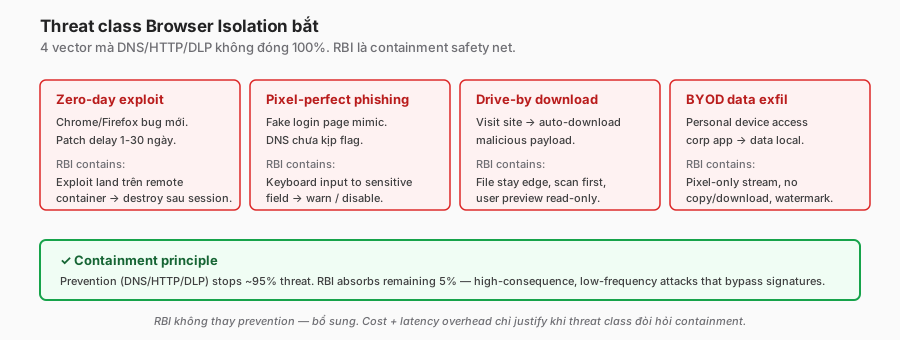
Zero-day exploit:
- A new bug in Chrome/Firefox/Safari.
- 0-day patch delay of 1–30 days.
- User lands on a page with an exploit → endpoint compromised.
- RBI: the exploit hits the remote browser → container destroyed at session end → endpoint untouched.
Pixel-perfect phishing:
- A fake Google login / Microsoft login the user can’t visually distinguish.
- DNS/category filters may not have caught it yet.
- RBI: users still render it, but keyboard input into sensitive fields is restricted or warned.
Drive-by download:
- A site loads → auto-downloads a malicious file.
- Traditional: endpoint AV scans reactively.
- RBI: downloads are filtered at the remote browser. The file stays at the edge; previews are read-only.
BYOD data exfil:
- A personal laptop accesses corporate Salesforce.
- Traditional VPN: full client access, data lands locally.
- RBI: access via remote browser, screen pixels only, no local storage, no copy/paste out.
When NOT to use RBI
- Internal apps with no external exposure.
- Workflows that need local OS integration (uploading from a local disk).
- Real-time collaboration (audio/video is broken in RBI).
Architecture — Network Vector Rendering
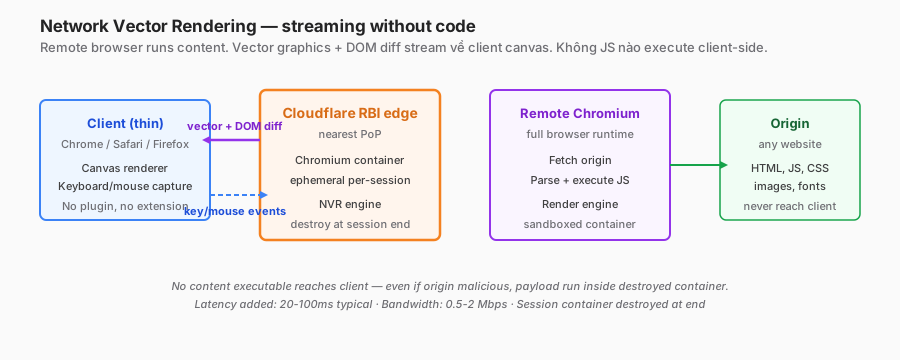
NVR flow, step-by-step
- The client (Chrome/Safari/Firefox, no plugin required) opens a URL through Gateway.
- Gateway matches the isolation policy → redirects to the RBI endpoint.
- The RBI edge spins up an ephemeral Chromium container.
- The remote Chromium fetches the origin, renders the DOM.
- The NVR engine captures vector-draw commands (shapes, text, images) + DOM diffs.
- Streams to the client over WebSocket.
- The client-side thin render engine paints vectors + DOM onto a canvas.
- Keyboard/mouse events stream back to the remote browser.
- Session ends → container is destroyed, state gone.
vs. traditional approaches
| Approach | Content on client? | Bandwidth | Compatibility | Security |
|---|---|---|---|---|
| Pixel push | No | High (video) | Low (loses browser quirks) | Excellent |
| DOM mirroring | Yes (DOM + JS) | Low | High | Moderate (JS still runs locally) |
| NVR (CF) | No executable code | Medium | High | Excellent |
NVR’s sweet spot: vector data transmitted but no script execution on the client. UX close to native; security close to pixel-push.
Performance
- Added latency: 20–100ms typical (depends on PoP distance to origin).
- Bandwidth: 0.5–2 Mbps typical web browsing.
- Client CPU: low (simple canvas paints).
- Video streaming: works, but reduced quality (RBI isn’t optimised for video).
Isolation triggers
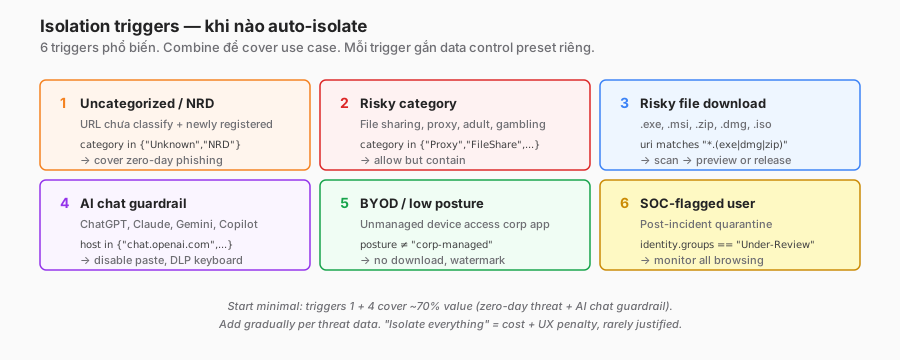
1. Category-based
policy: "Isolate uncategorised sites"
action: isolate
condition: |
  http.request.uri.host.category in {"Unknown", "Newly Registered Domain"}
data_controls: ["no_download", "no_copy", "no_keyboard_input_sensitive"]
Uncategorised + NRD covers zero-day phishing (not yet classified).
2. Risky category
policy: "Isolate risky categories"
action: isolate
condition: |
  http.request.uri.host.category in {
    "File Sharing", "Proxy Anonymizer", "Adult", "Questionable"
  }
Allow access, but contain it.
3. File-type download
policy: "Isolate risky file downloads"
action: isolate
condition: |
  http.response.uri.path matches ".*\\.(exe|msi|dmg|bat|ps1|iso|img|zip)$"
data_controls: ["scan_then_allow_download", "preview_only_pdf"]
Files go through an AV scan in a remote sandbox; users can preview or release.
4. AI chat guardrail
policy: "Isolate AI chat with DLP"
action: isolate
condition: |
  http.request.uri.host in {"chat.openai.com", "claude.ai", "gemini.google.com"}
data_controls: ["no_copy_paste_in", "warn_keyboard_input"]
Disable paste from the local clipboard into AI chat → prevents accidental source-code / PII dumps.
5. BYOD / low posture
policy: "BYOD browser access"
action: isolate
condition: |
  identity.device_posture not in {"corporate-managed"}
  and http.request.uri.host matches "*.company.com"
data_controls: ["no_download", "no_copy", "no_print", "watermark"]
BYOD access to internal apps with no data persisting.
6. Explicit user risk signal
policy: "Isolate high-risk user"
action: isolate
condition: |
  identity.groups in {"Compromised-Investigation"}
  # Group set by SOC after a phishing click is detected.
Quarantine-light: the user can still work, but all web content is rendered remotely for monitoring.
Data controls
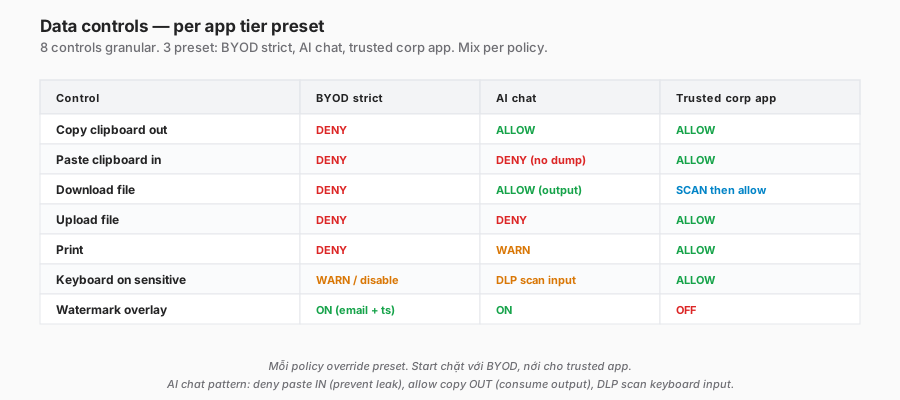
Control list
| Control | What it does | Typical use |
|---|---|---|
| Copy clipboard | User copies from the isolated page → local clipboard | Block for BYOD, allow for internal approved apps |
| Paste clipboard | Local clipboard → isolated page | Block for AI chat + sensitive forms |
| Download | File from isolated page → local | Scan-then-allow, or block entirely |
| Upload | Local file → isolated page | Block for BYOD |
| Print page content | Block by default (a leakage vector) | |
| Screenshot | Local OS screenshot of the isolated canvas | Limited (watermark overlay) |
| Keyboard input | Type into sensitive fields (passwords on a phishing page) | Disable / warn |
| Right-click menu | Save image, view source | Limit to safe options |
Config example — strict BYOD
data_controls:
  copy_clipboard: deny
  paste_clipboard: deny
  download: deny
  upload: deny
  print: deny
  keyboard_sensitive_fields: allow
  watermark: enabled
  watermark_text: "{user_email} - {timestamp}"
Config example — lenient-but-monitored (trusted user)
data_controls:
  copy_clipboard: allow
  paste_clipboard: allow
  download: scan_then_allow
  upload: allow
  print: warn
  watermark: disabled
Download modes
- Block: no download at all.
- Scan-then-allow: the file stays at the edge, is AV-scanned, released if clean.
- Preview only: PDF/Office viewable in the remote browser, no local copy.
- Protect: the file is released with an AIP/Purview sensitivity label applied.
Watermark
Overlays user email + timestamp on rendered content. Captured screenshots still show who leaked. Deterrent, not prevention.
Clientless mode
Traditional ZTNA: the user has a WARP client. Clientless = access via a browser-only link, no install.
Use cases
- Contractors / partners accessing a limited app, unwilling to install.
- Emergency access (WARP broken).
- BYOD phones/tablets where WARP install is too much friction.
- Shared kiosk devices.
Flow
- User navigates to
https://{tenant}.cloudflareaccess.com/{app-path}. - Access challenge: IdP login (SSO) or one-time-code email.
- Post-auth redirect → RBI session.
- All subsequent traffic goes through RBI.
Configuration
application: "Internal wiki"
clientless_access:
  enabled: true
  auth_methods: ["google-workspace", "otp-email"]
  session_duration: "8h"
  data_controls: ["no_download", "no_copy", "watermark"]
  ux: "full-screen browser"
Clientless limitations
- HTTP/HTTPS only. SSH/RDP need WARP.
- No posture check (no agent on the device).
- The link can’t auto-detect the user → they have to navigate the portal.
- Performance overhead + RBI overhead combined.
Security trade-off
- No endpoint visibility → can’t tell if the device is compromised.
- RBI mitigates (no code exec on the client).
- Combine with MFA + short session TTL + strict data controls.
AI chat guardrails — a standout use case
The problem
- Employees paste source code / PII into ChatGPT → leak to the vendor.
- Blocking = lost productivity (AI is legitimately useful).
- Allowing = DLP risk.
The RBI solution
policy: "AI chat guardrail"
action: isolate
condition: |
  http.request.uri.host in {"chat.openai.com","claude.ai","gemini.google.com","copilot.microsoft.com"}
data_controls:
  paste_clipboard: deny             # no paste IN → no accidental dump
  copy_clipboard: allow             # can copy OUT (AI output)
  upload: deny                      # no file uploads
  download: allow                   # can download AI-generated artefacts
  keyboard_input: warn_on_sensitive # warn if input looks like SSN / credit card
  dlp_scan: enabled                 # scan keyboard input for PII patterns
  watermark: enabled
warn_page: |
  AI assistants are allowed with guardrails.
  - Paste disabled to prevent accidental secret/code leaks.
  - Keyboard input scanned for PII patterns.
  - Do not type customer data.
User experience
- Opens ChatGPT → isolated session automatically.
- Typing works normally.
- Ctrl+V blocked with “Paste disabled per IT policy” notice.
- Typing a credit-card number → a warn overlay “Potential sensitive data, cancel?”
- AI replies can be copied out normally (work product).
Measuring effectiveness
- Log:
paste_denied_count,keyboard_dlp_warn_count. - Low counts (= users educated) → allow more.
- Persistent high counts (= the policy is being rejected) → investigate the user.
Cost model + performance
Cost drivers
- Per-user license (RBI tier).
- Session minutes — some pricing is tiered by active isolated-minute.
- Bandwidth — data stream client ↔ edge.
- Compute — a remote browser per session.
Pricing pattern (illustrative)
- CF Zero Trust Standard includes X isolated-user-minutes/month.
- Beyond quota: overage per user-minute.
- The “always-isolate” tier is more expensive.
Cost-control strategies
- Trigger-only isolation (risky categories, specific URLs) vs. always-on.
- Time-based: isolate only outside business hours.
- Tier by user group: contractors always isolated; full-time trusted users direct.
Performance tuning
- Choose the PoP closest to users for shorter client-edge RTT.
- Origin geography: an origin far from the RBI PoP = slow initial load.
- Video streaming sites → consider excluding (YouTube OK direct, isolate only paid video if there’s a security concern).
Measure
- Time to first paint — RBI session load.
- Interaction latency — type → render delay.
- Target: < 300ms feels normal, < 500ms acceptable, > 1s frustrating.
Privacy and compliance
Data handled
- Visited URLs.
- Typed input (password, search, forms).
- Screen content rendered.
- Audio/video if enabled.
Cloudflare data handling
- Ephemeral: remote browser container destroyed per session.
- Metadata logs: URL, timing retained per Logpush config.
- Content: not stored (except explicit data controls like scanned downloads).
Legal considerations
- Transparency — users know they’re browsing via RBI.
- Consent — BYOD requires explicit consent.
- Scope — exclude personal banking/health from isolation (privacy).
- Data residency — the RBI PoP choice affects the data path (EU data → EU PoP).
Compliance angle
- PCI DSS: RBI for cardholder data environment access from untrusted endpoints = documented compensating control, assessor-friendly.
- HIPAA: ePHI access via RBI with no-download + no-copy = a reasonable safeguard.
- SOC 2: watermark + session logs support access-control evidence.
Troubleshooting
”Isolated page loads slowly”
- PoP distance to origin + client to PoP.
- Test: user direct access (non-isolated) vs RBI — compare.
- If RBI is much slower: Cloudflare support — may be routing through a distant PoP.
”Copy/paste not working as expected”
- Policy controls apply per isolation scope.
- Browser permission (OS clipboard API) is also required.
- Check: policy config, browser permission prompt, browser compatibility.
”Video stream is broken”
- RBI isn’t optimised for video codec streaming.
- Exclude video sites from isolation if legitimate (e.g. company training).
- Alternative: lower quality but it works.
”User can’t access the internal app in clientless mode”
- Auth chain: IdP challenge → Access allow → RBI session.
- Any step fails → troubleshoot sequentially: IdP login, Access policy match, RBI session init.
”Isolated page shows ‘session terminated’”
- Container timeout default 30 minutes idle.
- Long-running task: extend the session TTL.
- Memory limit: heavy pages may exceed the container — report to CF.
”AI chat paste still works”
- Check policy scope — did the isolation trigger match?
- Some clipboard integrations bypass (Windows share, macOS universal clipboard).
- Test in incognito — eliminate extension interference.
Trade-offs and design decisions
| Decision | Option A | Option B | Recommendation |
|---|---|---|---|
| Isolation scope | Trigger-based | Everything always | Trigger-based. “Isolate all” adds cost + latency overhead for low-risk traffic. |
| Data controls | Strict (deny all) | Lenient (allow most) | Per app + posture tier. Strict for BYOD, lenient for corporate + trusted app. |
| Clientless vs client | Clientless only | WARP required | Both. Clientless for contractors/emergency; WARP for daily use. |
| AI chat | Block | Isolate + guardrails | Isolate. Blocking kills productivity. |
| Download scanning | Block | Scan-then-allow | Scan-then-allow. Block breaks legitimate workflow. |
| Watermark | Off | Always on BYOD | Always on BYOD + external contractors. The deterrent is worth the UX clutter. |
Checklist — production RBI
Policy:
- Isolation triggers defined (category, file type, AI chat, BYOD).
- Data controls per app tier.
- Watermark enabled for BYOD.
- Download mode decided (block / scan-then-allow).
Clientless:
- Clientless portal configured for target apps.
- Auth method (IdP + OTP fallback).
- Session TTL set (4–8h typical).
UX:
- PoP selection optimised for user geo.
- Warn page customised (brand + helpdesk).
- Block page with a friendly explanation.
Cost:
- Usage baseline measured (user-minutes/month).
- Alert at 80% quota consumed.
- Trigger scope reviewed quarterly.
Privacy:
- User notification of RBI in the privacy notice.
- Exclude personal/sensitive categories from isolation.
- BYOD consent.
- Data-residency PoP.
Monitoring:
- Logs for session start/end, data-control events.
- SIEM alerts for: paste-denied spike, download-scan malware, session-error rate.
- Dashboard: isolation trigger hit rate.
Operations:
- Runbook: app broken in RBI → exception process.
- Quarterly app-compatibility test (Salesforce, M365 updates).
- User education: what RBI is, why it’s needed.
Lessons from practice
- Start with a narrow trigger. “Isolate NRD + Unknown category + AI chat” is a 3-check minimum that covers the highest-value threats. Full-everything = user complaints, cost spike.
- AI chat is the highest-ROI use case. Employees are happy to have AI. Security is happy to have guardrails. Compliance is happy to have logs.
- BYOD access is the killer feature. Clientless RBI + watermark + no-download = contractor access without diving into the endpoint-posture rabbit hole.
- Perceived performance matters more than measured. Users notice 300ms of added latency. 150ms is acceptable. Tune the PoP.
- Video workflows break. Training sites, YouTube embeds, Zoom web clients — test before broad rollout. Build the exception list before launch.
- Copy/paste policy has nuance. “Block paste IN, allow copy OUT” is the sweet spot for AI chat — prevents dumps, allows consuming output.
- Watermark is more psychological than technical. OCR bypass exists. But knowing you’re watermarked = behaviour change. Worth the pixels.
- Don’t isolate banking/health/personal — even on a corporate device. The legal + trust cost makes a simple block lighter than isolation.
Summary
RBI is a containment layer when prevention isn’t sure. It doesn’t replace DLP/CASB/Gateway lower tiers — it’s a safety net for a class of threats the other layers miss (zero-day, pixel-perfect phishing, BYOD workflow).
Production recipe:
- Trigger-based isolation (category, file type, AI, BYOD).
- Data controls by app tier + posture.
- Clientless for contractors/emergency/BYOD.
- AI guardrails — paste deny + keyboard DLP scan.
- Watermark + logs for deterrent + audit.
One line to remember:
Browser Isolation turns risky web into a view-only sandbox. When prevention doesn’t catch it, containment helps. Don’t use it for everything — use it at the right scope so cost + UX stay acceptable.
Part 18 continues Advanced Security with CASB — Cloud Access Security Broker: API integration with SaaS (Google Workspace, M365, Salesforce), posture assessment, shadow-IT discovery, and inline control (via Gateway) vs. API scan.
References
- Cloudflare Browser Isolation
- Data control policies
- Clientless access
- NVR technical blog
- AI chat isolation pattern
In this series:
- ← Part 16: Device posture
- Next → Part 18: CASB
- All parts: Cloudflare One Handbook series
