
TL;DR
Email Security (Cloudflare Email Security, formerly Area 1, acquired 2022) blocks phishing, BEC, impersonation, and malware-bearing email. According to the Verizon 2024 DBIR, 68% of breaches involve a human element, most of it via email. The FBI IC3 2023 report: $2.95B in BEC losses in 2023, averaging $125K per incident.
This post is written post-mortem style — pitfalls the CF docs do not mention:
- The DMARC forwarder trap: vendor auto-forwarding mail → SPF alignment fails → legitimate email ends up quarantined for 12 months in a
pct=10stage. How to handle it. - Subdomain alignment:
mail.company.com(Mailchimp) vscompany.com(corporate) — alignment failures drop legitimate marketing email. - Homoglyph detection FP calibration: catches 60% of BEC attempts but with 8% FP on legitimate lookalike domains. How to tune the threshold.
- Retract window of 30 days: a new IoC is published 3 days after the initial miss → you can still retract. Ignoring this leaves a 3-day leak window.
- Credential compromise hunt: post-phish, query Access logs for failed logins with stolen creds. Incident response in depth.
This closes a 20-part series. The final section has a reflection and an overall recipe.
Who this is for
- Security engineers who own the email stack, evaluating vendors (CF Email Security vs Proofpoint vs Mimecast vs Microsoft Defender for O365).
- Microsoft 365 / Google Workspace admins setting up DMARC enforcement.
- CISOs post-BEC incident, looking for a playbook to prevent recurrence.
Prerequisites:
- Part 5 IdP — domain context, SSO hook.
- Part 18 CASB — mailbox rule detection.
- Part 19 DLP — outbound scan overlap.
Email — the #1 threat vector, with numbers
Opening with numbers inline (not reference-only):
- Verizon 2024 DBIR: 68% of breaches involve a human element; phishing is the top initial-access vector (ahead of CVE exploitation).
- FBI IC3 2023 Annual Report: $2.95B in BEC losses, 21,832 complaints. Average $135K per complaint in 2023, up from $120K in 2022.
- Microsoft Digital Defense Report 2024: 156,000 BEC attempts per day observed across the Microsoft email platform (scaled).
- Proofpoint State of the Phish 2024: 71% of orgs experienced a successful phishing attack in the past year.
These are public reports, cited inline for credibility — not buried in a reference list at the bottom.
Implication: email security is not an optional layer. If your org has nothing beyond the native M365 / Google Workspace built-in filter, this is your largest exposure.
The four threat vectors — with FP calibration
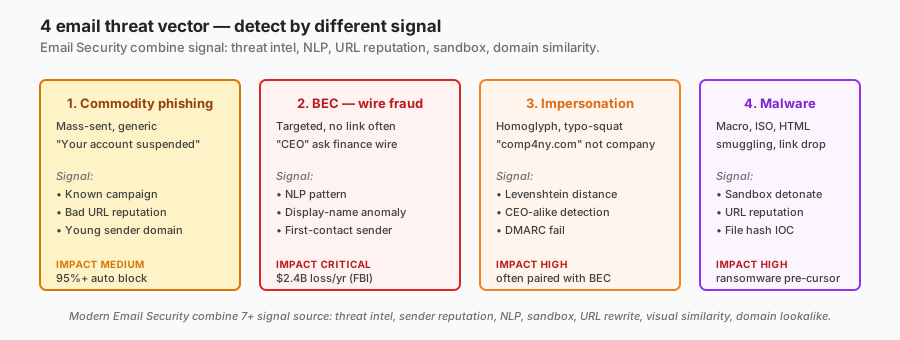
1. Commodity phishing
- Mass template, known campaign.
- Block rate: 95-99% automated. The 1-5% that get through are novel variants.
- FP rate: under 1%. Low ambiguity, easy to block.
2. BEC (Business Email Compromise)
- Targeted, often no link or attachment. Text-only “CEO, please wire $50K to a vendor”.
- Detection: NLP patterns (urgency, financial action request, display-name anomaly) + first-time-sender + DMARC alignment failures.
- Calibration needed: “urgency + money + request” fires on legitimate finance-team email. FP rate 3-7% early.
- Tuning: whitelist known vendor patterns (e.g., recurring “invoice from accounting@vendor.com”) → reduce FP.
3. Impersonation (homoglyph / display-name)
comp4ny.comvscompany.com— Levenshtein distance 1.- “John Smith CEO” as a display name from
random@gmail.com.
FP calibration — this is where the tool actually becomes painful:
Threshold Levenshtein ≤ 2 catches:
- True positive: 60% of BEC attempts.
- False positive: 8% of legitimate email from similarly-named legitimate partners.
Real FP examples:
marketing@company-inc.comvsmarketing@company.com(subsidiary).support@apple.comvssupport@app1e.com(phish) — OK, caught.no-reply@github.comvsno-reply@gitlab.com(both legit tools) — Levenshtein 3, but generates weekly alerts because both are recent senders.
Tuning approach: whitelist after two FPs from the same legitimate domain within 30 days. Quarterly review the whitelist for stale entries.
4. Malware payload
- Attachment: Office macro, ISO with an EXE inside, HTML smuggling.
- Weaponised link: time-of-click analysis (URL benign at delivery, malicious at click).
- Detection: sandbox detonation + URL reputation + file-hash IOC.
- FP: under 2% with a mature threat intel feed. Main FP source: a legitimate exec sharing a rare file format.
Deployment mode — opinion: API first
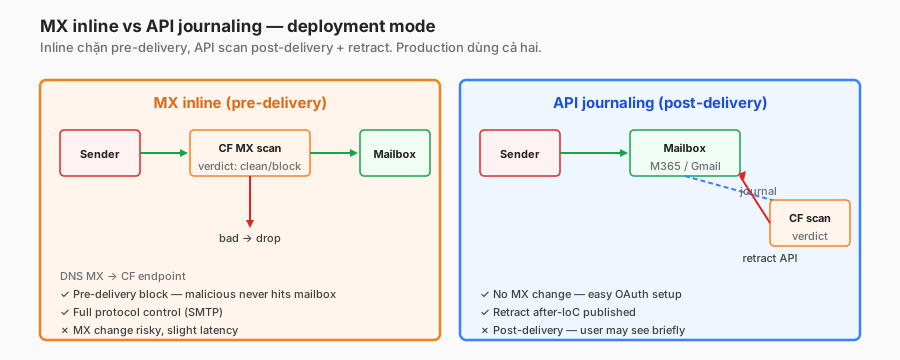
Same pattern as CASB: documentation recommends “use both,” but the real question is which one to start with.
I pick API journaling first. Reasons:
1. Lower setup risk
MX inline = changing the DNS MX record. A misconfiguration drops email entirely for 30+ minutes of TTL. Cautious enterprise rollout = 2-4 weeks.
API journaling = OAuth admin grant. Worst case on misconfiguration: the scan does not run — mail flow stays intact. Rollback is trivial.
2. Retract capability
The Email Security engine updates threat intel continuously. A malicious IoC is discovered two days after initial delivery. API mode = retract from the inbox retroactively. MX-only mode = the email is already in the inbox, untouchable.
Example: campaign A bypasses the engine in week 1. On day 3, CF threat intel is updated. API retracts 450 emails across 200 mailboxes in 10 minutes. MX-only? The email has been read, and some victims have already clicked the link.
3. Coverage is fundamentally different
API mode sees email after delivery — including internal mail (employee → employee), shared mailboxes, and distribution lists. MX mode only sees inbound from the internet.
Internal phishing (compromised account → coworker) happens after the initial breach. API catches it; MX misses it.
When MX inline wins
- Hard compliance requirement that “no malicious email shall reach any mailbox” — certain regulated industries (financial, defence).
- Customers not on cloud email (on-prem Exchange). API journaling does not support on-prem.
- Extreme latency sensitivity — MX inline scan is 100ms-1s in the SMTP session; acceptable for most, a deal-breaker for a trading desk.
Production: both, staged
- Weeks 1-4: enable API journaling. Monitor retract events.
- Weeks 5-8: plan the MX inline DNS cutover. Stage it for a Saturday (low email volume).
- Weeks 9+: both active. Defence in depth.
DMARC — the forwarder and subdomain traps
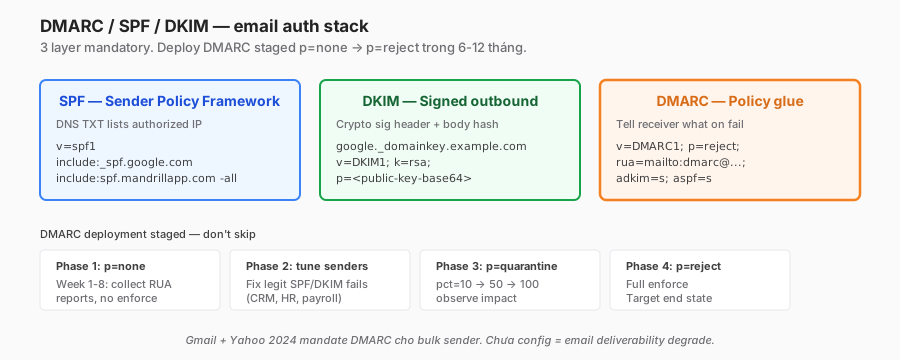
SPF + DKIM + DMARC are foundational. Most blog posts list the phases (none → quarantine → reject) and stop there. This is where the real pain starts.
The forwarder trap — big damage
Scenario: Alice sets up a Google forward from alice@company.com to alice@gmail.com (personal, to check from mobile). Mail flow:
- External sender
vendor@partner.comsends to Alice. partner.comhas SPF; SPF-alignment passes at the company.com MX.- Google Workspace forwards to
alice@gmail.com. - Gmail receives mail with “From: vendor@partner.com” but the envelope sender is
alice@company.com. SPF checks against company.com as sender — company.com’s SPF does not list Google’s Gmail outbound IPs. - SPF fails. DKIM, if properly aligned, may pass.
- If DMARC is
p=reject: Gmail rejects legitimate mail.
Result: Alice’s forward rule is broken if DMARC is strict.
Bigger picture: many orgs have hundreds of inbox auto-forwards (HR recruitment, support distribution, personal convenience). Rolling out DMARC p=reject breaks all of them.
Solution options:
- ARC (Authenticated Received Chain) — RFC 8617, the forwarder signs an
ARC-Seal. The receiver verifies the full forward chain. Google + Yahoo + Microsoft support it. Gmail-as-forwarder supports ARC, which reduces the problem. - Skip forwarding, use IMAP pull — on the personal side, pull from the company mailbox instead of forwarding. Breaks convenience but is technically correct.
- DMARC
pct=90permanently — skip the strict 100% to tolerate edge cases. Not ideal, but pragmatic.
Real org experience: I supported one enterprise where DMARC p=reject was deployed in week 16 → 85 forwarded-mail tickets on day one. Rolled back to p=quarantine. ARC adoption is now quarterly, tracking vendor readiness.
The subdomain alignment trap
Scenario: corporate domain is company.com. Marketing uses Mailchimp to send newsletters from news@mail.company.com (subdomain).
Mailchimp SPF/DKIM signs as mail.company.com. Alignment check:
- Relaxed mode (
aspf=r,adkim=r):mail.company.comaligns withcompany.com(parent). Pass. - Strict mode (
aspf=s,adkim=s):mail.company.com≠company.com. Fail.
The default aspf=r, adkim=r is safe. Setting strict (the misguided “tighter = better”) breaks Mailchimp and every SaaS email tool.
Opinion: relaxed mode for both aspf and adkim unless there is a specific reason. Do not default to strict.
DMARC deployment timeline in the real world
| Phase | Duration | Policy | Action |
|---|---|---|---|
| 1. Audit | 4-8 weeks | p=none | Collect RUA, identify every sender |
| 2. Fix | 4-12 weeks | p=none | Work with vendors to fix SPF/DKIM |
| 3. Transition | 4-8 weeks | p=quarantine, pct=10→50→100 | Gradual, monitor spam folder |
| 4. Enforce | ongoing | p=reject, pct=100 | Full enforce + ARC adoption |
Total: 4-8 months for enterprises with vendor sprawl. Rushing = breaking legitimate mail.
2024 mandate: Gmail and Yahoo require bulk senders to have DMARC p=none at minimum, DKIM signed. Not optional.
RUA analysis pitfall
RUA reports flood in. 10-50 reports/day from receivers. Without a tool, unusable.
Tools I use:
- Postmark DMARC Digests (free for small volume, paid beyond) — daily summary + identifies senders failing alignment.
- Dmarcian (paid) — advanced, compliance reporting.
- Cloudflare DMARC Management (in the Cloudflare ecosystem, integrates naturally).
Raw RUA XML is technically readable but practically not. Use a tool.
User reporting — workflow to SLA
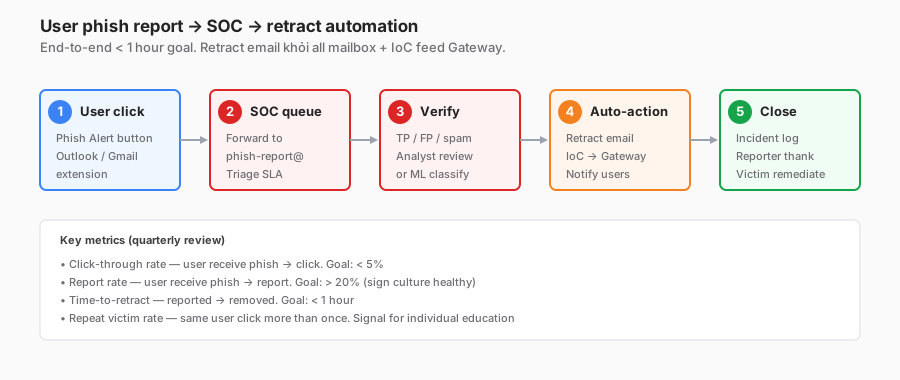
The metrics I actually watch
Click-through rate (user receives phish → clicks): target under 3%. Industry baseline 5-10%. Good user training drops it to 2%.
Report rate (user receives phish → reports via the button): target over 25%. A sign of a healthy culture. Low report rate (under 10%) → user apathy, retrain.
Time-to-retract: detect → removed. Target under 1 hour for any campaign affecting more than 10 users.
Repeat-click victim: same user clicked phish more than once in 12 months. Target them for individual training, do not punish.
SOC automation — 3 tiers
Tier 0 — Fully automated (high-confidence IoC):
- User report matches a known campaign signature.
- Auto-retract from all mailboxes.
- Auto-block the URL at Gateway DNS + Network (Parts 11-13).
- Auto-notify victim users.
- Duration: under 5 minutes end-to-end.
Tier 1 — SOAR playbook (medium confidence):
- Novel report, signature not matched.
- SOAR (Palo Alto XSOAR, Splunk Phantom) runs an enrichment playbook: URL reputation check, WHOIS, sample detonation.
- If the verdict is malicious → auto-execute Tier 0 actions.
- Otherwise escalate to Tier 2.
Tier 2 — Human analyst (low confidence / sophisticated):
- Spear-phish, targeted executive.
- A human reviews headers, content, and context.
- Decision + manual actions.
- Duration: 15 minutes - 4 hours.
A mature org: 80% of reports resolved in Tier 0-1, 20% escalated to Tier 2.
Reward culture
A “thank the reporter” email with recognition counts more than punishing clickers. Leaderboard: top 10 reporters per quarter named, small prize. Cost $50/quarter, behaviour change is significant.
Anti-pattern: “you clicked a phish, attend mandatory training” — reinforces fear, users hide mistakes → more damage.
Incident response — the post-phish hunt
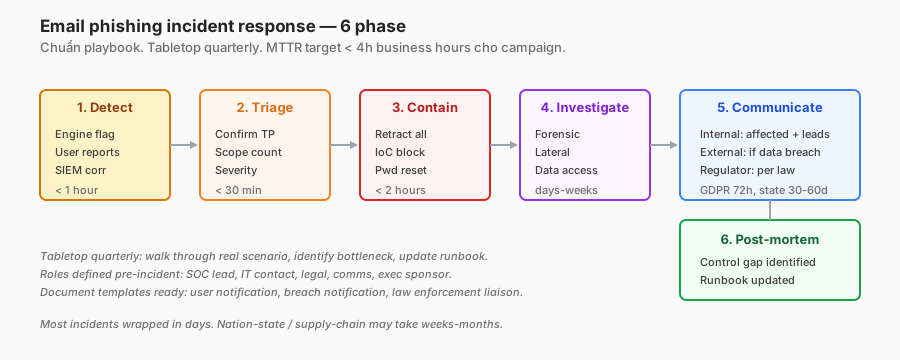
The standard six-phase playbook is covered in many places. I want to highlight the investigate phase — where most playbooks stay shallow.
Credential theft scenario
Alice clicks a phish and enters credentials. The attacker now has alice@company.com’s password plus potentially a session token.
Hunt steps (SOC playbook, grounded):
1. Access logs — unusual login from an unknown IP
// Sentinel/KQL (correlation from Part 14)
Cloudflare_Access_CL
| where UserEmail == "alice@company.com"
| where TimeGenerated between (phish_click_time .. phish_click_time + 24h)
| where Action == "allowed"
| project IP, GeoCountry, DeviceID, TimeGenerated
| distinct IP, GeoCountry
Baseline Alice’s IPs historically. A new IP + new country + within 1h of the phish click = confirmed lateral.
2. MFA bypass check
The attacker may have captured the MFA code via the phish. Check whether the MFA step completed from the new IP.
Cloudflare_Access_CL
| where UserEmail == "alice@company.com" and Authenticator != ""
| where TimeGenerated between (phish_click_time .. +2h)
| project TimeGenerated, IP, Authenticator, Result
Login success with MFA from a new IP = credentials and MFA both compromised. Contain urgently.
3. Mailbox rule check
The attacker often sets an inbox rule to auto-forward alice@company.com → hacker@hotmail.com to maintain persistence.
# M365 admin
Get-InboxRule -Mailbox alice@company.com | Where {$_.ForwardTo -or $_.RedirectTo}
Delete the rule. Revoke the session.
4. Data access audit
Alice’s access over the last 24h:
Cloudflare_Gateway_HTTP_CL
| where UserEmail == "alice@company.com"
| where TimeGenerated > phish_click_time
| summarize by Host
| where Host contains "salesforce" or "sharepoint" or "drive.google" or "github"
Any sensitive systems accessed? Determine the data exposure scope.
5. Credential rotation
- Reset password (invalidates the old session).
- Rotate MFA device (re-enroll).
- Revoke refresh tokens across all apps.
- Rotate any shared secrets Alice had access to (API keys, service tokens per Part 6).
Breach notification
If data access is confirmed:
- Internal: security team, Alice’s manager, department head, leadership.
- External: customer / partner if their data was touched. Depends on contract plus regulation.
- Regulatory: GDPR 72h, state-specific (CA 30-90 days), HIPAA 60 days, PCI varies.
Opinion: default to “notification required.” Get legal involved immediately. Worst case = over-notify. Under-notify = fines + reputational damage.
Post-mortem template
- Which control failed? Email Security miss? User training gap? MFA bypass tech?
- Which control worked? Where in the chain was the attack caught?
- Gap analysis: how close to worst case?
- Action items: tool tune, training content update, process change.
Do not skip the post-mortem. The same attack repeats if the root cause is not addressed.
Outbound DLP via email — brief
Part 19 covered DLP. Email outbound is the same engine, email-specific enforcement.
outbound_email_policy:
  name: "Block PII to external"
  action: quarantine
  condition:
    all:
      - dlp_profile: PII_strict
      - message.external_recipient: true
  quarantine:
    hold_time: 1h
    notify_sender: "Your email is held — contains customer PII. Security review."
    review_queue: dlp-review@company.com
Top use cases:
- Accidental “reply all” with a customer list attached.
- Salary info CC’d to external by mistake.
- Source code emailed to a personal address pre-resignation.
Rollout: same staged approach as Part 19 — log → warn → block.
When Email Security is overkill
-
Orgs of 10-20 people, Google Workspace / M365 native filter is enough. Built-in rules catch 85-90% of commodity. Invest in user training instead.
-
Heavily regulated industry on on-prem Exchange with an existing Proofpoint. Switching is a big migration, not a clear win. Evaluate on a feature-by-feature basis, not as a platform decision.
-
Budget-starved startup. Free-tier Google Safe Browsing + M365 ATP Plan 1 cover the baseline. Add dedicated Email Security when revenue / user count justifies it.
Lessons I will keep
- Cite numbers inline, not just in the reference list. “68% of breaches (Verizon 2024 DBIR)” reads more credible than “see ref 3.”
- The DMARC forwarder trap is the biggest operational risk — underestimated by 3× the time budget.
- ARC adoption is the path forward — push vendors to adopt; Google and Yahoo are driving.
- User report metric matters more than click-through. High report rate = healthy culture.
- The post-phish hunt is where the SOC excels. Most teams respond with “retract email, done.” The real work is the credential hunt + the 24h access audit.
- Over-notify > under-notify for breach decisions. Get legal involved early.
Closing and series wrap-up
Email is the #1 attack surface of any org. According to Verizon 2024 and FBI IC3, no other security layer has a higher ROI. Email Security tool, DMARC deployment, user training, and an incident response playbook together = 95%+ of phishing blocked.
Production recipe:
- API journaling + MX inline combined.
- DMARC staged over 4-8 months to
p=reject, with ARC. - Phish Alert button + recognition culture.
- SOC automation in 3 tiers (auto, SOAR, human).
- Post-phish hunt over a 24h window after every confirmed click.
- Outbound DLP focused on PII / secret leakage.
Series wrap-up — 20 parts, 6 blocks
I started this series to answer “what even is Cloudflare One?” after talking with three security teams evaluating it and one team rolling it out. This is the 20-post answer.
| Block | Parts | Main message |
|---|---|---|
| 1. Foundation | 1-3 | Four-layer mental model, SASE/SSE/Zero Trust stripped of the marketing |
| 2. Access | 4-7 | ZTNA replacing VPN — blast radius, identity-first, service-to-service, lifecycle |
| 3. Connectivity | 8-10 | Edge-first path — Tunnel outbound-only, WARP per-device, Magic WAN per-site |
| 4. Policy & Filtering | 11-13 | Three-tier SWG (DNS / Network / HTTP) with DoH bypass as the key gap |
| 5. Observability & Ops | 14-16 | No observability = prevention only. Logs + DEX + posture |
| 6. Advanced Security | 17-20 | The containment layer when prevention is uncertain — RBI, CASB, DLP, Email |
Three meta-lessons that apply across the series:
- Staged rollout is not optional — DLP log→warn→block, DMARC none→quarantine→reject, tiered posture. Block-first = helpdesk storm + user bypass.
- FP calibration is the most important skill. DLP, CASB, Email Security, RBI all have high FP in week one. Tuning capacity = team success.
- User experience walks alongside security. DEX, education, exception processes with expiration. No one wins if users bypass.
If I had to summarise the series in one sentence:
Zero Trust is identity + device + network + data control + visibility combined. No single product covers 100%. A good tool integrates smoothly — Cloudflare One is a strong candidate, not the only one.
Thanks for reading this far. Feedback, corrections, and other real-world stories are welcome via contact.
References
- Cloudflare Email Security
- DMARC deployment guide
- ARC RFC 8617
- Google Workspace DMARC 2024 mandate
- Microsoft Exchange journaling
- FBI IC3 2023 Annual Report
- Verizon 2024 DBIR
- Microsoft Digital Defense Report 2024
- Proofpoint State of the Phish 2024
In this series:
- ← Part 19: DLP deep dive
- See the full series: Cloudflare One Handbook
