
TL;DR
Magic WAN is a network-layer tunnel: site-to-site connectivity over the Cloudflare backbone, in place of MPLS and traditional SD-WAN for multi-branch and multi-cloud enterprises.
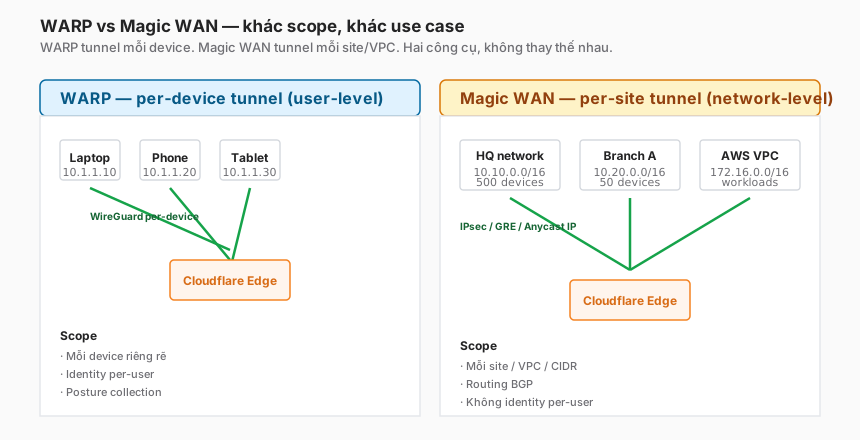
The difference from WARP (Part 9) is scope:
- WARP — per-device tunnel, user identity, posture — a user-level ZTNA.
- Magic WAN — per-site tunnel, CIDR routing, no identity — a network-level backbone.
This post covers:
- WARP vs Magic WAN — both are tunnels, different scope.
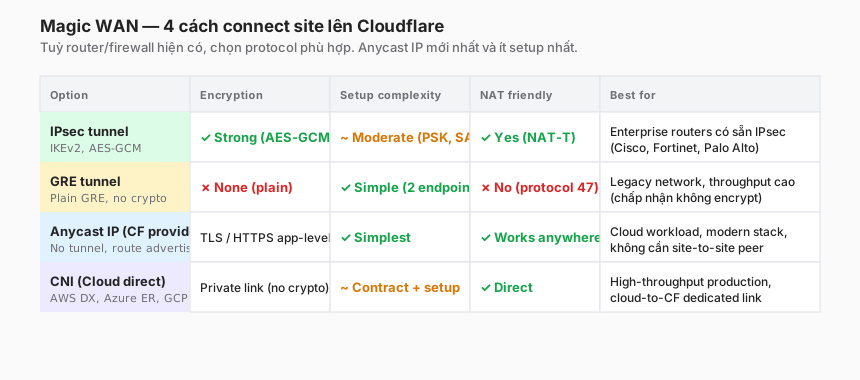
- Four tunnel options: IPsec, GRE, Anycast IP, CNI (Cloud Network Interconnect).
- BGP peering — when to use it, the basic setup.
- Magic Transit vs Magic WAN — two distinct products that are frequently confused.
- Multi-cloud topologies — hub-and-spoke with Cloudflare as the backbone.
- Magic Firewall — L3/L4 policy applied along the backbone.
- Migration from MPLS/SD-WAN — a realistic playbook.
The thesis:
Magic WAN doesn’t replace Cloudflare Access or WARP. It complements them one layer down — network-level connectivity for branch sites and cloud VPCs. The right split: ZTNA via WARP + Access, site-to-site via Magic WAN. Blurring the scope leads to a bowl-of-spaghetti design.
This is Part 10 of the Cloudflare One Handbook and closes the Connectivity block (Parts 8–10).
Who this is for
- Network engineers operating MPLS, SD-WAN, or site-to-site VPN today.
- Platform engineers building multi-cloud architectures (AWS + Azure + GCP + on-prem).
- IT directors evaluating a SASE platform as a replacement for a traditional SD-WAN vendor.
Recommended prior reading:
- Part 8 — Cloudflare Tunnel (exposing internal apps without inbound ports).
- Part 9 — WARP (per-device, user-level tunnel).
After this post you will:
- Distinguish WARP, Magic WAN, and Magic Transit.
- Know which tunnel protocol (IPsec / GRE / Anycast / CNI) fits which site.
- Understand BGP peering with Cloudflare (AS 13335).
- Be able to design a multi-cloud topology using the Cloudflare backbone.
- Have a migration playbook from MPLS.
What this post does not cover
- WARP Connector (subnet-level tunnel via the WARP daemon) — a middle-ground between WARP and Magic WAN, niche.
- Cloudflare Network Interconnect (CNI) deep-dive — mentioned at overview level only.
- Vendor-specific SD-WAN comparisons (Cisco Viptela, VMware VeloCloud, Fortinet) — only contrasted with Magic WAN as a concept.
- Advanced traffic engineering / QoS — Cloudflare does not expose the full BGP community set; only basic traffic steering.
Concepts
- Magic WAN — Cloudflare’s SD-WAN-like product. Sites and cloud VPCs tunnel up to the Cloudflare backbone.
- Magic Transit — a different product: ingress DDoS scrubbing for customer public IP ranges (BGP-advertised customer prefixes).
- Magic Firewall — L3/L4 firewall rules applied on Magic WAN/Transit traffic.
- IPsec — the standard encrypted tunnel (IKEv2, AES-GCM). Widely supported.
- GRE — Generic Routing Encapsulation. A plain tunnel with no native encryption.
- Anycast IP — Cloudflare provides a public IP; customers route traffic directly (no tunnel).
- CNI (Cloud Network Interconnect) — a dedicated private link (AWS Direct Connect, Azure ExpressRoute) into Cloudflare, bypassing the Internet.
- BGP peering — a dynamic routing protocol that advertises prefixes between the customer and Cloudflare AS 13335.
- ASN — Autonomous System Number, the BGP identifier for a network.
WARP vs Magic WAN — different scope
Core differences
| Dimension | WARP | Magic WAN |
|---|---|---|
| Scope | Per-device | Per-site / per-VPC |
| Tunnel count | One per device | One per site |
| Identity | User (via IdP) | None (network-level) |
| Posture | Yes (device posture) | No |
| Policy layer | Access, Gateway, DLP | Magic Firewall (L3/L4) |
| Typical use | User laptops, phones | Branch offices, cloud VPCs, DCs |
| Deploy target | OS-level client | Router, firewall, cloud VPN GW |
| Ideal scale | 10–100,000 devices | 1–1,000 sites |
When to pick which
WARP when:
- Users travel, work from home, or use mobile devices.
- Identity-bound policy matters (engineers vs contractors).
- Posture checks (disk encryption, MDM compliance) matter.
Magic WAN when:
- An entire site (50–500 devices behind a router) needs connectivity.
- Cloud VPCs need to reach each other or the datacentre.
- You can’t install WARP on every endpoint (IoT, OT, legacy devices).
- You’re replacing MPLS or a traditional SD-WAN.
Using both at once:
- Real enterprises use WARP for user devices and Magic WAN for branches and cloud. The two layers don’t conflict.
Magic WAN topology
Hub-and-spoke with Cloudflare as the hub
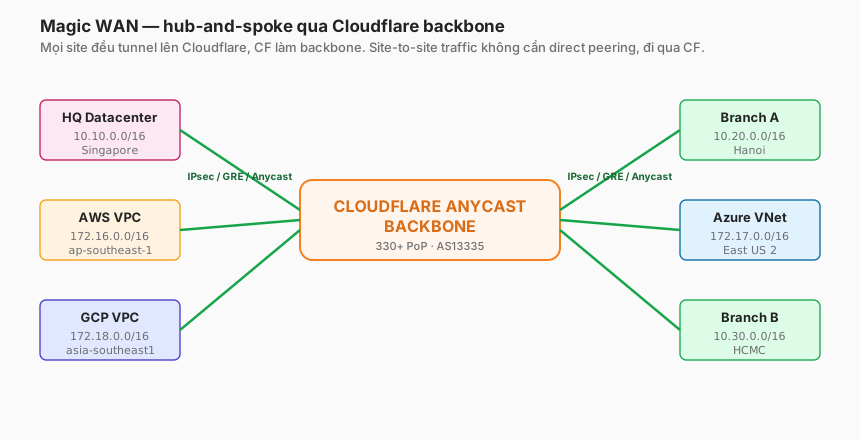
- Each site establishes a tunnel (IPsec/GRE/Anycast/CNI) to the Cloudflare edge.
- Site-to-site traffic does not need a direct peer — it rides the Cloudflare backbone.
- Adding a new site means one new tunnel to Cloudflare; no change required at existing sites.
Contrast with traditional full-mesh
Traditional full-mesh needs N(N-1)/2 tunnels for N sites. Ten sites = 45 tunnels. Multiply across branch-of-branch topologies and the operational burden compounds.
Magic WAN needs N tunnels for N sites. Operational complexity scales linearly.
The anycast advantage
The Cloudflare backbone uses anycast — every site connects to the nearest PoP. A site in Vietnam lands on Singapore; Frankfurt lands on Frankfurt. Latency optimisation is automatic.
Throughput
A single tunnel has a cap (roughly 1–2 Gbps for a single IPsec, higher for CNI). At larger scale, run multiple tunnels plus ECMP (equal-cost multi-path routing) — Cloudflare supports it, configuration required.
Four tunnel options
1. IPsec
Pros:
- Strong encryption (AES-GCM, IKEv2).
- Supported on most enterprise routers and firewalls (Cisco, Fortinet, Palo Alto, Juniper).
- NAT-friendly (NAT-Traversal).
Cons:
- More complex setup (PSK/cert, SA, tunnel config).
- Throughput is lower than GRE (crypto overhead).
- The IKE stack is harder to debug.
When to use: existing sites with enterprise firewalls, or compliance mandates requiring encrypted tunnels.
Sample config (Cloudflare side):
Anchor IP: <provided by CF>
Remote IP: <your public IP>
IKE version: IKEv2
Pre-shared key: <generate>
Proposals: AES-GCM-256, SHA-256, DH group 14
Lifetime: 28800s (8h)
Sample config (customer side, example Cisco ASA):
crypto ikev2 policy 1
  encryption aes-gcm-256
  integrity sha256
  group 14
  prf sha256
  lifetime seconds 28800

crypto map CFMAP 10 set peer <CF-anchor-IP>
crypto map CFMAP 10 set ikev2 ipsec-proposal AES-GCM
crypto map CFMAP 10 set pfs group14
2. GRE
Pros:
- Simple: two endpoints, no encryption negotiation.
- High throughput (no crypto overhead).
- Well-documented on Cisco and Juniper.
Cons:
- No encryption — traffic traverses the Internet in clear. A compliance non-starter for many organisations.
- Protocol 47 (not TCP/UDP) gets blocked by many NATs, hotel Wi-Fi, etc.
- Requires public IPs on both ends.
When to use: legacy internal segments, scenarios where throughput outranks encryption (e.g. existing MPLS-class trusted paths).
Sample config (Cloudflare side):
Anchor: 162.159.x.x
Customer: 203.0.113.1
MSS: 1476 (GRE + IP header = 24 bytes)
Customer side (Linux example):
ip tunnel add cfgre mode gre remote 162.159.x.x local 203.0.113.1 ttl 255
ip link set cfgre up
ip addr add 10.255.0.1/30 dev cfgre
ip route add 172.16.0.0/12 via 10.255.0.2
3. Anycast IP
Pros:
- Simplest setup — no tunnel configuration.
- Cloudflare provides a public anycast IP; the customer routes traffic there.
- Works wherever the Internet reaches.
Cons:
- Application-layer (TLS/HTTPS).
- No native network-layer encryption (encryption is an app-level concern).
When to use: cloud workloads talking to Cloudflare, modern stacks, no need for site-to-site IP peering.
Not suitable for legacy protocols (SMB, NFS, direct DB) that need network-level routing.
4. CNI — Cloud Network Interconnect
Pros:
- Private connection — not over the public Internet.
- Predictable bandwidth (dedicated link).
- Guaranteed SLA.
Cons:
- Contract + setup time (weeks).
- Ongoing cost (dedicated port fee).
- Only available at colocations with a Cloudflare presence.
When to use:
- High-throughput production (multi-Gbps).
- Cloud-direct: AWS Direct Connect, Azure ExpressRoute, GCP Partner Interconnect.
- Compliance that forbids Internet paths.
When not: startups, testing, or lower-throughput scenarios — IPsec is enough.
BGP peering
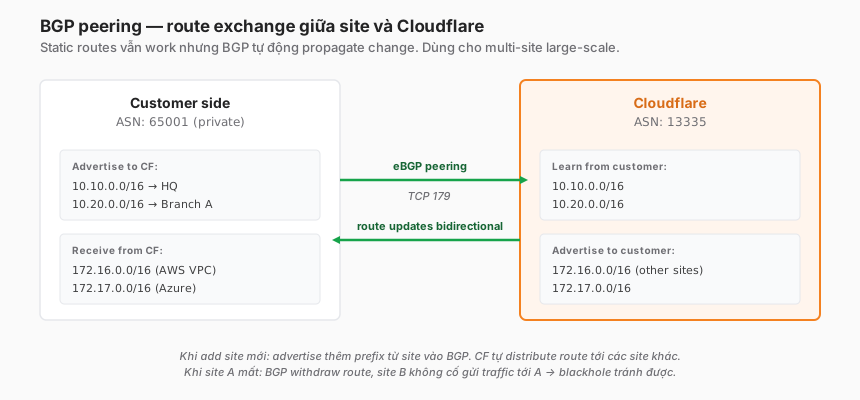
At more than a handful of sites, static routing stops scaling. BGP handles dynamic route exchange.
When to use BGP
- ≥ 3 sites.
- Routes change often (adding/removing VPCs, subnets).
- Automatic failover is required (a site goes down → BGP withdraws → traffic reroutes).
Setup
- Customer ASN: use a private ASN (65xxx–65534) or an owned public ASN.
- Cloudflare ASN: 13335 (Cloudflare’s public ASN).
- eBGP peering: TCP 179 over the tunnel (IPsec or GRE).
- Advertise: the site’s prefix (e.g. 10.10.0.0/16) to Cloudflare.
- Receive: prefixes from the other sites (Cloudflare propagates).
Sample config (Cisco, BGP over an IPsec tunnel)
router bgp 65001
  neighbor 10.255.0.2 remote-as 13335
  address-family ipv4 unicast
    neighbor 10.255.0.2 activate
    network 10.10.0.0 mask 255.255.0.0
    network 10.20.0.0 mask 255.255.0.0
Route-advertisement best practices
- Aggregate prefixes — advertise /16 instead of many /24s → smaller route tables.
- Community tags — Cloudflare supports BGP communities for traffic steering (a specific community for a backup path).
- AS-path filter — only accept routes from Cloudflare (AS 13335); reject rogue advertisements.
Common BGP issues
- No route exchange → check TCP 179 reachability. Telnet 179 from the customer side to the tunnel IP; if it fails, firewall is blocking.
- Route flap → unstable BGP session. Check tunnel MTU (recommend 1400 with IPsec overhead).
- Prefix limit → Cloudflare caps at 1000 prefixes per peering. Aggregate heavily.
Magic Transit vs Magic WAN
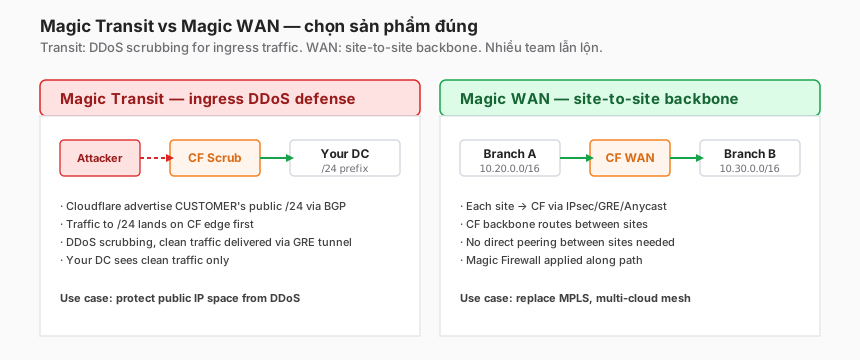
The two products have similar names and get confused constantly.
Magic Transit
Use case: DDoS protection for a customer’s public IP range.
Mechanism:
- The customer owns a public /24 or /23.
- Cloudflare advertises that prefix over BGP (Cloudflare becomes the upstream).
- Global traffic targeting that prefix lands on the Cloudflare edge first.
- DDoS scrubbing happens at the edge → clean traffic → GRE tunnel back to the customer DC.
Example: a bank with a public API endpoint at 203.0.113.0/24 that takes DDoS hits daily. Magic Transit scrubs at the edge; the datacentre only ever sees clean traffic.
Magic WAN
Use case: site-to-site connectivity across the customer’s own sites and VPCs.
Mechanism:
- The customer has many sites.
- Each site tunnels to Cloudflare.
- Cloudflare routes between them — no direct peering needed.
Example: an enterprise with 10 branches and 3 cloud VPCs, tired of paying for MPLS and wrangling SD-WAN complexity. Magic WAN replaces it with 13 tunnels to Cloudflare.
Using both
Magic Transit and Magic WAN can run side by side: the public prefix protected by Transit, internal sites connected via WAN. The two products are not mutually exclusive.
Magic Firewall
L3/L4 firewall rules applied to Magic WAN + Magic Transit traffic.
Rule examples
# Block all inbound except specific allowed
- action: block
  expression: "ip.proto == tcp and tcp.dstport in {23 3389}"
  # block Telnet, RDP default ports

- action: allow
  expression: "ip.src in 10.0.0.0/8 and ip.dst in 172.16.0.0/12"
  # allow HQ to AWS VPC

- action: log
  expression: "ip.proto == udp and udp.dstport == 53"
  # log all DNS for investigation
Fields: ip.src, ip.dst, ip.proto, tcp.srcport, tcp.dstport, udp.srcport, udp.dstport, icmp.type, ip.geoip.country.
Magic Firewall vs a traditional firewall
| Dimension | Traditional NGFW | Magic Firewall |
|---|---|---|
| Location | Per-site appliance | Cloudflare edge |
| Scale | Per-box limit | Unlimited |
| Management | Per-device config sync | Single dashboard across sites |
| L7 inspection | Yes (DPI) | Basic — use Gateway for L7 |
| Cost | Box + per-site license | Per-throughput |
Magic Firewall doesn’t fully replace an NGFW — it is the L3/L4 layer at the edge. L7 inspection lives in Gateway (Parts 11–12).
Multi-cloud scenario
The challenge
- An AWS VPC
172.16.0.0/16needs to talk to an Azure VNet172.17.0.0/16. - Traditional: VPC peering (AWS only) or VPN gateway-to-gateway (complex, expensive).
- At multi-cloud scale: 3 clouds × 3 peers = 9 links, each with its own config.
Magic WAN solution
AWS VPC      → IPsec/CNI → Cloudflare Edge
Azure VNet   → IPsec/CNI → Cloudflare Edge
GCP VPC      → IPsec/CNI → Cloudflare Edge
Oracle Cloud → IPsec/CNI → Cloudflare Edge
Cloudflare routes between all four. Adding a fifth cloud means one new tunnel, not four.
BGP advertisement per cloud
Each cloud’s tunnel advertises its VPC CIDR. Cloudflare propagates to all others. Route tables stay in sync automatically.
Latency considerations
Site-to-site over the Cloudflare backbone is usually faster than the cloud provider’s own inter-region VPN, because the anycast mesh optimises the path. Direct peering within the same cloud (e.g. AWS VPC peering) is still fastest.
Rule of thumb: intra-cloud uses native peering; cross-cloud uses Magic WAN.
SD-WAN vs Magic WAN
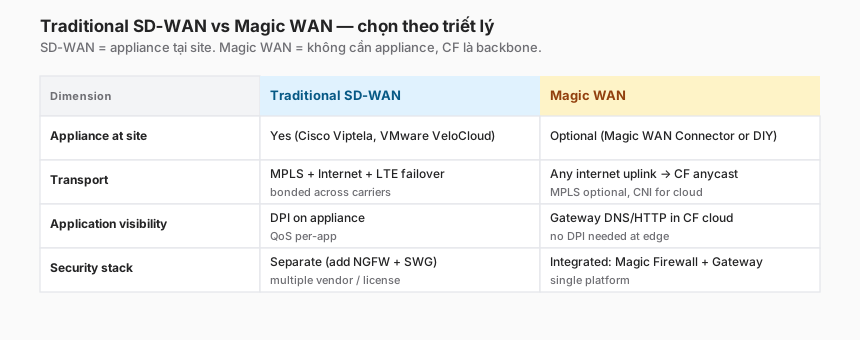
Philosophical difference
Traditional SD-WAN (Cisco Viptela, VMware VeloCloud):
- An appliance at every site.
- Appliances sync config from a central controller.
- Traffic engineering at the box.
- QoS and DPI on the device.
Magic WAN:
- A tunnel up to Cloudflare (minimal local box).
- Configuration centralised in the Cloudflare dashboard.
- Traffic engineering at the Cloudflare edge.
- L3/L4 firewall + L7 through Gateway/CASB.
When SD-WAN still wins
- Extreme latency-sensitive cross-site paths (Cloudflare adds 10–50 ms; a direct SD-WAN peer can be lower).
- Advanced WAN optimisation (dedup, compression) that Cloudflare doesn’t offer.
- Sunk cost in an existing SD-WAN investment.
When Magic WAN wins
- Multi-cloud (SD-WAN has weak cloud integration; Magic WAN is native).
- Small-to-mid enterprises unwilling to carry appliance overhead.
- Security-first organisations — Magic Firewall + Gateway integrated.
Migration playbook
Phase 1 — Assessment (4 weeks)
- Inventory sites and CIDRs.
- Map current MPLS circuits and costs.
- Identify cloud assets that need to connect.
- Measure baseline throughput and latency.
Phase 2 — Pilot (8 weeks)
- Pick 2–3 low-risk sites (a small branch, a dev environment).
- Set up an IPsec Magic WAN tunnel in parallel with the existing MPLS.
- Test: HTTP, database connections, SMB, SIP (if VoIP is in scope).
- Measure: latency, throughput, stability.
Phase 3 — Cutover site-by-site (3–6 months)
- For each site, cut MPLS and route via Magic WAN.
- Monitor closely — one week per site.
- Rollback plan: re-enable the MPLS circuit if a critical issue surfaces.
- End state: cancel MPLS contracts; save real money.
Phase 4 — Add cloud + optimise (ongoing)
- Connect AWS/Azure/GCP VPCs via CNI or IPsec.
- Tune: BGP communities, Magic Firewall rules, throughput.
Realistic timeline
A full migration runs 12–18 months for a 50+ site enterprise. Don’t rush — MPLS contracts are typically 1–3 years; align the rollout with renewal windows.
Troubleshooting
”IPsec tunnel is up but no traffic”
Check BGP/static routing. The tunnel layer is healthy, but routing isn’t announcing the prefix to Cloudflare.
# Customer side
show ip bgp summary
# The CF peer should be "Established"

# CF side (dashboard)
Magic WAN → Sites → [site] → BGP sessions
# Status: Active
”Throughput lower than expected”
- MTU issue. IPsec adds ~40–60 bytes of overhead. Set the customer-side MTU to 1400 (not the default 1500).
- Single-tunnel bandwidth ceiling. Use ECMP across multiple tunnels.
”Route flap every few minutes”
- Unstable BGP session.
- Check tunnel keepalive (DPD Dead Peer Detection) configuration.
- Sometimes a NAT-T timer issue — extend to 20s.
”Can’t reach the AWS VPC from HQ”
- Is BGP advertising the AWS VPC prefix toward Cloudflare?
- Is Cloudflare propagating it to the HQ peer?
- Debug:
show ip bgp 172.16.0.0/16on the HQ side.
”Magic Firewall rule not enforcing”
- Rule order matters — check precedence.
- Verify rule action (block vs log).
- Cloudflare analytics → firewall events.
Trade-offs
| Decision | Option A | Option B | Recommendation |
|---|---|---|---|
| Tunnel protocol | IPsec | GRE | IPsec for compliance. GRE when plain traffic is acceptable and throughput matters. |
| Routing | Static | BGP | BGP at 3+ sites. Static is fine for 2. |
| Connect cloud | IPsec over Internet | CNI | CNI for prod / high-throughput. IPsec for dev / low-volume. |
| Replace SD-WAN | Full migration | Parallel run | Run in parallel 3–6 months, validate, then cut. |
| Magic WAN + WARP | Either/or | Combine | Combine — WARP for users, Magic WAN for sites. Complementary. |
| MTU | Default 1500 | Tuned 1400 | Tuned — avoid IPsec fragmentation. |
Checklist — before Magic WAN in production
Planning:
- Site inventory + CIDR map.
- Cloudflare zone has a Magic WAN license.
- Public IP or CNI available for each site.
- BGP ASN assigned (private 65xxx or public).
Tunnel config:
- Anchor IP + customer IP verified.
- PSK stored in a secret manager.
- MTU = 1400 (IPsec) or 1476 (GRE).
- DPD / keepalive enabled.
Routing:
- BGP session established (Active in the Cloudflare dashboard).
- Prefixes advertised/received correctly.
- Route aggregation (larger blocks).
Security:
- Magic Firewall rules tested in log mode before enforcement.
- Rule order reviewed.
- Anti-spoofing: refuse prefixes from unexpected peers.
Operations:
- Monitoring: tunnel state, throughput, BGP session health.
- Alert on tunnel down > 1 minute.
- Alert on BGP session flap > 3×/hour.
- Runbook for tunnel recovery.
Lessons from practice
- BGP is the silent killer of a Magic WAN pilot. Teams underestimate BGP complexity. Invest in BGP knowledge (or bring in a contractor) before the pilot.
- MTU fragmentation bites. Default 1500 with IPsec overhead = fragmented packets = slow. Tune MTU to 1400 explicitly.
- Magic Transit ≠ Magic WAN. Product managers named both “Magic”, which causes ongoing confusion. Internalise the split: Transit = DDoS scrubbing, WAN = site-to-site.
- Don’t rip and replace MPLS in one go. A parallel run is not optional. Plan for 3–6 months.
- Each new cloud adds 1–2 months. Networking teams are new to Cloudflare, cloud teams are new to Magic WAN. Budget the time.
- ECMP for throughput. A single tunnel has a cap. Multiple tunnels with ECMP deliver N× throughput.
Summary
Magic WAN completes Cloudflare One’s connectivity story. Part 8 (Tunnel) brings internal apps to the edge. Part 9 (WARP) brings user devices to the edge. Part 10 (Magic WAN) brings entire site networks to the edge.
These three layers cover 100% of modern enterprise connectivity patterns:
- Users via WARP.
- Individual apps via Tunnel.
- Sites / cloud VPCs via Magic WAN.
When the three work together, traffic flows through Cloudflare with consistent security policy, observability, and predictable cost.
If one line is worth remembering:
Magic WAN doesn’t replace Access or WARP. It complements them one layer down. Use the right tool: ZTNA via WARP + Access, site-to-site via Magic WAN. Blur the scope and the design turns into a bowl of spaghetti.
Part 11 switches gears to the Policy & Filtering block. Starting with Gateway DNS filtering — the simplest layer of the Secure Web Gateway, and typically the first one a security team turns on.
References
- Cloudflare Magic WAN overview
- Magic WAN tunnel options
- BGP with Magic WAN
- Magic Firewall
- Magic Transit (distinct product)
- Cloudflare Network Interconnect
In this series:
