
TL;DR
Cloudflare Tunnel (cloudflared) brings internal applications onto the Cloudflare edge without opening any inbound port. The daemon runs inside your infrastructure, establishes outbound-only QUIC connections to Cloudflare, and forwards traffic from the edge back to the origin.
This post covers:
- Why outbound-only matters more than it looks (DDoS surface, firewall burden, NAT).
cloudflaredarchitecture internals: 4 QUIC connections, health check, connection mesh.- Ingress rules YAML — hostname + path matching, catch-all.
- HA replicas — multiple instances sharing a tunnel ID, with Cloudflare edge load-balancing.
- Non-HTTP protocols: SSH/RDP/SMB/Kafka through Tunnel.
- A three-phase VPN → Tunnel migration playbook.
- Troubleshooting the six most common failure modes.
The thesis:
Tunnel is not a reverse proxy with a token. It is the connectivity foundation of Zero Trust — removing public IPs from internal apps, offloading DDoS/WAF/cert work from the operations team, and enabling multi-region HA without a load balancer in front.
This is Part 8 of the Cloudflare One Handbook, moving to the connectivity layer after completing identity & access.
Who this is for
- Platform/SRE engineers running internal apps behind a firewall or NAT.
- Security engineers looking to reduce attack surface — eliminating public IPs for internal services.
- Network engineers evaluating replacements for SSH bastions, reverse proxies, or VPNs for “expose the app externally” use cases.
Recommended prior reading:
- Part 4 — Access (Tunnel usually pairs with Access for ZTNA).
- Part 3 — The four-layer mental model (Tunnel sits at Layer 4).
After this post you will:
- Understand how the
cloudflareddaemon works and when to use it. - Be able to write ingress rules for HTTP and non-HTTP apps.
- Set up HA with ≥ 2 replicas correctly.
- Have a VPN-migration playbook.
- Debug the six most common failure cases.
What this post does not cover
- Magic WAN / Magic Transit — network-layer tunnels for branch connectivity; different scope (covered in Part 10).
- WARP Connector (tunnel on the client side of the network) — Part 9 goes into WARP.
- Cloudflare Tunnel for RDP gateway (unified RDP) — mentioned but not deep-dived.
- WARP-to-WARP private routing — advanced topic requiring Cloudflare One Enterprise.
Concepts
- Tunnel — an abstract object in a Cloudflare account, with an ID + credentials. One tunnel can have multiple connectors (replicas).
- Connector — a running
cloudflareddaemon inside infrastructure. A connector picks up a tunnel credential and establishes outbound connections to Cloudflare. - Ingress rule — configuration that routes a request coming from Cloudflare to a specific internal service.
- QUIC — the UDP-based transport
cloudflaredprefers (less head-of-line blocking, faster reconnect). Falls back to HTTP/2 over TCP when QUIC is blocked. - Public hostname — a DNS record proxied through Cloudflare, pointing to the tunnel (CNAME
app.example.com → <tunnel>.cfargotunnel.com). - Private network — route CIDR through a tunnel for WARP-client access. Different from public hostnames — clients must use WARP, not a browser.
Outbound-only — the central point
Why this matters
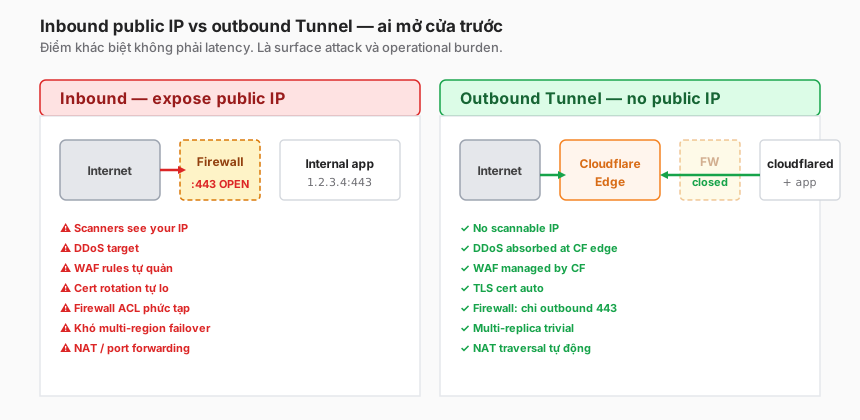
When an organisation has 50 internal apps, each with a public IP + firewall rule + WAF + cert + DDoS considerations, the operational burden is substantial:
- Attack surface — every public IP is a scanning target.
nmapcan sweep the range in a night. One app with an unpatched CVE, and an attacker finds it within hours. - DDoS — either self-handled or outsourced to a CDN (in which case traffic has to flow through the CDN and back to the origin, and the configuration gets complicated).
- WAF — maintained in-house: rules, false positives, OWASP rule updates.
- Certificates — rotation annually, automation fragile.
- Firewall ACLs — rule explosion: whitelist office IPs, VPN range, partner IPs, monitoring IPs, etc.
- NAT / port forwarding — router or cloud-SG configuration for each new app.
- Multi-region failover — needs a global load balancer (Route 53 / Cloudflare LB / AWS ALB cross-region).
Outbound-only Tunnel solves all of these by reversing direction: no ports are opened, the Cloudflare edge is where traffic arrives, and only the daemon makes outbound connections.
Trade-off
Not a free lunch:
- Dependence on the Cloudflare edge — if the CF edge is down (rare, but has happened), the tunnel is down. A traditional public IP still works (if the wider Internet still works).
- Daemon operational overhead — running
cloudflared, monitoring it, updating versions. One more dependency. - Harder to debug — “the app is unreachable” could be the app, the network, or the CF edge. Logs live in three places.
In practice, the trade-off is a net positive for most enterprises.
cloudflared daemon — internals
On the edge side
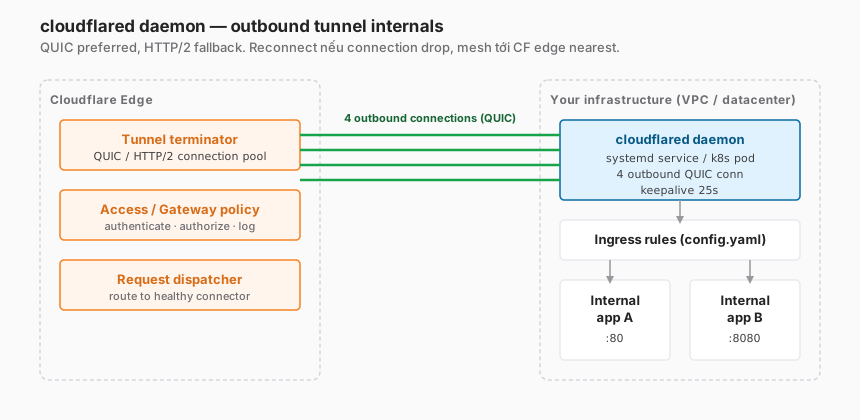
When a tunnel is created, Cloudflare assigns a tunnel ID (UUID) and generates credentials. The edge has three logical components:
- Tunnel terminator — accepts outbound connections from the daemon, maintains a QUIC/HTTP2 pool.
- Policy layer — Access + Gateway checks, where applicable.
- Request dispatcher — routes requests to a healthy connector (in the HA case).
On your infrastructure side
cloudflared daemon:
- Reads credentials (JSON file or token string).
- Opens four outbound connections to four distinct edge PoPs (built-in redundancy).
- Preferred: QUIC (UDP 7844). Fallback: HTTP/2 (TCP 443).
- Keepalive 25s — keeps connections warm.
- Auto-reconnects on connection drop (a no-op for the operator).
- Reads ingress rules from configuration to route inbound requests.
Outbound port requirements
Firewall outbound rules need to allow:
443/TCPto Cloudflare IP ranges (HTTP/2 fallback)7844/UDPto Cloudflare IP ranges (QUIC preferred)
If the organisation firewall only allows 443/TCP, the daemon auto-falls back — slower than QUIC, but still works.
Connection count
Default is 4 connections per connector. Rationale:
- 4 geographically diverse PoPs → if one has a problem, the other three still serve.
- Parallelism for concurrent requests.
Can be raised with the --ha-connections flag, but rarely needed.
Running modes
# Mode 1: systemd service (production)
sudo cloudflared service install <tunnel-token>
sudo systemctl status cloudflared

# Mode 2: foreground (dev/debug)
cloudflared tunnel run <tunnel-name>

# Mode 3: Kubernetes deployment
# Cloudflare maintains an official Helm chart, use multiple replicas

# Mode 4: Docker
docker run -d cloudflare/cloudflared:latest tunnel --no-autoupdate run --token <token>
Production → systemd or Kubernetes. Test/dev → foreground.
Ingress rules — routing inside the tunnel
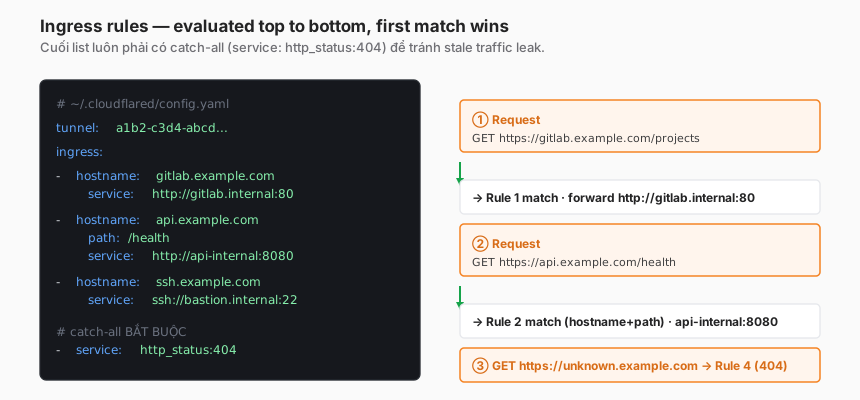
A single tunnel can serve multiple hostnames to multiple internal services. Ingress rules map path → service.
Basic config
# ~/.cloudflared/config.yaml
tunnel: a1b2-c3d4-abcd-1234
credentials-file: /etc/cloudflared/cred.json

ingress:
  - hostname: gitlab.example.com
    service: http://gitlab.internal:80

  - hostname: api.example.com
    path: /health
    service: http://api-internal:8080

  - hostname: ssh.example.com
    service: ssh://bastion.internal:22

  # catch-all MANDATORY — always last
  - service: http_status:404
Rule evaluation
- Top-to-bottom, first match wins.
- Matches on hostname + path combined.
- Catch-all is mandatory — without it, the tunnel fails to start. Typically
http_status:404to return 404 for unmatched requests.
Match modifiers
ingress:
  # Regex hostname
  - hostname: "*.example.com"
    service: http://multi-tenant:80

  # Path + method match (method not supported, path only)
  - hostname: api.example.com
    path: "^/admin/.*"
    service: http://admin-api:8080

  # Different protocol
  - hostname: db-admin.example.com
    service: tcp://mysql.internal:3306
Per-rule options
Each rule can customise origin-connection behaviour:
  - hostname: slow-app.example.com
    service: http://slow:80
    originRequest:
      connectTimeout: 30s
      tcpKeepAlive: 30s
      noHappyEyeballs: true
      keepAliveConnections: 100
      keepAliveTimeout: 90s
      httpHostHeader: app.internal
      originServerName: app.internal
      tlsTimeout: 10s
      noTLSVerify: false
Common options:
httpHostHeader— override theHostheader sent to the origin (when the app expects a different hostname).noTLSVerify: true— anti-pattern, but sometimes needed for self-signed internal certs. Prefer fixing the cert.originServerName— SNI name for the TLS connection.
DNS setup
Once the tunnel is up and the ingress has hostname: gitlab.example.com, a DNS record is required:
CNAME gitlab.example.com → <tunnel-id>.cfargotunnel.com (proxied)Via dashboard or CLI:
cloudflared tunnel route dns <tunnel-name> gitlab.example.comThe command auto-creates the proxied DNS record.
HA replicas
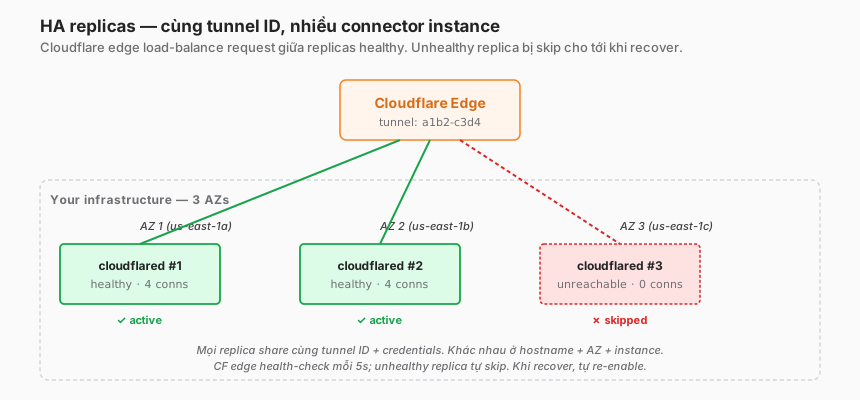
A tunnel with only one connector is a single point of failure. Best practice: ≥ 2 replicas across ≥ 2 AZs.
How it works
- Same tunnel ID — all replicas share the tunnel credentials (the same JSON file or token).
- Independent processes — each replica is a separate
cloudflaredinstance on its own host/AZ. - CF edge auto-load-balances — requests reach any healthy replica.
- Health check: the CF edge probes replicas every few seconds. A non-responsive replica is marked unhealthy and traffic skips it.
- Auto-recovery: when the replica comes back online, CF re-adds it to the pool.
Two-replica setup
On host 1:
sudo cloudflared service install eyJhIjoi...<TOKEN>On host 2 (different AZ):
sudo cloudflared service install eyJhIjoi...<TOKEN> # same tokenSame token = same tunnel = replica. The CF dashboard shows two “connector” entries under the tunnel, both active.
Verify HA is working
# On the tunnel:
cloudflared tunnel info <tunnel-name>
# Output: list of CONNECTORS with ID, created_at, client IP
# More than one connector with "Healthy" status → HA active
Or via the dashboard: Networks → Tunnels → [tunnel] → Connectors tab.
Kubernetes replicas
# Helm values
replicaCount: 3
affinity:
  podAntiAffinity:
    requiredDuringSchedulingIgnoredDuringExecution:
      - topologyKey: topology.kubernetes.io/zone
        labelSelector:
          matchLabels:
            app: cloudflared
Anti-affinity spreads replicas across AZs. Critical for real HA — not “three pods on the same node”.
Failover behaviour
- Graceful restart (daemon version update) — replica A restarts, traffic shifts to B within < 10s, returns to A once healthy.
- Crash — a few seconds for the CF edge to detect unhealthy and switch traffic. An in-flight request hitting the crash fails; the retry lands on another replica.
- Network partition — replica is still “up” locally but unreachable from CF → CF edge marks unhealthy, skips it.
Trade-off vs. cost
Each replica is one host’s worth of cost. For 4–5 separate tunnels with 3 replicas each, that is 15 hosts. Not trivial.
Optimisation: share a tunnel — one tunnel serves many apps through ingress rules (see above). A single tunnel with three replicas can serve ten apps.
Non-HTTP protocols
Tunnel is not just HTTP. Several protocols are supported:
SSH
Ingress:
  - hostname: ssh.example.com
    service: ssh://bastion.internal:22
Clients connect via WARP (client mode) or through Cloudflare’s browser-based SSH rendering.
Cloudflare dashboard → Access app type → Infrastructure → SSH.
RDP
  - hostname: rdp.example.com
    service: rdp://winhost.internal:3389
Similar to SSH, Cloudflare offers browser-based RDP rendering (RDP over HTTPS through the browser).
TCP generic
  - hostname: db.example.com
    service: tcp://postgres.internal:5432
Clients connect via WARP → local port forward → origin.
SMB (Windows file share)
  - hostname: fileserver.example.com
    service: smb://fileserver.internal:445
Kafka
  - hostname: kafka.example.com
    service: tcp://kafka.internal:9092
Kafka clients connect through the WARP bridge.
Limitations
- UDP-only protocols (DNS, IoT) — limited support.
- Multiplexed protocols (gRPC bi-directional streaming) — work, but timeout behaviour needs careful testing.
- Kerberos — not fully supported.
Tunnel vs. alternatives
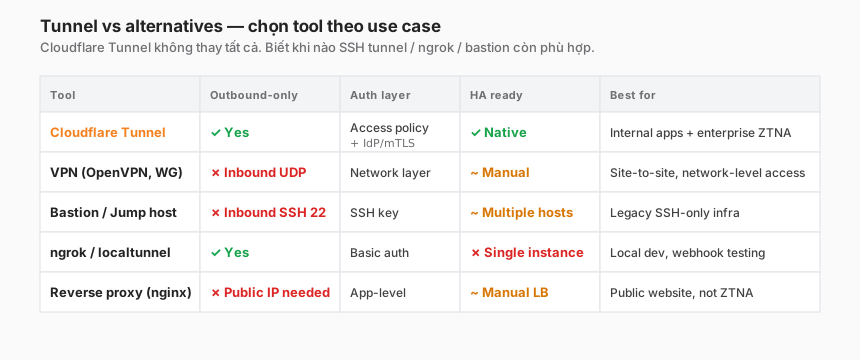
When to pick what
- Cloudflare Tunnel — internal apps, enterprise ZTNA, multi-region, no appetite for managing public IPs.
- VPN — site-to-site connectivity, network-level access, legacy integration that needs IP-based ACLs.
- Bastion / jump host — SSH-only infrastructure, tech-heavy teams that still want a shell-based workflow.
- ngrok / localtunnel — dev-laptop exposure, webhook testing, temporary sharing. Not for production.
- Reverse proxy (nginx) — public website, CDN frontend — not ZTNA.
Tunnel does not replace VPN for everything
VPN still fits when:
- Site-to-site between datacentre and cloud.
- Network-level access for legacy protocols.
- The team has invested in VPN infrastructure that is working well.
Tunnel is strongest for user-to-app (ZTNA), not for site-to-site.
VPN migration playbook
Phase 1 — Assess (1–2 weeks)
- Inventory every app users reach through the VPN.
- Classify: HTTP web app / SSH / RDP / DB / file share / legacy TCP.
- Identify owners per app.
- Priority: apps most strained by VPN (VPN latency pain) — migrate first.
Phase 2 — Pilot five apps (2–4 weeks)
- Pick five simple HTTP apps (internal wiki, Jira, dashboard).
- Set up one tunnel with two replicas.
- Configure ingress rules for the five apps.
- Access policies for each.
- Enrol WARP for the pilot team (Part 9).
- Rollback path: keep the VPN active in parallel; users fall back if there is an issue.
Phase 3 — Expand (2–6 months)
- Each sprint: migrate 5–10 apps.
- Non-HTTP protocols (SSH, RDP) need careful testing — browser-rendered UX differs from native clients.
- Legacy apps with quirky requirements (sticky sessions, specific headers) need
originRequesttuning. - VPN user counts fall each month → eventually unused.
Phase 4 — Decommission VPN (1–2 months)
- Announce EOL date to the team.
- Monitor VPN session count → near zero.
- Shut down VPN concentrators.
- Cost savings: license, hosts, maintenance.
Practical note: Phase 3 usually takes longer than planned because of legacy apps. Don’t force-migrate difficult ones — keep the VPN for 5–10% of legacy apps, focus on moving 90%.
Troubleshooting — six common cases
1. “cloudflared cannot connect”
Check:
sudo journalctl -u cloudflared -n 50Common causes:
- Wrong token: re-paste from the dashboard.
- Outbound firewall blocking 443/7844: ask the network team to allow it.
- DNS resolution failing: test
dig argotunnel.comfrom the host. - Corporate proxy: set
HTTPS_PROXYenv var.
2. “Tunnel up, but app returns 502 Bad Gateway”
Policy passes, but the origin is not responding:
# From the host running cloudflared:
curl -v http://gitlab.internal:80
# If this fails → app is down or there is a network issue
# If this works → ingress config is wrong (hostname/path/service mismatch)
3. “Replica A is active, B not visible in the dashboard”
Check:
- B is running:
sudo systemctl status cloudflaredon host B. - B has the same token/credentials: compare
/etc/cloudflared/cred.json. - B’s network:
curl https://cloudflare.comfrom B.
Frequent cause: B’s token was mistyped, or a different token was used → created a new tunnel instead of a replica.
4. “HA is active, but restarting A freezes traffic for 30s”
The CF edge health-check interval defaults to ~10s. When A restarts:
- Graceful (SIGTERM) → A drains connections before shutting down, < 2s.
- Abrupt crash → CF takes up to 10s to detect.
Mitigation: rolling restart with staggered timing. Don’t restart all replicas at once.
5. “SSH through Tunnel is slower than direct”
Tunnel adds hops (WARP → CF edge → tunnel → origin). Typical extra latency: +20–50ms.
If > 200ms → not a Tunnel fault, check:
- Origin CPU/network utilisation.
- SSH cipher negotiation (slow crypto on older CPUs).
originRequest.connectTimeouttoo short.
6. “noTLSVerify: true as a workaround for self-signed certs”
Anti-pattern. Fix:
- Replace self-signed with Let’s Encrypt or a corporate CA.
- Origin has a CA cert → mount the CA bundle into cloudflared:
  - hostname: app.example.com
    service: https://app.internal:443
    originRequest:
      caPool: /etc/ssl/corporate-ca.pem
      originServerName: app.internal
Trade-offs
| Decision | Option A | Option B | Recommendation |
|---|---|---|---|
| Tunnel per app vs shared | One tunnel per app | One tunnel, many ingress rules | Shared — managing 5 tunnels is easier than 50. Split only when compliance demands it. |
| Replica count | 1 | ≥ 2 | ≥ 2 in production always. 3+ for cross-region. |
| Deploy method | systemd on a VM | Kubernetes deployment | Kubernetes if a cluster already exists. VM is fine for legacy. |
| Protocol preference | QUIC (7844 UDP) | HTTP/2 fallback | QUIC — only fall back when the firewall blocks UDP. |
| noTLSVerify | Enable for speed | Fix the cert | Fix the cert — enabling is technical debt. |
Zero-config (cloudflared tunnel run quick) | Dev mode | Named tunnel | Named tunnel for anything persisting more than a day. |
Checklist — before running Tunnel in production
Setup:
- Named tunnel (not a quick tunnel for production).
- Credentials stored securely (k8s secret, AWS SM, Vault).
- Ingress config has a catch-all rule.
- DNS record proxied (orange cloud).
HA:
- ≥ 2 replicas across ≥ 2 hosts/AZs.
- Pod anti-affinity (for Kubernetes).
- Tested a graceful restart of one replica → traffic does not break.
- Monitoring on connector status.
Security:
- Access policy on the Application (Part 4).
- Origin app no longer exposes a public IP — verify firewall rules.
-
noTLSVerifydisabled. -
originRequest.caPoolconfigured if the origin uses a corporate CA.
Operations:
- Alert on connector unhealthy > 5 minutes.
-
cloudflaredlogs pushed to SIEM. - Helpdesk runbook for “user says the app is unreachable”.
-
cloudflaredversion update process (quarterly).
Lessons from practice
- Share tunnels more broadly than feels right. One tunnel can serve 50+ apps through ingress. Don’t create 50 tunnels — operational burden explodes, HA gets complicated.
- Pod anti-affinity is critical. Without it, 3 replicas on one node = node die = tunnel die. With it, spread across nodes/AZs, resilient.
originRequest.caPoolis the silent hero. Enterprises commonly have a corporate CA for internal services. UsecaPoolinstead ofnoTLSVerify.- VPN migration is not linear. Expect 80% smooth, 20% legacy apps painful (SAP, Citrix, Oracle). Budget extra time for that 20%.
- Replica count vs downtime tolerance. Startup/non-critical: 2 replicas. Production critical: 3+ replicas across 3 AZs. Compliance-heavy: add a separate region.
Summary
Cloudflare Tunnel is the backbone of a Zero Trust architecture. Access controls who gets in (Part 4); Tunnel controls how to reach the app without exposing a public IP.
Outbound-only is not a “nice feature” — it is an architectural shift that reduces attack surface, operational burden, and enables patterns (multi-region, HA, per-app policy) that were previously difficult.
One line to remember:
Tunnel is not a reverse proxy with a token. It is the connectivity foundation of Zero Trust — removing public IPs from internal apps, offloading operational burden from infrastructure teams, and enabling multi-region HA without a load balancer in front.
Part 9 moves to the client side: the WARP client + device enrollment flow. How a user’s device joins the Cloudflare network, device posture signals, split tunnelling, troubleshooting when connectivity fails.
References
- Cloudflare Tunnel overview
- cloudflared configuration reference
- Ingress rules
- cloudflared GitHub
- Helm chart cloudflared
In this series:
