
TL;DR
CASB (Cloud Access Security Broker) is how you see and control what is happening inside a SaaS tenant — where a Gateway only sees “traffic hitting port 443.” Open OAuth admin scopes to Google Workspace, M365, or Salesforce, let CASB walk files, configuration, OAuth grants, and sharing, and it reports back: a public file with PII, a third-party app with full read access to mail, an admin account with no MFA.
If you need a two-sentence summary:
API-first, inline-second. Inline (through the Gateway HTTP proxy) blocks in real time but only sees through-proxy traffic; API scans see the entire tenant state and are not bypassed by BYOD or mobile apps. The first scan usually returns 3,000-10,000 findings — do not panic, and do not start blocking immediately.
This post is not a feature spec. It is three lessons from vendor reviews plus one real rollout:
- The four Gartner pillars are a useful framework but not a tool-buying checklist — read the scope correctly.
- The inline vs API trade-off — clear opinion: if you can only choose one, choose API.
- Shadow IT discovery turns “60 SaaS approved” into “240 SaaS in use” within the first week.
- Tenant lock (Google
X-GOOGLE-HD, M365Restrict-Access-To-Tenants) is a small control with an outsized impact on BEC prevention. - When not to use CASB: many organisations actually should not — unlike Access or Gateway, CASB is not universal.
This is Part 18, sitting in the middle of the Advanced Security block. Part 17 (Browser Isolation) handled external web traffic; CASB handles the SaaS that an organisation actively uses.
Who this is for
- Security engineers who were just handed a CASB evaluation (CF vs Netskope vs Defender for Cloud Apps).
- Google Workspace / M365 SaaS admins who need to prove to an auditor that the tenant is configured to best practice.
- Compliance officers preparing for a SOC 2 audit and looking for continuous evidence for “SaaS controls tested quarterly.”
- CISOs who want to know which baseline the $2M/year SaaS bill actually covers.
Prerequisite reading:
- Part 5 — IdP — the OAuth mental model. Without a working IdP, the very first CASB setup step is painful.
- Part 12 — HTTP + TLS decrypt — inline CASB lives on this layer.
Out of scope
- CSPM for AWS/Azure/GCP IaaS — a different problem space. CASB asks “is this SaaS tenant configured correctly?”; CSPM asks “is this cloud account configured correctly?”.
- Standalone SSPM vendors (AppOmni, Obsidian) — deeper than CF CASB for SaaS-native scenarios, but this post focuses on what Cloudflare One provides natively.
- Financial shadow IT (cost optimisation) — a procurement problem with a different goal.
The four Gartner pillars — and the common misreading
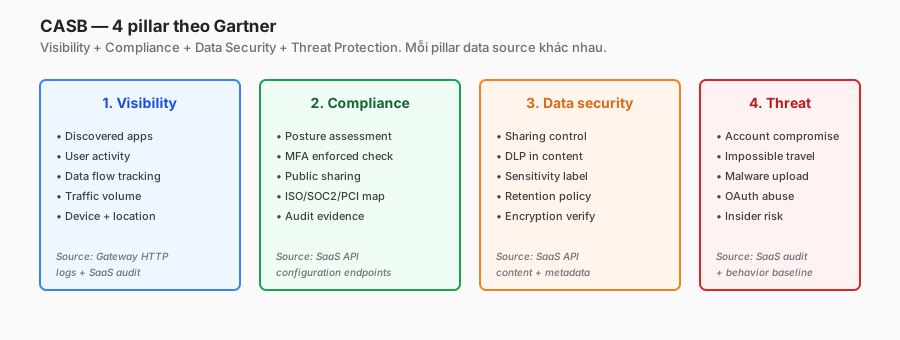
Gartner defines four pillars: Visibility, Compliance, Data Security, Threat Protection. Most vendor blog posts restate those four words and call it done. The problem: this is not a buying checklist.
In a real rollout, the four pillars have very different priority tiers:
| Pillar | Cost to get value | Time to first win | ROI |
|---|---|---|---|
| Visibility (shadow IT) | Low — Gateway logs already exist | 1 day | High |
| Compliance (posture) | Medium — OAuth setup + triage | 1-2 weeks | High (next audit cycle) |
| Data Security (SaaS DLP) | High — heavy pattern tuning | 1-3 months | Medium (false positives hurt) |
| Threat Protection | High — ML baseline + SOC integration | 3-6 months | Low in week one, rising over time |
If CASB is a new capability, do Visibility and Compliance first. Data Security and Threat Protection are advanced — they land after the first two are stable. Vendor demos tend to highlight Threat Protection (the coolest pillar), but that is the last pillar a team becomes proficient in.
A mistake I have personally seen from two CISOs: buy CASB, configure Threat Protection alerts, the SOC drowns in noise, alerts get muted, and three months later CASB is labelled “not effective.” The tool was fine — the enablement order was wrong.
Inline vs API — opinion: API first
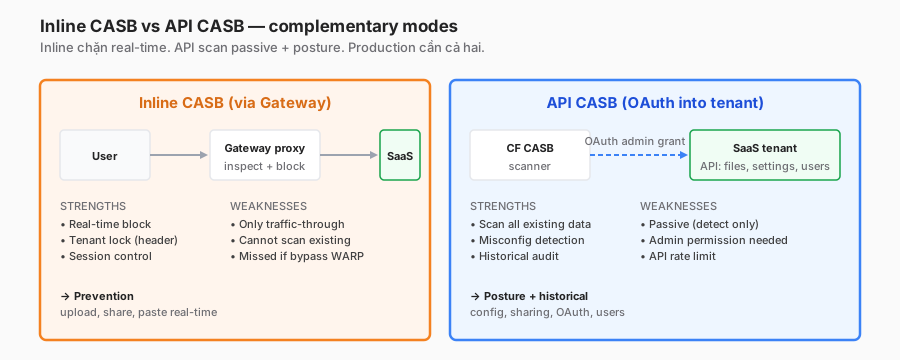
The two modes work in fundamentally different ways. Most articles say “use both,” which is correct but unhelpful. The real question: if you pick one first, which one?
I pick API first. The reasons:
Reason 1 — coverage is completely different
- Inline sees traffic that passes through the Gateway. When WARP is disconnected, when a native mobile app bypasses the proxy, when a personal BYOD device hits Salesforce over cellular — none of that shows up in the log.
- API sees the full tenant state: every file, every user, every OAuth grant, every configuration. It is not bypassed by endpoint choice.
The proportion of traffic that actually goes through the Gateway, versus total SaaS interaction, in the org I measured: about 65%. The other 35% (mobile, BYOD, partner guest) is only visible via API.
Reason 2 — historical data
A file that was shared publicly three years ago is still there. Inline only catches what is being shared right now (through the Gateway). An API scan walks the full drive and surfaces legacy sharing — typically 80% of the first wave of findings.
Reason 3 — configuration drift
An admin disables MFA through the admin console (not through a browser). Inline is blind. The API scan on the next polling cycle detects it and alerts. This is a case the SOC cares deeply about, because it covers insider threat and credential-compromised admin scenarios.
When inline wins
Two cases:
- Real-time tenant lock — block a user from signing into personal Gmail on a corporate laptop. API cannot do this (it is passive).
- Point-in-time DLP block — a user drags a file with PII into a public Dropbox folder. Inline blocks it immediately. An API scan may catch it five minutes later, if you are lucky.
Both matter, but both are second-tier. The first tier is “do I know which OAuth apps have permission to read mail?” — API only.
Rollout recommendation
- Weeks 1-4: API-connect all critical SaaS (Google Workspace, M365, Salesforce). Triage findings.
- Weeks 5-8: Inline tenant lock for Google and M365. TLS decrypt is already in place from Part 12.
- Month 3+: Inline DLP upload block (overlaps with Part 19).
The first-scan shock — reacting correctly
During one CASB rollout for a 400-person org (Google Workspace + M365 + Salesforce + GitHub), the first scan returned 8,247 findings after four hours.
Leadership’s first reaction: “why so many? Is the tool broken?” It was not broken — that result was six years of accumulated misconfiguration across three different admins plus two M&A integrations. CASB did not create the misconfiguration; it exposed it.
Breaking down the 8,247
- 4,100 (50%) — Drive files shared with “anyone with the link” (many of them legitimate internal docs that used link sharing instead of explicit user invitations).
- 1,800 (22%) — stale accounts still enabled (over 90 days inactive).
- 920 (11%) — OAuth apps with overly broad scopes (apps that former employees had granted Drive access to).
- 580 (7%) — external forwarding rules (inbox → personal Gmail — in one case a former employee, a legitimate concern).
- 420 (5%) — public SharePoint sites / Teams external access.
- 427 (5%) — the remainder (public GitHub repos, excessive Salesforce permissions, and so on).
What to do with 8k findings
Do not batch-block. I have watched other teams do exactly that: “script revoke every public link” → 200 tickets in two hours, 150 of which were legitimate internal wiki docs using link sharing.
A realistic playbook:
- Day 1: critical severity (secret in a public file, OAuth with Directory.ReadWrite.All, external forwarding from an active user) → triage manually in the first four hours. Usually 30-80 cases (under 1% of the total).
- Week 1: high severity (public file with a DLP hit) → email the owner with a link to remediate self-service. Watch how many remediate versus ignore.
- Weeks 2-4: medium (stale accounts, excessive roles) → batch with the SaaS admin, do not ping the user.
- Month 2+: low severity and policy-level items (retention, default sharing) → roll into a tenant baseline, not a per-finding process.
Do not set a “close all critical in 24h” SLA in the first week. The team burns out and the false-positive rate is still unknown.
Steady-state cadence
After six weeks in that org, findings dropped from 8,247 → 340 — most of which could not or did not need to be fixed (a CEO forwarding email to an assistant is expected). Do not chase zero. Steady state: 30-60 new findings per week, 80% resolved within SLA.
SaaS integrations — read by threat
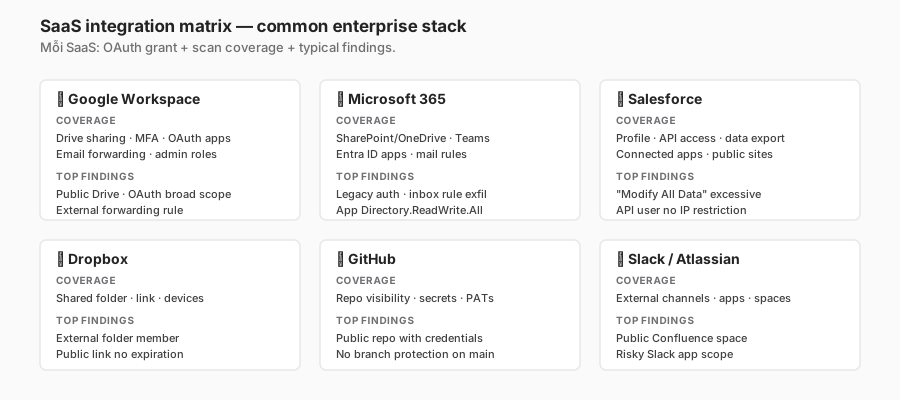
Instead of listing features per SaaS, I organise by the primary threat each vendor presents.
Google Workspace — OAuth app sprawl
Primary threat: an employee grants a third-party app access via OAuth, with scope https://mail.google.com/ (full inbox read/write). These apps are usually benign productivity tools — but they are a high-value compromise vector.
CASB check: inventory every OAuth app, flag broad scopes, recommend admin-consent-required for anything above “low” scope.
Real-world gotcha: Google Workspace legacy accounts (people who have left) still have active OAuth grants. Revoking the account does not automatically revoke the grants. CASB catches this.
Microsoft 365 — inbox-rule exfiltration
Primary threat: an attacker compromises an account, creates an inbox rule that auto-forwards to an external email address. The victim sees nothing; the attacker reads corporate mail for a month.
CASB check: scan mail rules, flag any rule with an external forwarding destination.
Real story: in one org I reviewed, CASB discovered 12 accounts with forwarding rules to Gmail/Yandex/Hotmail. Three were active BEC (the victim had no idea).
Salesforce — “Modify All Data” profile sprawl
Primary threat: user roles are granted “Modify All Data” liberally. A developer needs to query the API → the admin grants the profile “System Admin” for convenience → it sits there for two years.
CASB check: profile inventory, recommend least privilege.
Dropbox / Box / personal storage
Primary threat: a “Team folder” shared with an external email domain. Or a public link with no expiration.
GitHub — secrets and outside collaborators
Primary threats:
- Public repo with credentials committed (AWS key, private key).
- An outside collaborator with admin on a private repo.
- A PAT (personal access token) with a broad scope.
CASB check: secret scanning plus permission audit.
My bias: a GitHub org needs a dedicated CASB integration (not just “scan repos for secrets”). Outside collaborator audits are a quarterly minimum.
Atlassian — anonymous access
A Confluence space with “anyone can view” — trivial for someone to find an internal doc via Google. CASB flags the anonymous access.
Slack / Teams — external channel sprawl
Slack Connect: a channel shared with a partner → the partner can invite others → soon it is no longer clear who is in the room. CASB reports every new external channel.
Shadow IT — from 60 approved SaaS to 240 real ones
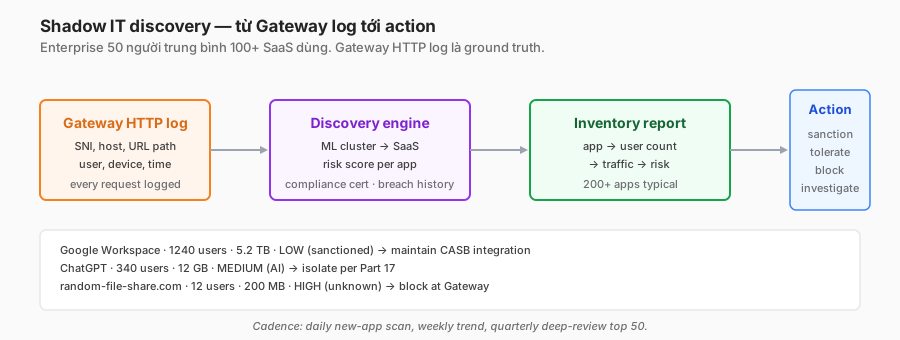
This is the pillar of Visibility that actually pays for itself. The real conversation:
- Procurement team: “We approve 60 SaaS.”
- First Gateway log scan: “You have 247 active SaaS.”
- Cross-reference with expense reports: “50 SaaS are paid licenses; 197 are free tier or OAuth-grant-only (AI plugins, CRM helpers, AI meeting notes).”
AI sprawl 2024-2026
The heaviest trend: AI plugins. Every week an employee tries a new tool — a ChatGPT plugin, a Claude extension, Perplexity, Cursor, Copilot variants. Anything that requires OAuth is auto-sharing corporate data. Most vendors do not have an enterprise agreement.
In the 400-person org mentioned above, 34 AI-related SaaS were discovered in the first month of 2025. 12 of the 34 had unclear data processing (who trains a model on the input?).
Action framework
Do not classify SaaS purely by the “risk score the CASB suggests.” That score is based on public threat intel — it does not reflect the organisation’s context.
Use a four-tier model:
- Sanctioned — approved, CASB integration enabled, tenant lock enforced where available.
- Tolerated — legitimate use case, no enterprise agreement, monitor closely, consider blocking download/share.
- Transitional — under review. Allow temporarily, set a decision deadline (four weeks).
- Blocked — clear violation or threat-intel red.
The key insight: the “tolerated” bucket is not a cop-out. Employees use a tool because it solves a problem the org has not solved. Block everything and shadow IT migrates to mobile hotspots — losing visibility entirely. Allow with guardrails beats block-and-create-bypass-incentive.
Discovery cadence
- Daily: new-hostname scan, ML cluster into SaaS candidates.
- Weekly: trend delta (new SaaS, user count up over 20%, traffic spike).
- Monthly: action decisions in batch — transition tolerate → sanctioned, or block.
- Quarterly: full policy review with leadership.
Cost note: Gateway log volume for shadow-IT discovery is not cheap. The R2 data-lake discussion in Part 14 applies directly.
Tenant lock — the single biggest BEC prevention win
Not the most famous pillar, but the highest ROI. Inline CASB mode (via the Gateway HTTP filter from Part 12) injects a header when a user reaches Google / M365 / Dropbox.
Google Workspace
name: "Google Workspace tenant lock"
applies_to: "*.google.com"
decrypt: required
policy_logic: |
  IF http.request.uri.host matches "*.google.com"
    AND http.request.header["X-GOOGLE-HD"] != "company.com"
  THEN block
X-GOOGLE-HD is “Hosted Domain” — Google injects it in requests when the user is logged into that domain. If a user tries to sign into personal@gmail.com on a corporate browser, the header is empty or different → block with a “IT policy: use the company Google account only” page.
Why this covers BEC: an attacker phishes an employee; the victim enters credentials on a fake login at company.com.phish.xyz. Tenant lock blocks it because the destination is not actually google.com. This is defence-in-depth after a phishing link has bypassed DNS filtering.
Microsoft 365
Use the Restrict-Access-To-Tenants header, injected by the Gateway. The M365 tenant verifies it and enforces the tenant boundary.
header_rewrite:
  path: "*.office.com/*"
  inject:
    - "Restrict-Access-To-Tenants: company.onmicrosoft.com, company.com"
    - "Restrict-Access-Context: <company-tenant-id>"
Dropbox has no native header
Dropbox does not standardise a tenant identification header. Workaround: block dropbox.com at the Gateway, allow only through a dedicated egress IP (the M365/Google approach does not apply). This is a bit of a hack; if Dropbox is critical, API-only CASB coverage is worth considering.
Measurement
In the 400-person org, after enabling tenant lock:
- personal Gmail block events: roughly 15-25 per day (mostly convenience, personal email during work hours).
- BEC-related block events: 1-2 per month (phishing domains mimicking google.com).
- Complaints: 8-10 tickets in the first week — “why can’t I access personal email?” The alternative: personal device, phone, or break-time via guest wifi.
Top misconfigurations — which to fix and which to accept
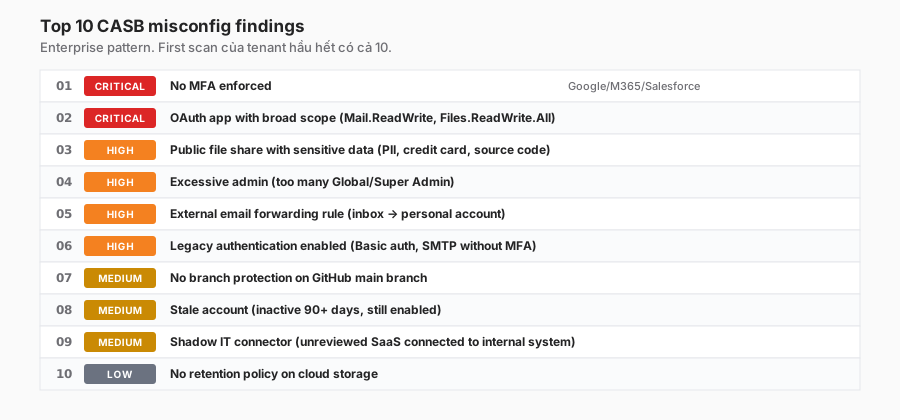
Ten findings that consistently show up. Not all of them deserve equal attention. I rank by actionability × severity:
| # | Finding | Fix difficulty | Priority |
|---|---|---|---|
| 1 | OAuth app with broad scope (Mail.ReadWrite.All) | Easy (revoke via admin) | Fix now |
| 2 | External inbox forwarding rule | Easy (tenant-level disable) | Fix now |
| 3 | Legacy auth (basic auth, SMTP without MFA) | Medium (30d transition) | Fix month 1 |
| 4 | Public file with sensitive data (PII, credit card, secret) | Hard (case-by-case, many FPs) | Fix 30% TP, tolerate 70% |
| 5 | Excessive Global Admin | Medium (role redesign) | Fix this quarter |
| 6 | No MFA on admin account | Easy (enforce policy) | Fix now |
| 7 | Stale account over 90 days | Easy (SCIM, Part 7) | Batch quarterly |
| 8 | GitHub repo without branch protection | Medium (per repo) | Auto-enforce via template |
| 9 | Retention policy absent | Low priority (unless compliance) | Accept if not regulated |
| 10 | Anonymous Confluence space | Hard (content audit) | Focused sprint annually |
Why some findings are “don’t fix”
- Public retention absent in a dev environment = OK if it is test data only. Compliance only cares for prod data.
- Public Drive shares in practice: 50-70% are internal wikis using link sharing instead of explicit invitations. Not a vulnerability.
Exception process
Any finding a team decides to accept-not-fix must have:
- A ticket with the business justification.
- A reviewer (not the person who accepted it).
- An expiration (max one year, re-checked).
- A compensating control where applicable (e.g. “public file allowed, but the parent folder has continuous DLP scanning”).
Without this process, “accepted risk” becomes “forgotten risk.”
Findings workflow — how to keep the team from being overwhelmed
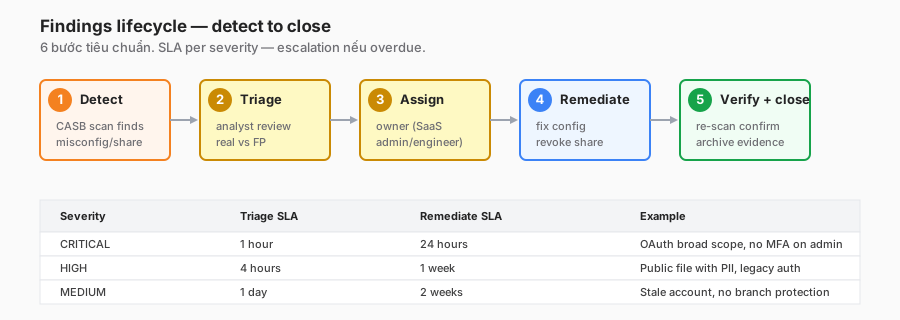
SLA template:
| Severity | Triage | Remediate |
|---|---|---|
| Critical | 1 hour | 24 hours |
| High | 4 hours | 1 week |
| Medium | 1 day | 2 weeks |
| Low | 1 week | 1 month |
That is a template. Actual SLAs adjust to team size and finding volume. A 400-person org with one security engineer at partial capacity → a four-hour critical triage is more realistic.
Common bottlenecks
- One-hour triage is not feasible when the finding volume is over 50 per day. Solution: auto-tag severity, auto-close obvious false positives (test data domains, internal wikis).
- Ambiguous owner assignment — a “public Drive file” belongs to whom? The file owner, the data owner, the department head? This needs a rule decided in advance: default owner = last modifier; escalate if the last modifier has left.
- Exception pile-up — accepted findings without expiration. Next quarter the auditor asks “why is this still open?” Force an expiration date.
Practical integration
- Jira/ServiceNow: finding → auto-created ticket with severity label.
- Slack to owner: notify with a “finger-click” remediate button for simple cases (revoke a share, disable a forwarding rule).
- Weekly email digest for managers: open tickets by team.
- Dashboard: MTTR trend. If MTTR is rising, the team is overloaded — negotiate deprioritisation.
Privacy — when CASB scanning crosses the line
CASB scans content — file bodies, email subjects, Slack messages. This is privacy-sensitive, especially in the EU (GDPR Art. 88 on employee monitoring).
Notices are mandatory
- The employee handbook must mention the SaaS monitoring scope.
- A banner or wiki doc must be accessible.
- Be specific: what is scanned (files in the corporate Drive), what is not (personal Gmail, Slack DMs between two users).
Legal review before scanning
- Germany, France, the Nordics: consultation with the works council (Betriebsrat, CE) is typically required. Allow 30-60 days.
- United States: fewer regulatory requirements, but the employee contract should still cover it.
- Vietnam: less strict, but notice is still best practice.
Data residency
CF CASB scanning happens in the closest region. If compliance requires an EU-only data path, verify with the CF team — a paid tier may be required.
Access to findings
RBAC needs to be strict: only the security team sees finding content. SaaS admins see a summary. Managers see team-level metrics, not per-file content.
Reference configuration
Starter policy I recommend for a new rollout:
# 1. Google Workspace — API connect
google_workspace:
  admin_oauth_scopes:
    - drive.readonly
    - admin.directory.user.readonly
    - admin.reports.audit.readonly
  scan_cadence: daily
  alerts:
    critical:
      - oauth_scope_high      # Mail.ReadWrite.All or similar
      - mfa_not_enforced
      - external_forwarding_rule
    high:
      - public_drive_file_with_dlp_hit
      - stale_admin_account

# 2. Microsoft 365 — API via Graph
microsoft_365:
  admin_consent: required
  scan_cadence: daily
  alerts:
    critical:
      - app_registration_high_privilege
      - mail_rule_external_forward
      - legacy_auth_enabled
    high:
      - sharepoint_public_share
      - teams_external_owner

# 3. Inline tenant lock (Gateway HTTP policy)
gateway_http:
  tenant_locks:
    google:
      host: "*.google.com"
      require_header: "X-GOOGLE-HD == company.com"
    microsoft:
      host: "*.microsoft.com"
      inject_header: "Restrict-Access-To-Tenants: company.com"

# 4. Shadow IT discovery
shadow_it:
  source: gateway_http_log
  cadence: daily
  retention: 90d
  alert_threshold:
    new_saas_per_week: 10
    user_count_spike: 20  # percent
When not to use CASB
Just as important as when to use it:
-
Orgs with only one or two SaaS (e.g. Google Workspace only). Native Google Admin tools plus Workspace audit logs are enough. CASB is overkill by cost.
-
Heavily regulated in a specific framework (FedRAMP High, HIPAA with strict BAA). CASB scanning of content = data processing; the vendor needs a BAA. If the CASB vendor does not qualify, use native SaaS compliance tools plus a manual audit.
-
Early-stage startup without a dedicated security team. Triaging 500 findings a week is a full-time job. Better: a basic tenant lock (inline) plus a quarterly manual Google Admin audit.
-
Fully on-premise stack — on-prem email exchange, no cloud storage. CASB has nothing to scan.
-
Teams without OAuth admin access. This sounds obvious, but in enterprises the SaaS admin role sits in central IT, and they do not share admin consent with the security team. CASB depth will be limited.
Lessons I will keep
- “Accepted risk” needs an expiration. Otherwise every finding eventually gets accepted → the tool becomes useless.
- Tenant lock is the highest-ROI inline control. If you can only ship one inline rule, ship this one.
- Set first-scan expectations with leadership. “The tool will find over 5,000 findings in week one. That is normal — the tool is not broken.” Send the email before enabling.
- AI sprawl is the 2025 threat. Every week employees try one to three new AI tools. The discovery dashboard has to surface AI as a separate category.
- Audit OAuth apps quarterly. Employees leave, but OAuth grants stay. Only CASB sees this cleanly.
- GitHub needs a dedicated tier integration. Generic CASB coverage for GitHub is insufficient; you need outside collaborator + secrets + branch protection combined.
- Most “public shares” are legitimate. Do not auto-revoke. Emailing the owner for self-service works better.
Closing
CASB turns SaaS from a “black box” into a “glass box.” No other tool does this — the Gateway only sees traffic, the SIEM only sees events; CASB sees state.
Start with the Visibility and Compliance pillars, API-first. Inline tenant lock is layer two. Data Security and Threat Protection are layer three, after the team is comfortable with the findings workflow.
Every time you look at 8,000 findings in week one, remember: this is accumulated debt from years, not a fresh disaster. Budget realistic triage, manage expectations with leadership, and do not chase zero.
In Part 19 the series moves on to DLP — Data Loss Prevention — pattern matching inside content. It overlaps with CASB’s third pillar (Data Security) but goes deeper into technique: regex + context + Luhn + EDM, and which tool wins when.
References
- Cloudflare CASB overview
- CASB integrations list
- Microsoft Graph security API
- Google Workspace Admin SDK
- Gartner CASB reference
- GDPR Art. 88 — employee monitoring
In this series:
- ← Part 17: Browser Isolation
- Next → Part 19: DLP deep dive
- See the full series: Cloudflare One Handbook
