
TL;DR
Part 5 ended on a problem: an admin disables a user in the IdP, but the user can still reach Cloudflare apps for up to 24 hours (the session cookie has not expired). This is the disgruntled-employee window — the most dangerous gap in off-boarding.
SCIM (System for Cross-domain Identity Management) closes it: the IdP pushes updates (user or group changes) into Cloudflare in near-real time. Instead of Cloudflare pulling claims when a user logs in, the IdP calls a Cloudflare API as soon as the admin changes anything.
This post covers:
- JIT claim (Part 5) vs SCIM — where the trigger differs.
- The full SCIM flow: the IdP is the client, Cloudflare is the server.
- SCIM setup for Okta, Entra ID, and Google Workspace.
- The three user-lifecycle phases (Join / Move / Leave) via SCIM.
- Deprovisioning latency comparison: manual → JIT → SCIM → SCIM + short session.
- Conflict resolution when JIT and SCIM disagree.
- Anti-patterns + an audit checklist.
The thesis:
JIT claim is minimum-viable Zero Trust. SCIM is grown-up Zero Trust. The gap between them is the disgruntled-employee window — and it is worth one afternoon to close.
This is Part 7 of the Cloudflare One Handbook.
Who this is for
- Security engineers who have set up Access + IdP (Parts 4–5) and now want lifecycle automation.
- IAM engineers handling user provisioning organisation-wide.
- Compliance teams needing to prove off-boarding SLA under 15 minutes.
Recommended prior reading:
- Part 4 — Cloudflare Access
- Part 5 — IdP integration — most important, especially the “Group sync timing” section
After this post you will:
- Understand the SCIM protocol at a practical depth.
- Be able to set up SCIM for the three common IdPs.
- Know how to test/verify that SCIM is working.
- Have a playbook for the three lifecycle phases (join/move/leave).
- Understand which source wins when JIT and SCIM disagree.
What this post does not cover
- Custom SCIM providers (standing up your own SCIM endpoint) — only Cloudflare’s SCIM consumer is covered.
- SCIM for non-human / service accounts — service tokens (Part 6) are the right approach, not SCIM.
- Just-in-time provisioning at first login — Part 5 covered this in “JIT claim”.
- Nested / transitive group membership — support varies by IdP; mentioned but not deep-dived.
Concepts
- SCIM — System for Cross-domain Identity Management, IETF RFC 7643/7644. The protocol to push user/group changes from an IdP to a SaaS/target system.
- Provisioning — creating a user/group in the target system when the IdP changes.
- Deprovisioning — removing or disabling a user/group in the target system.
- Pull vs Push model — JIT claim is pull (Cloudflare fetches at login). SCIM is push (the IdP sends on change).
- SCIM server (target) — Cloudflare in this context.
- SCIM client (source) — Okta, Entra ID, Google Workspace.
- Tenant URL — the endpoint URL Cloudflare exposes for the IdP to call. Unique per Cloudflare account.
- Bearer token — the token the IdP uses to authenticate SCIM requests to Cloudflare.
JIT vs SCIM — different trigger
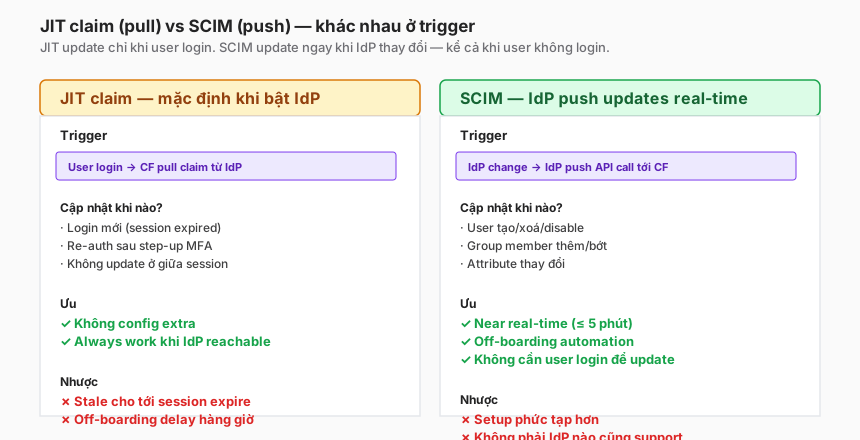
JIT claim — default when an IdP is configured
On login, Cloudflare calls the IdP’s userinfo endpoint → gets the latest claim. Group membership is refreshed only at this moment.
Problem: between logins, Cloudflare relies on the claim stored in the CF_Authorization cookie. If an admin removes the user from a group three minutes after login, Cloudflare does not know until the session expires.
Default session duration = 24h. Worst case: 24 hours stale.
SCIM — push in near-real time
The IdP has a provisioning engine: when an admin changes something, the IdP automatically calls Cloudflare’s API. Cloudflare updates its internal state.
Result: re-evaluation on the next request uses fresh state. Typical latency 1–5 minutes (depending on the IdP queue).
Using both together
SCIM and JIT are not mutually exclusive. Cloudflare uses both:
- First login → JIT pulls a claim → cache.
- Admin changes something → SCIM pushes an update → Cloudflare updates the cache.
- Subsequent request → reads cache (already fresh thanks to SCIM).
- Session expires → JIT pulls again (double-check).
Enable both. SCIM is the primary mechanism for lifecycle; JIT is the fallback plus initial login.
SCIM flow in detail
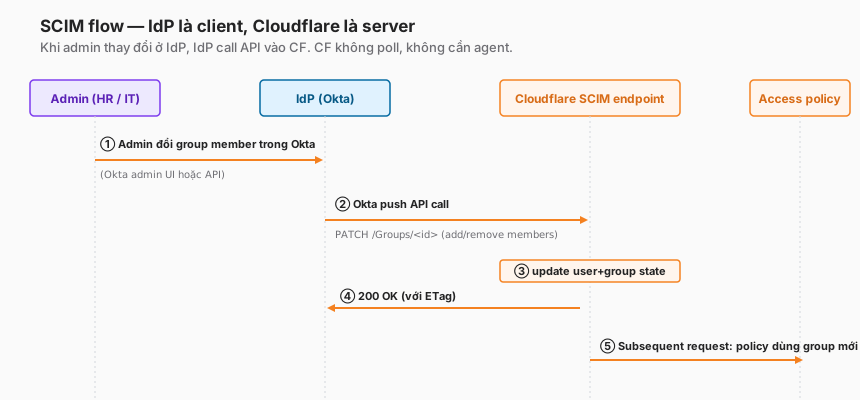
Actors
- Admin (HR/IT person operating in the IdP).
- IdP — has a provisioning engine (Okta Lifecycle Management, Entra Provisioning Service, Google Admin SDK).
- Cloudflare SCIM endpoint — URL + token that Cloudflare provides.
- Access policy — the beneficiary when state updates.
HTTP calls the IdP sends to Cloudflare
SCIM sample requests (standard RFC 7644):
Create a new user:
POST /scim/v2/Users HTTP/1.1
Host: <team>.cloudflareaccess.com
Authorization: Bearer <scim-token>
Content-Type: application/scim+json

{
  "schemas": ["urn:ietf:params:scim:schemas:core:2.0:User"],
  "userName": "alice@example.com",
  "name": { "givenName": "Alice", "familyName": "Nguyen" },
  "emails": [{ "value": "alice@example.com", "primary": true }],
  "active": true
}
Add a user to a group:
PATCH /scim/v2/Groups/<group-id> HTTP/1.1
Authorization: Bearer <scim-token>
Content-Type: application/scim+json

{
  "schemas": ["urn:ietf:params:scim:api:messages:2.0:PatchOp"],
  "Operations": [{
    "op": "add",
    "path": "members",
    "value": [{ "value": "<alice-user-id>", "display": "alice@example.com" }]
  }]
}
Deactivate a user (leave event):
PATCH /scim/v2/Users/<user-id> HTTP/1.1

{
  "Operations": [{
    "op": "replace",
    "path": "active",
    "value": false
  }]
}
You don’t write these requests yourself — the IdP’s provisioning engine does. But knowing the format helps when debugging.
Setup 1 — SCIM with Okta
Step 1 — Generate the SCIM token in Cloudflare
Zero Trust dashboard → Settings → Authentication → Login methods → select the Okta IdP (from Part 5) → Edit → scroll to SCIM.
- Toggle Enable SCIM.
- Click Regenerate token → copy Tenant URL and Bearer token.
The token is shown only once. Save to the secret manager.
Step 2 — Configure provisioning in Okta
Okta admin → Applications → Cloudflare Access app (created in Part 5) → Provisioning tab.
-
Enable SCIM provisioning:
- SCIM Base URL: Tenant URL from Cloudflare
- Authentication Mode: HTTP Header →
Bearer <token> - Unique identifier:
userName - Supported operations: Create, Update, Deactivate, Group Push
-
Test connection → Okta calls the CF endpoint → must return 200.
Step 3 — Enable “To App” provisioning
Provisioning tab → To App → Edit:
- Create Users: enable
- Update User Attributes: enable
- Deactivate Users: enable
Attribute mapping: the defaults are enough for email and displayName. For custom attributes (department, costCenter), add them via Go to Profile Editor.
Step 4 — Assign users and groups
Provisioning tab → Push Groups → + Push Groups → select the Okta groups to sync:
cf-engineeringcf-admincf-contractors
Okta pushes these groups + corresponding members into Cloudflare.
Step 5 — Verify
Within a few minutes, check Zero Trust → My Team → Users. Users from Okta should appear. Click a user → check Groups — the names should match.
End-to-end test:
- Okta admin: create a new user
test-scim@example.com, add tocf-engineering. - After 1–5 minutes, CF dashboard → My Team → user appears.
- User logs into an Access app whose policy requires
cf-engineering→ pass. - Okta admin: remove the user from
cf-engineering. - Within a few minutes, the user’s next request → policy denies.
Common Okta SCIM pitfalls
- Token format wrong → 401 in Okta test. Re-paste the token, ensuring no whitespace.
- Forgetting to Push Groups → group syncs but has no members. Dashboard shows an empty group.
- Attribute mapping conflicts — Okta maps
departmentbut Cloudflare expects a different format. Simpler = the minimal mapping (email + groups + name). - “Deactivate” not ticked → off-boarding does nothing. Re-check the configuration.
Setup 2 — SCIM with Entra ID (Azure AD)
Step 1 — Get the SCIM endpoint + token from CF
Same as Okta: Zero Trust → Authentication → Entra ID IdP → SCIM → enable + copy token.
Step 2 — Configure the Enterprise Application
Azure portal → Enterprise Applications → Cloudflare Access app (created in Part 5) → Provisioning → Get started.
- Provisioning Mode: Automatic.
- Tenant URL: from CF.
- Secret Token: bearer token from CF.
- Test connection → 200 OK.
Save.
Step 3 — Assign users/groups
Enterprise Application → Users and groups → Add user/group. Add the groups to sync.
Note on Entra: only users/groups assigned to the Enterprise App get provisioned. Different from Okta’s separate Push Groups model.
Step 4 — Start provisioning
Provisioning → Start provisioning. Entra runs the initial cycle: syncs everything assigned. Takes minutes to hours depending on user count.
After the first cycle, Entra runs an incremental sync every 40 minutes by default.
Common Entra SCIM pitfalls
- Initial cycle is slow — 200+ users can take 1–2 hours. Be patient, monitor Provisioning Logs.
- 40-minute default for incremental — not “real-time” like Okta. If faster is needed, a Microsoft premium tier is required.
- Group object ID mode (Part 5 warning) — if Entra is configured to emit Group IDs, SCIM will still send group names, but the CF policy may have been written against GUIDs → mismatch. Pick names or GUIDs, consistently, everywhere.
- Disabled users not deprovisioned — Entra needs explicit “Deactivate” configuration; the default is “ignore” for disabled users.
Setup 3 — SCIM with Google Workspace
Google Workspace has SCIM, but the setup is the most involved.
Step 1 — Enable Cloudflare SCIM
Same as the previous two: Authentication → Google Workspace IdP → SCIM → enable.
Step 2 — Google Workspace Admin Console
Google Workspace has no dedicated provisioning UI like Okta/Entra. Instead:
- Provisioning from Google Workspace → CF goes through Automated provisioning in Google Admin.
- But not every SaaS app is in the list — Cloudflare Access may not yet be available in the Google Apps Marketplace for SCIM.
At the time of writing, the cleanest options are:
- Alternative 1 — Rely on JIT only: accept the stale window until Google/CF ship native SCIM.
- Alternative 2 — Okta middleman: use Okta as a bridge. Google → Okta (via Google SSO) → Okta → CF (via Okta SCIM). Adds a vendor but gives a proper SCIM flow.
- Alternative 3 — Custom polling script: Google Admin SDK → a custom script pulls groups → pushes via SCIM to CF. Build it yourself, maintain it yourself.
Recommendation
If the organisation already uses Okta for user lifecycle → route through Okta (Alternative 2). If the organisation is Google-heavy and not on Okta → accept JIT with a short session duration (Alternative 1) until native integration ships.
User lifecycle through SCIM
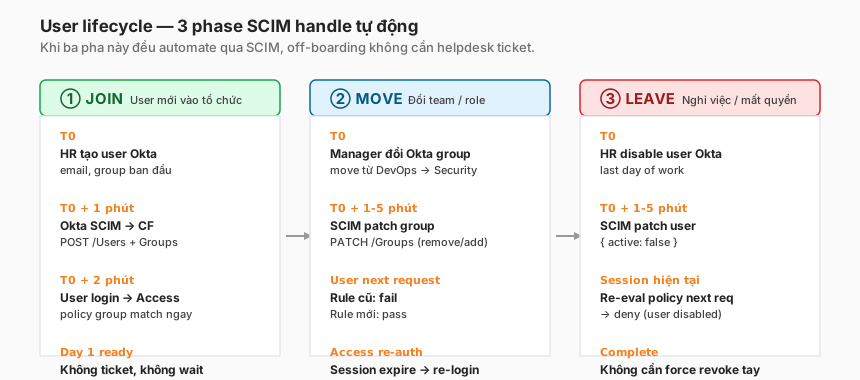
JOIN
Trigger: HR creates a new user in the IdP.
SCIM action: POST /scim/v2/Users → CF creates a user record. Then PATCH /Groups to add to a group.
Timeline:
- T0: HR creates the user.
- T0+1 minute: Okta detects the change → pushes SCIM.
- T0+2 minutes: CF user record is in place.
- User logs in for the first time → claims + posture signals all present.
Important: the user is ready from day one. No “add user to Cloudflare” ticket for the helpdesk.
MOVE (group change, role change)
Trigger: manager changes the user’s group in the IdP (e.g. DevOps → Security).
SCIM action: PATCH /Groups/<old-group> remove member, PATCH /Groups/<new-group> add member.
Timeline:
- T0: manager updates Okta.
- T0+1–5 minutes: SCIM push.
- T0+5 minutes: user reaches the new app → policy passes.
- User reaches the old app → policy denies (the old group is gone).
Gotcha: the user may need to re-login if the CF_Authorization cookie still carries the old claim. Cloudflare re-evaluates on next access — but when necessary, force re-auth by clearing the session: Dashboard → My Team → User → Revoke.
LEAVE (off-boarding)
Trigger: HR disables the user (or deletes, per policy).
SCIM action: PATCH /Users/<id> { active: false }.
Timeline:
- T0: HR disables in Okta.
- T0+1–5 minutes: SCIM push, CF user
active=false. - User’s next request: policy evaluates → user disabled → deny.
- Existing session (cookie
CF_Authorization): re-evaluated automatically, deny.
Important: no helpdesk force-revoke needed as before. SCIM handles it.
Deprovisioning latency — four tiers
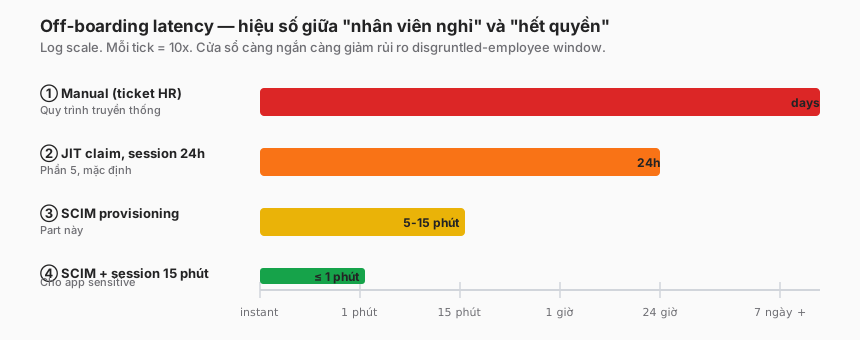
Tier 1 — Manual (no SSO, no SCIM)
Helpdesk receives a ticket from HR. Disables the user manually in each system. Latency: hours to days.
Tier 2 — JIT claim only (Part 5 setup)
User login refreshes the claim. But the cookie is valid for 24 hours. Latency: up to 24h.
Tier 3 — SCIM
IdP pushes the update in near-real time. Latency: 5–15 minutes.
Tier 4 — SCIM + short session duration
SCIM is fast, and the Access application’s session duration is 15 minutes. Worst case: the user makes a request in the old session immediately after admin disable → ≤ 1 minute until the session re-evaluates or expires. Latency: ≤ 1 minute.
Recommendation for sensitive apps: Tier 4. Admin panels, database access, financial tools.
Risk framing
Tier 1 = “a disgruntled employee has days to exfiltrate”. Tier 4 = ”≤ 1 minute — not enough time to do anything significant”. Trade-off against UX (short session = frequent re-logins).
Conflict resolution — when JIT and SCIM disagree
Scenario: admin disables a user in Okta at 10:00. SCIM pushes to CF at 10:02. User logs in at 10:05 — JIT pulls a claim from Okta, also sees disabled.
Both sources agree “disabled” → no conflict.
Scenario: admin adds a user to a new group at 10:00. SCIM pushes at 10:02. User logs in at 10:05 — JIT pulls and sees the new group.
Both agree → CF uses the JIT claim (fresher at login time).
Complex scenario: SCIM update at 10:02 (user disabled), but the user has an active session from 09:50 (old claim = active).
Cloudflare re-evaluates on the next request:
- Re-reads internal state (SCIM has updated) → user.active = false.
- Denies the next request.
Rule: SCIM state is authoritative for user/group membership. The JIT claim only affects initial login; it does not override SCIM state.
Testing that SCIM is working
Test 1 — Provision (JOIN)
- Create a test user in the IdP, add to group
cf-test. - Wait 5 minutes.
- Zero Trust → My Team → Users → search email → user should appear.
Test 2 — Deprovision (LEAVE)
- Disable the test user in the IdP.
- Wait 5 minutes.
- Zero Trust → My Team → Users → search email → status = Inactive.
If the status is still Active after 15 minutes → SCIM is not working properly. Check logs.
Test 3 — Group change (MOVE)
- Remove the user from
cf-test, add tocf-prod-admin. - User logs into an Access app requiring
cf-prod-admin→ pass. - User logs into an Access app allowing only
cf-test→ deny.
Debug pointers
- Okta: Applications → Cloudflare Access → Provisioning → Audit Log. Each SCIM request + response code is visible.
- Entra: Enterprise Application → Provisioning → Provisioning logs. Similar.
- Cloudflare: no direct SCIM log, but user/group update timestamps are visible.
Anti-patterns
1. “SCIM enabled but Deactivate not ticked”
Common Okta bug. Create + update sync fine, but disabling a user in Okta is a no-op in CF. Off-boarding fully fails.
Fix: Provisioning config → tick all four operations: Create, Update, Deactivate, (optional) Delete.
2. “Push Groups without assigning users”
Okta-specific. Push Groups sets the group up in CF but users still need to be in the app’s Assignment to be included in the push. Easy to miss.
3. “Rely on SCIM but keep a 30-day session”
SCIM is fast, but the session cookie is still valid for 30 days if configured that way. A SCIM revoke does not immediately invalidate an existing cookie.
Fix: short session duration (≤ 1h) for sensitive apps, or explicit session revocation when off-boarding a critical user.
4. “Nested groups don’t sync”
Okta nested groups may not be expanded over SCIM depending on configuration. A group All-Employees containing Engineering, Product, Design — pushing All-Employees to CF does not auto-expand.
Fix: push flat groups, or configure Okta to expand nested. Test carefully before relying on it.
5. “Hardcode the SCIM token into Terraform state”
Bearer token rotation = Terraform state update = commit = leak. Tokens belong in a separate secret manager (Vault, AWS Secrets Manager), with Terraform referencing them via a data source.
6. “No monitoring of SCIM success rate”
SCIM can fail (IdP hiccup, CF endpoint blip). No monitoring = discovering two weeks later that off-boarding is broken.
Fix: alert when SCIM error rate > 1% in an hour. Alert when SCIM hasn’t run in 24 hours (zero events = suspicious).
Trade-offs
| Decision | Option A | Option B | Recommendation |
|---|---|---|---|
| SCIM enabled | Yes | No (JIT only) | Yes for orgs > 50 users. JIT only is fine for small teams. |
| Sync scope | All groups | Prefix cf-* only | Prefix — less noise, easier audit. |
| Delete operation | Delete users in CF | Deactivate only | Deactivate — preserves audit logs, reversible. |
| Manual override | No manual operations | Allow emergency revoke | Allow — SCIM can lag or fail; an escape hatch is needed. |
| Monitoring | CF dashboard spot-check | Alerts + dashboard | Alerts — silent SCIM failure is a latent risk. |
Checklist — before relying on SCIM
Setup:
- SCIM enabled on both the IdP side and the CF side.
- Tenant URL + bearer token stored in a secret manager.
- Test connection succeeds (200 OK).
- All four operations (Create, Update, Deactivate) enabled.
- Groups assigned/pushed with the right scope.
Testing:
- All three phases (Join, Move, Leave) tested end-to-end with real users.
- Measured latency < 15 minutes.
- Disabling in the IdP → user denied on the next CF request.
Operational:
- Session duration matches each app’s risk profile.
- Manual revoke procedure documented (escape hatch).
- Alert on SCIM error rate > 1%.
- Alert on zero SCIM events in 24 hours.
- Quarterly audit: compare IdP active users vs. CF active users.
Documentation:
- Runbook for helpdesk: how to verify SCIM sync is working.
- Runbook for IT: how to emergency off-board when SCIM is down.
Lessons from practice
- Silent SCIM failure is the scariest class of bug. Setup works initially, six months later the IdP updates or a token expires, and SCIM silently fails. Monitor the success rate as a first-class metric.
- Test off-boarding monthly. Step 1: disable a test user. Step 2: confirm they cannot reach the Access app. Many teams set up SCIM but never actually test off-boarding — until an incident reveals it.
- Entra ID’s 40-minute default is a gotcha. Teams migrating from Okta (near-real-time) to Entra are often surprised. Document latency expectations.
- Google Workspace SCIM still has gaps. For Google-heavy organisations, budget for the Okta bridge or accept JIT-only in the short term.
- “SCIM fixes all off-boarding” — not quite. SCIM handles the IdP side. If the user has a direct CF access token (service token, forwarded cookie, cached browser), SCIM cannot revoke that. Emergency revoke in the CF dashboard is still required.
Summary
SCIM is the missing piece that turns Cloudflare Access from “ZTNA with policy” into “ZTNA with lifecycle automation”. Without SCIM, you hit a ceiling of effectiveness — correct policy, slow off-boarding = security gap.
Cost: one afternoon’s setup per IdP, plus ongoing monitoring. Benefit: the disgruntled-employee window drops from 24 hours to 5 minutes (or 1 minute with a short session).
One line to remember:
JIT claim is minimum-viable Zero Trust. SCIM is grown-up Zero Trust. The gap is the disgruntled-employee window — one afternoon to close.
Part 8 moves to the connectivity layer: Cloudflare Tunnel deep dive. How cloudflared brings private origins into Cloudflare’s scope without exposing a public IP, ingress routing, replicas, and health checks.
References
- Cloudflare SCIM overview
- SCIM RFC 7644 — protocol
- Okta Provisioning setup
- Entra ID SCIM
- Google Workspace SCIM limitations
In this series:
