
TL;DR
The WARP client (officially “Cloudflare One Client”) is an agent running on user devices that sends traffic into the Cloudflare edge through a WireGuard or MASQUE tunnel. It does three jobs:
- Intercepts traffic from the device via a TUN interface and routes it by split-tunnel rules.
- Collects posture signals (disk encryption, EDR, OS version, MDM) and reports them to Cloudflare.
- Binds the device to a user identity (through IdP login at enrollment), so Access/Gateway policies can rely on it.
This post covers:
- Daemon architecture + enrollment flow.
- Device posture checkers — built-in vs third-party (CrowdStrike, Intune, SentinelOne, Kolide).
- Split tunnel modes (include vs exclude) — the philosophy and when to pick which.
- DNS resolution path with Local Domain Fallback.
- Deployment options: manual / MDM / GPO.
- Troubleshooting the six most common cases (no connection, posture fail, split-tunnel conflict, internal DNS not resolving, slow browsing, battery drain).
The thesis:
WARP is the “eye and hand” of Zero Trust at the endpoint. Without WARP done right, every Access/Gateway policy that targets a managed device is wishful thinking — Cloudflare has no way to see device posture or to route ZTNA traffic.
This is Part 9 of the Cloudflare One Handbook.
Who this is for
- IT/Endpoint teams preparing to deploy WARP to a laptop/mobile fleet.
- Security engineers designing device-posture policy (Part 4).
- Platform teams troubleshooting “user can’t reach the internal app”.
Recommended prior reading:
- Part 8 — Cloudflare Tunnel (the server side; WARP is the client side).
- Part 4 — Access (policies that require
device_posture).
After this post you will:
- Understand how WARP operates at the OS level.
- Enroll devices with IdP authentication.
- Configure posture rules — pick between built-in and SP integration.
- Write split-tunnel rules in the right mode for the team.
- Troubleshoot the six most common cases.
What this post does not cover
- WARP Connector (bringing a network segment into Cloudflare instead of an individual device) — different use case, separate post.
- 1.1.1.1 consumer WARP — similar name, different product, personal use, unrelated to enterprise.
- Browser-based Access (no WARP required) — already covered in Part 4.
- Zero Trust DNS policy deep-dive — Part 11.
Concepts
- WARP client — app installed on Windows, macOS, Linux, iOS, Android. Enterprise version, not the consumer 1.1.1.1 app.
- Team name — subdomain
<team>.cloudflareaccess.com, the organisation identifier for WARP. Entered by the user during enrollment. - Enrollment — the process of binding a device to a Cloudflare organisation (team name + IdP auth).
- Device posture — signals collected by WARP about device state.
- Posture checker — a rule that defines a specific check (e.g. “disk encrypted”). Built-in or SP integration.
- Split tunnel — the mode that decides which traffic goes through WARP and which does not.
- Local Domain Fallback (LDF) — a rule that allows DNS queries for certain domains to resolve via local DNS instead of Cloudflare.
- MASQUE — a newer protocol (HTTP/3-based) that replaces WireGuard in some environments, useful where UDP is restricted.
WARP architecture
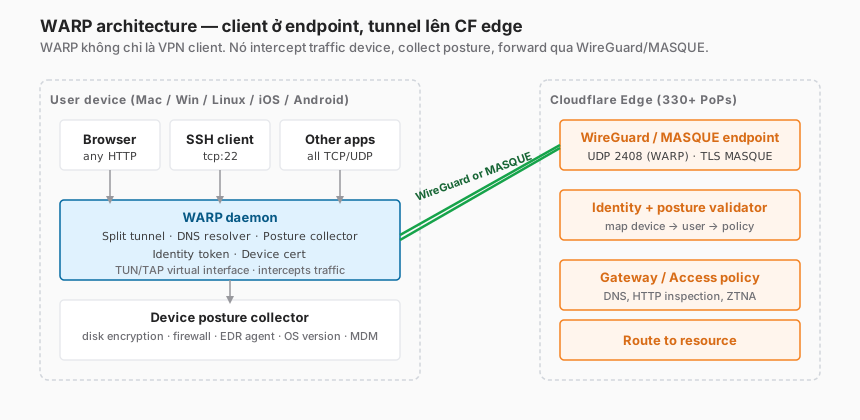
On the device side
- Apps (browser, SSH, Slack, etc.) know nothing about WARP. They use the system network stack.
- The WARP daemon runs as a service (
cloudflared-warp,cgd, or similar depending on OS). It creates a virtual TUN/TAP interface and configures the routing table to intercept traffic. - The posture collector runs periodic checks (every 1–5 minutes), reporting to Cloudflare.
- The split tunnel engine decides which packets go into the tunnel and which stay direct.
On the CF edge side
- A WireGuard endpoint (UDP 2408) or MASQUE endpoint (HTTPS TLS) terminates the tunnel.
- A validator maps device certificate → user identity → policy scope.
- Gateway / Access apply policy. When the destination is private → route through Tunnel (Part 8).
Protocol: WireGuard vs MASQUE
WireGuard is the default. Pros:
- Fast, low overhead.
- Proven at scale (WARP consumer 1.1.1.1 uses WireGuard by default).
Con: UDP 2408. Some corporate/hotel/airport networks block UDP → fails.
MASQUE is the fallback, built on HTTP/3 (TCP 443 TLS). Used when:
- The firewall blocks WireGuard UDP.
- The network only permits outbound HTTPS (restricted enterprise environments).
The WARP client auto-falls back: tries WireGuard first, MASQUE second. No user configuration needed.
Enrollment flow
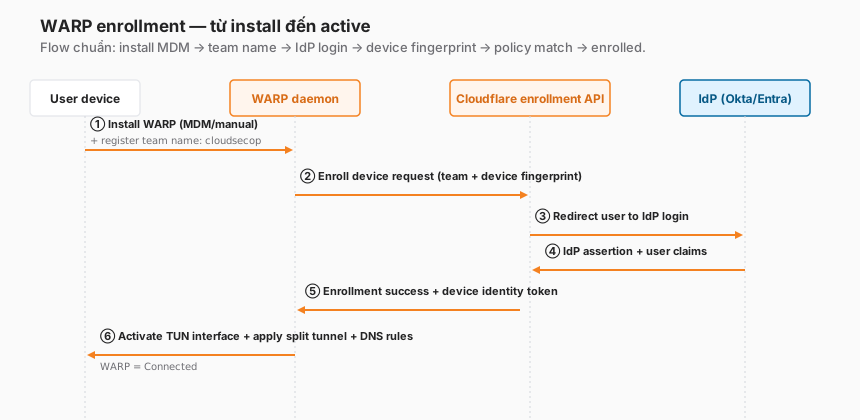
Six end-to-end steps
① Install WARP client — manual or via MDM (details in the “Deployment” section).
② Register team name — user enters <team> in the WARP UI. Or MDM pushes a configuration with the team name pre-set. The WARP daemon calls the Cloudflare enrollment API with a device fingerprint (hardware ID, OS info).
③ CF redirects to the IdP — the user’s browser is redirected to the IdP login page (Okta/Entra/Google). For one-time PIN, the user enters their email and receives a PIN by mail.
④ IdP returns claims — after login, the IdP redirects back to the CF callback with user identity + group claims.
⑤ Binding + token — CF binds the device cert ↔ user identity and returns a device identity token to the WARP daemon.
⑥ Activate — the WARP daemon creates a TUN interface, applies split-tunnel rules, and configures DNS. WARP status = Connected.
Policy controls who can enroll
Before allowing enrollment, CF checks Device enrollment permissions (Zero Trust → Settings → WARP Client → Device enrollment permissions). The rule is similar to an Access policy:
include:
  - emails_ending_in: "@example.com"
  - groups: [Engineering, Platform, Admin]
require:
  - mfa_method: [FIDO2, TOTP]
exclude:
  - country: [KP, RU]
If the user does not match the rule → enrollment is rejected.
Device posture — built-in vs third-party integrations
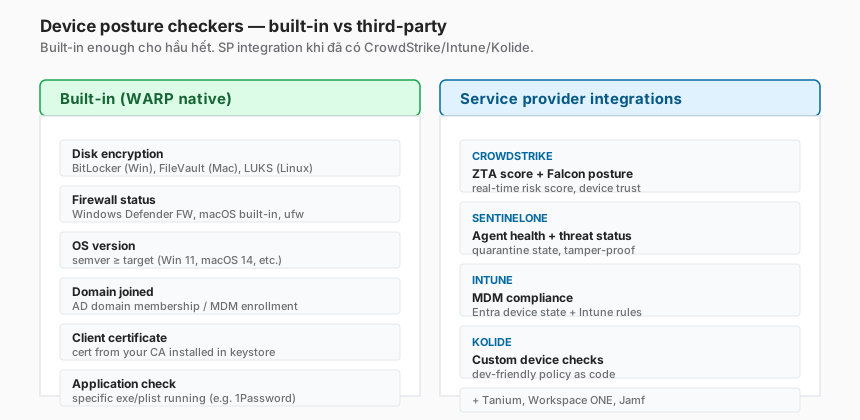
Built-in checkers
WARP collects signals directly from the OS:
| Check | Windows | macOS | Linux |
|---|---|---|---|
| Disk encryption | BitLocker | FileVault | LUKS |
| Firewall status | Windows Defender | built-in FW | ufw/firewalld |
| OS version | WMI | system_profiler | /etc/os-release |
| Domain joined | AD domain | Active Directory Mobility | n/a |
| Client certificate | Certificate Store | Keychain | PEM file |
Built-in covers most baseline cases (the device is corporate-issued, the OS is up to date, disk encryption is on). Orgs that already have EDR/MDM usually want the third-party integrations below on top of this.
Third-party integrations (EDR / MDM)
When the organisation already invests in EDR/MDM:
- CrowdStrike Falcon — ZTA score (0–100), device trust level from the Falcon console.
- SentinelOne — agent health, tamper-proof status.
- Microsoft Intune — MDM compliance state from Entra.
- Kolide — policy-as-code, developer-friendly custom checks.
- Jamf (macOS), Tanium, Workspace ONE — also supported.
Setup: Zero Trust → Settings → WARP Client → Device posture providers → connect the SP account with an API key.
When to pick what
- Startup / team < 100 — built-in is enough. No extra vendor.
- Enterprise with EDR — integrate the SP for a centralised view. The security team already uses the EDR dashboard.
- Compliance-heavy — integrate Intune if MDM is already through Entra (reduces duplicate audit trails).
Posture check frequency
- Built-in: every 1 minute (configurable).
- SP integration: depends on the SP API — CrowdStrike ~5 minutes, Intune ~15–30 minutes.
Policy evaluation uses the most recent snapshot. Cached in the daemon, not strictly real-time.
Split tunnel — two modes
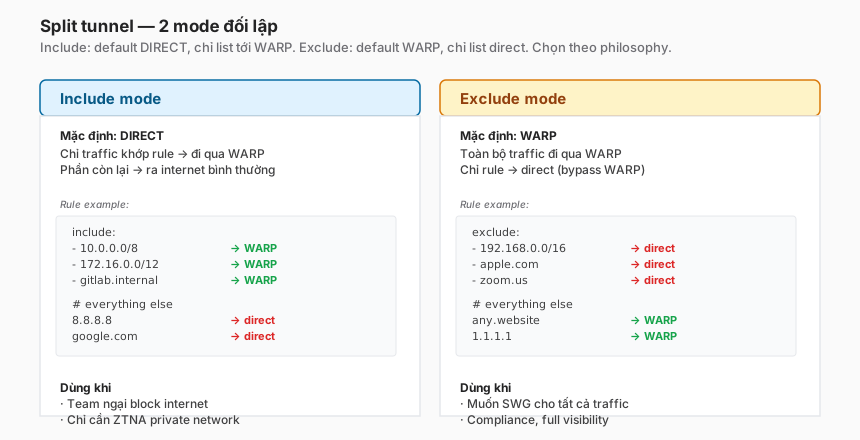
Include mode
Default: traffic goes direct (not through WARP). Only destinations matching a rule go through WARP.
Include list:
  - 10.0.0.0/8         # private network
  - 172.16.0.0/12
  - gitlab.internal    # specific hostname
  - *.corp.example.com
Philosophy: “WARP is a tool for ZTNA, not a full-traffic VPN”. Use when:
- The team is reluctant to block the user’s Internet traffic.
- Only private-network access is needed.
- Avoid latency for traffic that doesn’t need security policy (Zoom, Google Drive).
Exclude mode
Default: all traffic goes through WARP. Only destinations matching a rule bypass.
Exclude list:
  - 192.168.0.0/16     # home LAN
  - apple.com           # macOS updates
  - zoom.us             # video call
Philosophy: “WARP is an SWG for the entire Internet”. Use when:
- Compliance requires full visibility (HIPAA, PCI).
- Full DLP / category filtering for all traffic.
- The latency overhead is acceptable.
Decision
In practice, exclude mode fits security-heavy organisations; include mode fits developer-heavy ones.
Start with include mode (less disruptive), migrate to exclude once the team is ready for full SWG.
Local host exceptions
Whitelist is required for:
- DHCP / ARP (automatic)
- mDNS (Bonjour, printer discovery)
- Printer IPs on home networks (if the user prints from home)
- Captive portals (airport/hotel wifi)
The WARP client excludes these protocols by default in include mode. Configure them manually in exclude mode.
DNS resolution
DNS is the biggest gotcha during a WARP rollout. The reason: corporate internal DNS zones cannot be routed through Cloudflare.
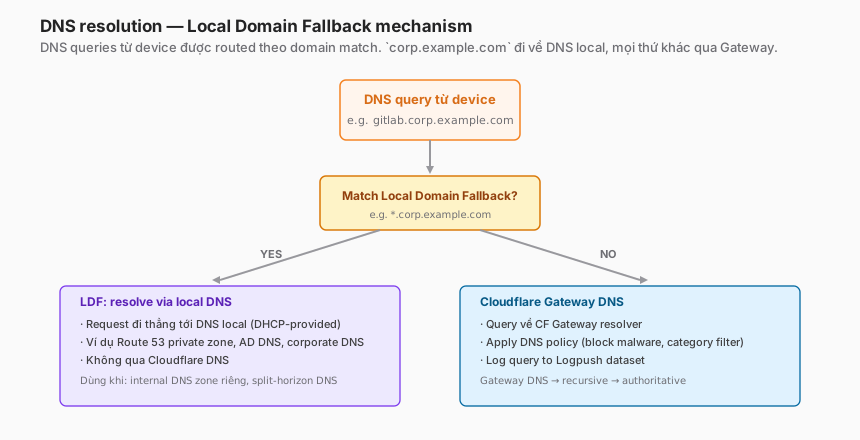
Two possible paths
Path 1 — Cloudflare Gateway DNS (default for any query).
- The query goes to the CF Gateway resolver.
- DNS policy applies (block malware category, log).
- Recursive resolution.
Path 2 — Local Domain Fallback (LDF).
- Query matches a rule like
*.corp.example.com→ bypasses Gateway. - Query goes straight to the local DNS (from DHCP or manual configuration).
- Used for internal zones that only the corporate DNS knows (Route 53 private zones, AD DNS, corporate DNS).
Setting up LDF
Zero Trust → Settings → WARP Client → Local Domain Fallback → Add:
corp.example.com(the entire internal zone)*.internal10.in-addr.arpa(reverse DNS for private IP ranges)
Without LDF, users cannot resolve gitlab.corp.example.com — the request fails at the DNS step, before Access/Tunnel are even involved.
Split-horizon DNS
Corporate environments often split horizons: app.example.com resolves to a public IP publicly and a private IP internally. With WARP + LDF:
- LDF rule for
example.com→ internal DNS sees the private IP → WARP routes through the tunnel. - No LDF → public DNS through Gateway → public IP → user reaches the app via the direct path (bypassing ZTNA).
Designing LDF is security-critical, not just convenience.
Deployment options
Manual install (for pilots)
macOS:
# Download from dash.teams.cloudflare.com
# Open the .pkg, install, launch the app
# Tab: enter team name → follow IdP loginWindows:
# Download the .msi
msiexec /i Cloudflare_WARP.msi /quiet
# Configure team name via GUI or command:
Set-WarpOrg -Organization "<team>"Linux:
# Debian/Ubuntu
curl -fsSL https://pkg.cloudflareclient.com/install.sh | sudo bash
sudo apt install cloudflare-warp
warp-cli register
warp-cli teams-enroll "<team>"
warp-cli connect
MDM deployment (for production)
Intune (Windows/macOS):
- Upload an
.intunewinpackage. - Configure a deployment profile with the team name.
- Assign to the user group.
Jamf (macOS):
- Upload the
.pkg. - Configure a configuration profile.
- Scope to the device group.
Workspace ONE / JumpCloud: similar.
Mass deployment best practices
- Pre-seed the team name via MDM config → users don’t type it.
- Auto-enroll with silent install → fewer helpdesk tickets.
- Pilot wave of 10–50 users before the fleet deployment.
- Opt-out mechanism for edge cases (engineers with custom network setups).
Troubleshooting — six common cases
1. “WARP cannot connect”
Step-by-step check:
# 1. Daemon running?
# macOS
sudo launchctl list | grep warp
# Linux
sudo systemctl status warp-svc
# Windows
Get-Service Cloudflare* | Where-Object {$_.Status -eq 'Running'}

# 2. Network reaches Cloudflare?
curl https://cloudflareclient.com/v0a/connect_test
# Should return 200

# 3. Firewall allows UDP 2408?
# If blocked → MASQUE fallback. Check status in the app UI.
Common causes:
- Corporate firewall blocks UDP → MASQUE should auto-fall back, but sometimes fails.
- DNS cannot resolve Cloudflare endpoints →
nslookup cfd-hw.cloudflareclient.com. - Typo in the team name.
2. “Enrollment failed: user not allowed”
Device enrollment permissions are denying the user. Check:
- Zero Trust → Settings → WARP Client → Device enrollment permissions.
- Review the include/require/exclude rule.
- Verify the user’s email / group claims from the IdP match the expected rule.
3. “Posture check failing”
WARP is connected, but Access policies with device_posture still deny.
# Check what WARP is reporting
warp-cli debug posture
# Or in GUI: Settings → Preferences → Diagnostics → Posture
Common causes:
- Disk not encrypted: the user hasn’t turned on BitLocker/FileVault.
- Check name mismatch: the policy expects
disk_encrypted, WARP reportsbitlocker_enabled. Align the names. - SP integration lag: CrowdStrike posture hasn’t synced. Wait 5–10 minutes.
4. “Cannot resolve internal hostname”
# Before WARP: nslookup gitlab.corp.example.com → works (via corporate DNS)
# After WARP: nslookup gitlab.corp.example.com → NXDOMAIN
Cause: no LDF rule for corp.example.com.
Fix: Zero Trust → Settings → WARP Client → Local Domain Fallback → add.
5. “Browsing is slow after installing WARP”
Common causes:
- The user is far from the nearest Cloudflare PoP (rare with 330+ PoPs, but possible).
- Exclude-mode split tunnel with too-broad rules → traffic that should have been fast goes through WARP.
- MASQUE fallback is active (UDP blocked) → TCP-over-TCP overhead.
Debug:
warp-cli settingsto check the mode.- Check connected PoP: WARP UI → About →
Connected to: <PoP>. - Test speedtest: speed.cloudflare.com.
6. “Battery drain on laptop/phone”
The WARP daemon is usually < 2% CPU at idle. If it’s higher:
- Antivirus is inspecting TUN traffic — exempt the WARP process.
- Posture checks are too frequent → reduce frequency.
- WireGuard keepalive too high — default 25s is fine, don’t tune manually.
Trade-offs
| Decision | Option A | Option B | Recommendation |
|---|---|---|---|
| Deployment method | Manual pilot | MDM | Manual for < 50-user pilots, MDM for production. |
| Split tunnel mode | Include (ZTNA only) | Exclude (full SWG) | Include for developer-heavy, Exclude for compliance-heavy. |
| Posture source | Built-in | SP integration | Built-in to start. SP once EDR is mature. |
| Team name | Company brand | Generic | Company brand — users search by name, less confusion. |
| Auto-enroll | Silent MDM | User-initiated | Silent for most, opt-out for edge cases. |
| WireGuard vs MASQUE preference | Auto | Force MASQUE | Auto — the WARP client picks the best option. |
Checklist — before fleet-wide WARP deployment
Planning:
- Team name chosen, documented in the IT wiki.
- Device enrollment permissions rule set.
- Posture providers (SP) connection tested OK.
- LDF rules for every internal zone.
- Split tunnel mode decided (include / exclude).
- Opt-out policy for engineers with custom network setups.
Deployment:
- Pilot of 10–20 users first.
- MDM package tested (silent install).
- Rollback plan: uninstall procedure documented.
- Helpdesk runbook for the six cases above.
Operations:
- Monitoring on enrollment success rate.
- Alert when posture check fail rate > 5%.
- Dashboard for DEX-style metrics (Part 18).
- Quarterly audit: users enrolled vs. total fleet, posture compliance.
Lessons from practice
- Missing LDF is bug #1 after a WARP rollout. Users complain “internal site unreachable” → 80% of the time it’s a missing LDF rule. Test LDF with
nslookupfrom a WARP device. - Split-tunnel mode does not hard-switch mid-flight. If the rollout went with include mode, switching to exclude changes fleet-wide behaviour. Plan the migration carefully, pilot first.
- SP posture integration has lag. CrowdStrike posture can lag 5–10 minutes. Policies requiring posture strictly and immediately → users complain “posture fails even though my laptop has EDR”. Education + SLA expectations.
- WARP does not automatically turn into a “block-all-traffic” VPN. A team expecting WARP to block 100% of unwanted user traffic out of the box is wrong. WARP is the tool; policy configuration decides the behaviour.
- Battery impact is near-zero if the daemon is healthy. When users complain about battery drain, it is usually too-frequent posture checks or AV conflict, not WARP by nature.
Summary
WARP is the client-side counterpart to Cloudflare Tunnel — bringing the device onto the Cloudflare network, binding identity, collecting posture, routing by split tunnel. Without WARP done correctly, Access/Gateway policies that depend on device_posture are just text in a dashboard — nothing actually enforces them.
Where to invest:
- MDM-based deployment — silent, not dependent on the user.
- LDF rules before go-live — without them, internal DNS fails.
- Split tunnel mode decision — include vs exclude, pick one, stick with it.
- Posture SP integration — when EDR exists, leverage it for richer signals.
- Troubleshooting runbook — the six cases above cover 90% of helpdesk tickets.
One line to remember:
WARP is the “eye and hand” of Zero Trust at the endpoint. Without WARP,
device_posturepolicy is wishful thinking. With WARP deployed correctly, ZTNA policy works as designed.
Part 10 covers Magic WAN — when WARP (user-level) is not enough and network-level site-to-site tunnels through Cloudflare are required.
References
- WARP client overview
- Device enrollment permissions
- Device posture
- Split tunnels
- Local Domain Fallback
- MDM deployment
In this series:
