
TL;DR
Device posture is the signal about a device’s security state at every request, not just at login. It detects compromise, compliance drift, and stolen devices after the user has authenticated — the core of Zero Trust’s “never trust, always verify”.
Four layers of posture signal:
- WARP built-in checks — OS version, disk encryption, firewall on, application running.
- EDR integration — CrowdStrike Falcon, SentinelOne, Microsoft Defender: is the device actively protected in real time?
- MDM integration — Intune/Jamf: does the device meet the compliance policy?
- Custom service-to-service — webhook posture providers you define yourself.
This post covers:
- Why login-time verification isn’t enough.
- WARP client checks — the native posture signal list.
- EDR integration setup + failure-mode considerations.
- Continuous evaluation — Access re-verifying every N minutes.
- Response playbook — device fails posture → kill session, alert SOC, remediate.
- Layered posture policy — tiered access by posture level.
The thesis:
Authentication is “who are you?” asked once. Device posture is “what’s the state of your machine?” asked continuously. A user can log in clean at 9am and click malware at 10am — without continuous posture checks, the attacker holds a valid token and Access doesn’t notice. Posture-based continuous verification is the only way to close that loop.
This is Part 16 of the Cloudflare One Handbook, closing the Observability & Ops block and opening the Advanced Security block (Parts 17+).
Who this is for
- Security engineers building Zero Trust policy with device-aware signals.
- EDR administrators (CrowdStrike, SentinelOne, Defender) who want to feed telemetry into access decisions.
- Compliance teams that need to prove “verify” happens continuously, not only at login.
Recommended prior reading:
- Part 4 — Cloudflare Access (policy evaluation context).
- Part 9 — WARP (posture signal source).
- Part 14 — Logs (posture results stream).
After this post you will:
- Know the list of native posture checks WARP provides.
- Configure EDR integrations (CrowdStrike ZTA, SentinelOne, Defender).
- Write Access policies that use posture conditions.
- Design a response when a device fails posture mid-session.
- Tier access by posture level (corporate-managed > BYOD managed > BYOD unmanaged).
What this post does not cover
- Endpoint protection vendor comparison in depth — only the integration angle.
- MDM (Intune/Jamf) policy design in detail — separate post.
- Full SOC response playbooks — briefly mentioned.
- Compliance framework detail (CIS, NIST 800-171) — mapping only.
- UEBA (User Entity Behavior Analytics) — different dataset, briefly mentioned.
Concepts
- Posture — the security state of a device at evaluation time: OS version, disk encrypted, firewall on, EDR agent running, compliance state.
- Posture provider — the source that emits the signal. Native (WARP), SaaS (EDR vendor), or custom (webhook).
- Posture check — a rule combined with a provider signal. E.g. “CrowdStrike ZTA score ≥ 50”.
- Continuous evaluation — Access re-checking posture every N minutes or per request, not only at login.
- Access policy — the rule that gates device access to an app, potentially including posture conditions.
- EDR — Endpoint Detection and Response: CrowdStrike, SentinelOne, Defender for Endpoint, Carbon Black, Cortex XDR.
- ZTA (Zero Trust Assessment) — CrowdStrike’s name for their posture score.
- Session token — the JWT issued by Access after login + policy pass; valid 15min–24h.
Why login-time verification isn’t enough
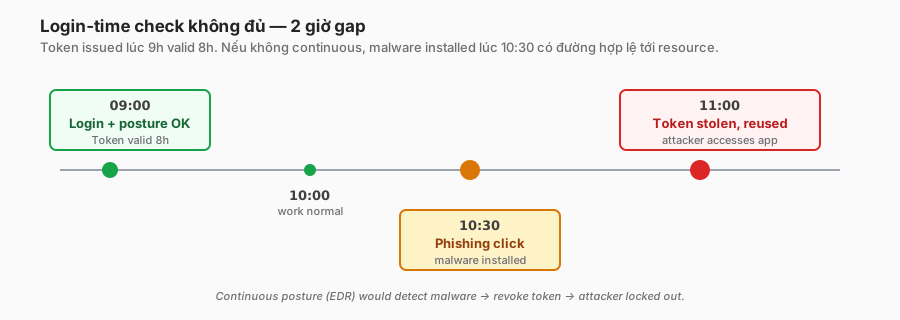
Scenario
- 9:00: Alice logs into Salesforce through Access. Posture check passes (firewall on, OS updated, disk encrypted). Token valid 8 hours.
- 9:30: Alice is working fine. No alerts.
- 10:30: Alice clicks a phishing email. A dropper runs. A credential stealer calls C2.
- 10:45: The malware dumps Chrome credentials → SSO token stolen.
- 11:00: The attacker uses the token, accesses Salesforce from another IP.
- Classic Access: the session is still valid (within the 8h window). Token verifies OK. The request passes.
- Continuous posture: CrowdStrike raises an alert → ZTA score drops → Access re-evaluates → policy fails → session killed.
Login-time verify is a snapshot, not continuous
Traditional ZTNA gates at login. A token is issued after auth + checks. That token is reused for every request in its TTL. The token does not carry real-time signals — it only says “at 9am everything was OK”.
The “never trust, always verify” principle only holds if verification happens every request (or at least every N minutes).
Posture signal types
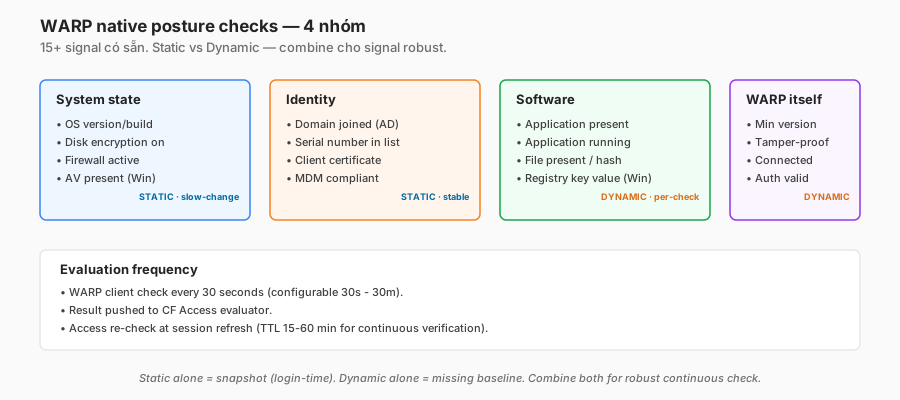
Static signals (checked once or rarely change):
- OS version.
- Disk encrypted (BitLocker, FileVault).
- Serial number / machine ID.
- Domain-joined.
- Certificate presence.
Dynamic signals (can change every minute):
- EDR agent running and healthy.
- EDR threat score (CrowdStrike ZTA).
- Firewall active.
- Required app running (e.g. DLP agent).
- Network health (secure wifi, not a public AP).
Continuous verification focuses on dynamic signals.
WARP built-in posture checks
Native check list
The Cloudflare WARP client collects around 15 signal types:
| Check | Platform | Example |
|---|---|---|
| OS version | Win, Mac, Linux, iOS, Android | macos_version >= 14.0 |
| Domain joined | Windows | Joined to the corporate AD |
| Disk encryption | Win (BitLocker), Mac (FileVault) | on/off |
| Firewall | all | on/off |
| Anti-virus | Win | Defender present |
| Application present | all | Chrome installed |
| Application running | all | DLP agent active |
| File present | all | /etc/corp-config.ini exists |
| File hash | all | SHA256 matches expected |
| Registry key | Win | Key value matches |
| Serial number | all | In approved list |
| Certificate | all | Cert issued by corp CA present |
| MDM compliant | Intune, Jamf | Compliant flag |
| Client version | WARP | Minimum version |
| Tamper-proof | WARP | WARP binary not modified |
Example configuration
posture_check:
  name: "corp-required-baseline"
  platforms: ["windows", "macos"]
  checks:
    - type: os_version
      operator: ">="
      value: "windows 10 build 19045"  # or macos 14.0
    - type: disk_encryption
      value: "on"
    - type: firewall
      value: "on"
    - type: application_present
      application: "com.crowdstrike.falcon.agent"
    - type: serial_number
      list: "$corp-serial-approved"  # UUID list from MDM export
Evaluation frequency
- The WARP client runs checks every 30 seconds (configurable 30s–30m).
- Results push to the CF Access evaluator.
- Access re-checks posture at each session refresh (configurable, 1h default).
For continuous verification, reduce the token TTL to 15–30 minutes → posture is re-checked on every refresh.
EDR integration
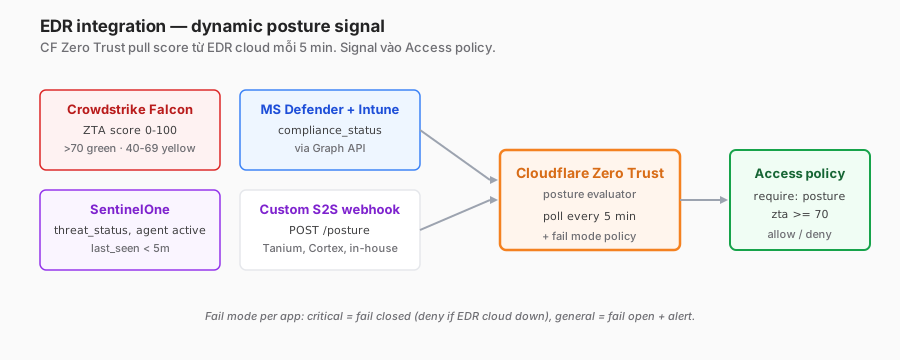
Supported EDRs
- CrowdStrike Falcon ZTA — native integration, posture score 0–100.
- SentinelOne — device health status via API.
- Microsoft Defender for Endpoint — compliance via the Graph API.
- Tanium — agent compliance.
- Carbon Black — custom via API.
CrowdStrike ZTA integration
- CrowdStrike dashboard → API Clients → create a client with scope
ZTA:read. - Cloudflare Zero Trust → Settings → Device posture → Add integration → CrowdStrike → enter the API credentials.
- CF pulls the ZTA score every 5 minutes per enrolled device.
- Use in policy:
posture_check:
  name: "CrowdStrike healthy"
  type: crowdstrike
  zta_score_minimum: 70
  overall_status: "pass"
ZTA score interpretation:
- 70–100: Green — healthy, minimal risk.
- 40–69: Yellow — some concern.
- 0–39: Red — active threat detected.
Microsoft Defender integration
Requires Azure AD + Intune context. The Intune compliance signal is exposed via the Graph API.
posture_check:
  name: "Intune compliant"
  type: intune
  compliance_status: "compliant"
SentinelOne integration
posture_check:
  name: "SentinelOne active"
  type: sentinel_one
  threat_status: "resolved"
  agent_last_active_within: "5m"
Data-flow considerations
- Latency: EDR cloud → CF polling — a typical 5-minute delay.
- Availability: EDR cloud outage → CF can’t pull posture → what does the policy do?
- Fail closed: deny access (strict, Zero Trust pure).
- Fail open: allow with a warning (lenient).
- Recommendation: fail closed for critical apps, fail open with elevated logging for general access.
API quota
- EDR vendors rate-limit the API.
- 10K devices → ~2K calls/hour for ZTA data.
- Check the contract quota; upgrade if at scale.
Custom service-to-service posture
Use case
The EDR isn’t natively supported → build custom.
Webhook pattern
Custom posture provider (your service)
  ↓ push
POST https://posture.cloudflareaccess.com/webhook
  { "device_id": "d_xyz", "status": "pass", "score": 85, "timestamp": ... }
  ↓
Cloudflare validates
  ↓
Access policy evaluates with the custom signal
Setup
- Cloudflare Zero Trust → Device posture → Add integration → Service to service.
- Get the webhook URL + API key.
- Your service POSTs device state on a regular cadence.
When to use custom
- Vendor not supported (Trellix, F-Secure, Sophos).
- Need combined signals (EDR + vulnerability scanner + network hygiene).
- In-house security tooling.
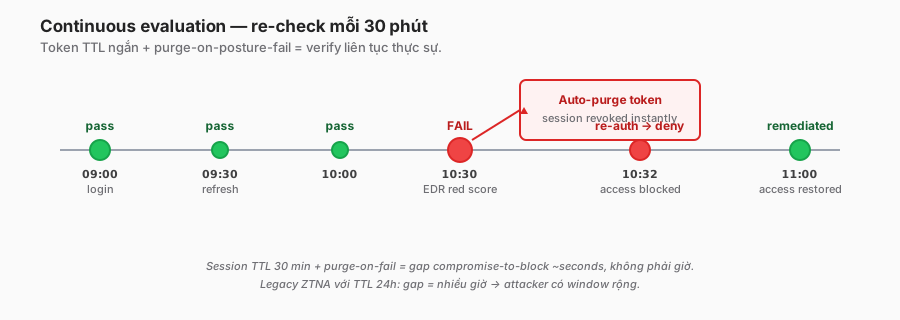
Continuous evaluation — Access policy
Policy pattern
application: "salesforce"
policies:
  - name: "Allow if posture OK"
    action: allow
    include:
      - email_domain: "company.com"
    require:
      - posture:
          name: "corp-required-baseline"
      - posture:
          name: "CrowdStrike healthy"
    session_duration: "30m"  # short TTL = frequent re-check
require = ALL must match. include = any matches.
Short session TTL
- Default Access session: 24h.
- Posture-aware: 15–30 minutes for sensitive apps.
- Each refresh re-evaluates the entire policy, including posture.
Force re-auth on posture change
Cloudflare supports Purge tokens on posture failure (beta at time of writing).
Flow:
- Device fails a posture signal.
- CF posture evaluator marks the device non-compliant.
- The Access token is revoked immediately (not waiting for expiry).
- User’s next request → re-auth + re-posture check.
- If the device is still bad → deny.
Middleware pattern — Access Workers integration
For ultimate control, pair Access + Cloudflare Workers:
// Worker in front of a critical app
export default {
  async fetch(request, env) {
    const jwt = request.headers.get("cf-access-jwt-assertion");
    const identity = await verifyJWT(jwt, env.AUD);

    // Real-time posture check via API
    const posture = await fetch(
      `https://api.cloudflare.com/client/v4/accounts/${env.ACCOUNT}/devices/${identity.device_id}/posture`,
      { headers: { Authorization: `Bearer ${env.API_TOKEN}` } }
    ).then(r => r.json());

    if (posture.result.crowdstrike_score < 70) {
      return new Response("Posture insufficient", { status: 403 });
    }

    return fetch(`https://origin.corp.internal${new URL(request.url).pathname}`, request);
  }
};
Per-request verification. Expensive (an API call per request), reserve for the highest-risk apps.
Response playbook — posture fails
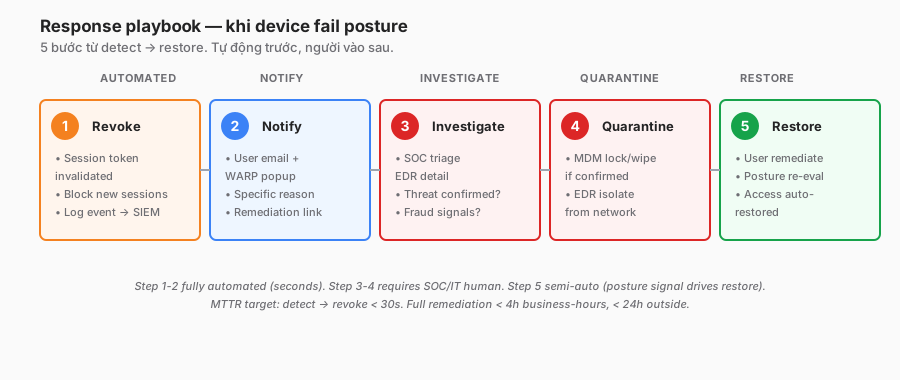
Immediate actions (automated)
- Revoke session — Access token invalidated.
- Block new sessions — the user lands on the login page with a posture error.
- Log the event —
access_requests+device_posture_results→ SIEM.
Notifications
- User: email + WARP popup: “Your device failed a security check. Contact IT to restore access. Error: [specific reason]”.
- SOC/IT: PagerDuty alert, especially for EDR red scores (active threat).
- Manager: if the issue persists.
Investigation (manual or semi-automated)
- SOC: check EDR detail, identify the threat type.
- IT: verify the user isn’t compromised (fraud signal, impossible travel).
- Isolation: EDR isolates the device from the network if active malware is present.
Remediation
- User guided remediation: run AV scan, update OS, re-encrypt disk.
- IT verifies remediation: posture signals are re-evaluated.
- Access restored automatically once posture improves.
Quarantine via MDM
For confirmed compromise: the MDM wipes the device + re-provisions. Not just a posture block.
Documentation
- Every posture failure is logged.
- SOC triage ticket opened per red-score event.
- Monthly review: false-positive rate, remediation time.
Layered posture — tiered access
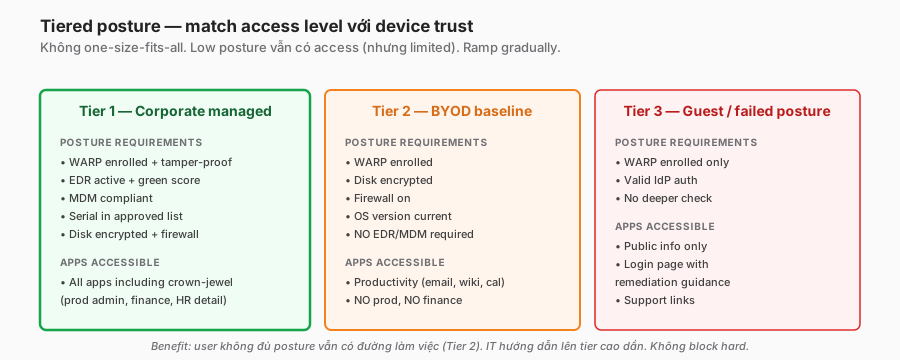
Not every user needs full posture. Tier by risk:
Tier 1 — Fully managed corporate device
Posture: WARP + EDR + MDM compliant + disk encrypted + firewall + serial in list.
Access: all apps, including crown-jewel systems (production, finance, HR details).
Tier 2 — BYOD with partial posture
Posture: WARP + disk encrypted + firewall (no EDR/MDM).
Access: productivity apps (email, wiki, calendar). No production, no finance system.
Tier 3 — Guest / failed posture
Posture: WARP enrolled only, no deeper checks.
Access: public info only. A login page with remediation help.
Policy example
- application: "prod-admin"
  policies:
    - action: allow
      require:
        - posture: ["corp-baseline", "crowdstrike-green", "mdm-compliant"]

- application: "company-wiki"
  policies:
    - action: allow
      require:
        - posture: ["warp-enrolled", "firewall-on"]

- application: "public-info"
  policies:
    - action: allow
      include:
        - email_domain: "company.com"
A gradual ramp: a user who doesn’t meet high-tier posture can still access lower-tier apps → IT gradually improves the device.
Security considerations
Posture spoofing
A user with local admin can:
- Fake the WARP posture state.
- Silently disable the EDR.
- Modify registry keys.
Mitigations:
- WARP tamper-proof check: binary integrity verification.
- EDR self-protection: the agent process can’t be terminated.
- Combine signals — harder to spoof all at once.
- Monitor: a device suddenly flipping all-green after prolonged red is suspicious.
EDR agent as an attack target
EDR runs privileged. Bypass = control of the device. A known APT playbook:
- Disable the EDR service.
- Uninstall the agent (if admin).
- Kernel-level rootkit.
Mitigations:
- EDR tamper protection + self-heal.
- Alert on agent disconnects > 10 minutes.
- Combine EDR with behaviour monitoring (make “suddenly healthy” impossible).
Privacy of posture data
Posture checks collect OS, disk state, and app lists — potentially privacy-sensitive, especially on BYOD.
Guidance:
- Document what’s collected in the privacy notice.
- BYOD: collect the minimum (OS version, disk encryption, firewall). Skip app inventory.
- EDR: corporate devices only. EDR on BYOD crosses the privacy line.
- Retention: posture results 30–90 days maximum.
Fail-open vs fail-closed
EDR cloud outage → CF can’t fetch posture. Decision:
- Fail closed: deny everything that relies on the EDR signal. Secure but ops impact.
- Fail open: allow with a warning. Less secure but maintains business continuity.
- Hybrid: critical apps fail closed; general apps fail open with elevated logging.
Choose per app sensitivity, not globally.
Compliance mapping
- NIST CSF: PR.AC-1 (identities managed), PR.DS-1 (data at rest protected), PR.IP-12 (vulnerability management).
- ISO 27001: A.8.1 (asset inventory), A.8.9 (secure configuration), A.8.16 (monitoring).
- CIS 18: Control 4 (secure configuration of enterprise assets), Control 10 (malware defences).
- PCI DSS 4.0: 5.x (malware protection), 2.x (secure configuration).
Troubleshooting
”A user fails posture but says the device is OK”
- Dashboard → Device posture → per-device → see each check status.
- Identify the failing check — a specific signal.
- Common causes: EDR agent updating, WARP temporarily disconnected, firewall disabled by another app (Zoom, Teams in dev).
- User remediates per the guide → posture re-check in 1–5 minutes → access restored.
”EDR integration isn’t pulling data”
- Verify the API credentials are still valid (an EDR admin may have rotated them).
- Check the EDR API quota isn’t exceeded.
- Cloudflare → integration status page — see the last successful pull.
- EDR side: verify device enrollment (is the agent registered?).
”Continuous verification is too aggressive; users log out often”
- Session TTL too short (5 minutes) for normal use.
- Increase to 30–60 minutes with purge-on-posture-fail instead.
- Balance: shorter = more secure; longer = less friction.
”Posture check is slow; the login page delays”
- A synchronous check at login: every check runs serially → slow.
- Cloudflare runs them in parallel; a slow check is likely a network path to the provider.
- Reduce the number of login-time checks; do async posture eval post-login.
”EDR false-positive red score on a healthy device”
- The EDR vendor may flag legitimate corporate software.
- Add an EDR exclusion (talk to the EDR admin).
- Temporary policy override: allow the device while investigating.
- Track the false-positive metric monthly — > 5% = noise.
Trade-offs and design decisions
| Decision | Option A | Option B | Recommendation |
|---|---|---|---|
| Session TTL | 24h (legacy) | 15 min (Zero Trust) | 30–60 min with posture re-check + purge on fail. |
| EDR fail mode | Fail open | Fail closed | Per app tier: critical closed, general open + log. |
| BYOD posture depth | Full (EDR) | Minimal (firewall + disk) | Minimal. EDR on BYOD is a privacy red flag. |
| Posture provider | One (EDR only) | Combine multiple | Combine — harder to spoof, more resilient to vendor outage. |
| Remediation | Manual ticket | Automated script | Automated for common issues (restart EDR), manual for novel. |
| Quarantine action | MDM lock | MDM wipe | Lock + investigate; wipe only after confirmed compromise and accepted data loss. |
Checklist — production continuous posture
Baseline:
- WARP enrolled on all managed devices.
- Native WARP checks defined (OS, disk, firewall, serial).
- Serial list imported from MDM + rotation process.
EDR:
- EDR integration configured (CrowdStrike, SentinelOne, Defender).
- API-credential rotation schedule.
- Fail mode defined per app tier.
- API-quota monitoring.
Access policy:
- Tier 1 (corporate) policy with full posture requirement.
- Tier 2 (BYOD) policy with minimal posture.
- Tier 3 (guest) policy minimal.
- Session TTL 30–60 min for critical apps.
- Purge-on-posture-fail enabled.
Response:
- Revoke automation validated.
- User notification template.
- SOC runbook for red posture.
- MDM integration for quarantine.
- Remediation guide published.
Monitoring:
- Posture results via Logpush → SIEM.
- Dashboard: pass rate, top failure reasons.
- Alert: EDR agent disconnect > 10 minutes per user.
- Alert: posture-fail spike per group.
- False-positive metric tracking.
Documentation:
- Privacy notice updated.
- Explicit BYOD policy.
- User remediation FAQ.
- Runbook: “posture fail” triage.
Lessons from practice
- Start minimal, tighten gradually. Launch with 3–5 checks, add based on data. Overloading day one = user friction + helpdesk load.
- EDR integration has the biggest ROI. Native checks are static; EDR is dynamic and catches real-time threats. Worth the investment.
- Shortening session TTL triggers a strong user reaction. 24h → 30 minutes = a helpdesk wave in week one. Communication + phasing matter.
- BYOD posture depth is thorny. Full checks cross the privacy line. Minimal checks give a weak signal. Tiered access is the sane compromise.
- EDR vendor outages happen. Define the fail mode beforehand, not during the incident. Test fail open vs closed quarterly.
- Posture logs contain PII-adjacent data. Retention + access control. Don’t share posture logs broadly.
- Quarterly posture policy review. New EDR features, new OS versions, new threats → update rules. Stale posture = security theatre.
- Measure false positives obsessively. Users blocked incorrectly more often than correctly = users find bypasses. 2–3% FP is acceptable; 10%+ means tuning is required.
Summary
Device posture is the “verify” in “never trust, always verify”. Authentication answers “who”; posture answers “what state is the machine in”. Combining them + continuous = real Zero Trust.
Production recipe:
- WARP native checks as a cheap, broad baseline.
- EDR integration for dynamic signals (CrowdStrike / SentinelOne / Defender).
- Custom webhook when a vendor isn’t supported.
- Short session TTL + purge-on-fail for continuous behaviour.
- Tiered access by posture level — no one-size-fits-all.
One line to remember:
Authentication is “who?” asked once. Device posture is “are you still trustworthy?” asked every minute. Drop posture and Zero Trust is walking on one leg.
That closes the Observability & Ops block (Parts 14–16).
The series continues with the Advanced Security block: Browser Isolation, CASB, DLP, Email Security (Area 1) — each post digging into one capability.
References
- Device posture overview
- WARP native posture checks
- CrowdStrike Falcon ZTA
- SentinelOne integration
- Intune integration
- Service-to-service webhook
In this series:
- ← Part 15: DEX
- Next → Part 17: Browser Isolation (RBI)
- All parts: Cloudflare One Handbook series
