
TL;DR
DLP (Data Loss Prevention) is not a “turn it on and it works” tool. It is a program: continuous tuning, user education, tolerating imperfection. The pattern engine scans content traversing the Gateway or sitting in SaaS, looking for PCI/PII/secret/IP — but on its own, it is mostly wrong at the start.
Let me open with a real case study (a ~400-person company, DLP rollout 2024): week 1 false-positive rate was 55%. By week 6 it was down to 3%. The difference was not a different tool, it was a different methodology.
This post walks through (in real rollout order):
- A week-by-week case study from 55% FP down to 3%.
- Pattern anatomy: why regex on its own is useless, and why Luhn + context + EDM are the keys.
- When regex is enough, and when EDM (Exact Data Match) is required — a concrete opinion.
- Built-in profiles and a Vietnam-specific custom profile (CCCD, bank account, mobile).
- The 5 commands I run when triaging an FP ticket.
- When not to roll out DLP (not every org needs it).
This is Part 19 of the Cloudflare One Handbook, inside the Advanced Security block.
Who this is for
- Security engineers who just turned DLP on for the first time and are now fielding 500+ “I got blocked by mistake” tickets.
- Compliance officers needing evidence of “sensitive data controls” for a PCI/HIPAA/GDPR audit.
- Platform engineers wiring DLP into CI/CD for secret scanning.
- Managers deciding “should we buy DLP?” — the final section covers when to skip it.
Prerequisites: Part 12 HTTP + TLS decrypt (inline DLP runs on this layer), Part 18 CASB (at-rest scanning shares the API).
Case study: 55% → 3% FP in 6 weeks
A 400-person org. A mix of Google Workspace, Salesforce, and internal web apps. DLP scope: inline (Gateway HTTP upload/paste) and at-rest (CASB Drive).
Enabled profiles: PCI (credit card), PII (passport, CCCD), Secrets (AWS key, GitHub PAT, JWT), Source code (React/Java patterns).
Week 1 — log-only, the shock phase
Action mode: log only. No blocking, no warning.
Total matches: 14,320 over 7 days.
Random sample of 200 triaged:
| Profile | Total (7d) | True positive | FP | FP rate |
|---|---|---|---|---|
| PCI | 4,100 | 1,230 | 2,870 | 70% |
| PII (CCCD 9-12 digits) | 6,800 | 510 | 6,290 | 92% |
| Secrets (AWS key pattern) | 1,200 | 680 | 520 | 43% |
| Source code | 2,220 | 1,400 | 820 | 37% |
| Total | 14,320 | 3,820 | 10,500 | 73% |
Leadership asked: “tool broken?” No. This is a reality check for anyone who thinks DLP pattern matching works out of the box.
Representative false positives:
- PCI: 70% FP because the internal app’s order-ID format matched a Visa regex (
4[0-9]{15}). Pattern matches, but it is not a credit card. - PII CCCD: 92% FP because the regex
\b[0-9]{9}(?:[0-9]{3})?\bmatched every 9- or 12-digit number — phone numbers with area code, transaction IDs, epoch-milli timestamps. - Secrets: 43% FP because the AWS key regex matched UUIDs and hash prefixes.
Week 2 — diagnose and tune
Action: still log-only. Tune profiles.
# Command 1: group FPs by destination host to find the main source
SELECT profile, dest_host, COUNT(*) FROM dlp_matches
WHERE week = 1 AND confirmed_fp = true
GROUP BY profile, dest_host ORDER BY 3 DESC LIMIT 20;
Result: 65% of FPs came from five internal hostnames (internal CRM, analytics tool, data warehouse admin UI). These systems are full of numbers that look like credit cards but are actually order IDs, user IDs, and transaction IDs.
Action: exclusion list — skip DLP scans when the destination is an internal admin domain. This is not a weakness, it is the correct scope (internal systems do not need exfil checks against themselves).
dlp_exclusion:
  - dest_host_in: [".internal.company.com", "admin.crm.company.com", "dw.company.com"]
  - profiles: all
Second: require context for PCI and PII.
profile: PCI
pattern:
  regex: '\b4[0-9]{12}(?:[0-9]{3})?\b'
  validations:
    - luhn_mod10
    - bin_range_visa
  context_required:
    any:
      - within_50_chars: ["card", "visa", "mastercard", "cvv", "exp", "pan"]
      - same_line: ["payment", "billing"]
Requiring context cut FPs dramatically: a bare 16-digit number sitting in a database → no flag. A 16-digit number with “card number:” 30 characters earlier → flag.
Third: CCCD profile with prefix validation.
profile: vietnam_cccd
pattern:
  regex: '\b[0-9]{12}\b'  # 12 digits only (new CCCD), drop 9-digit legacy
  validations:
    - prefix_check:
        # First 3 digits = province code, valid range 001-096
        regex: '^(0(0[1-9]|[1-9][0-9])|0[1-8][0-9]|09[0-6])'
  context_required:
    any:
      - within_30_chars: ["CCCD", "căn cước", "CMND", "chứng minh"]
Every change increases precision but lowers recall — some real cases get missed. Decision: acceptable, because DLP does not replace training plus audits.
Weeks 3-4 — still logging, measuring
After tuning, resample 200:
| Profile | Total | TP | FP | FP rate |
|---|---|---|---|---|
| PCI | 480 | 430 | 50 | 10% |
| PII CCCD | 120 | 98 | 22 | 18% |
| Secrets | 720 | 620 | 100 | 14% |
| Source code | 1,100 | 820 | 280 | 25% |
| Total | 2,420 | 1,968 | 452 | 19% |
Significantly lower. Volume dropped 10x because of the exclusion list plus context requirements. Still more tuning to do.
Week 5 — warn action for PCI and Secrets
With PCI and Secrets now under 15% FP, enable warn. The user sees an overlay — “potential sensitive data, proceed?” — and the click-through is logged.
Week 5 click-through rate:
- PCI warn: 8% of users clicked “proceed” (most accept the stop).
- Secrets warn: 12% (developer workflow — pasting a key into a secret-manager UI, legitimate).
CCCD stays log-only (FP 18% is still too high to warn).
Week 6 — block critical, steady state
Enable block on two profiles:
- AWS key leaving the org to a non-approved endpoint (not github.company.com, not secret-manager.corp).
- PCI with Luhn + BIN + context within 20 chars.
Everything else stays on warn or log.
Six weeks after enabling full DLP, tickets returned to baseline (3-5/week). The measured FP rate on a random sample: about 3%.
Lesson: every DLP tool has a high FP rate in week one. A good tool is one that is easy to tune. CF DLP has context + Luhn + BIN + validator chain built-in, so tuning is fast — six weeks to production.
Pattern anatomy — why regex alone is not enough
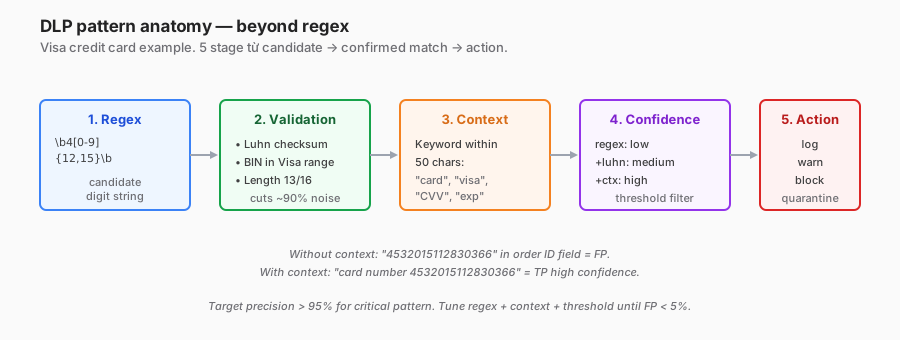
Example: Visa credit card. A simple regex:
\b4[0-9]{12}(?:[0-9]{3})?\bMatches any 13- or 16-digit string starting with 4. The problem:
4532015112830366in an order ID or transaction log — match.4321098765432109in test data — match.4111111111111111(standard test credit card) — match.
Regex alone → 60-90% FP.
Fix 1: Luhn checksum
Visa/Mastercard/Amex use the Luhn (mod-10) algorithm. A random 16-digit number fails Luhn about 90% of the time. Adding Luhn validation cuts 80-90% of the noise.
# Luhn logic
def luhn_check(card):
    digits = [int(d) for d in card[::-1]]
    checksum = sum(d if i % 2 == 0 else sum(divmod(d*2, 10))
                   for i, d in enumerate(digits))
    return checksum % 10 == 0
Fix 2: BIN range
The first 6 digits = BIN (Bank Identification Number). Visa BINs are a subset of 4xxxxx, not all of it. The test card 4111-1111-1111-1111 has BIN 411111, which is a test range, not a real issue.
Fix 3: Context
This is the secret sauce. A bare number has no meaning. A number alongside “card number:” or “visa” within 50 characters is almost certainly a credit card.
Implementation: Cloudflare DLP supports context_required rules. Cases without context → no flag.
Fix 4: Negative context (advanced)
Add anti-patterns to further reduce FPs:
context_negative:
  - within_20_chars: ["order_id", "transaction_ref", "user_id", "txn"]
If a number has “order_id” within 20 characters → explicit exclusion. This cuts remaining FPs in internal app logs.
Sensitivity vs specificity
| Strategy | Recall (catch TP) | Precision (low FP) |
|---|---|---|
| Regex only | 99% | 30% |
| Regex + Luhn | 98% | 55% |
| Regex + Luhn + BIN | 97% | 70% |
| Regex + Luhn + BIN + context | 92% | 95% |
| + negative context | 88% | 97% |
Production target: precision above 95% for any block profile. Lower than that → users bypass the tool. Recall of 85-95% is an acceptable trade-off.
Built-in profiles — which to enable from day 1
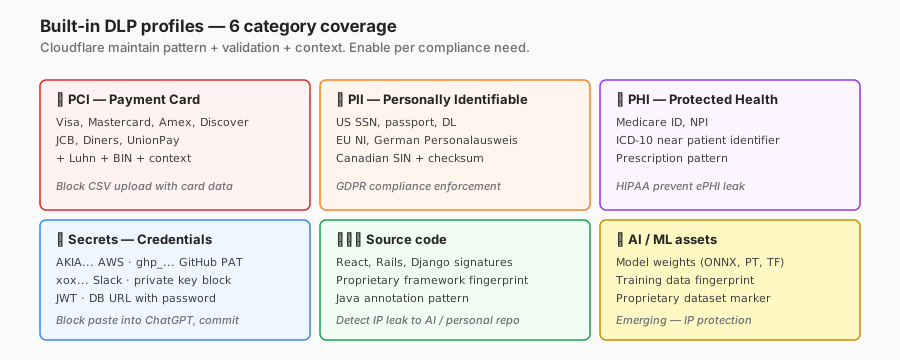
CF ships six built-in categories. My priority opinion:
Tier 1 — enable on day 1 (high ROI, predictable)
-
AWS access key (
AKIA...) + GitHub PAT (ghp_...) + private key block (-----BEGIN PRIVATE KEY-----).- Pattern is very structured, native FP under 5%.
- High severity (credential leak = immediate breach vector).
- Log-only week 1, block week 2.
-
Credit card with Luhn + BIN + context.
- FP under 10% after tuning.
- PCI compliance evidence.
Tier 2 — log-only week 1, iterate
-
National ID for the country the org operates in (US SSN, EU patterns, VN CCCD).
- High FP (20-60%) on unstructured digits.
- Require context plus prefix validation.
-
Database URL with password (
postgres://user:pwd@host/db).- Medium FP (legit config files matching).
- Block if the destination is external.
Tier 3 — advanced, wait until the team is used to DLP
-
Source code fingerprint.
- Mostly FPs because open-source code is everywhere.
- Only useful if the org has a proprietary framework — an internal fingerprint is required.
-
PHI (medical).
- HIPAA orgs only. Patterns are hard (Medicare ID, ICD-10 need patient-record context).
- Outsource to a healthcare-specialised vendor (Proofpoint Healthcare, Symantec) if serious.
Tier 4 — emerging, experimental
- Model weights / training data.
- AI IP protection emerged in 2024+.
- New patterns, not battle-tested. Keep log-only for 3+ months before blocking.
Custom patterns — Vietnam locale
Built-in does not cover the Vietnam locale. Custom patterns for three common formats:
CCCD (Vietnamese citizen ID)
name: "Vietnam CCCD"
pattern:
  regex: '\b[0-9]{12}\b'
  validations:
    - length_eq: 12
    - prefix_check:
        # First 3 digits = province code (current range 001-096)
        regex: '^(00[1-9]|0[1-8][0-9]|09[0-6])'
    - date_check:
        # Digits 4-5 = gender + century code (0-3 male, 4-7 female by century)
        pos_4: "[0-7]"
context_required:
  any:
    - within_30_chars: ["CCCD", "căn cước", "CMND", "chứng minh", "ID number"]
confidence_threshold: high
Skip 9-digit CMND (the old ID) — the FP rate is too high (every 9-digit number matches).
Vietnam bank account numbers
name: "Vietnam bank account"
pattern:
  regex: '\b[0-9]{8,16}\b'
context_required:
  any:
    - within_30_chars: ["STK", "số tài khoản", "account number"]
    - same_line_any_of: ["Vietcombank", "Techcombank", "BIDV", "MBBank", "VPBank",
                          "ACB", "Sacombank", "Agribank", "VietinBank"]
confidence_threshold: medium
Bank-name context matters. A bare account number has no meaning on its own.
Mobile phone
name: "Vietnam mobile"
pattern:
  regex: '(?:\+?84|0)(3|5|7|8|9)[0-9]{8}\b'
context_required:
  any:
    - within_30_chars: ["phone", "số điện thoại", "SĐT", "di động", "mobile"]
confidence_threshold: low
Vietnamese mobile numbers now have standardised prefixes (0[3|5|7|8|9]) — precision is fine with regex alone. Context just adds confidence.
Exact Data Match — when regex is not enough
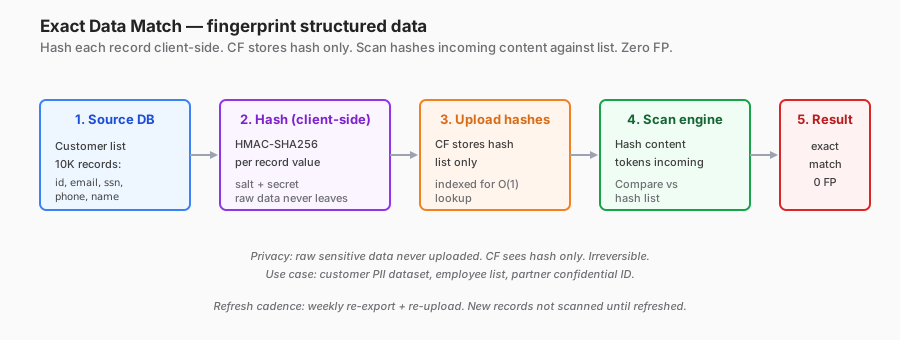
The problem regex cannot solve
A customer list with 10,000 names + emails + phones. A regex for “Vietnamese name” does not exist (names come in all shapes). A regex for emails matches every email — not specifically a customer.
How EDM solves it
- Export the dataset from the DB as CSV: email, phone, customer_id, name.
- Client-side, hash each field with HMAC-SHA256 plus a salt.
- Upload the hash list (not the raw data) to CF.
- The scan engine hashes incoming content and compares against the list.
- Exact match → flag with near-100% certainty.
Opinion: when to use EDM
Use EDM when:
- The dataset is stable (customer list, employee roster).
- The size is moderate (1K-1M records, check the CF size limit).
- Extremely low FP is required (compliance evidence, litigation defense).
- The dataset is not liberal PII (EDM requires export to a filesystem — which is itself a control risk to manage).
Skip EDM when:
- The dataset changes more than once per day. The refresh cadence cannot keep up.
- Regex + context achieves the needed precision (around 95%). The EDM setup cost is not worth it.
- The dataset holds high-sensitivity PII where exporting it for hashing is additional risk (contradicting the goal of protecting it).
Implementation gotchas
- Hash salt must be secure and must not leak (the salt does not live in the CF repo; manage it separately).
- Refresh cadence — weekly minimum for an active dataset.
- Removed records — when a customer churns and the record leaves the dataset, should we still scan historical 30 days to catch post-delete exfil? That is a policy decision.
Integration — Gateway inline vs CASB API
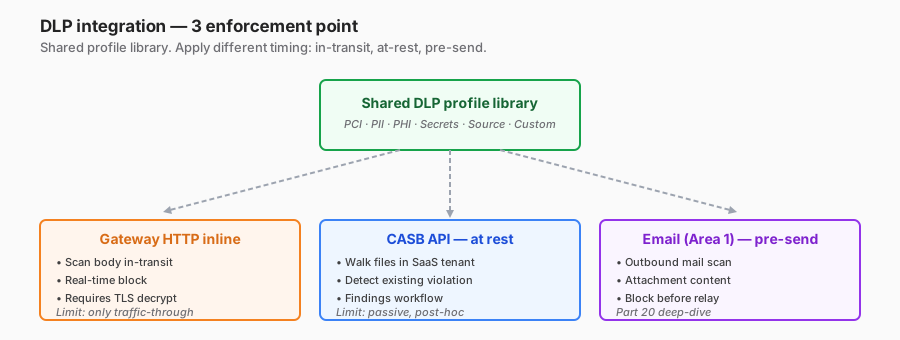
Same profile, three enforcement points:
Gateway HTTP inline
- Moment: the user is uploading / pasting.
- Action: real-time block.
- Coverage: traffic through the Gateway only (WARP + HTTP decrypt enabled).
- Latency: adds 20-50ms for the scan.
- Gotcha: encrypted or archived files — DLP cannot scan them. User zips + password = bypass.
CASB API at rest
- Moment: post-upload, next scan cycle.
- Action: alert, finding in the dashboard.
- Coverage: every file in the SaaS tenant (inside Google Drive, SharePoint).
- Latency: scan cycle (1-24h).
- Catch: historical data — a file uploaded two years ago with a CC inside.
Outbound email (Part 20)
- Moment: the user hits send, pre-relay.
- Action: block, quarantine, warn.
- Coverage: email body and attachments.
- Overlap: a lot of PII leaks via email to partners (accidental CC external).
In production: all three
The wise move is to enable all three with overlapping profiles. User pastes a CC into an upload form → Gateway inline blocks. User uploads a historical file → CASB API catches it. User attaches a file to email → Email DLP catches it.
Overlap = defence in depth, not redundancy (each layer misses different things).
The 5 commands I run when triaging an FP ticket
User pings Slack: “I uploaded a report file, it was blocked, says credit card.” Playbook I run:
Command 1: locate the finding
# CF dashboard → Logs → DLP → filter by user_email + timestamp
# Or via API
curl -H "Authorization: Bearer $TOKEN" \
  "https://api.cloudflare.com/client/v4/accounts/$ACC/gateway/logs?email=user@co.com&action=block&since=1h"
Output: event ID, profile triggered, pattern matched, content snippet.
Command 2: fetch the matched snippet
# Get specific event detail
curl -H "Authorization: Bearer $TOKEN" \
  "https://api.cloudflare.com/client/v4/accounts/$ACC/dlp/matches/$EVENT_ID"
Output: 200 characters around the match. Decision: TP or FP?
Command 3: query the DB — is this pattern common in internal data?
-- Run against the data warehouse
SELECT hostname, COUNT(*) AS matches,
       SUM(CASE WHEN confirmed_fp THEN 1 ELSE 0 END) AS known_fp
FROM dlp_events
WHERE profile = 'PCI'
  AND timestamp >= now() - interval '7 day'
  AND match_snippet LIKE '%<PATTERN>%'
GROUP BY hostname ORDER BY matches DESC;
If the same pattern appears 100x on an internal CRM hostname → structural FP, add an exclusion.
Command 4: test the pattern against a sample
# Local test: does the pattern change reduce FP?
from dlp_test import apply_pattern
old_matches = apply_pattern(corpus, old_profile)
new_matches = apply_pattern(corpus, new_profile_with_negative_context)
print(f"Old: {len(old_matches)} matches, {fp_rate(old_matches):.1%} FP")
print(f"New: {len(new_matches)} matches, {fp_rate(new_matches):.1%} FP")
Corpus = one week of historically blocked content (redacted).
Command 5: deploy the tuning
# Update profile via API, roll out
curl -X PATCH "https://api.cloudflare.com/client/v4/accounts/$ACC/dlp/profiles/$PID" \
  -d @updated_profile.json

# Monitor FP rate over the next 7 days
# Alert if FP jumps by more than 10% — possible over-tightening
Commit the change to the config repo (Terraform / git). Audit trail required.
Staged rollout — not optional
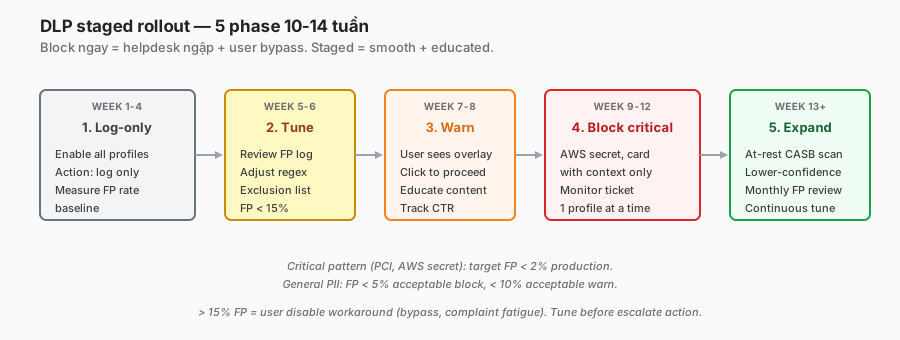
6 phases, 10-14 weeks:
- Log-only (4 weeks) — baseline FP, no action.
- Tune (2 weeks) — exclusion lists, context requirements, thresholds.
- Warn (2 weeks) — educate users, measure click-through.
- Block critical (2 weeks) — AWS key, PCI with context.
- At-rest scan (ongoing) — CASB API historical sweep.
- Continuous tune (forever) — monthly FP review, quarterly profile refresh.
Anti-pattern: skip phases 1-2, block immediately. I have seen two orgs do it. Both rolled back in the first week because of the helpdesk storm. Afterwards leadership lost trust in the tool, and the second rollout attempt was much harder.
When not to roll out DLP
Just as important as when to roll it out:
-
No data classification policy yet. DLP enforces policy; without policy, there is nothing to enforce. Classify first (Confidential / Internal / Public), DLP second.
-
Security team under 2 people. DLP triage is 50-200 FP tickets per week. That is a full-time job for one engineer. Part-time = backlog, tool gets disabled.
-
No HTTPS-everywhere + TLS decrypt ready. Inline DLP needs decryption (Part 12). If decryption is not possible (legal block), inline DLP cannot see bodies → only CASB at-rest covers about 50% of scenarios.
-
No compliance requirement + no specific threat model. DLP cost (license + ops) is $200k+/year for a mid-sized org. It has to be justified by incidents prevented or audits passed. If neither, defer.
-
Dataset too volatile — a startup releasing a new product weekly, data schemas changing constantly. EDM refreshes cannot keep up; regex profiles go stale. Stabilise the product first.
-
Privacy context blocks content scanning — union contracts / works councils prohibit employee content inspection. Legal review first.
Lessons I will keep
- 40-70% FP in week one is normal — not a broken tool. Plan triage capacity.
- Context requirements cut FP 70-80% — the single most important setting in any profile.
- Negative context (anti-pattern list) cuts the remaining FP inside internal apps. No built-in profile comes with this ready — it is custom for each org.
- EDM is expensive to set up but near-100% precision. Justify it for customer lists and employee rosters. Skip for general-purpose scanning.
- Warn > Block for the majority of patterns. User education does what blocking cannot — “do not paste PII into ChatGPT” internalises.
- Source code profiles have low ROI. Unless you have a proprietary fingerprint ready, skip.
- Block only on high-precision profiles (AWS key over 95%, PCI with context). Medium precision → warn. Low precision → log-only forever.
- Log-only forever is not a failure. Logs are forensic and compliance evidence, not prevention.
Closing
DLP is not plug-and-play. It is 6-12 months of iteration to steady state. Every tool has a high FP rate in week one. A good tool is one that is easy to tune.
CF DLP is strongest with: context_required, the Luhn + BIN validator chain, exclusion lists, and native EDM. It is weakest at: source code fingerprint (generic) and image DLP (no OCR).
If you only remember one line:
DLP is a program, not a tool. Precision over 95% and FP under 5% is a two-month goal, not a week-one one. Chasing it earlier = burned-out team + user bypass.
In Part 20, the final Advanced Security post: Email Security (Area 1 / Cloudflare Email Security) — anti-phishing, BEC, impersonation detection. Part 19 DLP overlaps with outbound email scanning; Part 20 goes deep on the email threat landscape and DMARC deployment pitfalls.
References
- Cloudflare DLP overview
- Built-in profiles
- Custom profile
- Exact Data Match
- Luhn algorithm
- Vietnam CCCD format
In this series:
- ← Part 18: CASB
- Next → Part 20: Email Security Area 1
- See the full series: Cloudflare One Handbook
